
 Catherine Hu
There is nothing worse than sinking 50 hours into a Solasta II campaign, surviving brutal tactical encounters, only to worry about a corrupted save file or a cloud sync error destroying your Iron Man run. Whether you want to manually backup your progress, transfer your save to another PC for a co-op session, or modify the config file for better performance, you first need to find where the data is hidden on your drive.
Below is the exact file path for Solasta II on Windows and Steam Deck, along with a safer, automated method to manage your backups for this Unity-engine CRPG.
Das könnte Ihnen auch gefallen: Solasta II Cheat Engine Alternative Guide
Editor’s View: Why This Matters
“We have all been there. You are deep into Solasta II, your party is exhausted, you are just about to face a deadly dungeon boss, and suddenly—a power outage, or a random crash during an auto-save. When you relaunch, the ‘Continue’ button is grayed out. In a hardcore D&D ruleset game, it is a gamer’s worst nightmare.
I specifically wrote this guide because Unity games like Solasta II store their saves deep in hidden system folders. Even if you don’t plan on cheating or modding your character sheets, please backup your Saves folder manually right now. Don’t lose an entire weekend of campaign progress like I did.”
— Catherine Hu, Senior Editor at XMODhub
Windows PC Save File Location
For the Steam, Epic Games, or PC Game Pass version of Solasta II, the save files are located in the hidden AppData folder. Because the game runs on the Unity Engine, it uses the LocalLow directory rather than the standard Local folder.
The direct path is:
C:\Users\YourUsername\AppData\LocalLow\Tactical Adventures\Solasta II\Saves
How to navigate there quickly:
- Presse Windows-Taste + R on your keyboard to open the Run dialog.
- Type
%appdaten%and press Enter. This opens the Roaming folder. - In the address bar at the top, click on AppData to go up one level.
- Open the LocalLow folder, then Tactical Adventures, and finally Solasta II.
- Your campaign files are inside the Saves folder.
Anmerkung: If you are navigating manually and cannot see the AppData folder, you need to enable “Hidden items” in the View tab of your Windows File Explorer.
Solasta II Config File Location (Graphics & Settings)
If you need to manually tweak graphics settings, disable motion blur, or fix resolution scaling issues that aren’t saving properly via the in-game menu, you will need to edit the configuration file.
Path:
C:\Users\YourUsername\AppData\LocalLow\Tactical Adventures\Solasta II
Look for a file named Settings.json oder Graphics.json.
How to Edit: Right-click the file and select Open with Notepad. Warning: Be careful not to change syntax lines you don’t understand, as this can break the game’s rendering on startup. If you make a mistake, simply delete the file, and the game will generate a fresh default config upon your next launch.
Steam Deck / Linux Save Location
If you are playing Solasta II on the Steam Deck, the Windows file structure is emulated within the Proton compatibility layer.
Path:
/home/deck/.local/share/Steam/steamapps/compatdata/STEAM_APP_ID/pfx/drive_c/users/steamuser/AppData/LocalLow/Tactical Adventures/Solasta II/Saves/
Tipp: Sie müssen Folgendes ersetzen STEAM_APP_ID with Solasta II’s specific numerical ID on Steam. You can easily find this number by checking the game’s URL on the Steam Store or via SteamDB.
The Smarter Way: One-Click Backup with XMODhub
Navigating through hidden AppData folders every time you want to save-scum a crucial dialogue check or backup your Iron Man save is tedious and prone to error. One accidental delete, and your entire party’s progress is gone forever.
XMODhub offers a built-in Save Manager tool designed specifically for complex RPGs like Solasta II.
- Auto-Backup: XMODhub can automatically backup your save file every time you exit the game or complete a Long Rest.
- Version History: Corrupted your save after a bad mod installation? Roll back to a previous, clean version from yesterday instantly.
- Visual Management: Access and organize your different campaign slots (Solo, Co-op, Iron Man) with a single click from the dashboard.
Download XMODhub to Manage Your Solasta II Saves Safely
XMODhub: More Than Just a Save Manager
XMODhub is your ultimate all-in-one toolkit for PC single-player gaming. Whether you need powerful Trainers to tweak dice rolls, real-time Translation Tools, or detailed Interactive Maps to find every hidden chest, XMODhub has everything covered to customize your experience.

Our library supports over 5,000+ games, ensuring that whether you are playing Solasta II, Baldur's Gate 3, or the original Crown of the Magister, you always have the best tools at your fingertips.
How to Use XMODhub for Solasta II: Getting started is easy.
Just follow these steps:

- Download and Install the XMODhub client safely from our official site.
- Search for Solasta II in the client’s search bar.
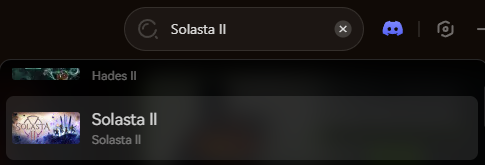
- Select the specific tool you need (Trainer, Mods, Visual Spawner, or Save Manager).
- Launch the game directly from the client and enjoy your enhanced gameplay!
FAQ
Can I transfer my Solasta II save to another PC for co-op?
Yes. Simply copy the entire contents of the Saves folder mentioned above and paste it into the exact same folder location on your friend’s computer.
What happens if I delete the config file?
Solasta II will simply regenerate a default configuration file the next time you boot up the game, resetting all your graphics and audio settings to default. We still recommend renaming the file to Settings.bak instead of deleting it outright, just in case.
Does modifying save files ban me?
No. Solasta II is a PvE, story-driven CRPG. Modifying your save file (like adding gold or changing stats) will not get you banned. However, if you are playing co-op multiplayer, ensure all players have the same mods and save states to prevent severe desync issues and crashes.
Schlussfolgerung
Locating your Solasta II save file is a crucial skill, whether you are recovering from a game-breaking glitch, migrating your campaign progress to a Steam Deck, or manually tweaking JSON config files for better FPS.
However, digging through hidden Unity engine system folders always carries a risk. One wrong deletion can wipe out hours of strategic combat progress instantly. If you prefer a safer, set-it-and-forget-it solution, we highly recommend the XMODhub Save Manager. It automates your backups, keeping your hard-earned loot and leveled-up characters secure so you can focus on the next dungeon, not the file directory.
Think Bigger: XMODhub is far more than just a modding tool or a save manager—it is a comprehensive Gaming Platform. With support for over 5,000+ titles, we provide an all-in-one ecosystem for PC gamers. XMODhub ensures you always have the ultimate toolkit ready at your fingertips.

Ich bin ein leidenschaftlicher Gamer und Autor bei XMODhub, der sich der Aufgabe verschrieben hat, euch die neuesten Gaming-News, Tipps und Einblicke zu geben.
Verbinden Sie sich mit mir:
LinkedIn-Profil
 Nancy Miller