
 Catherine Hu
Let’s get straight to the point. You spent an hour drafting the ultimate Dungeons & Dragons 5e party. You balanced your frontline fighters and backline casters, ready for the grid-based tactical combat of Solasta 2. You sit back, grab your gamepad, and the game ignores your inputs. Dealing with a dead controller completely shatters your immersion.
But once you fix your gamepad, the real struggle begins. The strict 5e ruleset is brutally unforgiving. You will face the soul-crushing agony of rolling a Natural 1 (Critical Failure) on a crucial check, the pain of blowing all your Spell Slots and being forced to spam weak cantrips, and the pure fatigue of constantly hitting F5 and F8 to save-scum your way through the campaign.
In this guide, we will provide the exact steps to fix your controller on PC. Then, we will introduce your new digital Dungeon Master: XMODhub—the ultimate tool to bypass brutal RNG, secure infinite magic, and conquer the campaign on your own terms.
Solasta II: Cheat Engine Table vs. XMODhub Trainer (Best Free Alternative)
🛠️ TL;DR: How to Fix Solasta 2 Controller Not Working
If you are stuck on the main menu because your gamepad is unresponsive, apply these direct fixes immediately:
➤
Enable Steam Input (Most Common Fix): Right-click Solasta 2 in your Steam Library > Properties > Controller > select Enable Steam Input. This forces Steam to translate your gamepad into an XInput device the game can read.
➤
Unplug Conflicting USB Devices: The Unity Engine often gets confused by secondary peripherals. Unplug HOTAS setups, racing wheels, and macro keypads. Keep only your mouse, keyboard, and primary controller connected.
➤
Launch Epic Games Through Steam: If you bought the game on Epic, add the Epic Games Launcher to Steam as a “Non-Steam Game.” Launching it through Steam applies Steam’s superior controller drivers.
1. Fixing PlayStation Controller Support (DS4Windows)
While Xbox controllers are generally plug-and-play on Windows, DualSense (PS5) and DualShock 4 controllers frequently encounter compatibility issues in CRPGs.
- ✦
The Issue: Native PlayStation support is often broken or missing the correct UI button prompts in Solasta 2. - ✦
The Fix: Download and install DS4Windows. - ✦
How it Works: This lightweight background app tricks your PC into thinking your PlayStation controller is a native Xbox 360 controller. Once running, your gamepad will work flawlessly in the game’s UI and radial menus.
2. Solving Xbox Controller Bluetooth Disconnects
If your Xbox Wireless Controller randomly turns off or stops working in the middle of a dungeon, the issue is likely a Windows power management timeout.
Press the Windows Key, type Geräte-Manager, and open it.
Expand the Bluetooth section and right-click your active Bluetooth adapter.
Wählen Sie Eigenschaften and navigate to the Power Management tab.
Uncheck the box that says “Allow the computer to turn off this device to save power.” This prevents inputs from dropping during long turn-based battles.
3. The Real Campaign Killer: D&D 5e RNG and Rules
Once your controller is finally working, the real battle against the ruleset begins. The D20 dice system has absolutely no mercy on your party composition.
🔥
The Agony of the D20: You enter a high-stakes dialogue sequence to bypass a boss fight. You have a massive charisma modifier. You press ‘A’ to roll, and hit a Natural 1. Automatic failure. The party wipes, forcing a frustrating reload.
🔥
The 15-Minute Adventuring Day: Your Wizard unleashes a massive spell to survive a brutal ambush. Because you are instantly out of Spell Slots, your archmage is now useless. You must hide them in the backline, throwing weak cantrips for pathetic damage until you can force a Short or Long Rest.
🔥
Save-Scumming Fatigue: To avoid these punishments, players are forced into an exhausting loop of quicksaving (F5) before every roll and quickloading (F8) after every miss, ruining the pacing of the adventure.
4. Safe Modding: Why XMODhub Beats Traditional .pak Files
You are playing to have fun, not to suffer statistical variance or fragile file modifications. Many players try to fix the punishing mechanics using traditional .pak mods from community forums.
These mods physically overwrite your hard drive files. When you load a custom map or the game updates, those files conflict, resulting in hard crashes and permanently corrupted save files.
XMODhub operates entirely differently. It is the ultimate D&D dimension-reduction tool. It is a clean memory trainer that injects directly into your PC’s active RAM, keeping your physical game files 100% safe.
With XMODhub, you can toggle Always Roll 20 for guaranteed critical successes, enable Infinite Spell Slots to drop meteors in every fight without resting, and force Max Attributes during character creation to bypass the agonizing reroll grind.
5. How to Use XMODhub for Solasta 2?
Getting XMODhub running is incredibly simple and perfectly safe for your PC. Here is the exact step-by-step process:

Grab the verified, virus-free XMODhub desktop application from our official homepage and install it on your PC.
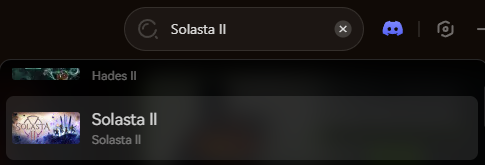
Open the XMODhub client and use the search bar to find Solasta 2. The app will automatically detect your game installation path.
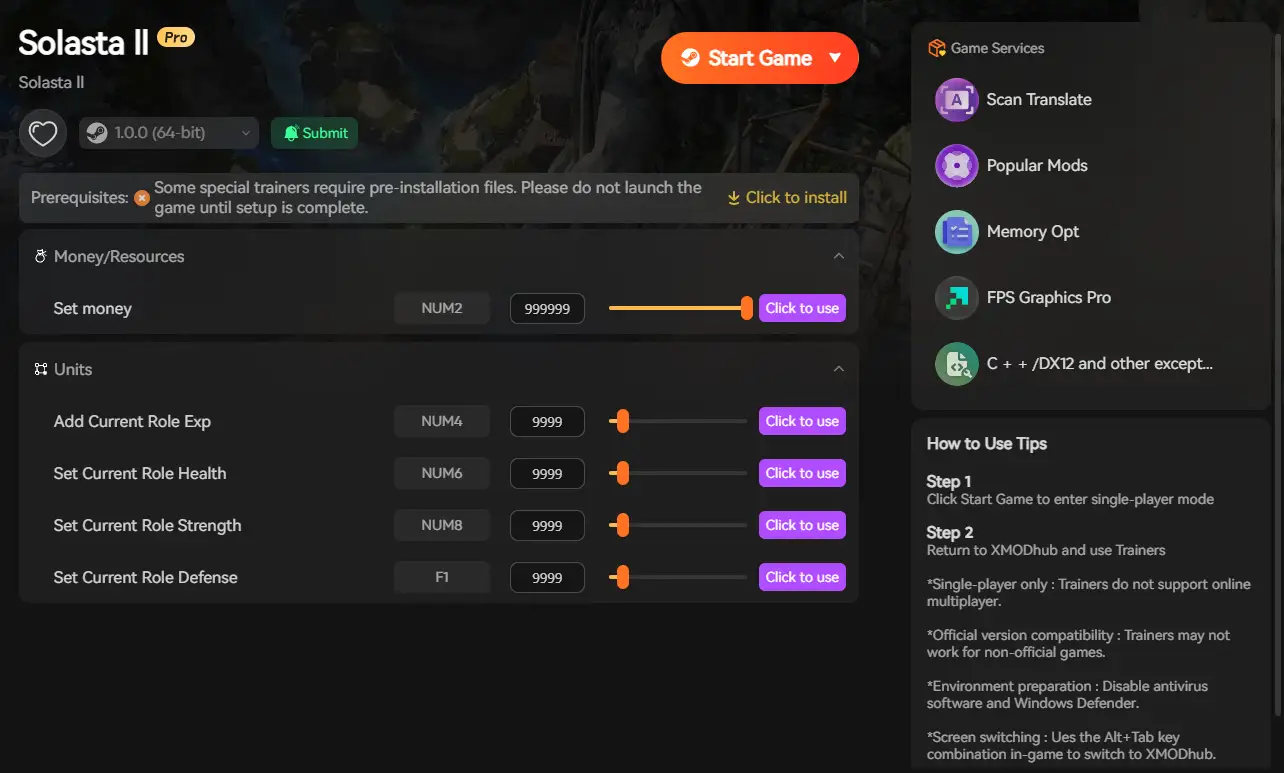
Click the prominent Play button within the XMODhub app. This safely links the software to the game’s memory. Once in-game, simply toggle your cheats to instantly activate your powers.
6. Conclusion: Protect Your Campaign
Ihr Solasta 2 journey should be defined by epic loot, tactical triumphs, and memorable stories—not by dead gamepad inputs or the artificial difficulty of punishing RNG. Fixing the controller issue is only the first step to enjoying the game from your couch.
By utilizing a clean memory injector like XMODhub, you protect your hard-earned progress while gaining the power to bypass the most frustrating aspects of the tabletop ruleset.
Take control of your campaign, end the exhausting cycle of F5/F8 save-scumming, and become the true Dungeon Master today.

Ich bin ein leidenschaftlicher Gamer und Autor bei XMODhub, der sich der Aufgabe verschrieben hat, euch die neuesten Gaming-News, Tipps und Einblicke zu geben.
Verbinden Sie sich mit mir:
LinkedIn-Profil

 Nancy Miller

