
 Catherine Hu
You have spent the last 20 minutes scouring forums for a working Lost and Found Co. Cheat Engine table (.ct file). You finally found one, loaded it up because you were stuck trying to find that one last tiny hidden object and needed an extra hint, and… it says “Process not found” or simply crashes your game to the desktop.
The era of manually searching for memory addresses and risking save corruption just to enjoy a cozy puzzle game is over. Today, we break down why the XMODhub Trainer is the safer, smarter evolution of Cheat Engine for Lost and Found Co. players on Steam and Game Pass.
Das könnte Ihnen auch gefallen:
Lost and Found Co. Console Commands (2026): Cheat Codes & Item IDs List
Editor’s View: The “Update” Nightmare
“I used to love Cheat Engine for tweaking single-player games. But because Lost and Found Co. is built on the Unity engine, memory offsets for dynamic variables—like your current Coins or Hint cooldowns—shift constantly every time you load into a new bustling map. When the developers released a minor optimization patch yesterday, every single script in my CT table broke. I had to wait 4 days for the forum creator to update it.
There is nothing relaxing about debugging hexadecimal code when you just want to find a hidden cat and decorate your office. With XMODhub, the app detected the patch and auto-updated the cheats in seconds. It saves me time, plain and simple.”
At a Glance: XMODhub vs. Cheat Engine Table
| Merkmal | Cheat Engine Tabelle (.ct) | XMODhub Trainer |
|---|---|---|
| Benutzerfreundlichkeit | Hard (Manual Scripts) | Easy (Sliders/Toggles) |
| Spiel-Updates | Breaks Instantly (Manual fix) | Auto-Updates (Cloud Sync) |
| Game Pass Support | Very Difficult (Encrypted) | Native Support |
| Sicherheit | High Risk (User Uploads) | Verified (Signed Code) |
| Mobile Control | Nein | Yes (Remote App) |
| Cost | Free | Free |
The “Hard Way”: How to Use a Cheat Engine Table
If you insist on using the old-school method just to get some extra coins for office decorations, here is what you have to do:
- Download and install Cheat Engine (Risk of bundled bloatware).
- Find a
.ctfile on a forum matching your exact Lost and Found Co. game version. - Launch Lost and Found Co.
- Open Cheat Engine, click the “PC Icon”, and attach to the game process.
- Load the table file.
- Hope the Unity engine pointers aren’t broken.
Warning: One wrong click in the memory viewer can corrupt your save data permanently, wiping out all the beautiful artifacts you’ve collected.
The “Easy Way”: How to Use XMODhub
Now compare that to the XMODhub experience:
Download and Launch XMODhub.

Suche Lost and Found Co.

Click “Play”.
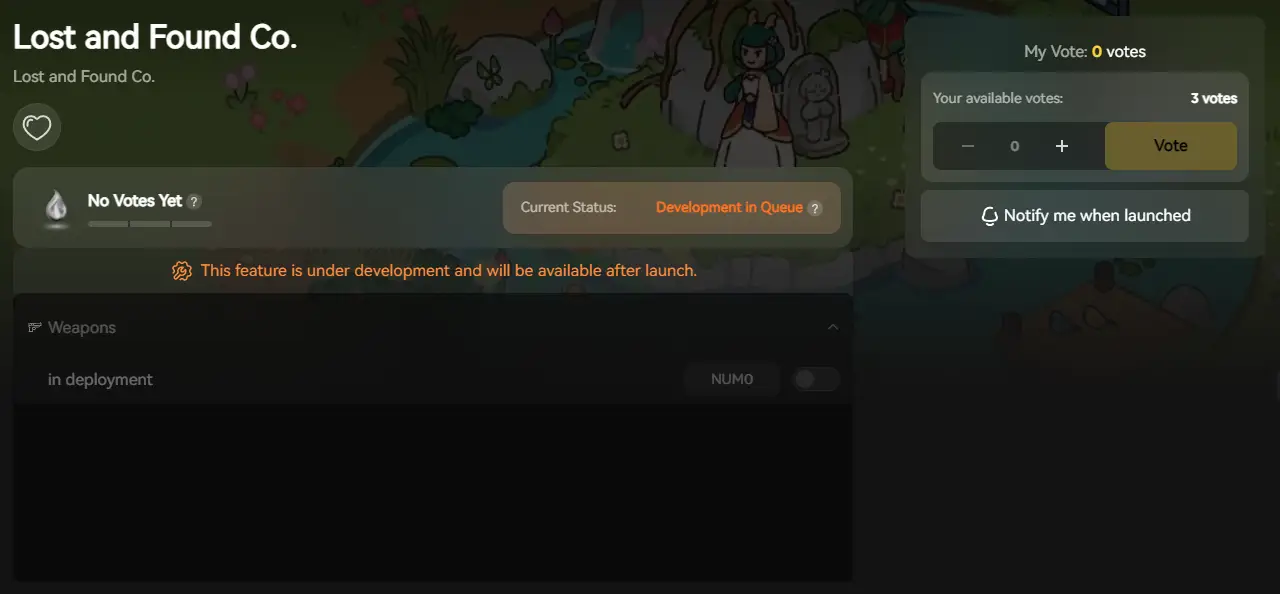
Use intuitive sliders to set Infinite Hints, Infinite Coins, or adjust the Game Speed to make fast-moving objects easier to spot.
Done. No attaching processes, no version matching.
Game Pass & Windows Store: The Cheat Engine Killer
Playing Lost and Found Co. on Xbox Game Pass (PC)?
Cheat Engine often fails completely on Windows Store games because the executable files are encrypted and hidden in protected system folders. You cannot “attach” to them easily without triggering security errors.
XMODhub is different. Our engine is built to recognize Game Pass / Windows Store directories natively. We handle the encryption bypass automatically, so your cheats work seamlessly regardless of where you bought the game.
Safety Check: VirusTotal Proof
Is XMODhub safe? Ja.
Trainers are often flagged as “False Positives” by Windows Defender because they inject code into memory (just like a virus, but for a good cause—like giving you unlimited hints). Unlike random forum files uploaded by anonymous users, XMODhub is:
- Digitally Signed.
- Bloatware Free.
- Scanned Daily.
(Live VirusTotal scan report for XMODhub Installer consistently shows 0/70 Detections).
Why is XMODhub the Best WeMod Alternative?
WeMod is the market leader, but XMODhub offers key advantages for Lost and Found Co. players:
A huge and growing library covering both new indie releases and classic titles, all in one place for easy access.
Get trainers and mods for new games right from release day — no long waiting, just instant enhanced gameplay so you can enjoy the story and art at your own pace.
Our cheat creation is driven by user votes, not just mainstream popularity. If the cozy gaming community needs a specific mod, we build it.
FAQ
Q: My Lost and Found Co. Cheat Engine table says “???” on all values.
This means the table is outdated. The pointers (memory addresses) have changed in the latest Unity engine update. You must switch to XMODhub or wait for a new manual table update from the forum.
Q: Can I use this in Multiplayer?
No. Lost and Found Co. is a single-player experience, and XMODhub is strictly designed for Single Player / Campaign use.
Q: How do I fix “Process Not Found” on Game Pass?
As mentioned above, Cheat Engine struggles with Game Pass file encryption. Download XMODhub, which has native Game Pass support to fix this instantly.
Schlussfolgerung
Stop fighting with broken pointers and encrypted files when you should be relaxing and enjoying beautiful hidden object maps. Upgrade your gaming experience with the XMODhub Trainer for Lost and Found Co. It is the modern, safe alternative that ensures your cheats work—whether you are on Steam or Game Pass.
Cheat Smarter, Not Harder.

XMODhub supports more than 5000+ games, and also supports similar cozy puzzle titles like:

Ich bin ein leidenschaftlicher Gamer und Autor bei XMODhub, der sich der Aufgabe verschrieben hat, euch die neuesten Gaming-News, Tipps und Einblicke zu geben.
Verbinden Sie sich mit mir:
LinkedIn-Profil
 Nancy Miller