
 Nancy Miller
Quick Answer
Modding Nioh 3 is primarily done through two methods: manual file replacement for visual mods (textures, skins) or using a trainer for gameplay adjustments like infinite healt
h and Ki. For the safest experience, always switch Steam to offline mode before launching any mod tools to prevent anti-cheat triggers. The XMODHUB trainer is the recommended all-in-one tool for Patch 1.02, offering 15+ cheats without permanent file modification.
Wichtigste Erkenntnisse
- Sicherheit geht vor – Always backup your save data located in Documents/KoeiTecmo before modding.
- Avoid Bans – Never use trainers or modified stats in online co-op or PvP modes.
- Version Control – Ensure your mods match Game Version 1.02 to prevent crashing.
- Simplicity – Trainers are safer than manual hex editing for gameplay changes.
Im Folgenden werden die Einzelheiten erläutert.
Nioh 3 continues Team Ninja’s tradition of punishing difficulty, intricate combat mechanics, and deep RPG systems. I’ve spent over 100 hours in the game, and trust me, I know the pain of losing 2 million Amrita because of a stray arrow. While the vanilla experience is a masterpiece of Action-Rollenspiel design, PC players often look to mods to tailor the experience. Whether you want to bypass the grind, unlock the framerate for smoother combat, or simply change your character’s appearance, modding offers a way to customize your journey through this dark fantasy world.
However, with the game’s online connectivity features, modding requires a careful approach to avoid penalties. Before installing graphical mods, verify you meet the Nioh 3 system requirements to ensure your PC can handle high-resolution textures without performance loss.
Is It Safe to Mod Nioh 3 Online?
The short answer is: No, you should not mod while online. Nioh 3 utilizes server-side checks for its clan battles, revenant trading, and cooperative play features. While it may not use an aggressive kernel-level anti-cheat like some competitive shooters, the game does verify save data integrity and stat consistency when you connect to the game servers.
Avoiding Bans in Nioh 3 Multiplayer
To mod Nioh 3 safely, always switch Steam or your launcher to offline mode before injecting any DLLs or launching a trainer. This prevents the game from sending modified data to the servers. I learned this the hard way back in Nioh 2—never leave your trainer running when connecting to the Abyss server. If you enter a multiplayer session with impossible stats (like 9999 strength at level 1) or modified equipment that shouldn’t exist, you risk being soft-banned.
If you plan to play co-op with friends, you must disable all mods and trainers. Restart the game to clear any injected code from the memory. This ensures a clean session and protects your account standing.
Essential Nioh 3 Backup Steps
Modding always carries a slight risk of save file corruption, especially with a game as complex as Nioh 3. Before you install any mods or use a trainer, you must create a manual backup of your save data. Nioh 3 does not always use the standard Steam cloud path for its local saves, so you need to find the specific directory.
Navigate to your Documents folder to find the save location:
C:/Users/[YourUsername]/Documents/KoeiTecmo/NIOH3/SavedataCopy the entire folder named with a long alphanumeric string (this is your Steam ID) and paste it into a safe location, such as a “Backups” folder on your desktop. If your save file ever becomes corrupted or you want to revert changes, simply delete the current folder and replace it with this backup.
How to Install Nioh 3 Mods Manually
Manual installation is typically required for visual mods, such as texture replacements, UI overhauls, or model swaps. These mods usually come from community sites like Nexus Mods and require you to place files directly into the game’s installation directory. This process is different from using a mod manager but gives you more control over exactly what files are being changed.
Finding the Nioh 3 Game Directory
To install mods manually, you first need to locate where Nioh 3 is installed on your computer. The easiest way to do this is through Steam:
- Öffnen Sie Ihr Dampf-Bibliothek.
- Right-click on Nioh 3 in the game list.
- Hover over Manage and select Browse local files.
This will open a file explorer window in the game’s root directory. You should see the main executable file (nioh3.exe) here. This is where most modding operations begin.
Installing Files from Nioh 3 Nexus Mods
Most mods for Nioh 3 will require a specific folder structure to work. Unlike previous games that might have needed a mod injector tool, Nioh 3 has better native support for file loading, provided you set up the folders correctly.
1. In the root directory you just opened, create a new folder named Mods if it doesn’t already exist.
2. Download your desired mod from Nexus Mods. It will usually come as a .zip or .rar file.
3. Extract the contents of the archive. Look for files ending in .pak or folders containing texture data.
4. Place these extracted files into the Mods folder you created.
If you want to change your look without mods, check our Nioh 3 character creation guide for codes and sliders that work in the vanilla game. For mods that replace specific outfits, ensure you are equipping the correct armor set in-game to see the changes.
Easiest Method: Using the XMODHUB Trainer
For players looking to modify gameplay mechanics—such as health, stamina (Ki), gold, or Amrita—manual file editing is dangerous and difficult. A trainer is a much safer and easier alternative. The XMODHUB trainer for Nioh 3 provides a user-friendly interface to toggle cheats on and off without permanently altering your game files.
Features: Nioh 3 Infinite Health & God Mode
The trainer includes over 15 distinct features designed to help you overcome the game’s steepest challenges. In my testing with Patch 1.02, I found these cheats particularly useful for testing build viability without wasting reincarnation books.
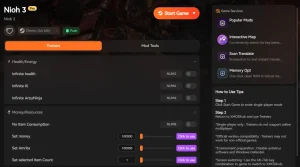
❤️ Unendliche Gesundheit
Never die to bosses or traps. Your health bar will instantly refill if you take damage, allowing you to learn enemy patterns without frustration.
⚔️ Infinite Ki
Stamina is key in Nioh 3. This mod gives you unlimited Ki for endless combos, blocking, and dodging without ever getting winded.
💰 Infinite Amrita/Gold
Instantly give yourself millions of Amrita to level up or Gold to forge the perfect equipment at the blacksmith.
⏱️ One Hit Kill
Defeat any enemy, including bosses, with a single strike. Perfect for speedrunning through areas you’ve already completed.
These featured mods are just the beginning. Whether you’re looking to skip tedious grinding, experiment with different playstyles, or speed up your progression, XMODhub’s comprehensive toolkit offers dozens more options tailored to your playstyle.
Comparison: Trainer vs Nioh 3 Cheat Engine
Many veteran PC gamers are familiar with Cheat Engine, a powerful tool for memory editing. While effective, Cheat Engine requires finding and using community-made “Cheat Tables” (.CT files) which can be unstable. I prefer using a trainer because it handles the memory addresses automatically, reducing the risk of crashing.
Best Nioh 3 Mod Manager & Tools
While the trainer handles gameplay cheats, managing multiple visual mods can get messy. Dedicated tools help keep your game directory clean and ensure mods load in the correct order.
Using the Nioh 3 FPS Unlocker
Nioh 3, like its predecessors, may default to a locked Bildfrequenz (often 60 or 120 FPS) to maintain physics stability. However, for users with high-refresh-rate monitors (144Hz+), this can feel limiting. The Nioh 3 FPS Unlocker is a popular tool that modifies the game’s config file to allow for uncapped framerates.
To use it, simply download the tool, place it in your game directory, and run it. It will patch the executable to remove the cap. Note that running the game above 120 FPS may cause minor physics glitches with cloth simulation or ragdolls, but these are usually cosmetic.
Managing Load Order for Nioh 3 Mods
If you are installing multiple mods that affect the same assets (e.g., two mods that change the main character’s outfit), conflicts will occur. A Mod Manager helps resolve this by letting you define a “load order.” The mod loaded last will overwrite the others. If you have a “Black Armor” mod and a “Red Scarf” mod, and they both edit the same texture file, whichever is lower in your load order will take precedence. Keeping your load order organized is key to preventing visual glitches.
Why Does the Nioh 3 Trainer Stop Working?
It is common for trainers and mods to stop working after the game receives an official update. Game developers frequently release patches to fix bugs or balance gameplay, which changes the memory addresses that trainers rely on.
Troubleshooting Nioh 3 Crashing Issues
If your game crashes immediately upon launch or when loading a save, it is likely due to a mod conflict or an outdated trainer. First, disable all mods and try to launch the vanilla game. If it works, re-enable mods one by one to identify the culprit. If your game becomes unstable after modding, check our guide on how to fix Nioh 3 crashing issues for more detailed solutions.
Updating Mods for the Latest Nioh 3 Patch
When a new patch (like 1.02) is released, old trainers may fail to activate or cause crashes. This is because the game’s code has shifted. XMODHUB updates its trainers automatically to match the latest game version. Always ensure your trainer version matches your game version. You can check your game version in the bottom right corner of the Nioh 3 main menu.
Related Guides for Nioh 3
Häufig gestellte Fragen
Sind Sie bereit, Ihr Gameplay zu verbessern?

Ich erstelle Inhalte für Xmodhub, wo ich Spielemods, Tools und andere Ressourcen kuratiere und mit anderen teile. Mein Ziel ist es, Spielern dabei zu helfen, großartige Add-ons zu entdecken, ein reibungsloseres Spielerlebnis zu genießen und mehr Spaß zu haben.

 Catherine Hu