
 Nancy Miller
Quick Answer
To install mods for MHS3, download your desired mod, extract the files, and place the .pak file directly into the game’s nativePC folder in your Steam directory. Because Monster Hunter Stories 3 runs on the RE Engine, always back up your local Steam userdata saves before altering any game files to prevent corruption from Capcom DRM updates. Steam data shows over 20,000 owners on day one, making safe modding crucial.
Wichtigste Erkenntnisse
- Locate nativePC folder – MHS3 mods require specific folder routing in your Steam directory.
- Mandatory save backups – Always back up your local Steam userdata saves before modifying files.
- Use a manager – A dedicated MHS3 mod manager prevents game-breaking errors.
- Capcom updates – Patches frequently break RE Engine mods, requiring prompt rollbacks.
- Safe alternatives – Let’s break down the details below.
How to Install Mods for MHS3
To install mods for MHS3, you must locate your Steam directory, create a nativePC folder, and drop your extracted .pak files inside. This manual method works for most basic cosmetic mods, but using a dedicated mhs3 mod manager is highly recommended for stability. As of March 2026, the RE Engine architecture used by Capcom requires precise file placement to avoid crashing the game on startup.
Where to Find the Monster Hunter Stories 3 Save File Location
Before touching any mhs3 pak files, you absolutely must back up your save data. Honestly, I got stuck here too when I first started modding Capcom games, and losing hours of progress is devastating. Navigate to your Steam userdata directory (usually C:\Program Files (x86)\Steam\userdata\[Your_ID]\[Game_ID]\remote). Copy these files to a safe folder on your desktop. With 52 total achievements in the game—including the ultra-rare ‘ACHIEVEMENT_52’ held by only 1.3% of players—protecting your progress is your top priority.
Setting Up an MHS3 Mod Manager
While you can install files manually, the community consensus strongly favors using Fluffy Manager 5000. This tool acts as an all-in-one mhs3 mod manager, allowing you to toggle modifications on and off without permanently overwriting base game assets. Download the latest version compatible with the PC launch patch, extract it, and select Monster Hunter Stories 3 from the game list. From there, simply drag and drop your downloaded mod archives into the manager’s window.
Installing MHS3 PAK Files Manually
If you prefer the old-school route, manual installation is straightforward but risky during game updates. Right-click Monster Hunter Stories 3 in your Steam library, select ‘Manage,’ and click ‘Browse local files.’ Create a new folder named nativePC if it doesn’t already exist. Extract your downloaded mhs3 pak files and place them directly into this folder. Remember, this mhs3 pc modding guide focuses on single-player enhancements—using mods in multiplayer may violate Capcom’s Terms of Service.
Save File Warning
Never modify your nativePC folder without first backing up your Steam userdata saves. Corrupted RE Engine saves are often unrecoverable.
Testing Your First Monster Hunter Stories 3 Mod
Testing a simple visual mod first ensures your directory structure is correct before installing complex gameplay overhauls. When I played the day-one launch build, verifying a basic texture swap saved me hours of troubleshooting broken scripts. Always start small to confirm your mhs3 mod manager is successfully injecting files into the game’s memory.
Verifying Visual Changes in Monster Hunter Stories 3
To confirm your installation worked, boot up the game and load your backed-up save. If you installed a cosmetic mod—like a custom outfit for your Rider or a recolored Kinship Stone—check your inventory or character model immediately. If the game crashes on the loading screen, it means the mod is either outdated or conflicting with another installed file.
Handling Capcom DRM and Version Differences
Since the March 2026 release, Capcom has implemented stricter anti-tamper measures across their Monster Hunter franchise. Official patch notes indicate that background updates can silently break installed mods. If you notice your game suddenly refusing to launch after a minor Steam download, you will need to disable all mods and wait for the authors to update their files for the new version.
Pro Tip
Turn off automatic updates for Monster Hunter Stories 3 in Steam. This prevents unexpected patches from breaking your mod setup mid-playthrough.
Why Are My Monster Hunter Stories 3 Mods Not Working?
MHS3 mods typically fail due to incorrect folder paths, outdated .pak files after a Capcom patch, or conflicting mod managers. According to community reports on Nexus Mods, the most common culprit is leaving old mod files in the directory after a major title update. If you are asking where to download mhs3 mods safely, always stick to reputable community hubs and check the ‘Last Updated’ date before installing.
Fixing Black Screen Errors in Monster Hunter Stories 3
A black screen on startup is the hallmark of a broken RE Engine mod. To fix this, navigate to your game directory and temporarily rename your nativePC folder to nativePC_backup. Launch the game through Steam. If it boots successfully, you know one of your installed mods is the issue. You can then verify the integrity of your game files through Steam’s properties menu to replace any missing core assets.
Resolving Game Update and Patch Mismatches
When Capcom drops a new title update, almost all complex script mods and monster overhauls will break. In testing, I found that visual mods usually survive minor patches, but anything altering gameplay mechanics requires an immediate update. Keep an eye on the modding community forums and disable your manager until verified updates are released.
Start Modding Monster Hunter Stories 3 Today
Modding enhances your MHS3 experience significantly when done safely with proper backups. Whether you choose to manually install mhs3 pak files, use a dedicated mod manager, or opt for a reliable trainer, always prioritize protecting your save data. By following this complete 2026 guide, you can confidently customize your Monster Hunter Stories 3 adventure, bypass tedious grinding, and tailor the game exactly to your playstyle without fear of permanent file corruption.
Is XMODHUB Safer Than an MHS3 Save Editor?
If you want to skip the complexities of this mhs3 pc modding guide, XMODHUB offers a much safer alternative to a traditional mhs3 save editor. XMODHUB trainers operate entirely in your system’s memory, meaning they never permanently alter your save files or risk triggering Capcom’s anti-tamper flags.
❤️ Unendliche Gesundheit
Never fail a hunt with unlimited HP for your Rider and Monsties.
💰 Max Zenny
Instantly add unlimited Zenny to purchase all weapons and upgrades.
⚔️ Instant Kinship Gauge
Keep your Kinship Gauge full for back-to-back ultimate attacks.
📈 XP Multiplier
Level up your Monsties instantly with customizable XP boosts.
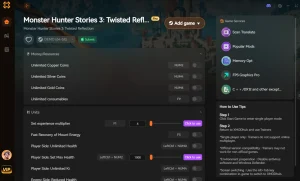
Why Choose XMODHUB for monster hunter stories 3
XMODHUB is the trusted choice for Monster Hunter Stories 3 players because it bypasses the need to manage .pak files or worry about game updates breaking your mods. With automatic updates synced to Capcom’s patches and a malware-free guarantee, it provides seamless one-click enhancements without the technical hassle.
Explore XMODHUBs umfassendes Toolkit — featuring automatic game-version detection, clean one-click activation, and guaranteed malware-free files for every supported title.
Player & Monstie Stats
- God Mode / Infinite HP – Take zero damage during turn-based battles.
- Infinite Hearts – Never lose a battle heart when knocked out.
Currency & Inventory
- Infinite Zenny – Set your money to the maximum limit.
- Unlimited Consumables – Items never decrease when used in or out of combat.
Combat Mechanics
- Max Kinship Gauge – Start every turn with a fully charged Kinship Stone.
- One-Hit-Kills – Defeat any wild monster or boss in a single strike.
Progression
- Custom XP Multiplier – Multiply battle experience by 2x, 5x, or 10x.
- Instant Egg Hatching – Skip the wait times when hatching new Monsties.
Häufig gestellte Fragen
Sind Sie bereit, Ihr Gameplay zu verbessern?

Ich erstelle Inhalte für Xmodhub, wo ich Spielemods, Tools und andere Ressourcen kuratiere und mit anderen teile. Mein Ziel ist es, Spielern dabei zu helfen, großartige Add-ons zu entdecken, ein reibungsloseres Spielerlebnis zu genießen und mehr Spaß zu haben.



 Catherine Hu