
 Nancy Miller
Grinding through repetitive tasks just to see the story content in Glückliche Insel-Fantasie can be frustrating, especially when you have limited time to play. Whether you lost your save file or just want to access the full gallery immediately, this guide covers the safest and fastest methods to unlock everything without spending dozens of hours on gameplay loops.
Wichtigste Erkenntnisse
- Instant Access – Unlock 100% of the gallery scenes with one click using the trainer.
- Save Safety – Avoid the risk of corrupted save files often found in shared downloads.
- Version Support – Verified to work on the latest 2026 game patch.
- No Ban Risk – The XMODHUB tool operates safely in offline single-player mode.
Im Folgenden werden die Einzelheiten erläutert.
How to Unlock All Scenes Instantly with XMODHUB
The most reliable way to bypass progression requirements is by using a dedicated trainer (games). Unlike manual save swapping, this method allows you to keep your own character name and choices while simply toggling the content you want to see. For players tired of the endless Schleifen required to raise affection stats, this is a game-changer.
Setting Up the Happy Island Fantasy Trainer
Getting started is straightforward, but following the correct order of operations is crucial for the software to hook into the game process correctly. The XMODHUB-Trainer is designed to detect your game version automatically, ensuring compatibility even after small patches.
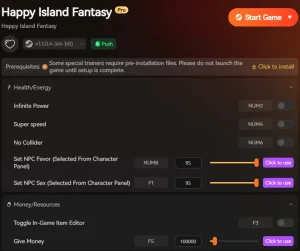
Here is the step-by-step installation process:
- Download the Tool: Grab the latest version of the trainer from the official page. Avoid re-uploads on shady forums to ensure you aren’t getting malware.
- Extract the Files: The trainer usually comes in a compressed archive. Extract it to a dedicated folder on your desktop or game drive. Do not run it directly from the ZIP file.
- Launch the Game First: Start Happy Island Fantasy and load into your save or the main menu. This ensures the game memory is active.
- Run as Administrator: Right-click the XMODhub trainer executable and select “Run as Administrator.” This gives the tool the necessary permissions to modify the game’s memory addresses.
🔓 Unlock All Gallery
Instantly unlocks every scene and image in the gallery menu without needing to play through specific routes.
💰 Unendliches Geld
Sets your currency to maximum, allowing you to buy all items and gifts required for character progression.
❤️ Max Affection
Instantly maxes out relationship stats with all characters, bypassing the need for daily interactions.
📈 Max Stats
Sets all player attributes to their highest level, ensuring you pass every skill check automatically.
These features are just a glimpse of what’s possible. Whether you want to skip the grind entirely or just speed up specific parts of the gameplay, XMODhub’s complete toolkit gives you full control over your experience.
Activating the Gallery Unlock Feature
Once you have the trainer installed, launch Happy Island Fantasy first, then open XMOD. Navigate to the “Gallery” or “Unlocks” tab. You will see a toggle switch labeled “Unlock All Scenes” or similar. Simply flip this switch to “On”. You should hear a confirmation sound. Return to the game’s main menu and open the Gallery to verify that all slots are now visible. Honestly, I thought it hadn’t worked at first until I refreshed the menu page by backing out and re-entering.
It is important to note that this unlock is temporary in some game engines—meaning it stays unlocked while the trainer is active—but XMODHUB’s implementation for Happy Island Fantasy forces the game to write the “unlocked” state to your persistent data file. This means once you unlock it, it stays unlocked even if you launch the game without the trainer next time.
Does Happy Island Fantasy Have Console Commands?
Many PC gamers are used to pressing the tilde key (~) to open a developer console, but not every game supports this feature out of the box. In many modern titles, the cheat code era has largely been replaced by paid DLC shortcuts or strict developer controls.
Happy Island Fantasy Console Commands Availability
Currently, Happy Island Fantasy does not have a native developer console accessible to players. The developers have disabled this function in the public release build to prevent accidental game-breaking bugs. This means you cannot simply type a code like unlock_all to access content. This limitation is exactly why third-party tools like XMOD are necessary for players who want to customize their experience.
While some Unity-based games allow you to re-enable the console by modifying config files, Happy Island Fantasy has encrypted these configurations. Attempting to force the console open often leads to crashes or a corrupted installation, which is why we strongly advise against editing the game’s binary files directly.
Using Save Files vs. Trainers
An alternative to using a trainer is downloading a “100% Completed” saved game from another player. While this works, it has significant downsides. You lose your own character name, choices, and progress history. Additionally, finding a save file that matches your exact game version can be difficult.
Locating Your Save Data
If you decide to go this route, or if you just want to back up your progress before using the trainer (which we highly recommend), save files are typically located here:
C:/Users/[Username]/AppData/LocalLow/HappyIslandFantasy/Saves/Always back up your existing save folder before replacing any files. Simply copy the entire folder to your desktop. If anything goes wrong, you can just delete the new files and drag your backup back into the directory.
Why the Happy Island Fantasy Trainer Might Fail?
If you press the hotkeys and nothing happens, don’t worry. It’s usually a simple configuration issue rather than a broken tool. Modding and cheating tools often require specific system permissions to function correctly.
Resolving Happy Island Fantasy Version Mismatches
Game updates are the most common culprit. If Happy Island Fantasy recently updated on Steam or Epic Games, the memory addresses for the cheats might have shifted. XMOD usually updates within 24 hours, but you should verify your game version matches the trainer version. You can check your game version in the bottom right corner of the main menu. If they don’t match, wait for the trainer to be updated or roll back your game version via Steam properties if possible.
Troubleshooting Common Connection Errors
Sometimes, aggressive antivirus software might flag the trainer because it injects code into the game process—which is exactly how it works. This is known as a false positive. To fix this, create an exception for the XMOD folder in your antivirus settings. Also, ensure you are running the trainer as Administrator to give it the necessary permissions to modify the game memory. If you are using Windows Defender, you may need to temporarily disable “Real-time protection” while installing the tool.
Happy Island Fantasy Unlocking FAQ
Sind Sie bereit, Ihr Gameplay zu verbessern?

Ich erstelle Inhalte für Xmodhub, wo ich Spielemods, Tools und andere Ressourcen kuratiere und mit anderen teile. Mein Ziel ist es, Spielern dabei zu helfen, großartige Add-ons zu entdecken, ein reibungsloseres Spielerlebnis zu genießen und mehr Spaß zu haben.


 Catherine Hu