
 Nancy Miller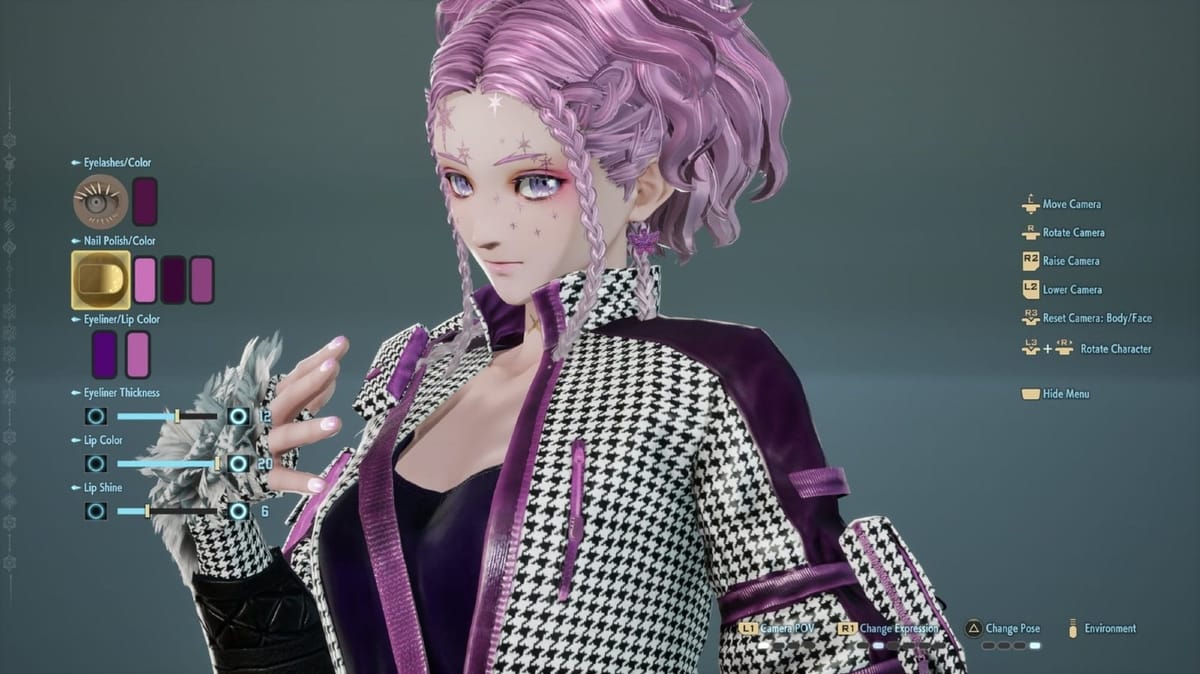
Quick Answer
Code Vein II features a significantly expanded character creator with over 50 accessory slots and advanced physics sliders. You can modify your appearance at any time using the Mirror in the Home Base hub, though Gender und Voice are permanently locked after the initial creation. According to developer notes, the new “Advanced Settings” toggle offers 3x more slider precision than the original game.
Wichtigste Erkenntnisse
- Expanded Limits – Use up to 50 accessories based on a new “Cost” system
- Permanent Choices – Gender and Voice cannot be changed later
- Home Base Mirror – The only location to edit appearance after starting
- Lighting Matters – Always test colors in “Daylight” mode to avoid surprises
Im Folgenden werden die Einzelheiten erläutert.
Code Vein II Sliders Guide and Basics
The customization system in Code Vein 2 builds upon the “Anime Souls” legacy with granular control over every aspect of your Revenant. Understanding the new slider mechanics is key to creating a unique avatar rather than a generic preset.
Understanding the Slider System
Advanced Settings is a new toggle in the 2026 release that unlocks decimal-point precision for facial features. Unlike the first game, which snapped to grid points, Code Vein 2 allows for fluid adjustment of eye spacing, jawline curvature, and nose bridge height. This is essential for recreating specific anime characters where proportions are exaggerated.
When you first enter the creator, you might feel overwhelmed by the sheer number of tabs. The interface is divided into four main categories: Physique, Face, Hair, und Accessories. Each category has sub-tabs for specific features. For example, the Face tab now separates “Skin Texture” from “Makeup,” allowing you to layer battle scars under foundation or face paint.
Male vs Female Customization Differences
While both genders share many accessories, the base body types and exclusive cosmetic options differ significantly. Here is a breakdown of what is unique to each gender option.
Deep Dive: Facial Geometry and Eyes
The face is where you will spend 90% of your time in Code Vein II Character Customization. The developers have introduced a new “Bone Structure” system that affects how light hits the face, preventing the flat, sticker-like appearance of some anime games.

Mastering Eye Customization
Eyes are the soul of any anime character. In Code Vein II, you can customize the iris, pupil, and sclera independently. A new feature is the “Glint” slider, which controls the reflection of light in the eyes. Setting this to zero creates the “dead eyes” look popular for yandere or possessed characters, while maximizing it gives a hopeful, shoujo-protagonist vibe.
You can also enable Heterochromia (different colored eyes) with a single toggle. Unlike the previous game, you can now apply different pupil shapes to each eye as well—perfect for characters with a “cursed eye” backstory.
Skin Texture and Aging
The “Revenant Veins” slider allows you to add glowing corruption lines under the skin. This is reactive to your blood code usage in-game, glowing brighter when you are low on Ichor. Additionally, the age sliders have been improved to avoid the uncanny valley effect, allowing for realistic wrinkles and weathering without looking like a low-resolution texture map.
How to Create Anime Characters in Code Vein II
The “waifu creator” reputation holds true in the sequel. If you are trying to recreate a specific character from anime or other media, following a structured approach prevents the “uncanny valley” effect common with random slider tweaking.
Step-by-Step Character Creation
- Wählen Sie a base template that matches your target’s eye shape, as this is the hardest feature to alter manually.
- Adjust the face shape sliders to match the jawline and chin sharpness before applying any makeup or skin textures.
- Layer accessories like hair extensions to create custom bangs or ponytails that aren’t in the default hair list.
- Finalize your physique and voice pitch, ensuring the voice matches the character’s personality type.
Unlocking Hidden Accessories and Outfits
Many of the best accessories, such as the glowing halo or cybernetic eye patches, are locked behind the in-game currency, Haze. You will need millions of Haze to unlock the full catalogue of cosmetic items at the shop.
Unlock All Cosmetics Faster
Grinding for Haze to buy every accessory can take dozens of hours. XMODhub provides a safe way to unlock resources instantly so you can focus on creativity.
💰 Infinite Haze
Give yourself unlimited currency to buy every outfit, accessory, and weapon immediately.
❤️ Unendliche Gesundheit
Explore dangerous areas to find hidden cosmetic chests without fear of dying.
📈 Max Materials
Instantly get all upgrade materials needed to enhance your Blood Veil’s appearance.
Diese vorgestellten Mods sind nur der Anfang. Egal, ob du das mühsame Grinden überspringen, mit verschiedenen Spielstilen experimentieren oder deinen Fortschritt beschleunigen willst, XMODhub's umfassendes Toolkit bietet Dutzende von weiteren Optionen, die auf Ihren Spielstil zugeschnitten sind.
Color Theory for Revenants
Creating a cohesive look requires more than just picking your favorite colors. Code Vein 2 uses a cel shading art style that relies heavily on contrast. When designing your character, consider the environment you’ll be playing in.
Using the RGB Color Picker
The game provides a full RGB color model picker for most items. A pro tip is to avoid 100% saturation (e.g., pure red 255, 0, 0) as it can look flat and unnatural under the game’s lighting. Instead, slightly desaturate your colors or shift the hue towards a cooler tone to make them blend better with the post-apocalyptic atmosphere.
For metallic accessories, the “Shininess” slider interacts with the color. Darker colors with high shininess look like polished chrome or obsidian, while lighter colors with low shininess resemble matte plastic or cloth. Experimenting with these material properties is crucial for making your armor look protective rather than cosmetic.
Can You Change Appearance in Code Vein II?
One of the most common questions for new players is whether they are stuck with their initial design. The good news is that most features are editable, but there are strict limitations you need to be aware of before finalizing your character.
Using the Mirror at Home Base
Once you complete the tutorial mission and arrive at the Home Base, you will find a Mirror in the main hub area, near the personal quarters. Interacting with this mirror opens the full character customization suite. Unlike the first game, using the mirror is completely free and does not require any special items.
What Features Are Locked Permanently?
While you can change your hair, makeup, and even physique, the following traits are permanently locked to your save file:
- Gender: You cannot switch between Male and Female body types.
- Voice: The voice actor selection is final.
- Name: Your character’s codename cannot be edited.
If you want to change any of these, you will need to start a completely new game.
Saving and Sharing Code Vein II Presets
The community for Code Vein is massive, and sharing creations is a huge part of the experience. The sequel introduces a streamlined system for managing your designs.
How to Save Your Design
In the creator menu, navigate to the “Save/Load” tab. You have 30 local slots to save your custom appearances. Saving a preset here allows you to quickly apply it to new characters or switch looks at the mirror without redoing all the sliders manually. Always save your creation before exiting the mirror to avoid losing progress.
Finding the Best Presets Online
Players share their creations on community hubs like Reddit and Discord. Look for screenshots that include the “Slider Data” view. Unlike some games with simple import codes, Code Vein 2 often requires you to manually copy slider values from screenshots, though PC players can sometimes share save files directly.
Performance Impact of High-Detail Characters
With great power comes great rendering cost. Code Vein II allows you to attach up to 50 accessories, but maxing out this limit can impact your frame rate, especially on consoles or lower-end PCs. Each accessory adds to the polygon count of your character model.
Items with physics properties, such as long chains, capes, or flowing ribbons, are particularly demanding. If you notice stuttering during combat, try reducing the number of physics-enabled accessories. The game also calculates the hitbox for your character based on the base body, so bulky accessories won’t make you an easier target, but they might obscure your vision during intense boss fights.
What Common Mistakes Ruin Code Vein II Characters?
Spending hours in the creator only to have your character look terrible in cutscenes is a rite of passage. Avoid these common pitfalls to ensure your Revenant looks good in action.
Avoiding Accessory Clipping Issues
Long hair and bulky accessories often clip through the high collars of Blood Veils (armor). When adding hair extensions or scarves, rotate your character to the side view and check the “Collision” toggle. It’s often better to choose shorter hairstyles or position accessories slightly further away from the body to accommodate armor bulk.
Fixing Lighting Settings for Accurate Colors
The default lighting in the character creator is a neutral studio light that doesn’t exist in the actual game world. Characters often look washed out or too dark once you start playing. Always cycle the background environment to “Ruins (Day)” or “Base (Night)” to see how your skin tone and hair color react to the game’s actual dramatic lighting engine.
Häufig gestellte Fragen
Sind Sie bereit, Ihr Gameplay zu verbessern?

Ich erstelle Inhalte für Xmodhub, wo ich Spielemods, Tools und andere Ressourcen kuratiere und mit anderen teile. Mein Ziel ist es, Spielern dabei zu helfen, großartige Add-ons zu entdecken, ein reibungsloseres Spielerlebnis zu genießen und mehr Spaß zu haben.

 Catherine Hu