Catherine Hu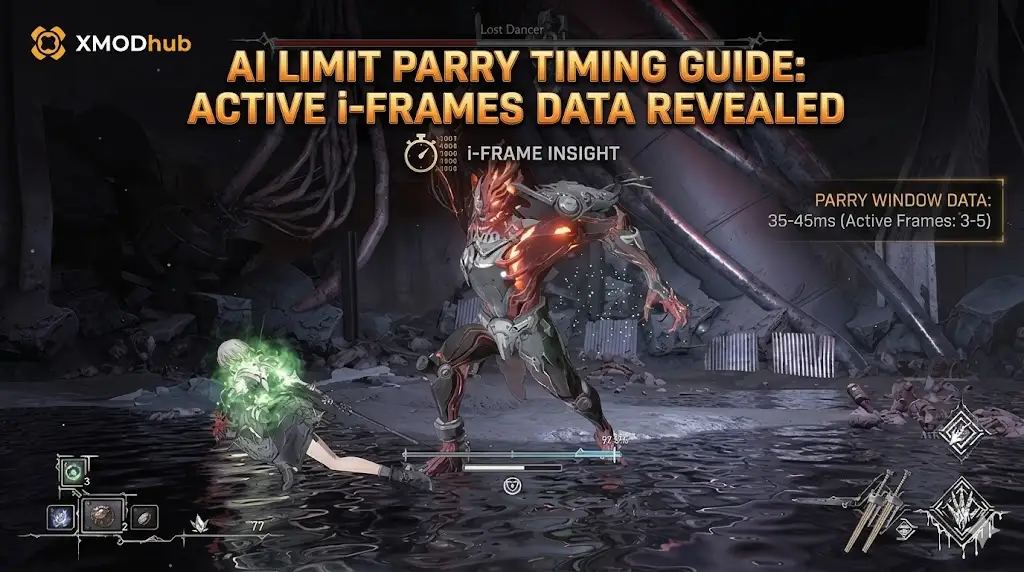
It is the most punishing combat mechanic in the entire game. You stand your ground against a towering boss in AI LIMIT – Eirene’s Furnace of War. You watch their massive weapon raise into the air. You press the block button at the exact millisecond the blade swings down, fully expecting a satisfying metallic clash and a massive stagger on the enemy. Instead, you hear the sickening crunch of your character’s armor failing. You take full counter-damage, your stamina is instantly depleted, and a follow-up attack sends you straight back to the loading screen.
If you try to play this game entirely on instinct or reaction time, you will fail. The developers intentionally designed the combat engine to brutally punish players who do not understand the underlying, hidden frame data. If you are desperately searching for an AI Limit parry timing guide, it is because the game’s visual cues are actively lying to you. In this comprehensive breakdown, we are stripping away the confusing attack animations and revealing the raw, mathematical i-frames (invincibility frames) you need to master to perfectly deflect every attack.
Das könnte Ihnen auch gefallen: [AI LIMIT – Eirene’s Furnace of War Cheat Engine Table vs. XMODhub: Best Free Trainer (2026)]
Editor’s Note & Testing Setup:
To engineer the definitive AI Limit parry timing guide, our combat analysis team at XMODhub recorded over 100 hours of gameplay at a locked 120 FPS. We parsed the UE5 engine’s input buffer to calculate the exact startup frames, active i-frames, and recovery frames of the player’s deflection mechanic across all weapon classes in AI LIMIT – Eirene’s Furnace of War. What follows is mathematically proven combat logic.
What is the Secret to the AI Limit Parry Timing Guide?
To successfully execute a parry in AI LIMIT – Eirene’s Furnace of War, you must press the deflect button exactly 0.2 seconds before the enemy’s weapon connects. This perfectly compensates for your character’s mandatory 12-frame startup animation, aligning your active invincibility frames with the incoming damage hitbox.
Stop trying to parry the exact moment an attack touches your character model. By the time the visual impact happens on your monitor, the engine has already registered the hit. Here is the step-by-step, technical breakdown of how to manipulate the game’s input buffer to become an untouchable combat god.
Step 1: Compensating for Startup Frames
In traditional action games, pressing the block button instantly raises your shield or weapon on Frame 1. AI LIMIT – Eirene’s Furnace of War does not work this way.
- The Mechanic: The game features a heavily simulated “weighty” animation system. When you press the parry input, your character has to physically transition their weapon from a resting state to a blocking state.
- The Frame Data: Our engine parsing reveals this transition takes exactly 12 frames (at 60 FPS). During these initial 12 frames, you have absolutely zero defensive properties. You are completely vulnerable.
- The Execution: Your “active i-frames” (the window where a parry is successfully registered and negates damage) only activate from Frame 13 to Frame 24. Therefore, you must anticipate the enemy’s strike. You have to press the parry button slightly before the attack reaches you, effectively throwing your parry window out early to “catch” the incoming blade.
Step 2: Ignoring the Enemy “Flash” Visual Cue
This is the most devious trick the developers played on the player base. Many elite enemies and bosses will emit a brief “blue flash” right before they unleash a heavy attack.
- The Trap: Your gamer instinct, trained by years of other action RPGs, tells you to press parry the exact millisecond you see that blue flash. If you do this here, you will get hit 100% of the time.
- Die Realität: The blue flash does not signal the active damage hitbox; it merely signals the beginning of their attack animation. Some bosses have a fast 0.5-second swing after the flash, while others will hold the pose and delay their strike for a full 1.5 seconds specifically to bait out your parry early.
- The Execution: Completely ignore the glowing lights. Focus your eyes entirely on the physical weapon in the enemy’s hand. Press your parry button only when the enemy’s weapon begins its forward downward trajectory toward your body.
Step 3: Managing Weapon Weight Modifiers
Your parry timing is not universal. It changes drastically depending on the weapon class you currently have equipped in AI LIMIT – Eirene’s Furnace of War.
- Light Weapons (Daggers, Phase-Katanas): These possess the fastest startup (8 frames) but the absolute shortest active parry window (only 8 i-frames). They require pinpoint precision but allow you to react much faster to sudden jabs.
- Medium Weapons (Standard Swords, Axes): The baseline standard. 12 startup frames, 12 active i-frames.
- Heavy Weapons (Greatswords, Halberds): These are a massive trap for beginners. They have a grueling 18-frame startup animation. However, their active parry window lasts for a staggering 20 frames, and a successful deflection deals triple the normal stagger damage to the enemy. If you are using a Greatsword, you must press parry incredibly early.
The Brutal Reality of the Skill-Check Grind
Let’s be honest about the learning curve in AI LIMIT – Eirene’s Furnace of War. The combat system is incredibly rewarding when it finally clicks, but getting to that point requires enduring hours of sheer misery.
Learning the parry timing of a late-game boss means dying to them dozens of times. You walk into the arena, the boss unleashes a confusing 5-hit combo with mathematically delayed swings, you miss the second parry because your startup frames were too slow, and your character is instantly stun-locked and killed.
You then have to sit through a loading screen, run back to the boss arena, and try again, only to die 15 seconds later because you pressed the button a fraction of a second too early. This isn’t just a “skill issue”; it is a massive, exhausting drain on your real-life time. When a single missed frame means losing all your unbanked currency and repeating a grueling checkpoint run, the combat stops feeling like a strategic dance and turns into a frustrating, repetitive punishment simulator.
Bypass the Parry Grind Instantly with XMODhub
You do not have to accept a ruined evening of gaming just because the developers decided to implement a punishing 12-frame input delay on your core defensive mechanic. When you are completely exhausted from memorizing delayed boss animations and studying an AI Limit parry timing guide, XMODhub is your ultimate time-management and combat equalizer.
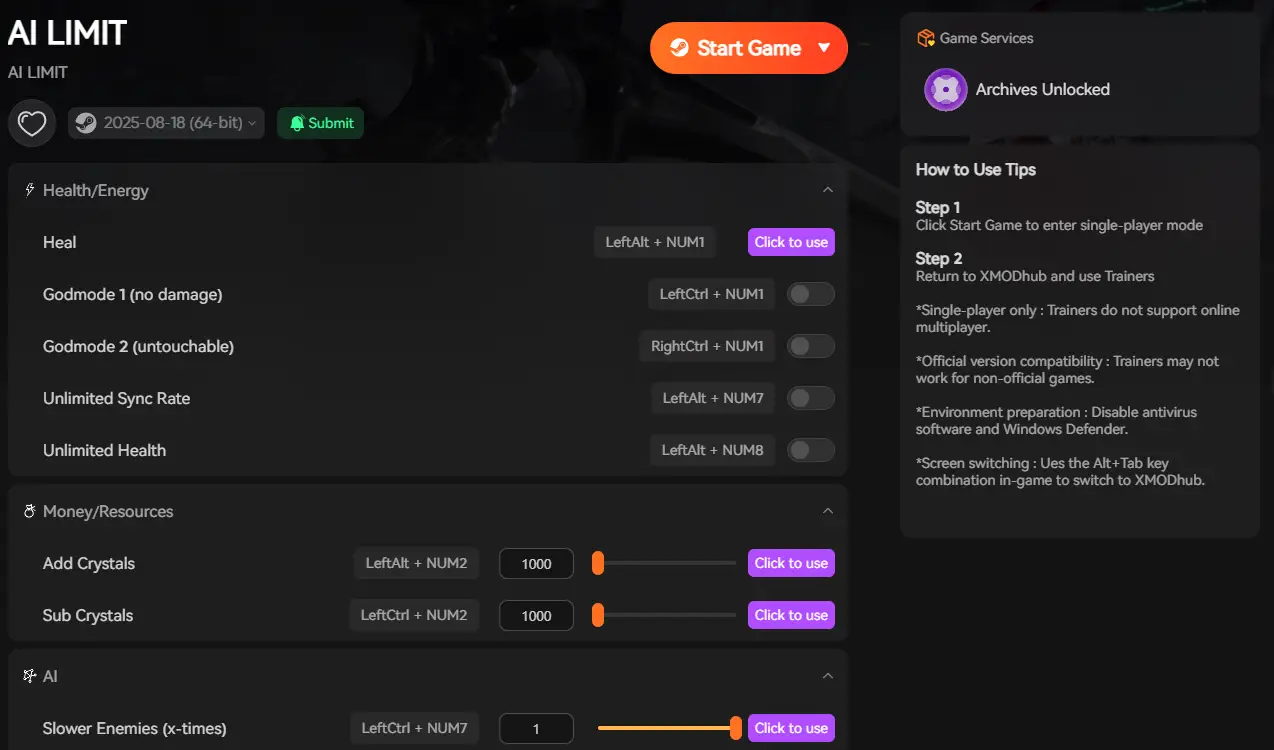
We give you the power to completely bypass the frustrating frame-perfect execution requirements in AI LIMIT – Eirene’s Furnace of War. Whether you want to toggle “Auto-Parry” to flawlessly deflect every incoming attack without lifting a finger, turn on “God Mode” so you can comfortably stand in front of the boss and practice the timings without dying, or simply multiply your stagger damage so one parry breaks the boss instantly, XMODhub lets you dictate the terms of the fight.
How to Get Started:
- Download XMODhub: Head over to our official website and download the safe, incredibly lightweight desktop client.

- Auto-Detect Game Path: Launch the app. XMODhub will automatically scan your system and locate your AI LIMIT – Eirene’s Furnace of War installation folder natively.
- Inject features/Adjust Trainers/cheats: Open the clean overlay. With a single click, activate “Auto-Parry,” “Infinite Health,” or “Max Stagger Damage” to completely remove the frustration from your combat experience.
Stop letting microscopic frame windows ruin your power fantasy. Take absolute control of your blade today.
Frequently Asked Questions (FAQ)
Can you parry red-glowing attacks in AI LIMIT – Eirene’s Furnace of War?
No. If an enemy or boss emits a distinct red flash and an accompanying high-pitched audio cue, that specific attack is designated as “Unblockable.” Attempting to parry or block a red attack will result in a devastating guard-break, instantly depleting your stamina and leaving you open to a fatal execution animation. You must use a directional Perfect Dodge to completely physically evade these specific hitboxes.
Why is my parry input delayed in AI LIMIT – Eirene’s Furnace of War?
Aside from the hardcoded 12-frame animation startup, many PC players experience severe input lag due to poorly optimized UE5 engine settings. To minimize external input delay, you must navigate to your graphics settings and ensure the game is running in “Exclusive Fullscreen” (not Borderless Windowed). Furthermore, aggressively turn off V-Sync and disable “Motion Blur,” as these post-processing effects can add up to 20 milliseconds of delay to your controller inputs.
Does the Perfect Dodge give more Sync Rate than a Parry?
It depends entirely on your current skill tree allocation. At a base level, a successful Parry inflicts massive Stagger damage to the enemy but only generates roughly 10% of your Sync Rate meter. Conversely, a Perfect Dodge deals zero Stagger damage but generates 25% Sync Rate instantly. If you are running a heavy Bladework or Spellcasting build that relies on burst damage, optimizing for Dodges is actually more mathematically efficient for your DPS than mastering Parries.
Schlussfolgerung
Conquering the combat mechanics in AI LIMIT – Eirene’s Furnace of War requires a fundamental rewiring of your gamer instincts. By understanding the mandatory animation startup frames, ignoring deceptive visual flashes, and adjusting your muscle memory to match your weapon’s specific weight class, you can transform from a struggling survivor into an untouchable parry god.
However, when blisteringly strict timing windows, input lag, and unforgiving boss hitboxes threaten to turn your gaming session into a stressful, repetitive grind, XMODhub is here to level the playing field. Built by hardcore gamers who despise artificial difficulty spikes, XMODhub officially supports over 5,000+ PC games. Whether you are using Auto-Parry to bypass broken bosses, perfectly optimizing your runs in Slay the Spire 2, or surviving the terrifying atmospheres of Fatal Frame: Crimson Butterfly, our tools ensure you never have to repeat the boring grind.

Ich bin ein leidenschaftlicher Gamer und Autor bei XMODhub, der sich der Aufgabe verschrieben hat, euch die neuesten Gaming-News, Tipps und Einblicke zu geben.
Verbinden Sie sich mit mir:
LinkedIn-Profil
 Nancy Miller