
 Catherine Hu
The Frustration of Empty Chambers
You are deep in the Dusty Gulch, surrounded by a dozen outlaws, your health is critical, and you have finally lined up the perfect shot on the bandit leader. You pull the trigger, and instead of a satisfying blast, you hear that hollow, soul-crushing click of an empty chamber. The reload animation begins, agonizingly slow, and before you can chamber another round, you are overwhelmed. If this scenario sounds painfully familiar, you are not alone. Far Far West is a masterpiece of environmental storytelling, but its ammo scarcity mechanics can often feel less like a tactical challenge and more like a tedious chore that disrupts the flow of high-octane combat.
Players searching for how to get infinite ammo in Far Far West are not looking to break the game for the sake of it; they are looking to remove the unnecessary friction that prevents them from enjoying the cinematic power fantasy the developers clearly intended. Whether you are playing on PC and want to experiment with loadouts or you simply find the crafting grind for ammunition to be a waste of your limited gaming time, you have come to the right place. We are going to bypass the grind and get you back to the action.
The Short Answer: Infinite Ammo Solutions
If you want to stop counting bullets and start painting the town red, there are three primary ways to achieve infinite ammo in Far Far West. The table below summarizes the most effective methods currently available for the PC version of the game.
| Methode | Benutzerfreundlichkeit | Stabilität | Achievement Friendly |
|---|---|---|---|
| XMODhub (Recommended) | Extremely Easy | Hoch | Varies by Mod |
| Community Mods | Mäßig | Mittel | Nein |
| Konsolenbefehle | Difficult | Niedrig | Nein |
Method 1: The Modding Route (Community Scripts)
The modding community for Far Far West has been working tirelessly to refine the game’s mechanics. Using community-created scripts is the traditional way to achieve infinite ammo. This usually involves installing a script extender, such as the widely used Far Far West ScriptHook. By injecting these scripts, you can toggle specific flags in the game engine that prevent the decrement of your ammo count when a weapon is fired.
However, this method is not without its pitfalls. Manual installation requires you to navigate game directories, manage compatibility between different versions of the game, and potentially troubleshoot crashes caused by script conflicts. If you are interested in a comprehensive overhaul of your game experience, I highly recommend checking out our guide on The 15 Best Far Far West Mods You Need in 2026 (Ranked). That article details the best quality-of-life improvements, including weapon handling tweaks and UI overhauls that pair perfectly with an infinite ammo setup.
Steps for Manual Modding:
- ✦Step 1: Locate your Far Far West installation folder (typically in Steam/steamapps/common).
- ✦Step 2: Download a reputable script extender or trainer from a trusted source.
- ✦Step 3: Extract the files into the root directory.
- ✦Step 4: Launch the game and use the designated hotkey (usually F8 or Insert) to open the mod menu.
- ✦Step 5: Navigate to the “Weapon” or “Player” tab and toggle “Infinite Ammo” or “No Reload” to ON.
Method 2: Console Commands and Developer Tweaks
For the purists who prefer not to use external software, developer console commands are a theoretical option. In many iterations of this engine, developers leave behind debug tools. However, in Far Far West, the developer console is frequently locked behind specific launch parameters or requires a complex modification to the game’s executable file to unlock. I generally advise against this method unless you are an advanced user, as it often leads to save file corruption or disabling Steam achievements permanently.
If you do manage to unlock the console, the command is typically something akin to set_ammo_infinite 1 oder player.setav ammo 9999. The problem with this approach is that it is often temporary. Once you fast travel or load a new zone, the game state resets, and you find yourself back to square one, forcing you to re-enter the commands repeatedly. This is inefficient and ruins the immersion.
The XMODhub Shortcut (Recommended)
If you are reading this, chances are you have already tried the manual methods and found them frustrating, or you simply do not have the time to debug script conflicts. You want to play the game, not manage files. This is where XMODhub becomes your best friend. XMODhub is the ultimate solution for gamers who value their time and want a hassle-free experience.
XMODhub eliminates the need for manual file manipulation, compatibility checking, and the risk of breaking your game files. It uses an intelligent, dynamic detection system that identifies your game version and applies the necessary patches automatically. You don’t need to be a programmer to get infinite ammo; you just need to be a gamer who wants to have fun.
How to Use XMODhub for Infinite Ammo:
- Download XMODhub: Head over to the official XMODhub website and download the desktop client. It is lightweight and secure.

- Auto-Detect Far Far West: Once installed, open XMODhub. It will automatically scan your PC for installed games. It will detect Far Far West instantly.
- Toggle Cheats: Navigate to the Far Far West dashboard within the app. You will see a list of available enhancements. Find the “Infinite Ammo” or “No Reload” option and simply toggle the switch to “ON.”
- Launch and Play: Launch the game through the XMODhub interface, and enjoy your new, limitless arsenal.
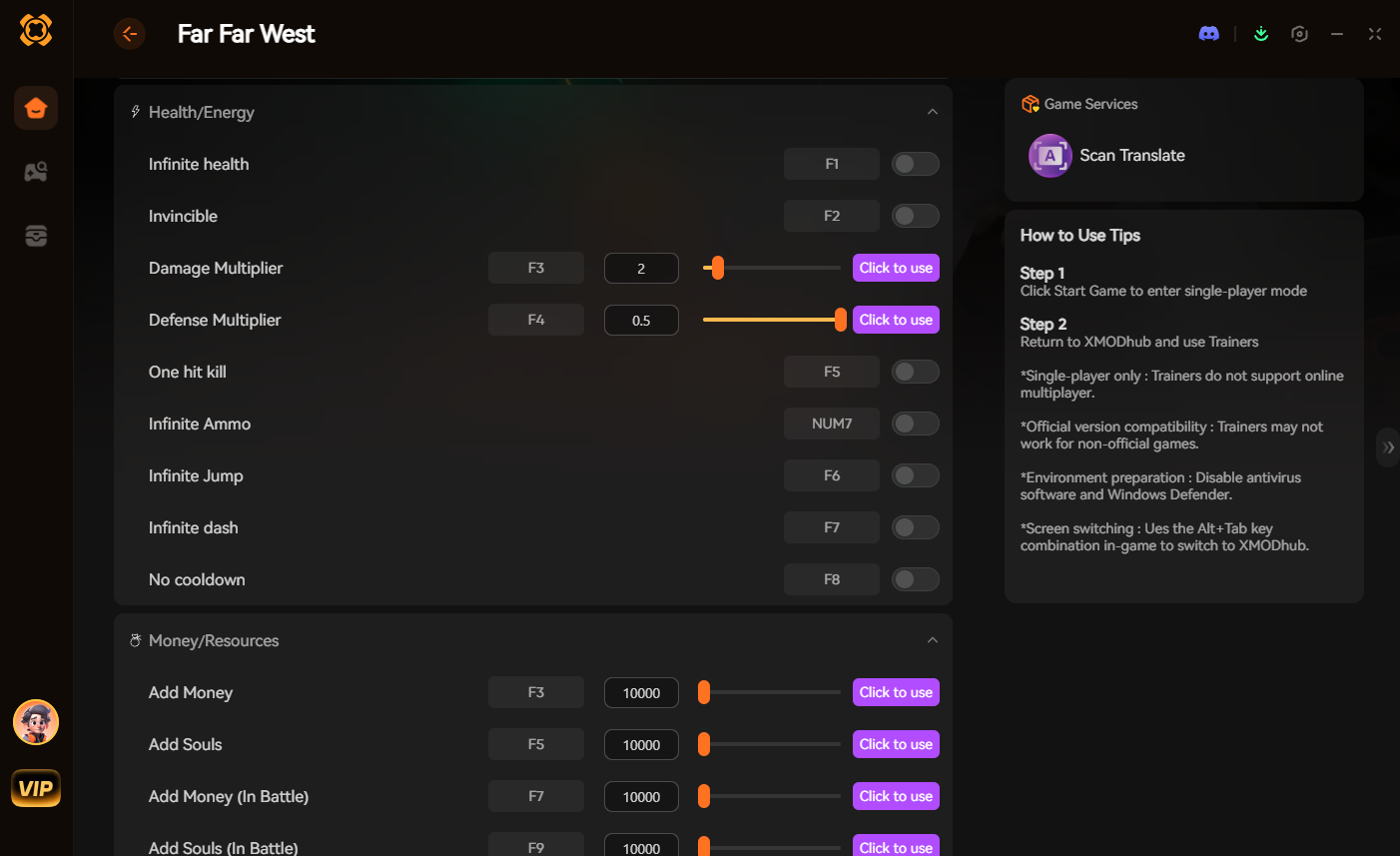
By using XMODhub, you are not just getting infinite ammo; you are gaining access to a suite of quality-of-life tools that work across over 5,000+ games. Whether you are playing similar titles like Red Dead Redemption 2, Borderlands, or Fallout, XMODhub offers the same seamless, one-click experience.
Troubleshooting & Performance Optimization
Even with the best tools, technical hiccups can occur. If you encounter issues while using infinite ammo tweaks, consult the table below to resolve them quickly and get back to the frontier.
| Ausgabe | Wahrscheinliche Ursache | Schnelle Lösung |
|---|---|---|
| Game Crash on Launch | Outdated ScriptHook | Update game files via XMODhub |
| Infinite Ammo Not Toggling | Version Mismatch | Verify game integrity in settings |
| Save File Incompatibility | Manual Mod Interference | Clean install & restore backup |
Pro-Tips for Infinite Ammo Gameplay
Infinite ammo changes the tactical landscape of Far Far West. To get the most out of your newfound power, keep these combat strategies in mind:
- ✓Manage Weapon Heat: Even with infinite ammo, guns can overheat. Use short, controlled bursts for maximum DPS rather than holding the trigger down.
- ✓Focus on Accuracy: Don’t just spray and pray; use the extra firepower to aim for headshots, which maximize damage multipliers and conserve your health.
- ✓Pair with God Mode: If you are already invincible with ammo, consider enabling God Mode or armor regeneration to truly dominate the frontier.
- ✓Weapon Variety: Experiment with high-fire-rate weapons like repeaters or gatling guns, which are often ammo-hungry but devastating when the magazine never empties.
Häufig gestellte Fragen
Q: Will infinite ammo mods get me banned from multiplayer?
A: If Far Far West has an online component, do not use these mods while connected to official servers. Infinite ammo mods are strictly for single-player offline campaigns. Using them in multiplayer will almost certainly result in an account ban. Always ensure you are in offline mode before toggling these features.
Q: Do these methods affect my save files?
A: Generally, no. However, it is always a best practice to create a backup of your save folder before applying any game modifications. XMODhub is designed to be non-intrusive, but having a backup is the golden rule of PC gaming.
Q: Can I disable the infinite ammo if I change my mind?
A: Yes. If you use XMODhub, you can simply toggle the feature off at any time without having to restart the game or uninstall files. It is the most flexible solution available.
Q: Why is “No Reload” better than just “Infinite Ammo”?
A: While infinite ammo prevents you from running out of bullets, “No Reload” is a higher-tier feature. It eliminates the reload animation entirely, allowing for a constant stream of fire. This is essential for high-difficulty encounters where every second counts.
Conclusion: Take Control of Your Gameplay
You bought Far Far West to experience the thrill of the frontier, not to spend your precious gaming hours scavenging for crafting materials or waiting for reload animations to finish. Whether you choose to manually mod your game or take the streamlined path with XMODhub, the goal remains the same: you should be the one defining your gameplay experience, not the game’s arbitrary limitations.
If you are ready to stop the grind and start playing, I highly recommend downloading XMODhub. It is the most efficient, safest, and user-friendly way to unlock infinite ammo and a host of other features for Far Far West and thousands of other titles. Don’t let a “No Ammo” warning ruin your session ever again. Take control, load up, and ride out.

Ich bin ein leidenschaftlicher Gamer und Autor bei XMODhub, der sich der Aufgabe verschrieben hat, euch die neuesten Gaming-News, Tipps und Einblicke zu geben.
Verbinden Sie sich mit mir:
LinkedIn-Profil