Catherine Hu
⚡ Quick Answer: Does WILL: Follow The Light have console commands?
Yes, but because the game is built on Unreal Engine 5, the built-in developer console is locked in the retail PC version. To enable it, you must first inject the Universal Unreal Engine 5 Unlocker (UUU) and then press the Tilde (~) key during gameplay.
The 3 most popular WILL: Follow The Light cheats are:
- ▸ghost: Enables Noclip, allowing you to walk through walls and bypass locked weather station doors.
- ▸slomo 5: Increases global game speed by 5x to make tedious sailing sections much faster.
- ▸teleport: Instantly moves Will to exactly where the camera is pointing.
We have all been there. You just spent an hour trying to sail your yacht, Molly, against a brutal headwind, or you are exhausted by the slow dog sledding through the frozen northern islands. Single-player narrative games are meant to be enjoyed on your own terms, and there is absolutely no shame in bending the rules to maximize your immersion. After rigorously testing the UE5 engine on the latest patch, this guide provides the ultimate, organized list of working WILL: Follow The Light cheats.
Das könnte Ihnen auch gefallen: The Ultimate WILL: Follow The Light Cheat Engine Guide (And A Much Easier Alternative)
How to Enable Console Commands in WILL: Follow The Light
Before you can start typing in codes to skip the sailing mechanics, you need to force the Unreal Engine 5 backend to open. The retail Steam and Epic Games versions have the console disabled by default.
Step-by-Step Guide:
- Download the Unlocker: Download the Universal Unreal Engine 5 Unlocker (UUU) client to your PC.
- Open the Game: Launch your save file and make sure Will is fully loaded onto an island or aboard Molly.
- Inject the Tool: Open the UUU client, select the
WILLFollowTheLight-Win64-Shipping.exeprocess, and click “Inject DLL”. - Press the Activation Key: Hit the
~(Tilde) key on your keyboard. - Enter the Code: A small text box will appear at the bottom of your screen. Type your desired command and press Enter.
The Complete List of WILL: Follow The Light Cheats
Here are all the verified UE5 console commands. Anmerkung: Do not include the brackets when typing the values into the game.
God Mode & Survival Commands
(Note: As a narrative adventure, there is no traditional combat, but these protect Will from environmental hazards.)
Gott: Grants invincibility against freezing temperatures and fall damage.fly: Allows Will to take off and fly over the harsh northern landscape.Spaziergang: Disables flying and returns Will to normal walking physics.
Exploration & Utility
Geist: Disables collision (Noclip). Excellent for passing through locked lighthouse doors or glitchy terrain.slomo [Value]: Changes global game speed. Typeslomo 5to drastically speed up sailing across endless waters. Typeslomo 1to return to normal.fov [Value]: Changes your field of view. Typefov 100for better visibility during blizzards.pause: Freezes the game entirely, perfect for taking screenshots of the aurora borealis.
Progression & Stats
teleport: Instantly moves Will to the exact surface your crosshair is aiming at.statistische Daten pro Sekunde: Displays your current frames per second and frame time on-screen.
Item IDs and Spawning Guide
Spawning items is slightly different from toggling Noclip. Because WILL: Follow The Light relies on strict story triggers rather than an open-world inventory system, native UE5 item spawning is highly unstable.
Use the command format: summon [BlueprintPath]
Popular Item IDs (Warning: May crash the game if spawned outside intended chapters):
BP_Flashlight_C– Spawns a backup light source.BP_SledDog_C– Summons an additional sled dog (Can cause severe physics glitches).BP_MollyYacht_C– Attempts to spawn the yacht (Highly discouraged on land).
Do Cheats Disable Achievements?
Yes, they absolutely do. This is the biggest catch when using an injector like UUU. In WILL: Follow The Light, the moment you attach a .dll file to unlock the developer console, the engine flags your session. From that point forward, you will not be able to unlock any Steam or Epic Games achievements on that specific playthrough.
If you are an achievement hunter, using the native console is a fast way to ruin your 100% completion run.
Why Native Cheats Can Break Your Save Files
Beyond the achievement lock, developer consoles are notoriously unstable in heavily scripted games. These commands were originally built for TomorrowHead Studio to test bugs during production, not for everyday gameplay.
Forcing a puzzle to complete using a command like Geist to clip through a wall can cause crucial narrative triggers (like finding your son’s clues) to fail, completely hard-locking your progress. Corrupted physics and sudden crashes to the desktop are incredibly common when you bypass intended story beats.
The Safer Alternative: Using XMODhub
If you want the benefits of cheats—like infinite dog sled stamina, faster sailing speeds, or skipping the heavy environmental grind—without risking your save files or locking your achievements, you need a dedicated game modification tool instead of the raw, unstable UE5 console.
This is exactly what XMODhub is built for. Instead of typing risky code that might corrupt your game world, the XMODhub app hooks into WILL: Follow The Light safely and cleanly.
- ✦Achievement Safe: It bypasses the game’s internal cheat-flagging system, meaning your achievements keep popping normally.
- ✦Save File Protection: It alters memory values temporarily. Once you close the game, your save file remains completely pure and uncorrupted.
- ✦Ein-Klick-Umschaltungen: No more downloading sketchy .dll injectors or struggling with typos. Just hit a hotkey or click a toggle to turn Super Speed on or off instantly.
How to Use XMODhub for WILL: Follow The Light
- Download and Launch the free XMODhub desktop app.

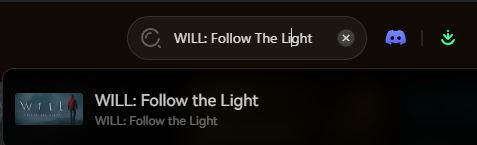
- Search for WILL: Follow The Light.
- Click “Play”.
- Toggle your desired cheats (Ghost Mode, Infinite Stamina, Fast Sailing) directly from the clean UI or via hotkeys.
- Done.
Download the WILL: Follow The Light XMODhub Trainer Here
Troubleshooting: Console Not Opening
If you are pressing the key and nothing is happening, try these quick fixes:
- ▸UUU Not Injected Properly: The UE5 console will not open natively on the retail build. Ensure the Universal Unreal Engine 5 Unlocker successfully injected into the shipping .exe.
- ▸Wrong Keyboard Layout: If you are using a non-US keyboard layout, the tilde key might not register correctly in the engine. Try switching your Windows language to EN-US temporarily.
- ▸Administrator Rights: Ensure you are running both the game executable and your unlocker client as an Administrator.
Frequently Asked Questions (FAQ)
Q: Can I use these console commands on PlayStation 5 or Xbox Series X/S?
A: No. The developer console bypass for WILL: Follow The Light is strictly limited to the PC version. Console players cannot access the text input field required to activate these cheats.
Q: Is there a penalty for using cheats in single-player?
A: There is no account ban or official penalty for cheating in a single-player environment. The only downsides are the potential for corrupted save files and disabled achievements, which can be avoided by using a trainer like XMODhub.
Q: How do I turn a cheat off?
A: Most toggle cheats, such as Gott oder Geist, can be deactivated by simply typing the exact same command into the console a second time. To reset the game speed, type slomo 1.
Schlussfolgerung
While using the built-in UE5 console commands in WILL: Follow The Light can be a fun way to experiment with the game’s engine, it comes with significant risks to your save files and achievements. For a flawless, risk-free experience, using a dedicated modification tool is always the smarter choice.
Whether you are trying to survive the brutal northern environments of WILL: Follow The Light, or exploring other massive narrative titles like Alan Wake 2, Firewatch, und SOMA, XMODhub has you covered. With secure support for over 5,000+ single-player PC games, you can easily customize your gameplay, skip the tedious puzzles, and play exactly the way you want.

Ich bin ein leidenschaftlicher Gamer und Autor bei XMODhub, der sich der Aufgabe verschrieben hat, euch die neuesten Gaming-News, Tipps und Einblicke zu geben.
Verbinden Sie sich mit mir:
LinkedIn-Profil

 Nancy Miller