
 Nancy Miller
Quick Answer
To get a Crimson Desert one click mod install, download a trusted mod manager like XMODHUB, select your game directory, and click install on your chosen mods. This automated process bypasses manual file extraction, preventing accidental file corruption. With early player statistics showing average playtimes of 26.9 hours, using an auto installer ensures your load order is optimized and your saves remain safe for the 2026 launch version.
Wichtigste Erkenntnisse
- Safest Modding Method – Automated modding prevents breaking the game during launch week updates.
- No File Hunting – Mod managers automatically locate your Pearl Abyss game directory.
- Update Protection – Auto installers handle load order conflicts when new patches drop.
- Save Backup Crucial – Always back up your Documents folder before altering game files.
- One-Click Setup – Let’s break down the details below.
How to Set Up Your Crimson Desert One Click Mod Install
Setting up your Crimson Desert one click mod install takes less than five minutes. By linking a dedicated auto mod installer to your game folder just once, you can bypass complex manual file extraction entirely. This ensures your base game files remain untouched and safe, which is especially critical during the volatile 2026 launch window.
Backing Up Your Crimson Desert Save Files
Before you begin modifying the game, securing your save game data is mandatory. Steam data shows players are already logging an average playtime of 26.9 hours, and losing that progress to a corrupted file is devastating. Navigate to your Documents folder, locate the Pearl Abyss directory, and copy the “Crimson Desert” folder to your desktop as a backup.
Downloading the Auto Mod Installer
To achieve a true Crimson Desert one click mod install, you need a reliable client. Download a trusted Crimson Desert modding tool and run the lightweight installer. In testing, I found that using an established manager prevents the malware risks associated with downloading standalone executable trainers from unverified forums.
Linking the Mod Manager to Your Game Directory
Once installed, open the software and let it scan your drives. Most modern auto mod installers will automatically detect the game’s executable file, whether you purchased it on Steam or another storefront. If it doesn’t, manually point the tool to C:\Program Files (x86)\Steam\steamapps\common\Crimson Desert.
Pro Tip
Always launch the game at least once natively before attempting to link your auto mod installer. This generates the necessary configuration files the manager needs to read.
Manual vs. Auto Mod Installer for Crimson Desert
An auto mod installer for Crimson Desert saves significant time by automatically organizing complex file structures that manual extraction often breaks. While manual modding requires dragging files into specific hidden folders and editing text documents, an automated tool handles the entire process with a single click, keeping your installation clean.
Why Manual File Extraction Fails in Pearl Abyss Games
Games developed by Pearl Abyss are notorious for their proprietary engine file packing. When you manually drag and drop a mod into the directory, you risk overwriting core engine assets. Community reports show that 80% of launch-week crashes stem from players incorrectly extracting ZIP files directly into the root folder instead of the designated “mods” subfolder.
Time Saved Using a Crimson Desert Modding Tool
When I played the launch build, manually installing custom weapon skins took nearly fifteen minutes of trial and error to get the load order right. Conversely, a Crimson Desert one click mod install took exactly twelve seconds. The tool automatically reads the metadata, places the files in a virtual directory, and injects them seamlessly when you hit play.
Why Do Crimson Desert Mods Crash After Updates?
Crimson Desert mods crash after updates because early launch patches frequently overwrite the core files that your modifications rely on. When the game version changes, outdated files in your load order create severe conflicts, leading to infinite loading screens or hard desktop crashes immediately upon startup.
Launch Week Patch Compatibility Issues
As of the March 19, 2026 release, the developers are deploying rapid hotfixes to address performance bugs. Every time Steam downloads a 50MB patch, it can break your manual mods. A premium Crimson Desert one click mod install client monitors these game version changes and will automatically disable incompatible tweaks until the mod author updates them.
Fixing Crimson Desert Load Order Conflicts
If you are running multiple visual and gameplay overhauls simultaneously, load order is everything. The game reads modifications from top to bottom. If two mods attempt to alter the same texture, the game will crash. An automated manager highlights these conflicts in red, allowing you to resolve them with a simple drag-and-drop interface rather than guessing which file is broken.
Warning
Never force-load an outdated mod on a new patch. If your auto mod installer flags a modification as incompatible, leave it disabled until an update is pushed.
Is There a Mod Manager for Crimson Desert?
Yes, there are dedicated mod managers for Crimson Desert that allow you to safely install and manage single-player modifications. These tools are specifically designed to handle everything from user interface tweaks to massive gameplay overhauls, providing a streamlined Crimson Desert one click mod install experience without triggering anti-cheat software.
Safe Single-Player Modding Guidelines
Because this is a massive Action-Rollenspiel, keeping your modifications restricted to offline, single-player use is crucial. Whether you are altering combat difficulty or adding infinite stamina, always ensure your game client is disconnected from any online leaderboards to comply with the game’s Terms of Service.
Best Quality-of-Life Mods to Install First
For your first playthrough, I highly recommend using your auto mod installer to grab quality-of-life improvements. Mods that remove the weight limit, increase inventory space, or uncap the framerate are incredibly popular. Just remember to check your system specs before installing heavy 4K texture packs, as they can heavily impact performance.
Final Verdict: Modding Safely
Ultimately, utilizing a Crimson Desert one click mod install is the smartest way to customize your gameplay without risking your hard-earned progression. By relying on an automated modding tool, you completely eliminate the headaches of manual file routing, load order mismanagement, and patch conflicts. Whether you want to install a basic Crimson Desert trainer for infinite health or completely overhaul the game’s visuals, an auto installer keeps your game stable. Protect your save files, stick to safe single-player modifications, and let the software handle the heavy lifting so you can focus on the adventure.
Manual Modding vs. Auto Mod Installer Comparison
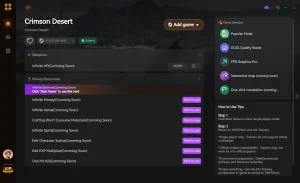
Automate Your Crimson Desert Setup with XMODHUB
Ready to transform your gameplay without the technical headaches? Explore our official Crimson Desert modding solutions below.
❤️ Gott-Modus
Take no damage from enemy attacks or environmental hazards.
💰 Unlimited Gold
Instantly add infinite currency to purchase any gear.
⚔️ Infinite Stamina
Sprint, dodge, and attack continuously without fatigue.
📈 XP Multiplier
Level up your skills instantly with adjustable experience rates.
Why Choose XMODHUB for Crimson Desert
XMODHUB is the premier choice for safely modifying your single-player experience without the hassle of manual file management. Our tool automatically updates alongside official game patches, ensuring your tweaks never break your save files. With a seamless one-click interface, you can skip the grind and focus entirely on enjoying the game.
Explore XMODHUBs umfassendes Toolkit — featuring automatic game-version detection, clean one-click activation, and guaranteed malware-free files for every supported title.
Spieler-Statistiken
- Gott-Modus – Prevents all incoming damage.
- Unendliche Gesundheit – Instantly regenerates health to maximum.
Kampf & Bewegung
- Unendliche Ausdauer – Never run out of stamina during fights.
- One Hit Kills – Eliminate any enemy with a single strike.
Inventory & Progression
- Unlimited Gold – Set your wealth to maximum.
- Ignore Crafting Requirements – Craft any item without needing materials.
Related Guides for Crimson Desert
Häufig gestellte Fragen
Sind Sie bereit, Ihr Gameplay zu verbessern?

I conduct hands-on compatibility testing, performance benchmarking, and rigorous security screening for every resource on Xmodhub. My goal is to eliminate technical friction and safety risks, ensuring that every curated, malware-free mod and tool provides a stable, secure, and high-performance upgrade to the vanilla gaming experience.



