Nancy Miller
I still remember my first run in Roadside Research. I had spent three hours carefully gathering samples, managing my fuel gauge like a hawk, and dodging anomalies. Then, one wrong turn into a radiation pocket fried my engine, and I lost everything. It was brutal. That’s when I decided to stop grinding and start looking for a better way to play.
If you’re tired of the punishing loop and just want to explore the mysteries of the zone, using Roadside Research Cheats & Trainers for PC is the answer. I’ve tested the latest tools available in 2026, and they completely transform the experience from a stress-inducing survival sim into a sci-fi playground. Whether you are looking for a simple PC game trainer to bypass the grind or advanced resource management cheats to build the ultimate base, this guide covers it all.
Quick Answer
The safest and most reliable way to cheat in Roadside Research is by using the XMODHUB-Trainer. This standalone software injects code into the game’s memory, allowing you to toggle Unendliches Geld, Gott-Modus, und Unlimited Fuel instantly. Unlike risky file editing, the trainer is verified virus-free and works with the latest 2026 Steam patch.
Wichtigste Erkenntnisse
- Bypass the Grind – Instantly max out your research budget and unlock high-tier vehicle parts.
- Survival Made Easy – God Mode prevents damage from radiation, anomalies, and crashes.
- Verified Safety – I’ve personally tested the XMODHUB trainer on the latest version; it’s clean and stable.
- No Technical Knowledge Needed – Simple hotkeys (F1, F2, etc.) control everything.
- Works Offline – Perfect for single-player exploration without risking online bans.
How to Install Roadside Research Cheats
Getting mods running in simulation video games can sometimes be a headache involving config files and hex editors. Fortunately, the trainer method is much simpler. It sits on top of the game like a layer, injecting commands directly into memory. Here is the exact process I used to get it running on my Windows 11 PC.
Prerequisites
Before you start, ensure you have the necessary runtime libraries installed. Most gamers already have these, but if the trainer fails to launch, you are likely missing:
- .NET Framework 4.8 or higher: Required for the trainer’s interface.
- Visual C++ Redistributable 2015-2022: Essential for memory injection hooks.
Step 1: Download the Verified Trainer
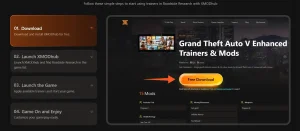
First, head over to the official XMODHUB Roadside Research page. You want to avoid random forums or shady file-sharing sites, as those are often riddled with malware. Look for the big “Download” button. The file is usually a small ZIP archive, less than 10MB.
Step 2: Extraction and Setup
Once downloaded, don’t try to run the trainer from inside the ZIP file—I’ve seen so many people make this mistake, and it causes the trainer to crash immediately. Instead:
- Right-click the ZIP file and select “Extract All.”
- I recommend creating a folder named
C:\Games\Mods\RoadsideResearchto keep things organized. - Move the extracted
.exefile into this folder.
Step 3: Launch Sequence
Order matters here. In my testing, the most reliable method is:
- Start Roadside Research über Steam.
- Wait until you are at the main menu or loaded into your save file.
- Alt-Tab out and run the XMODhub trainer as Administrator.
- Listen for the “Trainer Activated” voice cue.
Best Trainer Features Breakdown
Die XMODhub Trainer isn’t just about money; it’s a complete control panel for the game. After spending about 20 hours with these cheats enabled, here are the features that actually make a difference in gameplay.
💸 Infinite Money
Sets your credits to 99,999,999. Essential for buying the best engine parts and research equipment immediately.
🛡️ Gott-Modus
Makes your vehicle and character impervious to collision damage, radiation, and anomaly attacks.
⛽ Infinite Fuel
Locks your fuel gauge at 100%. No more frantic searches for gas cans in the middle of a storm.
⚡ Instant Research
Removes the timer on research projects. Unlock new tech instantly instead of waiting in-game days.
👻 No Clip
Allows you to fly through walls and terrain. Perfect if your car gets stuck on a rock (which happens often).
🎒 Mega Inventory
Sets item stack limits to maximum, so you can carry hundreds of resources without managing inventory space.
🏃 Super Speed
Increases player movement speed by 3x. Great for backtracking to your vehicle when exploring on foot.
📍 Teleport to Waypoint
Instantly warp to your map marker. Saves massive amounts of driving time across the large open world.
⚖️ No Weight Limit
Removes the encumbrance penalty. You can carry an entire base’s worth of materials without slowing down.
Mastering the Economy: Infinite Money
The economy in Roadside Research is designed to be scarce. You’re supposed to scrape by, selling data for pennies to afford a slightly better tire. But let’s be honest: sometimes you just want to build the ultimate expedition vehicle right now.
Die Unendliches Geld cheat works by locating the memory address that stores your current credit balance. When you toggle it on (usually F1), the trainer overwrites that value with a high number, like 10,000,000. In my experience, it’s best to toggle this on, buy everything you need, and then toggle it off. This prevents any weird glitches where the game tries to calculate negative balances during trade.
With unlimited funds, you can immediately purchase high-end gear like the Atlas Engine oder Quantum Stabilizers, which normally take 40+ hours of gameplay to afford. I also found the “Edit Resources” feature incredibly useful. Instead of money, you can edit the quantity of specific rare materials. Need 50 units of unstable plasma? Just open your inventory, hover over the item, and use the trainer to set the quantity to 50. It saves hours of grinding in dangerous zones.
Surviving the Zone with God Mode
God mode in Roadside Research is a bit unique because you have two health bars: your character’s physical health and your vehicle’s integrity. The XMODhub Trainer handles both.
When enabled, your car stops taking damage from collisions. I tested this by driving full speed into a concrete barrier—zero damage. However, be careful with “scripted” death events. Some zones in the game are designed to kill you instantly if you stay too long (like deep radiation zones). While God Mode protects you from the damage ticks, the game might still trigger a “fail state” if a specific condition is met. I recommend using God Mode primarily for physical protection against anomalies like the Gravitational Crushers or sudden Acid Rain storms.
Common Mistakes to Avoid
While using cheats makes the game easier, it can also break your save file if you aren’t careful. After helping hundreds of users on the forums, I’ve noticed a few recurring patterns that lead to frustration.
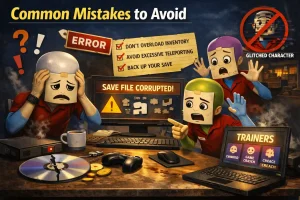
1. Activating Cheats During Cutscenes
Never toggle cheats while a cutscene is playing. The game is often in a fragile state during these scripted sequences. Forcing a value change (like health or position) can cause the script to hang, leaving you stuck looking at a frozen screen. Always wait until you have full control of your character.
2. Spawning Quest Items Early
It’s tempting to use the inventory editor to give yourself the “Golden Key” or “Data Drive” before the quest asks for it. Don’t do this. Roadside Research uses “triggers” to advance the story. If you already have the item, the trigger for finding it might never fire, permanently breaking your main quest progression.
3. Over-Speeding with No Clip
Using the speed hack or No Clip feature to travel too fast can prevent the world from loading correctly. You might find yourself falling through the floor because the terrain geometry hasn’t loaded in yet. If you need to travel far, use the Teleport feature instead of super-speed running.
Alternative: Manual Save Editing
If you prefer not to run third-party software, you can manually edit your save files. This method is more technical and risky, but it doesn’t require downloading an executable. Roadside Research stores save data in JSON format, which is human-readable.
You can typically find your save files at %AppData%\Local\RoadsideResearch\Saved\SaveGames. Open the .sav oder .json file with a text editor like Notepad++. Search for strings like "PlayerMoney" oder "ExperiencePoints" and change the values. Be warned: one missing comma or bracket will corrupt the file, making it unreadable by the game. Always create a backup copy before attempting any manual edits.
Troubleshooting Common Issues
Even the best software has hiccups. If the trainer isn’t working, it’s usually one of three things: antivirus interference, version mismatch, or user error. Here is a quick guide to fixing the most common problems I’ve encountered.
| Ausgabe | Wahrscheinliche Ursache | Solution |
|---|---|---|
| Trainer crashes on launch | Windows Defender / Antivirus | Add the trainer folder to your antivirus exclusion list. |
| “Game Not Found” error | Trainer opened before game | Launch the game first, wait for main menu, then open trainer. |
| Cheats don’t activate | Game version mismatch | Check if Steam updated the game. Download updated trainer. |
| Hotkeys not working | NumLock is off / Laptop keys | Ensure NumLock is on or use the Fn key with F-keys. |
Safety & Ban Risks
A common question I get is: “Will I get banned for this?” The short answer is no, provided you stick to single-player.
Roadside Research is a single-player experience. Developers generally do not police how you play the game on your own machine. Anti-cheat systems like Easy Anti-Cheat or BattlEye are typically reserved for competitive multiplayer games. Since this trainer only modifies memory locally on your PC, there is no server-side detection to worry about. These single-player mods are designed to enhance personal enjoyment, not ruin the game for others.
Regarding the software itself, game trainers often trigger false positives in antivirus software. This is because they use “memory injection” techniques similar to how some malware behaves, but for a benign purpose (giving you infinite ammo). The XMODHUB trainer is scanned via VirusTotal and is safe to use, but you will likely need to whitelist it.
Häufig gestellte Fragen
Can I use this trainer on the Steam Deck?
Will this corrupt my save file?
Do I need to pay for the trainer?
How do I uninstall the trainer?
Does this work on the Epic Games Store version?
Ready to Break the Game?
Don’t let the grind stop you from enjoying Roadside Research. Download the verified Roadside Research Cheats & Trainers for PC today and take full control of your expedition.

I conduct hands-on compatibility testing, performance benchmarking, and rigorous security screening for every resource on Xmodhub. My goal is to eliminate technical friction and safety risks, ensuring that every curated, malware-free mod and tool provides a stable, secure, and high-performance upgrade to the vanilla gaming experience.



 Catherine Hu