We’ve all been there. You spend four hours building the perfect defensive wall, only for a wave of mutants to tear it down in seconds. Or worse, Kelvin decides to chop down the tree holding up your treehouse, destroying your entire base. Sons of the Forest Cheat Engine Alternative.
The struggle for survival in Sons of the Forest is brutal. Naturally, players turn to tools like Cheat Engine or the native cheatstick command to spawn resources. But let’s be honest: hunting for “Item ID 485” (Shovel) lists, re-typing commands blindly every time you launch the game, and dealing with crashes is a nightmare.
You are looking for a Sons of the Forest Cheat Engine alternative—something that just works.
As experts in game memory modification, the XMODhubteam is here to explain why the native console is annoying, why free Cheat Tables are risky, and the best automated solution to get Infinite Logs, Ammo, and Rescue Stuck NPCs instantly.
Quick Summary (TL;DR)
The Problem: The native cheatstick console resets every session and requires memorizing hundreds of Item IDs.
The Risk: Using raw Cheat Engine tables can corrupt your save file or cause multiplayer desyncs.
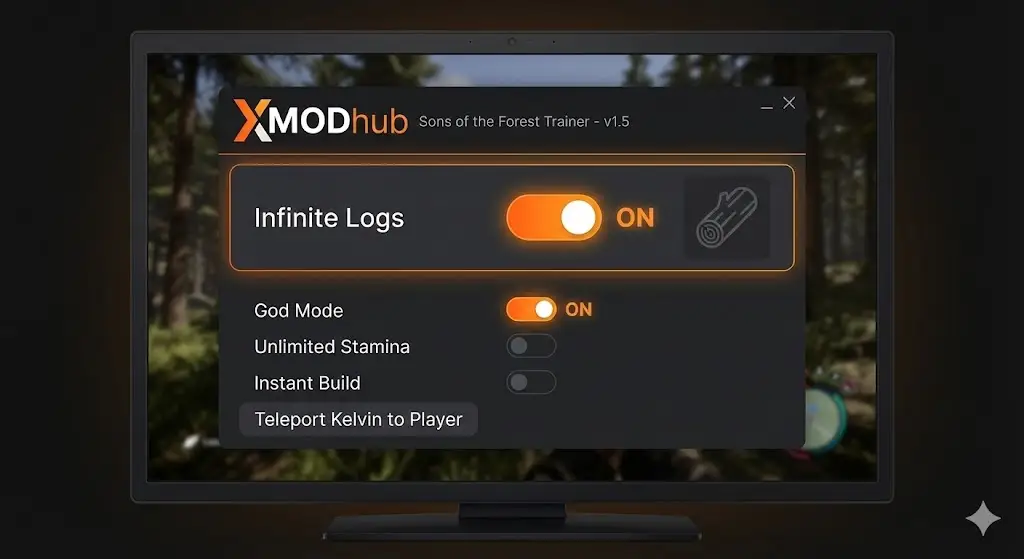
The Solution:XMODhub is the premier trainer. It offers a safe, visual interface to toggle Infinite Items, Teleport Kelvin, and Build Anywhere without touching a single line of code.
Table of Contents
Editor’s View: The “Kelvin” Incident
The Hard Truth: Why Cheat Engine is a Headache
Feature Spotlight: The “Item ID List” Killer
Comparison: Cheatstick vs. Cheat Engine vs. XMOD
Method 1: The “Manual” Way (Cheatstick Command)
Method 2: The XMODhub Solution (Recommended)
Fixing Stuck NPCs (Kelvin & Virginia)
How to Use XMOD for Sons of the Forest
Frequently Asked Questions (FAQ)
Verdict
Editor’s View
“I Just Wanted to Build a Log Cabin, Not a Cemetery”
Catherine Hu | Gamer andTester at XMODhub
“Sons of the Forest is a masterpiece, but the grind is real. I vividly remember trying to build a bridge across the river. I needed 400 logs. Kelvin was doing his best, but moving logs one by one was taking literal real-world days.
I tried using a Cheat Engine table I found on a forum to spawn logs. It worked for 5 minutes, then the game crashed due to a pointer error. When I reloaded, my inventory was corrupted, and Virginia was missing from the map entirely.
That was the breaking point. I switched to our internal XMOD trainer to toggle ‘Infinite Logs’. Suddenly, I could just build. I didn’t ruin the survival aspect; I just removed the tedious lumberjack simulator part so I could focus on exploring the caves.”
The Hard Truth: Why Cheat Engine is a Headache
Sons of the Forest runs on the Unity engine. While Unity is generally moddable, Endnight Games releases frequent patches that break memory addresses.
Why Cheat Engine fails for most players:
Pointer Scans Break: Every time the game updates, the memory addresses for Health or Ammo change. Your Cheat Table (.ct file) becomes useless until someone manually updates it.
Complex Values: Items like 3D Printer Resin (ID 390) or Knight V (ID 630) use dynamic values. Editing the wrong value can crash the game instantly.
No Visual Feedback: You are staring at hex numbers like 4A 2F 00. One typo, and you might accidentally delete your GPS tracker.
Feature Spotlight: The “Item ID List” Killer
One of the most searched terms is “Sons of the Forest Item ID List 2026”. Players hate Alt-Tabbing to a wiki to find the code for a Shotgun (ID 358) or Crossbow Bolt (ID 368).
XMODhub eliminates this entirely.
Visual Inventory: Our trainer scans your game and displays items as icons.
Add Any Item: Need a Pistol Rail? Just type “Pistol” in the XMOD search bar and click “Add”. No ID 376 required.
Infinite Ammo: Instead of spawning 1000 bullets, just toggle “Unlimited Ammo” and never reload again.
Comparison: Cheatstick vs. Cheat Engine vs. XMOD
Why switch from the traditional method?
Feature
Native Console (cheatstick)
Cheat Engine Tables
XMOD Trainer
Ease of Access
Annoying (Type blind every time)
Difficult (Hex codes)
Easy (Visual UI)
Stability
High
Low (Crashes often)
Safe (Anti-Crash)
Item Spawning
Must memorize IDs
Script dependent
Visual Search
NPC Rescue
Complex commands
Risky edits
1-Click Teleport
Virus Safety
N/A
Unknown Source
VirusTotal Clean
Method 1: The “Manual” Way (Cheatstick Command)
If you insist on doing it manually, the game has a hidden developer mode.
The “Cheatstick” Method:
Load into your saved game.
Type cheatstick on your keyboard (literally just type it while standing there). There is no text box or sound.
Press F1. If you did it right, a small console opens.
The Downside: You have to do this every single time you launch the game. Plus, commands like additem 390 (Printer Resin) require you to memorize the exact ID numbers.
Method 2: The XMODhub Solution (Recommended)
XMODhub acts as a wrapper around the game’s memory, providing the power of Cheat Engine without the complexity. It is the definitive Sons of the Forest Cheat Engine alternative.
Why XMOD is safer:
Instant Build: Our tool injects the buildhack logic safely, allowing you to place blueprints instantly without gathering resources.
Infinite Logs: Prevents the “log duplication glitch” crashes by simply freezing the log count in your hands.
VirusTotal Verified: Clean, signed code. No sketchy scripts from forums.
Fixing Stuck NPCs (Kelvin & Virginia)
A common bug in 2025 is Kelvin getting stuck under the map or running into walls endlessly. Native console commands to fix this are complex and often fail.
How XMODhub Fixes It:
Teleport to Player: One click pulls Kelvin or Virginia to your exact coordinates instantly.
Reset AI: If they are “frozen” in fear, use the Reset Stats button to clear their AI state and make them useful again.
Revive: If they died by accident (or you got mad), bring them back to life without editing JSON save files.
How to Use XMOD for Sons of the Forest
Stop typing cheatstick every time you log in.
Step 1: Auto-Detect
Open XMODhub. It automatically detects your Sons of the Forest installation (Steam).
Step 2: Survival Settings
Customize your experience:
Just want to build? Toggle Infinite Logs and Instant Build.
Scared of caves? Toggle God Mode and One Hit Kill.
Need Resin? Set Printer Resin to 1000ml instantly.
Step 3: Play
Click Activate. You can now toggle cheats seamlessly using hotkeys (F1, F2) while playing.
Frequently Asked Questions (FAQ)
Q: Will this corrupt my save file like Cheat Engine can?
A: XMODhub is designed to be “Save-Safe”. We modify memory in RAM, not the save file on your disk. However, we always recommend backing up your save before spawning thousands of items.
Q: Can I use this in Multiplayer?
A: Yes, but with limitations. If you are the Host, all cheats work perfectly. If you are a client (joining a friend), local cheats like Infinite Ammo and ESP work, but world-changing cheats (like Instant Build) may desync.
Q: Do I need to know Item IDs?
A: No. Unlike cheatstick or Cheat Engine, XMODhub uses a visual inventory system. You never need to look up an Item ID list again.
Q: How do I fix Kelvin if he is stuck under the map?
A: Use the XMODhub “NPC Manager” tab and select “Teleport Kelvin to Me”. This is much safer than editing player coordinate files manually.
Verdict
Sons of the Forest is an amazing survival horror experience, but the line between “challenging” and “tedious” is thin.
If you are tired of searching for “Item ID lists,” dealing with cheatstick resets, or fixing stuck NPCs manually, XMODhub is the superior Cheat Engine alternative. It’s stable, visual, and designed to keep your save file safe.
I am a passionate gamer and writer at XMODhub, dedicated to bringing you the latest gaming news, tips, and insights.
Connect with me:
LinkedIn Profile ↗
How to Survive the Minotaur Curse Puzzles in Resonance: A Plague Tale Legacy
You are trapped in the labyrinth, the walls are shifting, and the oppressive darkness of the ancient island is closing in. If you are searching for how to survive the Minotaur Curse puzzles…
Best SurroundedByBoys Mods Tool (2026): Safe Downloads & No-Crash Guide
Quick Answer: What is the best and safest SurroundedByBoys mods tool? To modify your gameplay safely without corrupting your save files, you need to use the right SurroundedByBoys mods tools: XMODhub: The absolute…

 Catherine Hu





 Nancy Miller