As a fan of simulation games, I know the pain of NTRaholic‘s economy. To unlock the “True Ending” or buy the expensive Lingerie sets from the Midnight Shop, you are forced to grind the same Massage Minigame hundreds of times.
I spent hours trying to manually edit my save file and mess with Cheat Engine tables from forums. The result? A corrupted save file right before a major event scene. Because the game uses the Unity Engine, memory addresses shift every time you launch the game. After frustration, I switched to the XMOD Trainer, which handles the memory injection automatically without breaking the game logic.
Quick Summary (For Busy Players)
Method
Safety
Difficulty
Works on v3.x?
Cheat Engine
Low (Corrupts Saves)
High (Requires Mono)
Broken often
Save Editing
Medium
Medium (JSON Editing)
Risky
XMOD Trainer
High
Easy (1-Click)
Yes
Table of Contents
The Technical Problem: Why Cheat Engine Fails
The Solution: XMOD Trainer Features
Comparison: Manual Scripting vs. Trainer
Step-by-Step Guide to Installing and Using XMOD
Troubleshooting & FAQ
Conclusion
The Technical Problem: Why Cheat Engine Fails
If you are searching for an “NTRaholic Cheat Engine Table,” you have likely run into specific technical barriers. It isn’t just that it’s “hard”—it’s about how the game is coded.
1. The “Mono” Backend Issue
NTRaholic runs on Unity. To make a Cheat Engine table work, you typically need to activate “Mono Features” to find the instance classes.
The Issue: Many public tables fail to hook into the Assembly-CSharp.dll correctly on newer updates, causing the game to crash instantly to desktop (CTD) when you tick the “Enable” box.
2. Dynamic Memory Allocation
Unlike older games where Money is always at address 00A4B2, NTRaholic assigns memory dynamically on boot.
The Result: A table that worked yesterday won’t work today. You have to perform a new “Float” or “4-Byte” scan every single time you launch the game, which is tedious.
3. The “Float” Value Trap
Values like Massage Sensitivity or Affection aren’t always simple integers (1, 2, 3). They are often “Float” values (1.0, 1.05, 1.2). If you edit these using a standard “Exact Value” scan, you won’t find them. If you force-edit them to an out-of-bounds number (like 9999), you will break the event triggers script.
The Solution: XMOD Trainer (Tested on v3.3+)
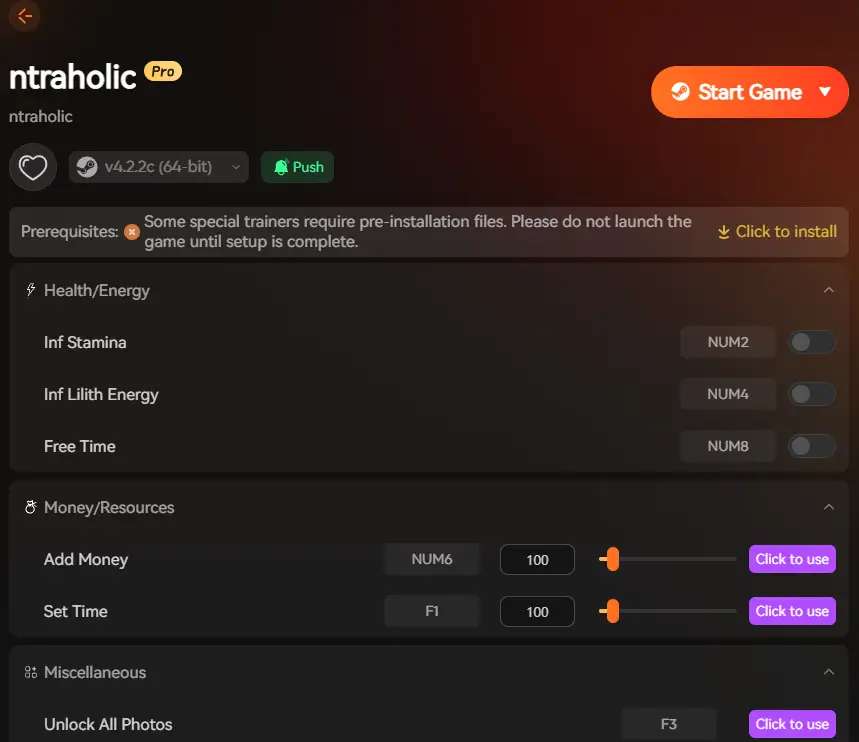
The XMOD NTRaholic Trainer is a compiled executable that bypasses the need for Mono injection. It reads the game’s pointer maps automatically.
It solves the grind by modifying these specific parameters:
Infinite Yen (Money): Sets value to 999,999. Essential for buying Gifts and Wine to speed up progression.
Freeze Action Points (AP): Usually, you only get 3-4 actions per day. This cheat freezes AP, letting you interact, work, and talk unlimited times in a single day cycle.
Max Skills: Instantly levels up Talk, Insight, and Massage skills to Level 5/Max.
Unlock Gallery: A specialized script that toggles the “Seen” flags for all events. Note: Use this if you just want to view content without playing the story.
Comparison: Manual Scripting vs. Trainer
Feature
Cheat Engine (.CT)
XMOD Trainer (.EXE)
Setup
Requires installing CE + finding valid tables
Download & Run
Updates
Scripts break every patch (v3.1 -> v3.2)
Auto-detects Game Version
Risk
High (Hex editing errors crash game)
Safe (Memory freeze)
Steam Deck?
Very difficult to set up
Works (via Proton)
Step-by-Step Guide to Installing and Using XMOD
Using XMOD is straightforward, even for beginners. We have simplified the process so you can get back to the game quickly.
You can launch NTRaholic either through the XMOD library or normally via Steam/folder.
Note: Load your save file and enter the game world (e.g., Living Room) before activating.
3. Activate Features
Once in-game, toggle the desired features via the trainer interface overlay or use the Hotkeys:
Numpad 1: Infinite Money
Numpad 2: Max Skills
Numpad 3: Freeze Action Points
4. Customize Your Experience
Toggle settings on/off during gameplay. For example, you can turn off “Freeze AP” when you want to advance to the next day.
Pro Tip: Start with basic features, such as Action Points and Money controls, before experimenting with complex enhancements like “Unlock Gallery” or “Modify Affection”. This helps maintain game stability and prevents script errors in the Unity engine.
Troubleshooting & FAQ
Q: The trainer opens but cheats won’t activate?
A: This usually happens if your Antivirus blocks the “Injection” method. Add the trainer folder to your Windows Defender Exclusion List. Also, ensure you are pressing the keys on the Numpad (right side of keyboard).
Q: Does this work on the Steam Deck / Linux?
A: Yes. You can add the Trainer as a “Non-Steam Game” and run it in the same Proton prefix as the game.
Q: Is it safe for my save file?
A: Yes, the trainer modifies memory values in real-time without permanently overwriting the game’s code files. However, we always recommend backing up your global.rpgsave before using “Unlock All” features.
Conclusion: The Best Way to Play NTRaholic
If you want to enjoy the story of NTRaholic without treating it like a second job, ditch the outdated Cheat Engine tables.
The XMOD Trainer is the superior, safer, and easier NTRaholic Cheat Engine alternative. It handles the complex Unity engine memory management for you, ensuring you can unlock the full Gallery, get Infinite Money, and max out your Skills without risking save corruption or crashes.
I am a passionate gamer and writer at XMODhub, dedicated to bringing you the latest gaming news, tips, and insights.
Connect with me:
LinkedIn Profile ↗
How to Survive the Minotaur Curse Puzzles in Resonance: A Plague Tale Legacy
You are trapped in the labyrinth, the walls are shifting, and the oppressive darkness of the ancient island is closing in. If you are searching for how to survive the Minotaur Curse puzzles…
Best SurroundedByBoys Mods Tool (2026): Safe Downloads & No-Crash Guide
Quick Answer: What is the best and safest SurroundedByBoys mods tool? To modify your gameplay safely without corrupting your save files, you need to use the right SurroundedByBoys mods tools: XMODhub: The absolute…

 Catherine Hu




 Nancy Miller