Summary: Discover all Mount & Blade 2: Bannerlord console commands and cheats for 2025. Learn how to enable cheat mode, spawn troops, and enhance gameplay with powerful tools.
Mount & Blade 2: Bannerlord delivers one of the most immersive medieval sandbox experiences ever created. From commanding armies across Calradia to building your own kingdom, the game offers incredible depth and freedom. But sometimes you want to experiment with different builds, skip the early-game grind, or simply enjoy the campaign without certain restrictions. That’s where console commands come in.
Before diving into the full list of cheats, it’s worth mentioning that Xmod is a powerful PC tool designed to enhance your single-player gaming experience. With Xmod, you can manage mods, activate cheats more easily, and use built-in features for games like Bannerlord — all without manually editing configuration files or risking your save data.
This comprehensive guide covers everything you need: how to enable cheat mode, the most useful Bannerlord commands, troop and item spawning, and safe ways to customize your medieval conquest.

Table of Contents
- What Are Mount & Blade 2: Bannerlord Console Commands?
- How to Enable Console Commands in Bannerlord
- Most Useful Bannerlord Console Commands
- Full Bannerlord Console Commands List
- How to Enhance Bannerlord with Xmod
- Conclusion
What Are Mount & Blade 2: Bannerlord Console Commands?
Console commands in Mount & Blade 2: Bannerlord are developer tools that let players modify gameplay, campaign settings, and character attributes in real time. By accessing the developer console, you can add gold and troops, level up skills instantly, teleport across the map, declare war or peace, and control nearly every aspect of your campaign. These commands are especially popular among players who want to experiment with kingdom management, test battle strategies, or replay the game without early-game tedium — offering complete control over your Calradian adventure.
How to Enable Console Commands in Bannerlord
Enabling console commands in Bannerlord requires a simple configuration file edit. Once enabled, you’ll have access to both hotkey cheats and text-based console commands. Here’s how to get started:
Step 1: Enable Cheat Mode via Config File
Locate the Configuration File:
- Navigate to:
Documents\Mount and Blade II Bannerlord\
- Open the
engine_config.txt file with Notepad or any text editor
- Important: Make a backup copy of this file before editing
Edit the Cheat Mode Setting:
- Find the line:
cheat_mode = 0
- Change
0 to 1 so it reads: cheat_mode = 1
- Save the file and close your text editor
- Launch Mount & Blade 2: Bannerlord
That’s it! Cheat mode is now permanently enabled until you change the value back to 0.
Step 2: Alternative Method (In-Game Console Toggle)
You can also enable/disable cheat mode without restarting the game:
- Launch Bannerlord and load any save
- Press Alt + ~ (tilde) or Alt + ` (backtick) to open the console
- Type:
config.cheat_mode 1 and press Enter to enable cheats
- Type:
config.cheat_mode 0 and press Enter to disable cheats
This method is useful for quickly toggling cheats on and off during gameplay.
Understanding Cheat Mode Features
With cheat mode enabled, you gain access to three main cheat categories:
Hotkey Cheats (No Console Required):
- Open your inventory screen — all items in the game appear on the left side. Click arrows to add items to your inventory.
- Open your party screen — all military units appear in a list. Click to add any troops to your party.
- Hold Ctrl + Left Click on the world map — teleport instantly to any location.
Console Commands:
- Press Alt + ~ to open the developer console
- Type commands and press Enter to execute them
- Press Alt + ~ again to close the console
Important Notes:
- The console window doesn’t display what you’re typing (this is normal)
- Commands are case-sensitive — type them exactly as shown
- Use the Tab key for autocomplete suggestions
- Type
help in console to see available commands
Most Useful Bannerlord Console Commands
Here are the essential commands every player should know, organized by function for quick reference.
Gold & Resources
campaign.add_gold_to_hero [amount] — Adds gold to your character.
Example: campaign.add_gold_to_hero 100000 gives 100,000 gold
campaign.add_influence [amount] — Grants influence points (for kingdom decisions).
Example: campaign.add_influence 500
Experience & Skills
campaign.add_skill_xp_to_hero [skill name] | [amount] — Adds experience to specific skills.
Example: campaign.add_skill_xp_to_hero leadership | 5000
Note: The vertical bar | is required between skill name and amount
campaign.set_all_skills_main_hero [value] — Sets all skills to specified value.
Example: campaign.set_all_skills_main_hero 300
campaign.add_focus_points_to_hero [amount] — Grants focus points for skill specialization.
Example: campaign.add_focus_points_to_hero 10
campaign.add_attribute_points_to_hero [amount] — Grants attribute points (Vigor, Control, etc.).
Example: campaign.add_attribute_points_to_hero 5
Troops & Army Management
campaign.give_troops [troop_id] [amount] — Spawns troops directly into your party.
Example: campaign.give_troops imperial_legionary 50
See the full troop ID list below
campaign.add_renown_to_clan [amount] — Increases your clan’s renown.
Example: campaign.add_renown_to_clan 1000
Diplomacy & Kingdom Commands
campaign.declare_peace [faction1] [faction2] — Declares peace between two factions.
Example: campaign.declare_peace empire sturgia
campaign.make_peace_with_every_faction — Instant peace with all factions.
campaign.declare_war [faction1] [faction2] — Declares war between factions.
Example: campaign.declare_war empire battania
Settlement & Territory Management
campaign.take_settlement_from_faction [settlement_id] — Transfers settlement ownership to you.
Example: campaign.take_settlement_from_faction town_pen_cannoc
campaign.give_settlement_to_player [settlement_id] — Alternative settlement claiming command.
Utility & Convenience Commands
campaign.show_hideouts 1 — Reveals all bandit hideouts on map.
campaign.heal_main_party_wounded — Instantly heals all wounded troops.
campaign.add_prisoners_to_party [amount] — Adds looter prisoners to your party.
Example: campaign.add_prisoners_to_party 50
campaign.teleport_main_party — Combined with coordinates for precise teleportation.
Full Bannerlord Console Commands List
Below is a comprehensive list of console commands available in Mount & Blade 2: Bannerlord. Commands are organized by category.
Core Cheat Commands
config.cheat_mode 1 — Enable cheat mode
config.cheat_mode 0 — Disable cheat mode
help — Display all available console commands
help [command] — Show details about specific command
Gold & Economy Commands
campaign.add_gold_to_hero [amount] — Add gold to yourself
campaign.add_gold_to_hero [amount] [hero_name] — Add gold to specific hero
campaign.add_influence [amount] — Grant influence points
campaign.give_item_to_main_party [item_id] [amount] — Spawn specific items
Experience & Character Development
campaign.add_skill_xp_to_hero [skill] | [amount] — Add XP to skill
Available skills: Leadership, Trade, Steward, Charm, Roguery, OneHanded, TwoHanded, Polearm, Bow, Crossbow, Throwing, Riding, Athletics, Smithing, Scouting, Tactics, Medicine, Engineering
campaign.set_all_skills_main_hero [value] — Set all skills to value
campaign.add_focus_points_to_hero [amount] — Grant focus points
campaign.add_focus_points_to_hero [amount] [hero_name] — Grant focus to specific hero
campaign.add_attribute_points_to_hero [amount] — Grant attribute points
campaign.add_attribute_points_to_hero [amount] [hero_name] — Grant attributes to specific hero
Troop Spawning Commands
campaign.give_troops [troop_id] [amount] — Add troops to party
Common Troop IDs by Faction:
Empire Troops:
- imperial_recruit
- imperial_infantryman
- imperial_legionary
- imperial_menavliaton
- imperial_palatine_guard
- imperial_archer
- imperial_veteran_archer
- imperial_bucellarii
- imperial_cataphract
- imperial_elite_cataphract
Vlandian Troops:
- vlandian_recruit
- vlandian_footman
- vlandian_infantry
- vlandian_billman
- vlandian_sergeant
- vlandian_crossbowman
- vlandian_sharpshooter
- vlandian_light_cavalry
- vlandian_vanguard
- vlandian_knight
- vlandian_banner_knight
Sturgian Troops:
- sturgian_recruit
- sturgian_spearman
- sturgian_warrior
- sturgian_veteran_warrior
- sturgian_archer
- sturgian_veteran_bowman
- sturgian_horse_raider
- sturgian_druzhinnik
- sturgian_heroic_line_breaker
Aserai Troops:
- aserai_recruit
- aserai_tribesman
- aserai_footman
- aserai_infantry
- aserai_veteran_infantry
- aserai_skirmisher
- aserai_archer
- aserai_master_archer
- aserai_faris
- aserai_mameluke_regular
- aserai_mameluke_cavalry
- aserai_mameluke_guard
Khuzait Troops:
- khuzait_nomad
- khuzait_spearman
- khuzait_darkhan
- khuzait_tribal_warrior
- khuzait_hunter
- khuzait_horse_archer
- khuzait_heavy_horse_archer
- khuzait_lancer
- khuzait_heavy_lancer
- khuzait_khan_guard
Battanian Troops:
- battanian_clanwarrior
- battanian_trained_warrior
- battanian_oathsworn
- battanian_picked_warrior
- battanian_veteran_falxman
- battanian_highborn_warrior
- battanian_scout
- battanian_wood_runner
- battanian_wildling
- battanian_fian
- battanian_fian_champion
- battanian_mounted_skirmisher
- battanian_horseman
Bandit & Mercenary Troops:
- looter
- mountain_bandit
- forest_bandit
- sea_raider
- desert_bandit
- steppe_bandit
- mercenary_1 (basic mercenary)
- mercenary_2 (veteran mercenary)
Renown & Clan Management
campaign.add_renown_to_clan [amount] — Increase clan renown
campaign.add_companions_to_player [number] — Add random companions to your clan
Diplomacy & War Commands
campaign.declare_peace [faction1] [faction2] — Make peace between factions
campaign.make_peace_with_every_faction — Peace with all factions
campaign.declare_war [faction1] [faction2] — Declare war between factions
campaign.start_world_war — Cause chaos across Calradia
Faction IDs:
- empire (Southern Empire)
- empire_s (Southern Empire – alternative)
- empire_w (Western Empire)
- vlandia
- sturgia
- aserai
- khuzait
- battania
Settlement & Kingdom Commands
campaign.take_settlement_from_faction [settlement_id] — Claim settlement
campaign.give_settlement_to_player [settlement_id] — Alternative claiming method
campaign.show_hideouts [1/2] — Reveal hideouts (1 = infested only, 2 = all)
campaign.give_all_crafting_materials — Unlock all smithing materials
Party & Combat Commands
campaign.heal_main_party_wounded — Heal all wounded troops
campaign.add_prisoners_to_party [amount] — Add looter prisoners
campaign.add_random_prisoner_hero — Add random hero as prisoner
campaign.control_troop_after_death — Continue playing after character death
Quest Commands
campaign.skip_all_quests — Complete all active quests instantly
Teleportation & Map Commands
Hotkey Method: Hold Ctrl + Left Click on world map (cheat mode must be enabled)
Console Method: campaign.teleport_main_party (requires coordinates)
Item Spawning (Advanced)
campaign.give_item_to_main_party [item_id] [amount] — Spawn specific items
Note: Item IDs are complex and found in XML files at:
\Modules\SandBoxCore\ModuleData\spitems\
Common Item ID Examples:
- crafted_steel_sword_1
- pugio
- imperial_throwing_axe
- imperial_scale_armor
- leather_gloves
Tip: Use cheat mode inventory screen for easier item spawning instead of typing IDs manually.
Command Syntax Notes
Important Rules:
- Commands are case-sensitive
- Use vertical bar | between parameters for skill commands
- Faction/settlement names with spaces should omit spaces in commands
- Example: “Western Empire” becomes “westernempire”
- Use Tab key for autocomplete suggestions
- Type
help after any command for detailed syntax
Parameter Formatting:
- [amount] = any number value
- [troop_id] = exact troop identifier from list above
- [skill] = skill name like “Leadership” or “TwoHanded”
- [faction] = faction identifier like “empire” or “sturgia”
How to Enhance Bannerlord with Xmod

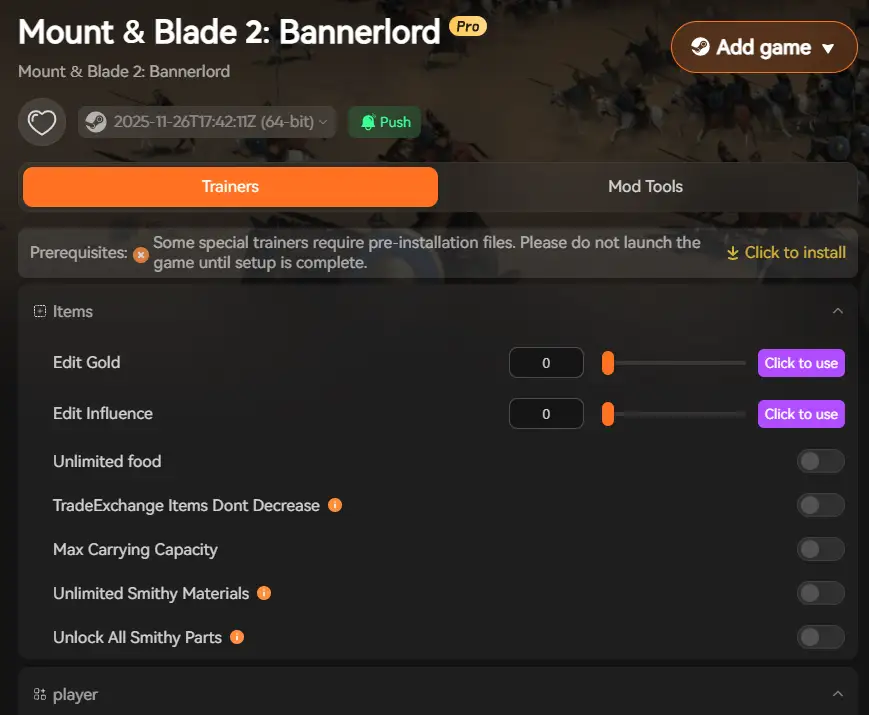
To take your Mount & Blade 2: Bannerlord experience even further, Xmod offers powerful tools that go beyond standard console commands. With Xmod, you can easily manage mods, activate cheats, and optimize your gameplay — all from one convenient platform.
Xmod provides:
- One-click trainer activation for gold, experience, renown, and influence cheats
- No manual file editing required — Xmod handles config changes automatically
- Built-in mod management for popular Bannerlord mods from NexusMods and Steam Workshop
- Performance optimization tools to boost FPS during large battles
- Safe experimentation without risking your save files or game installation
- Automatic updates ensuring compatibility with the latest Bannerlord patches
- User-friendly interface that doesn’t require knowledge of XML files or item IDs
Whether you want to skip the early-game grind, experiment with kingdom management, test battle formations, or simply enjoy commanding massive armies without resource concerns, Xmod gives you complete control while maintaining system security. It’s the ideal solution for players who want the power of console commands without the complexity of manual configuration and command syntax.
Conclusion
Console commands in Mount & Blade 2: Bannerlord unlock incredible possibilities for customizing your medieval conquest. From spawning elite troops and gaining gold to declaring wars, claiming settlements, and leveling skills instantly, these commands give you total control over your Calradian campaign. Whether you’re testing kingdom strategies, creating epic battles, or simply want to experience late-game content without the grind, console commands make it all possible.
Combined with Xmod, you can take your gameplay even further — safely activating cheats, installing quality mods, and optimizing performance without the hassle of config file editing or memorizing complex command syntax. Together, console commands and Xmod transform Bannerlord into a fully customizable sandbox experience, perfect for both new players discovering Calradia and veteran warriors looking to experience TaleWorlds’ masterpiece in entirely new ways. March forth and conquer — on your own terms.
I am a passionate gamer and writer at XMODhub, dedicated to bringing you the latest gaming news, tips, and insights.
Connect with me:
LinkedIn Profile ↗

 Catherine Hu


 Nancy Miller