Summary:XMOD Trainer Tool is a stable, user-friendly alternative to cheat tables or manual memory hacks for The Witcher 3: Wild Hunt, offering one-click enhancements to combat, inventory, crafting, loot flow, and quality-of-life—so you can enjoy the world and story with less micromanagement and more immersion.
The Witcher 3 is a sprawling action-RPG set in a dark fantasy open world. Players control Geralt of Rivia, a witcher monster-hunter, who explores a vast world — fighting beasts using swords, magic “signs”, bombs and alchemy; crafting weapons, armor and potions; managing inventory; and making moral choices that shape the story and world around him.
Between monster contracts, treasure hunts, side quests, exploring towns and wilderness, upgrading gear and crafting potions, Witcher 3 offers huge freedom — but also many repetitive loops, resource management, and occasional grind. For players who want to enjoy the lore, story, and exploration without being bogged down by tedious micromanagement or excessive looting loops, XMOD Trainer Tool can be a compelling “cheat engine alternative.”

Table of Contents
- Why Players Look for a The Witcher 3 Cheat Engine Alternative
- Problems with Traditional Cheat / Memory-Editing Tools in Open-World RPGs
- Why XMOD Trainer Tool Fits The Witcher 3
- Key Features XMOD Trainer Tool Brings to The Witcher 3
- How to Use XMOD Trainer Tool for The Witcher 3 (Step-by-Step Guide)
- Tips for Balanced Play & Immersion
- Other Games You Could Enhance with XMOD Trainer Tool
- FAQ – The Witcher 3 and XMOD Trainer Tool
- Conclusion
Why Players Look for a The Witcher 3 Cheat Engine Alternative
- Heavy inventory and crafting overhead. In Witcher 3 you gather loot, crafting components, alchemy ingredients, different weapons and armor. Managing storage, crafting potions/oils, repairing weapons, and keeping track of resources — this can become tedious, especially for long play sessions or completionist runs.
- Time-consuming resource and gear grind. High-tier gear, rare crafting diagrams, and bestiary-based loot often require extended play, many monster hunts, and repeated exploration. Some players may get bogged down in repetitive looting, crafting, or salvaging cycles.
- Combat & pace interruptions. Swapping weapons, applying oils/potions, reloading crossbow or bombs, constantly managing resources can sometimes interrupt immersion, especially during frequent combat or monster-hunting runs.
- Desire for story & exploration over busywork. Many enjoy Witcher 3 for its narrative depth, open world, side-quests, and character interactions; but find that micromanagement or repetitive tasks detract from those experiences.
These factors push some players to look for a “safer, cleaner boost” to smooth out loops — without risking save corruption or game instability.
Problems with Traditional Cheat / Memory-Editing Tools in Open-World RPGs
- Using memory editors or cheat tables to modify values (health, inventory size, gold, item stats) can lead to save corruption, unexpected bugs, or instability — especially in a complex open-world RPG where many systems (quests, inventory, crafting, NPC states) interconnect.
- Cheats often break after updates or patches, since memory addresses and game logic may shift — making cheat tables fragile and unreliable long-term.
- Many cheat tools come from unverified sources — risk of malware or security issues.
- Manual hacking requires technical knowledge (memory addresses, pointers, scripts) — not ideal or safe for casual players.
Why XMOD Trainer Tool Fits The Witcher 3
- Verified, non-invasive modules:
XMOD applies enhancements via stable, maintained modules rather than raw memory editing — reducing risk of corrupted saves or crashes.
Launch the game via XMOD, toggle desired enhancements (inventory/crafting tweaks, loot flow, quality-of-life options) — no scripting or technical knowledge needed.
- Better stability across updates:
Because XMOD doesn’t depend on fragile memory offsets, its modules are likely to remain compatible even after patches or expansions.
- Respect for single-player focus:
The Witcher 3 is a single-player, offline experience; using XMOD locally avoids any multiplayer cheating issues or bans.
Players decide when and how much to enable enhancements — for smoother exploration or loot farming, or for full unmodified challenge and immersion.
Key Features XMOD Trainer Tool Brings to The Witcher 3
- Improved Inventory & Resource Management:
Expand carrying capacity, simplify loot filtering or auto-salvage common items — reducing micromanagement and clutter.
- Faster Crafting / Blacksmith / Alchemy Flow:
Quicker crafting or repair, auto-sorting of ingredients, easier potion/oil management — less time spent in menus, more time exploring or fighting.
- Loot / Resource Flow Boost (optional):
Slightly increased drop rates, better loot quality — helps if you want to encounter rare gear without endless monster grinding.
- Combat & Survivability Quality-of-Life Aids (optional):
Minor convenience tweaks — for example, smoother weapon switching, faster stamina recovery, or easier potion/equipment management during combat.
All boosts and tweaks are optional and can be enabled or disabled at any time — giving full control over difficulty and immersion.
With these, XMOD helps smooth out hustle without undermining core Witcher 3 experience: explore, fight monsters, craft, hunt, live the story — with less busywork.
How to Use XMOD Trainer Tool for The Witcher 3 (Step-by-Step Guide)
- Download and install the latest stable version of XMOD that supports The Witcher 3.

- Launch XMOD; open its game library and locate “The Witcher 3: Wild Hunt.”

- Start the game via XMOD (instead of launching directly from Steam or launcher) — ensures the modules load correctly.
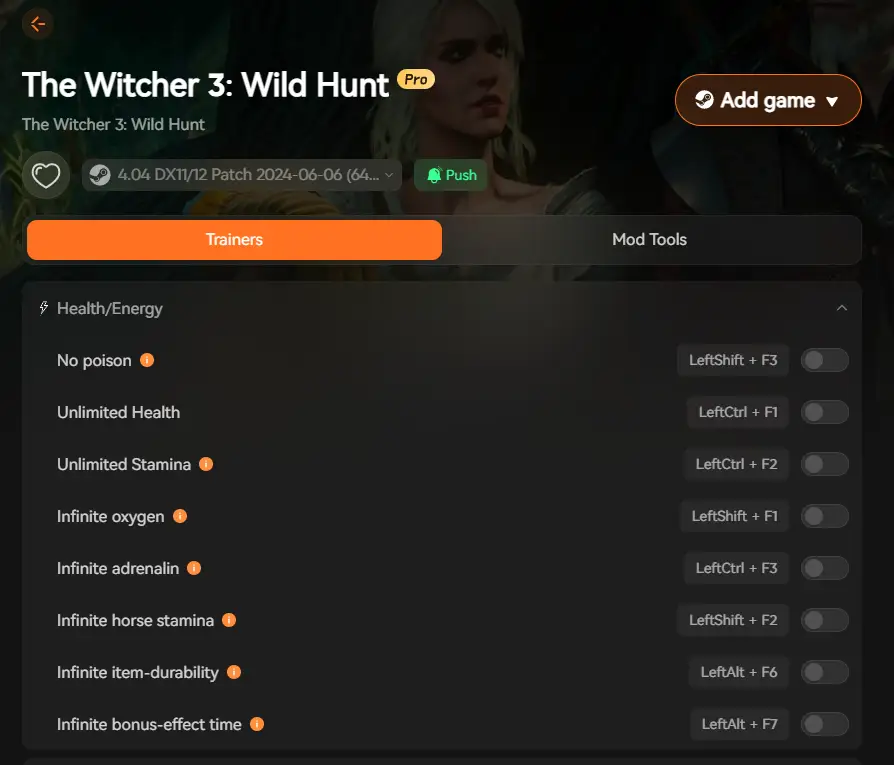
- In-game, open the XMOD overlay or interface — choose which enhancements you want (inventory boost, crafting/repair speed, loot/drop boost, QoL tweaks, optional combat supports, etc.).
- Play normally — XMOD runs in the background and applies enhancements without editing raw memory.
- Save & exit as usual — because the enhancements are modular and non-destructive, save data stays intact. You can enable or disable XMOD enhancements anytime depending on how you want to experience the game.
Tips for Balanced Play & Immersion
- Enable QoL & resource boosts early, then disable for pure challenge: Use enhancements when looting or crafting bothers you; turn them off when you want to enjoy full realism and challenge.
- Use boosted loot + gear runs for exploration or secondary playthroughs: If you’re going for completion, collectibles, secondary quests — boosts can help you focus on exploration rather than grind.
- Treat tweaks as convenience, not crutches: Avoid relying on constant boosts; use them to remove busywork, not as permanent shortcuts — preserves sense of achievement.
- Switch between boosted and unmodified sessions: Sometimes use XMOD for convenience, other times play vanilla to keep immersion and challenge fresh.
Other Games You Could Enhance with XMOD Trainer Tool
Given XMOD’s design — modular boosts, inventory/crafting flow improvements, loot/loot-rate adjustments, QoL tweaks — it’s suitable not just for Witcher 3. It fits many single-player open-world RPGs, action-RPGs, survival games or any loot-heavy titles where resource management or crafting becomes tedious. If you value flexibility and convenience, XMOD can serve as a long-term enhancement companion.
FAQ – The Witcher 3 and XMOD Trainer Tool
Is XMOD Trainer Tool safe to use with The Witcher 3?
Yes — since it uses verified enhancement modules rather than raw memory editing cheat tables, the risk of save corruption, instability or bugs is substantially reduced.
Will using XMOD get me banned?
No — The Witcher 3 is a single-player offline game; using XMOD locally does not trigger any online ban risk.
Will XMOD remain compatible after updates or patches?
Likely yes — because enhancements don’t rely on fragile memory pointers. However, after major updates or expansions it’s wise to check module compatibility.
Do I need technical skills to use XMOD?
No — XMOD is designed for ease of use: install, launch via XMOD, toggle what you want. No memory-editing, scripting, or technical operations required.
Does using XMOD ruin challenge or immersion?
Not necessarily — because all enhancements are optional and toggleable, you retain full control over how “hardcore” or “assisted” you want your experience. You can choose convenience when needed and pure immersion when you want.
Conclusion
The Witcher 3 remains one of the greatest open-world action-RPGs ever made — with its deep storytelling, immersive world, rich side-quests, monster contracts, crafting, alchemy, and morally ambiguous choices.
But with freedom comes complexity: loot, inventory, crafting, gear upgrades, resource management, potion/oil upkeep — these can bog down even the most dedicated players.
If you want to enjoy the freedom, exploration and story of The Witcher 3, but prefer to skip the tedious micromanagement loops, XMOD Trainer Tool offers a balanced, safe, and user-friendly enhancement path. With inventory & crafting convenience, optional loot/resource boosts, quality-of-life tweaks, and modular control, you can streamline the less fun parts — and focus on what makes Witcher 3 magical: the hunt, the quests, the world, and the story.
For players that value both immersion and convenience, XMOD Trainer Tool could be the ideal “Cheat Engine Alternative” companion for your journey across the Continent.
I am a passionate gamer and writer at XMODhub, dedicated to bringing you the latest gaming news, tips, and insights.
Connect with me:
LinkedIn Profile ↗

 Catherine Hu