Summary: Searching for a safe Cheat Engine alternative for Frostpunk 2? XMOD delivers secure, one-click trainers that enhance survival, boost resources, and make your colony management experience smoother and more strategic.
Frostpunk 2 is an ambitious city‑builder‑survival game where you lead a sprawling settlement in a frozen, post‑apocalyptic world, balancing resources, social factions, laws and expansion under brutal conditions.
Because growth, research and district management can grind, many players have looked to tools like Cheat Engine to skip ahead—but Cheat Engine is technically demanding, risky and prone to breaking with updates.
That’s where XMOD comes in — offering a modern, safer, user‑friendly Cheat Engine alternative that delivers secure boosts (such as unlimited resources, instant build/research, no cooldowns) so you can focus on strategy and survival in Frostpunk 2 without getting stuck in tedious mechanics.

Table of Contents
- What Is Frostpunk 2?
- Why Players Look for a Cheat Engine Alternative
- Why XMOD Is the Best Alternative to Cheat Engine
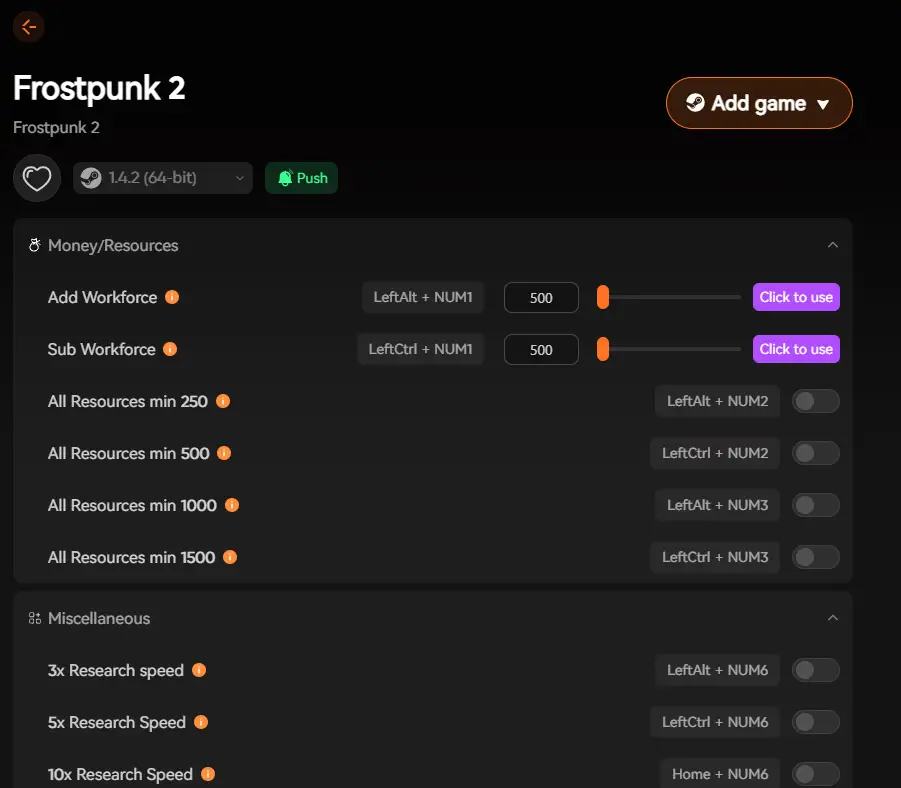
- Key Features of XMOD for Frostpunk 2
- How to Use XMOD Safely
- Benefits of Using XMOD Over Cheat Engine
- Tips for Getting the Most Out of XMOD
- Other Games You Can Enhance with XMOD
- FAQ
- Final Thoughts
What Is Frostpunk 2?
Frostpunk 2 is a city‑building survival game where you become the Steward of New London, tasked with rebuilding society in a volcanic winter‑wasted world, managing resources, factions and heat systems across a sprawling metropolis.
Its deep mechanics include district construction rather than individual buildings, political systems, research and more — which offer great depth but also impose slow progression.
Why Players Look for a Cheat Engine Alternative
Because Frostpunk 2 involves extensive micromanagement of resources (coal, oil, food), heat systems, faction relations and district placement, the time investment can be significant. Traditional tools like Cheat Engine have been used to adjust in‑game values but come with major drawbacks:
- Manual memory scanning and pointer editing required
- Risk of corrupted saves or game instability
- Scripts often break after game updates Given Frostpunk 2’s complexity and frequent patches, many players look for a safer alternative.
Why XMOD Is the Best Alternative to Cheat Engine
XMOD offers a trainer/mod platform with a modern interface where you can enable pre‑configured cheats and enhancements rather than manually editing memory. With Frostpunk 2, XMOD presents a more approachable, streamlined way to boost or adjust gameplay mechanics safely.
Key Features of XMOD for Frostpunk 2
When using XMOD with Frostpunk 2, benefits may include:
- Boosted resources (coal, oil, food) making early survival easier
- Faster unlocks of research and upgrades to district systems
- Stat or resource modifiers to explore challenging modes (Story, Utopia Builder)
- Performance/quality‑of‑life trainers for smoother sessions in late‑game large cities
How to Use XMOD Safely

Step‑by‑step:
- Download XMOD from its official site and install.
- Launch XMOD and detect/install the trainer for Frostpunk 2.
- Launch Frostpunk 2 through XMOD to ensure trainer hooks are applied.

- Within the XMOD overlay, enable desired features (e.g., resource boost, research unlock).
- Always backup your save file before using any trainer/mod.
- Use trainer features in single‑player mode only to avoid unintended consequences.
Benefits of Using XMOD Over Cheat Engine
Setup Complexity
Save & Stability Risk
Compatibility with Updates
Resource / Mod Variety
Beginner-Friendliness
Tips for Getting the Most Out of XMOD
- Use a resource boost trainer after your first major crisis to unlock research and district upgrades sooner.
- Enable performance or optimization mods if your cityscape becomes heavy on CPU/GPU.
- In Utopia Builder or Endless mode, use XMOD to experiment with alternate builds without repeating the entire campaign.
- After major Frostpunk 2 updates, check XMOD compatibility — new patches may require trainer updates.
- Don’t enable all features at once — start with one (e.g., resource boost), test stability, then expand.
Other Games You Can Enhance with XMOD
XMOD supports thousands of PC games beyond Frostpunk 2. Whether you play survival‑city builders, RPGs, or indie titles, XMOD provides trainers and mod support across a broad range — making it a flexible tool for enhancing your gameplay library.
Mount & Blade 2: Bannerlord
Hearts of Iron IV
Raiders of Blackveil
Fields of Mistria
FAQ
Q1: Is XMOD safe for Frostpunk 2?
A1: When downloaded from the official site and used in single‑player mode, yes — XMOD presents a safer alternative to manual hacks. Always backup your save.
Q2: Do I need advanced technical skill to use XMOD?
A2: No — XMOD is designed for ease of use with overlay and one‑click activation.
Q3: Will using XMOD affect achievements or later updates?
A3: Possibly — using trainer features may disable achievement tracking or may conflict with patches. Use with awareness.
Q4: Can I use multiple trainer features at once?
A4: Yes — but enable one at a time first to confirm stability.
Q5: What about online or multiplayer?
A5: Frostpunk 2 is single‑player, but if any online components exist, avoid using trainers there to prevent conflicts or bans.
Final Thoughts
Frostpunk 2 is a thoughtful and challenging survival‑city builder experience: managing not just cold and heat, but social dynamics and political factions in a frozen wasteland.
While the depth is rewarding, the pace and complexity can feel overwhelming. By using XMOD as a safe trainer/mod launcher, you can ease progression, experiment with varied builds and focus more on strategy and expansion — rather than being held back by repetitive micromanagement loops. If you’re playing Frostpunk 2 and want a streamlined, customizable experience, XMOD offers a viable and modern alternative to traditional tools like Cheat Engine.
I am a passionate gamer and writer at XMODhub, dedicated to bringing you the latest gaming news, tips, and insights.
Connect with me:
LinkedIn Profile ↗

 Catherine Hu