Catherine Hu
Summary: XMOD Tool offers a stable, easy-to-use alternative to traditional cheats in Mount and Blade 2: Bannerlord. It gives players one-click enhancements to handle the game’s deep systems of trade, politics, army upkeep, and large-scale battles.
With XMOD you can cut down on the grind of recruitment, upkeep, and resource micromanagement, letting you focus more on what makes Mount and Blade 2: Bannerlord great: leading armies, conquering lands, managing your fiefs, and living out a sweeping medieval sandbox experience.
Because XMOD’s modifications are modular and non-invasive, it reduces the risk of corrupted saves or unstable mods compared with raw memory-editing cheats. You decide when to enable boosts and when to play “vanilla,” so you retain full control over challenge and immersion. For players who want to enjoy strategy, politics, conquest — but with less tedium and more flexibility — XMOD Tool becomes a practical, reliable companion for Bannerlord.

- Why Players Might Look for a Mount and Blade 2: Bannerlord Cheat Engine Alternative
- Risks & Drawbacks of Traditional Cheat / Memory-Editing Tools in Mount and Blade 2: Bannerlord
- Why XMOD Tool Could Be the Better Fit for Mount and Blade 2: Bannerlord
- Key Features XMOD Tool Could Bring to Mount and Blade 2: Bannerlord
- How to Use XMOD Tool for Mount and Blade 2: Bannerlord (Step-by-Step Guide)
- Tips for Mount and Blade 2: Bannerlord Play & Enjoyment
- Other Games That Could Benefit from XMOD Trainer Tool
- FAQ – Mount and Blade 2: Bannerlord and XMOD Tool
- Conclusion
Why Players Might Look for a Mount and Blade 2: Bannerlord Cheat Engine Alternative
- Large scope and grind potential. Managing armies, villages/fiefs, trade, economy, relationships, plus repetitive battles or sieges — Bannerlord’s scale can sometimes mean hours of grinding before achieving goals (wealth, influence, strong troops).
- Complex resource, economy & clan-management mechanics. To build a strong army, maintain troops, manage fiefs or trade, and climb the social ladder — players may need to track many variables, which can be time-consuming, especially for newcomers.
- Time-intensive combat & sieges. Large scale battles or castle sieges can consume a lot of real time; for players who want to shorten repetitive struggle or focus on the narrative / strategy rather than micromanagement, optional aids could help.
- Desire for flexibility and customization: Some players may prefer to experiment — test builds, raise armies quickly, or fast-track trade/conquest — without committing dozens of hours to grind or restart.
These motivations lead many to look for safer, stable enhancement tools instead of risky cheat tables.
Risks & Drawbacks of Traditional Cheat / Memory-Editing Tools in Mount and Blade 2: Bannerlord
- Manual memory-editing or cheat tables may corrupt save data, especially dangerous in a complex, persistent sandbox with many interdependent systems: army data, economy, assets, relationships.
- Cheats may break after updates or patches — causing incompatibility, instability, or even lost progress (especially problematic given Bannerlord’s frequent patches / expansions).
- Many cheat tools come from unverified sources — risk of malware, unwanted scripts, or security threats.
- Using raw hacks often demands technical knowledge (memory addresses, pointers, etc.), making them error-prone and unsuitable for casual players.
Because of these risks, many players prefer a more controlled, maintained enhancement method like XMOD.
Why XMOD Tool Could Be the Better Fit for Mount and Blade 2: Bannerlord
- Modular, maintained enhancements (not raw memory edits): Reduces risk of corrupted saves or unexpected bugs — especially important with a large game world and long campaigns.
- User-friendly one-click interface: No scripting or memory-editing needed; launch Bannerlord through XMOD and toggle enhancements as you wish.
- Resilience across updates: Because XMOD doesn’t rely on fragile memory offsets, it has a better chance to stay compatible even when the base game receives patches or expansions (e.g. land battles, future updates, additional content).
- Flexible control — toggle anytime: Players can choose to enable boosts when they’re farming resources, managing clans, or experimenting — and disable them when they want a pure, challenging experience.
- Focus on single-player / offline or controlled sessions: As Bannerlord’s sandbox campaign is largely single-player or private-server based, using XMOD locally should avoid online-cheat detection or multiplayer conflicts.
Key Features XMOD Tool Could Bring to Mount and Blade 2: Bannerlord
- Wealth & Resource Boosts: Accelerate trade profits, resource gathering, or commodity flow — helpful when building armies, managing fiefs, or funding campaigns.
- Clan & Army Management Aid: Simplify or speed up recruitment, troop upkeep, troop training, and troop customization — reducing time spent on micromanagement.
- Combat / Siege Support (Optional): Provide optional boosts for tough sieges or large battles (troop morale, damage output, better AI-ally performance) — useful if you prefer strategy over grind.
- Quality-of-Life Tweaks: Streamlined inventory management, easier trading, faster travel/trade menu, UI improvements — helpful given Bannerlord’s many menus and management screens.
- Toggleable Enhancements: All options optional and toggleable — giving full control: either use them to ease early-game grind or turn off for immersion and challenge.
With these tools, XMOD can help players focus more on the fun parts — conquest, strategy, diplomacy, storytelling — instead of tedious micromanagement or repetitive grinding.
How to Use XMOD Tool for Mount and Blade 2: Bannerlord (Step-by-Step Guide)
- Download and install the latest stable XMOD Tool.

- Launch XMOD and locate “Mount & Blade II: Bannerlord” in its supported game list.
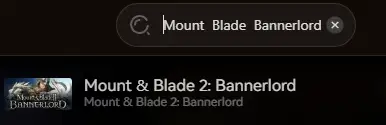
- Launch Bannerlord through XMOD (not directly via Steam/launcher) to allow modules to load properly.
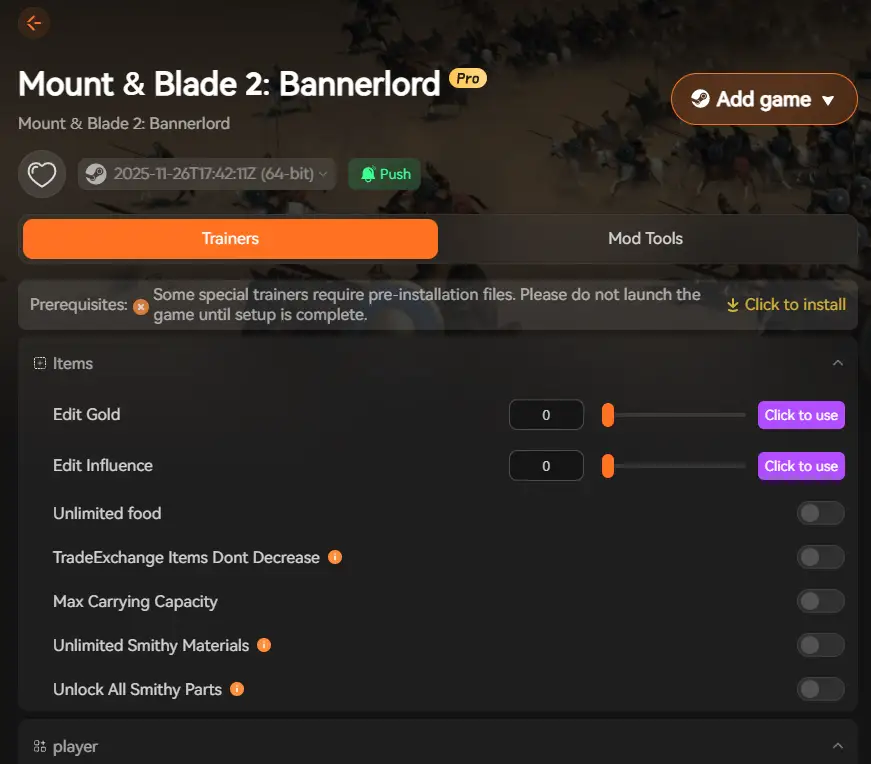
- Use the XMOD overlay or interface to choose desired enhancements: resource/wealth boosts, army/clan-management aids, combat/siege support, or QoL tweaks.
- Play as usual — XMOD runs in background, applying enhancements in real time without modifying raw memory or save files directly.
- Save or exit normally — because enhancements are modular and non-invasive, save data remains intact. You can disable or re-enable boosts anytime depending on what kind of experience you want.
Tips for Balanced Play & Enjoyment
- Use boosts selectively: enable resource and management aids early while building your clan, then disable for large scale battles or conquest to preserve challenge and realism.
- For first playthroughs: use QoL tweaks or small resource boosts to learn game systems (economy, diplomacy, army-building), then phase them out as you get comfortable.
- When experimenting with troop builds, trade strategies, or siege tactics — use boosts to reduce repetition and speed up testing.
- Alternate between boosted and vanilla sessions: boosted runs for convenience or fast progression; vanilla runs for full challenge and immersive medieval sandbox feel.
Other Games That Could Benefit from XMOD Trainer Tool
Thanks to its modular enhancement design—covering resource, weapon, and gear assistance; stealth and combat aids; and quality-of-life improvements—XMOD’s trainer functionality can also suit many games built around resource loops, gear progression, and tactical decision-making. If you enjoy tactical shooters, survival FPS, or titles with complex loadout systems, XMOD could become a long-term companion across your gaming library.
FAQ – Mount and Blade 2: Bannerlord and XMOD Tool
Is XMOD safe to use with Bannerlord?
Yes — because XMOD relies on modular enhancements rather than raw memory edits, the risk of save corruption, instability or data loss is significantly reduced.
Will using XMOD get me banned?
Unlikely — Bannerlord’s main sandbox campaign is single-player; using XMOD locally should avoid online-cheat detection or bans (especially if you stick to private servers or offline play).
Will XMOD remain compatible after updates or patches?
More likely than traditional cheat tables — because XMOD modules aren’t tied to fragile memory addresses. But after major updates or DLC (e.g. naval expansion, major balance patches), it’s wise to check module compatibility.
Do I need technical skills to use XMOD?
No — XMOD is designed for ease of use: install, launch via XMOD, choose enhancements, play — no scripting or memory-editing knowledge required.
Does using XMOD ruin the fun or challenge of Bannerlord?
Not necessarily — because enhancements are optional and toggleable. You control when to enable convenience and when to play raw. This flexibility lets you balance between ease, fun, and challenge as you see fit.
Conclusion
Mount & Blade II: Bannerlord delivers a rich, expansive medieval sandbox — from personal combat and massive battles, to clan building, trade, diplomacy, and feudal politics. Its depth and complexity bring great freedom — but also potential grind, micromanagement, and long hours.
If you want to enjoy the grand scope, strategy, and sandbox freedom of Bannerlord but prefer to reduce repetitive grind or resource-management burdens, XMOD Tool offers a practical, safer “Cheat Engine alternative.”
With resource & clan-management aids, combat and siege support, QoL enhancements, and full toggle control, XMOD can help you focus on what matters: conquest, diplomacy, strategy, and the epic story you build — on your terms.

I am a passionate gamer and writer at XMODhub, dedicated to bringing you the latest gaming news, tips, and insights.
Connect with me:
LinkedIn Profile ↗