Catherine Hu
Summary: Enhance your Baldur’s Gate 3 experience with XMOD, the safe Cheat Engine alternative offering reliable trainers and customizable gameplay features for single-player adventures.
Baldur’s Gate 3 brings expansive role‑playing, party dynamics, turn‑based combat and deep story choices to the fore — delivering hours of strategic gameplay and narrative immersion. Yet for many players the progression, loot optimization, and character–building fine‑tuning can become laborious and time‑consuming.
Many have traditionally turned to tools like Cheat Engine to speed things up — but Cheat Engine often demands manual memory searches, can break after updates, and carries risks for stability or compatibility.
That’s where XMOD steps in as a modern, streamlined Cheat Engine alternative: offering ready‑to‑use trainers and mods for Baldur’s Gate 3, enabling safe stat boosts, inventory tweaks, and performance optimizations without the hassle.
With XMOD, you can focus more on your build, your story‑path and less on grinding and patch‑work — giving you a smoother, more controllable single‑player experience.

- What Is Baldur’s Gate 3?
- Why Players Look for a Cheat Engine Alternative?
- Why XMOD Is the Best Alternative to Cheat Engine?
- Key Features of XMOD for Baldur’s Gate 3
- How to Use XMOD Safely?
- Benefits of Using XMOD Over Cheat Engine
- Tips for Getting the Most Out of XMOD
- Other Games You Can Enhance with XMOD
- FAQ
- Final Thoughts
What Is Baldur’s Gate 3?
Baldur’s Gate 3 is an expansive single‑player (and later co‑op) RPG from Larian Studios, featuring deep role‑playing mechanics, turn‑based combat, a branching narrative, and thousands of loot/character‑build possibilities. The scope of character progression, loot management, and exploration makes the game richly rewarding — but also time‑intensive.
Why Players Look for a Cheat Engine Alternative?
Because progressing in Baldur’s Gate 3 involves unlocking abilities, building optimal party compositions, managing inventory and resources, and replaying narrative branches, many players look for shortcuts. Traditional tools like Cheat Engine allow manual memory editing but come with notable drawbacks:
- Complex setup and memory scans required
- Risk of save‑file corruption or instability
- Scripts often break after game patches
For BG3, where updates and mod‑tools are frequent, depending on Cheat Engine can be risky.
Why XMOD Is the Best Alternative to Cheat Engine?
XMOD positions itself as a user‑friendly trainer/mod platform for PC games. Compared to Cheat Engine, XMOD offers:
- Pre‑configured trainers for supported games (less manual work)
- Automatic overlay/activation features for simpler use
- Ongoing updates to remain compatible with game patches In the context of Baldur’s Gate 3, XMOD offers a smoother, safer way to supplement your gameplay without diving deep into memory hacking.
Key Features of XMOD for Baldur’s Gate 3
When used with Baldur’s Gate 3, XMOD can offer:
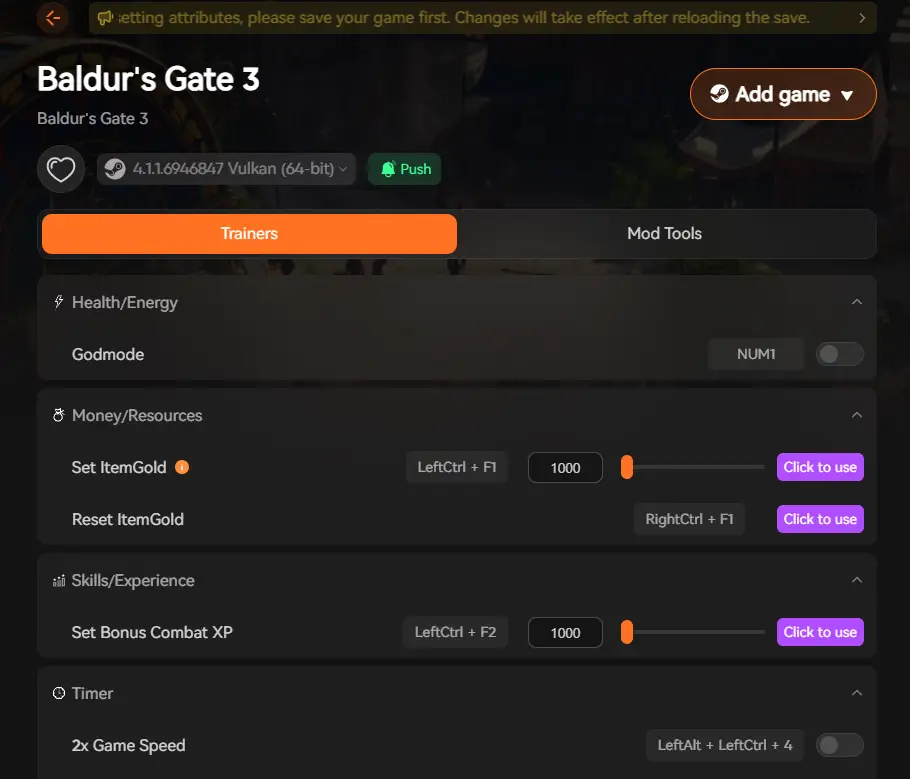
- Boosted character stats or experience gains for faster builds
- Instant resource or currency adjustments (gold, crafting mats)
- Inventory unlocks (rare loot, gear) to reduce grind loops
- Performance enhancements (if the trainer supports FPS/stability tools)
- One‑click activation and ability to toggle features on/off safely
How to Use XMOD Safely?

Simple step‑by‑step:
- Download XMOD only from the official source (verify legitimacy).
- Install XMOD and launch it.
- In XMOD’s game list, locate Baldur’s Gate 3 and launch the game through the trainer overlay.

- Once in‑game, open XMOD’s overlay and activate your desired features (e.g., stat boosts, resource tweaks).
- Always backup your save file before using any trainer, so you can restore if something goes wrong.
- Use trainer features responsibly, ideally in single‑player mode to avoid unintended multiplayer consequences.
Benefits of Using XMOD Over Cheat Engine
- Ease of Use: No manual memory scanning or pointer hunting; XMOD simplifies activation.
- Updated Compatibility: New patches for Baldur’s Gate 3 often break traditional hacks; XMOD trainers are updated to match.
- Safer for Your Saves: Well‑tested overlays reduce risk of corrupting save files or causing game crashes.
- Less Technical Knowledge Required: Good for players who want enhancement without deep hacking expertise.
Tips for Getting the Most Out of XMOD
- Try using stat/XP boosts once you’ve cleared early game to experiment with build variations.
- Use resource boosters to unlock higher‑tier crafting materials or gear, then switch back to normal for challenge.
- Combine performance tools (if available) with the open‑world exploration of BG3 to maintain smooth framerates.
- Monitor game updates — after major patches of Baldur’s Gate 3, ensure XMOD trainer compatibility.
- Avoid enabling everything at once; activate one feature, test stability, then add more.
Other Games You Can Enhance with XMOD
XMOD supports many PC titles beyond Baldur’s Gate 3. Whether you enjoy RPGs, action‑adventures or strategic builds, XMOD gives you a broad library of trainers/mods — all from a central interface. This makes it a versatile tool for enhancing your overall gaming experience.
FAQ
Q1: Is XMOD safe for Baldur’s Gate 3?
A1: When used from the official source and in single‑player mode, XMOD can be considered safer than manual hacks. Always backup your saves first.
Q2: Do I need high technical skill to use XMOD?
A2: No — XMOD is designed to be beginner‑friendly with overlay and one‑click activation.
Q3: Will using XMOD impact achievements or future updates?
A3: It might. Using trainer functions can disable or affect achievement tracking; use at your own risk.
Q4: Can I use multiple trainer features simultaneously?
A4: Yes — XMOD allows activating multiple features (e.g., stat boost + inventory unlock) but test stability first.
Q5: What about multiplayer or co‑op?
A5: Use trainer features only in single‑player mode; applying mods/trainer tweaks in multiplayer may violate terms or cause conflicts.
Final Thoughts
Baldur’s Gate 3 offers one of the deepest RPG experiences on PC: branching narratives, complex builds, party dynamics and countless hours of gameplay. While the progression and loot systems are rewarding, they can also become time‑consuming. By using XMOD as a well‑designed alternative to traditional hacking tools, you gain more control over your gameplay, reduce grind, and focus on story, exploration and build creativity. For players who want to accelerate progression or experiment with different builds in BG3, XMOD offers a compelling and safer choice.

I am a passionate gamer and writer at XMODhub, dedicated to bringing you the latest gaming news, tips, and insights.
Connect with me:
LinkedIn Profile ↗
 XMODhub_support
 Nancy Miller