Catherine Hu
Summary: Enhance your Assassin’s Creed Shadows experience with XMOD, the safe Cheat Engine alternative providing powerful trainers and customizable gameplay options for single-player adventures.
Assassin’s Creed Shadows takes players to feudal Japan, where dual protagonists — the shinobi Naoe and the African samurai Yasuke — navigate a war‑torn Sengoku world of stealth, parkour and open‑world exploration.
Progressing through enemy factions, skill trees, gear upgrades and hide‑outs can become time‑consuming and repetitive. Many players turn to legacy tools like Cheat Engine to speed things up, but such tools often require complex setup, risk instability, and may break with updates.
That’s where XMOD comes in — a modern, secure, and user‑friendly trainer/mod tool built for single‑player use. With XMOD you can safely unlock enhanced gameplay features like unlimited resources, max skills, or boosted stealth/parkour mechanics, letting you focus on the story, world and fluid action of Assassin’s Creed Shadows without the grind or technical hassle.

- What Is Assassin’s Creed Shadows?
- Why Players Look for a Cheat Engine Alternative?
- Why XMOD Is the Best Alternative to Cheat Engine?
- Key Features of XMOD for Assassin’s Creed Shadows
- How to Use XMOD Safely?
- Benefits of Using XMOD Over Cheat Engine
- Tips for Getting the Most Out of XMOD
- Other Games You Can Enhance with XMOD
- FAQ
- Final Thoughts
What Is Assassin’s Creed Shadows?
Assassin’s Creed Shadows is a single‑player open‑world action‑adventure set in late‑Sengoku‑period Japan, where you play as two protagonists — the kunoichi Naoe and the samurai Yasuke — navigating stealth, parkour, dual protagonist mechanics and richly detailed environments.
The game delivers deep RPG‑style progression, loot, skills and exploration, but its breadth means progression and mastery can feel time‑consuming.
Why Players Look for a Cheat Engine Alternative?
Because the game’s upgrading, loot‑hunting, skill tree investment and exploration loops are extensive, many players might look for shortcuts. Traditional tools like Cheat Engine allow memory scanning and value editing, but come with risks:
- Manual setup required, prone to errors
- Save‑file corruption, crashes or instability
- Scripts frequently break after game patches or updates For Assassin’s Creed Shadows, updated frequently with patches and expansions, relying on Cheat Engine can be risky.
Why XMOD Is the Best Alternative to Cheat Engine?
XMOD provides a streamlined trainer/mod‑platform designed for thousands of single‑player PC games. Instead of manual memory editing, XMOD offers:
- One‑click activation of trainers for supported games
- Safe memory hooks without modifying core game files
- A mod library updated for new game patches In the context of Assassin’s Creed Shadows, XMOD gives a more accessible, safer route to customising your experience.
Key Features of XMOD for Assassin’s Creed Shadows
When using XMOD with Assassin’s Creed Shadows you might expect:
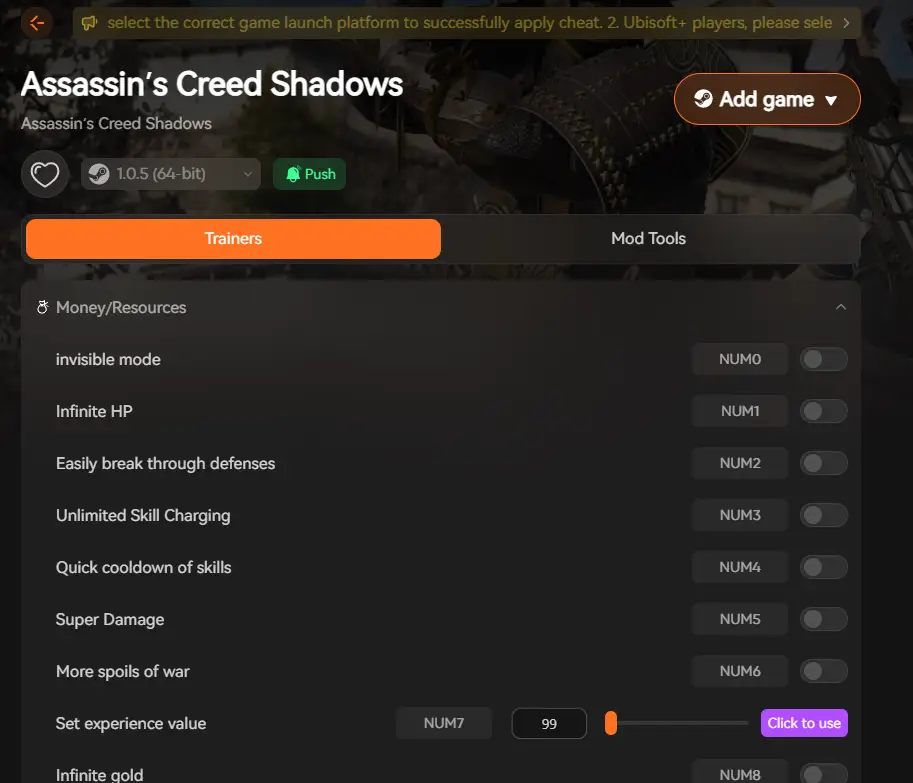
- Unlimited or boosted resources (e.g., skill‑points, upgrade mats, currency)
- Easy unlock of ability trees or gear without full grind
- Performance tools (frame‑rate/stability optimisations) for demanding open‑world settings
- Safe mod switching and activation via overlay, reducing risk of game corruption
How to Use XMOD Safely?

Step‑by‑step:
- Download XMOD from its official source.
- Install and launch XMOD.
- Within XMOD, choose “Assassin’s Creed Shadows” from the game list.
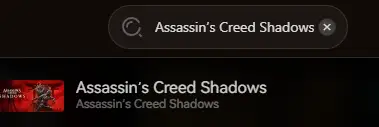
- Launch the game via XMOD’s overlay to ensure trainers activate properly.
- Within the overlay in‑game, activate the desired trainer functions (e.g., resources boost, skill unlock).
- Always backup your save file before using trainers to minimise risk.
Benefits of Using XMOD Over Cheat Engine
- Stability: Trainers are pre‑tested for supported games, avoiding the guesswork of Cheat Engine.
- Compatibility: XMOD updates its library when Assassin’s Creed Shadows receives patches, reducing broken scripts.
- Ease of Use: No memory scanning or manual pointer editing required.
- Focus Gameplay: You spend less time tool‑setting and more time exploring, stealthing, building your characters.
Tips for Getting the Most Out of XMOD
- Experiment with ability‑tree unlocks early to test different play‑styles for Naoe vs Yasuke.
- Use resource boosts after exploring new regions to unlock gear and upgrades faster.
- Combine performance tools with open‑world traversal to keep frame‑rates up in detailed environments.
- Keep XMOD updated to match Assassin’s Creed Shadows patches and expansions (which often add content).
Other Games You Can Enhance with XMOD
XMOD supports thousands of single‑player PC games beyond Assassin’s Creed Shadows.
- Fields of Mistria
- Ghost of Tsushima DIRECTOR’S CUT
- Dungeons & Kingdoms
- Prologue: Go Wayback!
- Moonlighter 2: The Endless Vault
- Rise of the Ronin
FAQ
Q1: Is XMOD safe for Assassin’s Creed Shadows?
A1: Yes — as long as you download the official version and use trainers in single‑player mode. XMOD claims to support safe game memory hooks without altering core files.
Q2: Do I need advanced knowledge to use XMOD with this game?
A2: No — XMOD is designed for ease of use with one‑click activation.
Q3: Will using XMOD affect achievements or saves?
A3: It may impact achievements in some cases; it’s best used in single‑player mode and you should backup saves.
Q4: Can I use multiple trainer functions simultaneously?
A4: Yes — XMOD allows activating multiple features concurrently (resources + abilities + performance).
Q5: Will it still work after a game update?
A5: Usually yes — XMOD’s library is updated regularly, but verify compatibility for each patch.
Final Thoughts
Assassin’s Creed Shadows delivers an immersive dual‑protagonist journey through feudal Japan, packed with stealth, parkour and RPG progression. While the core gameplay is strong, the progression loops and upgrade systems can require significant time investment. By using XMOD as a safe, beginner‑friendly trainer tool, you gain control over your resources, character development and performance, letting you focus on the story and exploration rather than the grind. For players seeking to optimise their experience in Assassin’s Creed Shadows, XMOD presents a compelling alternative to traditional Cheat Engine methods.

I am a passionate gamer and writer at XMODhub, dedicated to bringing you the latest gaming news, tips, and insights.
Connect with me:
LinkedIn Profile ↗
 XMODhub_support
 Nancy Miller