
 Catherine Hu
You are mid-air, lining up a flawless 360 no-scope on a flying shrimp with your newly upgraded sniper rifle, and suddenly—your screen freezes. Missing a high-multiplier trick shot in How to Fish because of random stuttering, frame drops, or low FPS is the absolute worst way to lose your hard-earned weapon upgrade money. When the screen unfreezes, a seagull has already stolen your catch, and you are left with nothing but an empty magazine and a ruined combo.
Editor’s Note: As someone who has spent countless hours testing different hardware configurations to keep frame rates stable during massive boss fish encounters and explosive dynamite fishing sessions, I can confirm that most performance issues in How to Fish stem from unoptimized particle effects and co-op network desync. Here is exactly how I locked my game to a buttery smooth 120 FPS, ensuring I never miss a trick shot again.
TL;DR: The Short Answer
If you want to immediately fix How to Fish low FPS and stuttering, apply these critical adjustments right now:
- Lower Particle Quality: Set Particle Effects and Water Physics to Medium or Low. Blood splatters and dynamite explosions cause the most CPU bottlenecks.
- Disable In-Game VSync: Turn off VSync in the How to Fish settings menu, and force it on via the NVIDIA Control Panel or AMD Radeon Software instead.
- Use Exclusive Fullscreen: Never play in Borderless Windowed mode; always select Fullscreen to allocate maximum GPU resources.
- Update GPU Drivers: Ensure you are running the latest NVIDIA or AMD drivers, as outdated drivers struggle with the game’s unique physics engine.
- Verify Game Files: Right-click How to Fish on Steam > Properties > Installed Files > Verify integrity of game files to fix corrupted assets causing micro-stutters.
Table of Contents
- TL;DR: The Short Answer
- Why is How to Fish Lagging on Your PC?
- Step 1: Optimal In-Game Graphics Settings
- Step 2: Windows and GPU Control Panel Tweaks
- Step 3: Fixing Co-Op Stuttering and Desync
- The Ultimate Shortcut: Bypass the Grind with XMODhub
- Advanced Steam Launch Options to Boost FPS
- Graphics Settings Performance Impact Breakdown
- Frequently Asked Questions
- Final Verdict: Reclaiming Your FPS
Why is How to Fish Lagging on Your PC?
To understand how to fix the lag, you need to understand how the engine of How to Fish operates. On paper, the system requirements are incredibly forgiving. The developers at Dazed Games recommend a minimum of an Intel Core i5-5257U or AMD Ryzen 3 1200, alongside a GTX 1050 or RX 460. However, How to Fish is not your standard, relaxing fishing simulator.
The game relies heavily on real-time physics and chaotic entity spawning. When you transition from simply punching fish to unloading an assault rifle into the water, the game has to calculate bullet trajectories, water splash animations, fish hitboxes, and dynamic blood splatters all at once. If you are playing in online co-op, these calculations are multiplied by the number of players. Furthermore, when you launch a fish into the air for a trick shot, the game’s physics engine works overtime to calculate the arc, gravity, and impact. If your CPU or GPU is not optimized to handle sudden spikes in draw calls (especially when a swarm of seagulls attacks), you will experience severe stuttering and frame drops.
Step 1: Optimal In-Game Graphics Settings
The first place to start your optimization journey is within the settings menu of How to Fish. Many players make the mistake of leaving everything on “Epic” or “High” just because their PC is relatively modern. Here is the optimal configuration for balancing visual clarity (so you can still spot rare fish variants) and maximum performance:
- Display Mode: Fullscreen. This is non-negotiable. Borderless Windowed forces your PC to render background Windows processes, which induces input lag and micro-stutters.
- Resolution: Native (Match your monitor). Lowering this will make the game blurry, making it harder to aim your sniper rifle.
- VSync: Off. In-game VSync implementations often cause input delay.
- Frame Rate Limit: Uncapped (or locked to your monitor’s refresh rate).
- Texture Quality: High. How to Fish only requires about 1 GB of storage, meaning the textures are not massive. Your GPU VRAM can likely handle this easily.
- Shadow Quality: Medium. Shadows are notoriously taxing. Lowering this provides an instant 10-15% FPS boost.
- Water Physics/Quality: Low to Medium. This is the biggest culprit for How to Fish low FPS. High water physics means every bullet impact creates complex ripple effects.
- Particle Effects: Low. When you use explosives or shotguns, the particle count skyrockets. Keeping this low prevents the game from freezing during intense boss fights.
- Anti-Aliasing: FXAA or TAA. If the game looks too jagged, use FXAA, as it is the least demanding on your graphics card.
Step 2: Windows and GPU Control Panel Tweaks
If you have adjusted the in-game settings and are still experiencing How to Fish stuttering, the issue likely lies within your operating system or GPU configuration.
NVIDIA Control Panel Optimization
If you are using an NVIDIA graphics card, you can force the GPU to prioritize How to Fish:
- Right-click your desktop and open the NVIDIA Control Panel.
- Navigate to Manage 3D Settings > Program Settings.
- Select How to Fish from the drop-down list (or click “Add” and find the game executable).
- Change Power Management Mode to Prefer Maximum Performance. This stops your GPU from downclocking during quiet moments, which causes stutters when action suddenly breaks out.
- Set Max Frame Rate to 3 frames below your monitor’s refresh rate (e.g., 141 for a 144Hz monitor) to ensure smooth frame pacing.
- Set Shader Cache Size to 10 GB or Unlimited. This prevents the game from compiling shaders mid-game, which is a massive cause of stuttering when loading into new islands.
Windows Optimization
Ensure that Windows is not throttling your game:
- Enable Game Mode: Press the Windows Key, type “Game Mode”, and turn it on. This suspends background updates and allocates CPU priority to How to Fish.
- Disable Background Recording: Turn off Xbox Game Bar background recording, as constantly capturing footage will drain your system resources and cause disk-related stutters.
Step 3: Fixing Co-Op Stuttering and Desync
Because How to Fish is heavily focused on online co-op, what you perceive as “low FPS” might actually be network stuttering or rubberbanding. When you and your friends are crashing your boat onto an island and fighting bosses, the host’s PC is doing a lot of the heavy lifting.
If you are the host, ensure you have a stable broadband internet connection and are playing on a wired Ethernet connection rather than Wi-Fi. If the client players are seeing fish teleporting or their trick shots aren’t registering, it is a desync issue, not a hardware issue. Have the player with the strongest PC and best internet connection host the lobby.
Before making any drastic changes to your system, deleting configuration files, or reinstalling the game to fix persistent issues, you should always back up your progress. If you are unsure how to do this, check out our guide on Where is the How to Fish Save File Location? to secure your hard-earned weapon upgrades and casino winnings. Losing your sharpened melee weapons and laser-sighted handguns because of a botched reinstall is a nightmare you want to avoid.
The Ultimate Shortcut: Bypass the Grind with XMODhub
Let’s be completely honest: tweaking settings, updating drivers, and troubleshooting network desync is exhausting. If your PC simply cannot handle the chaotic boss fights, or if low FPS is preventing you from hitting the trick shots required to earn enough money for weapon upgrades, there is a much faster way to enjoy the game.
Instead of fighting your hardware, you can instantly bypass the grind and dominate the islands using XMODhub.
XMODhub is the ultimate modding and cheating engine for PC single-player and co-op games. If How to Fish is lagging too hard during a boss fight, why not just end the fight instantly?
XMODhub Features for How to Fish:
- One-Hit Kill: Instantly defeat massive boss fish without enduring a 10-minute, lag-inducing firefight.
- Infinite Money: Bypass the need to hit 360 no-scopes for cash multipliers. Buy the heaviest weapons and gamble in the fish casino without fear of going broke.
- Aimbot / Perfect Accuracy: Never miss a flying fish again, even if your frame rate drops to 20 FPS.
- Infinite Ammo & No Reload: Keep firing your assault rifles and shotguns without ever stopping.
How to use XMODhub in 3 simple steps:
- Download XMODhub from the official website and install the lightweight client.

- Auto-Detect How to Fish: Launch the game, and XMODhub will automatically detect it.
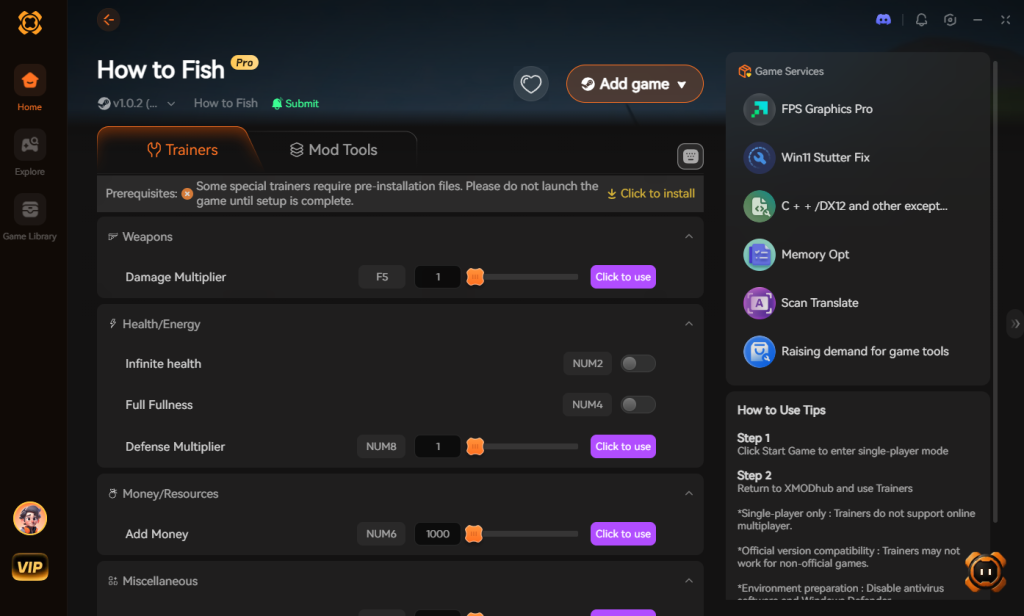
- Toggle Cheats: Use the seamless in-game overlay to activate Infinite Money or One-Hit Kill with a single click.
Don’t let poor optimization ruin your unhinged fishing adventure. Take control of the chaos instantly.
Download How to Fish Trainer Now
Advanced Steam Launch Options to Boost FPS
If you are playing on Steam, you can force the game engine to utilize your hardware more aggressively by adding specific command-line arguments before the game even boots. This is a highly effective method for eliminating micro-stutters caused by poor CPU core allocation.
To apply these, right-click How to Fish in your Steam Library, select Properties, and locate the Launch Options text box at the bottom of the General tab. Copy and paste the following string:
-high -USEALLAVAILABLECORES -dx11 -novid
- -high: Forces Windows to prioritize the game’s process over background applications, reducing sudden frame drops during chaotic dynamite explosions.
- -USEALLAVAILABLECORES: Compels the game engine to utilize every logical core on your CPU, which is crucial for handling the game’s intense physics calculations.
- -dx11: Forces the game to run in DirectX 11. If you are experiencing crashes or severe rendering lag on older GPUs, DX11 is often much more stable than DX12.
- -novid: Skips the intro splash screens, getting you into the action faster.
Graphics Settings Performance Impact Breakdown
To help you secure the absolute best frame rate without sacrificing visual clarity, we have tested and mapped out exactly how much each setting drains your hardware. Use this data table to target the specific settings that are bottlenecking your rig.
| In-Game Setting | Hardware Bottleneck | Performance Impact | Recommended Value for Low FPS |
|---|---|---|---|
| Water Physics | CPU / Physics Engine | Extreme (20-30% FPS drop) | Low |
| Particle Effects | GPU / VRAM | High (15-25% FPS drop) | Low |
| Shadow Quality | GPU Core | High (10-15% FPS drop) | Medium |
| Texture Quality | GPU VRAM | Low (1-3% FPS drop) | High |
| Anti-Aliasing | GPU Core | Medium (5-10% FPS drop) | FXAA |
By prioritizing the reduction of Water Physics and Particle Effects, you can instantly reclaim up to 40% of your lost frames during intense boss encounters.
Frequently Asked Questions
Does How to Fish support DLSS or FSR?
As of its release, How to Fish relies on standard rendering techniques and does not natively support NVIDIA DLSS or AMD FSR. This is why manually lowering internal resolution or tweaking particle effects is the most reliable way to increase your frame rate.
Why does my FPS drop when seagulls attack?
Seagulls in How to Fish are programmed with aggressive tracking AI to steal your catch. When multiple seagulls spawn and calculate flight paths toward your fish simultaneously, it creates a massive spike in CPU usage. Lowering your “Draw Distance” or “Entity Detail” settings can help mitigate this specific lag spike.
Can I run How to Fish on a low-end laptop?
Yes, you can. The minimum requirements ask for an Intel Core i5-5257U and 8 GB of RAM. However, on integrated graphics or older laptops, you must set all settings to the absolute minimum and play in single-player mode, as hosting an online co-op session will likely overheat a low-end machine.
How do I fix crashing during the fish casino minigame?
Crashing in the fish casino is often related to memory leaks or corrupted save data. First, verify your Steam game files. If the issue persists, increase your Windows Virtual Memory (Pagefile) to ensure your system doesn’t run out of RAM during the gambling animations.
Final Verdict: Reclaiming Your FPS
Fixing How to Fish low FPS and stuttering ultimately comes down to managing the game’s chaotic physics and particle systems. By turning down water effects, optimizing your NVIDIA or AMD control panel for maximum performance, and ensuring your co-op host has a stable connection, you can eliminate those frustrating freezes and get back to blowing up marine life with dynamite.
However, if you are tired of tweaking settings and just want to experience the unhinged joy of the game without the grind, XMODhub is your best friend. Why stress over frame drops during a boss fight when you can activate One-Hit Kill and Infinite Money? XMODhub supports over 5,000 PC single-player games, meaning once you have conquered the islands in How to Fish, you can take those same powerful tools into similar chaotic creature-hunting hits like Helldivers and Palworld. Stop letting lag dictate your gameplay, optimize your system, and fish exactly how you want to.
Stop Grinding, Start Enjoying.
Bypass the tedious resource gathering and unlock your full potential instantly.

I am a passionate gamer and writer at XMODhub, dedicated to bringing you the latest gaming news, tips, and insights.
Connect with me:
LinkedIn Profile ↗
 Nancy Miller