
 Catherine Hu
How do you cheat in Ruins of Dawn? To cheat in Ruins of Dawn, you can manually attach Cheat Engine to the game’s executable and scan for changing numeric values like your current Dawn Essence pool or your remaining Crimson Flask charges. However, because game updates frequently break Cheat Engine tables (.CT files), the safest and easiest alternative is using an auto-updating mod manager like XMODhub, which provides 1-click cheats without requiring any complex memory scanning.
[Editor’s Note] Look, I get it. We all start Ruins of Dawn thinking we’re going to play it completely legit. But after dying to The Hollowed Vanguard for the 15th time, or spending hours grinding for Astral Cores, the fun stops. I’ve been messing with Cheat Engine for years, and trying to isolate the exact memory values for this game’s current patch almost drove me insane. Today, I’m going to show you how to manually hack the values if you want the technical challenge—but I’ll also share the 1-click shortcut I actually use to save my sanity.
You may also like: The Ultimate Ruins of Dawn Console Commands and Cheats Guide
📋 Table of Contents
- Quick Answer
- 1. How to Use Cheat Engine for Ruins of Dawn (The Manual Way)
- 2. Common CE Errors: Pointers Breaking & Not Attaching
- 3. The Better Alternative: 1-Click Cheats with XMODhub
- 4. Where to Find Safe Ruins of Dawn Cheat Tables (.CT)?
- 5. How to Load and Activate a Ruins of Dawn Cheat Table
- 6. Top Features Found in Premium Ruins of Dawn Cheat Tables
- 7. Frequently Asked Questions (FAQ)
- Conclusion: Work Smarter, Not Harder
1. How to Use Cheat Engine for Ruins of Dawn (The Manual Way)
If you want to go the old-school route and find the memory addresses yourself, here is the basic “First Scan/Next Scan” method tailored specifically for this game.
Finding specific memory addresses in a modern action-RPG requires patience, especially when dealing with complex in-game economies. For this tutorial, we will focus on modifying your Dawn Essence—the primary currency used for leveling up your attributes at the Dawn Obelisks. Because Ruins of Dawn handles currency as a standard integer, we can track it down using a straightforward 4-Byte scan. Here is the exact step-by-step process to manipulate your essence pool without crashing the game engine.
Step 1: The Initial Setup and First Scan
First, launch Ruins of Dawn and load into your active save file. Ensure you are in a safe zone, preferably standing right next to a Dawn Obelisk. Note your exact amount of Dawn Essence (for example, let’s say you have 1,450 Essence). Pause the game, press ALT+TAB, and open Cheat Engine. Click the glowing PC icon in the top-left corner to open the process list, and select the Ruins of Dawn executable (RuinsOfDawn-Win64-Shipping.exe). In the “Value” box on the right side of the Cheat Engine interface, type 1450. Ensure the “Value Type” is set to “4 Bytes” and the “Scan Type” is set to “Exact Value”. Click “First Scan”. You will likely see thousands of addresses populate in the left pane. Do not touch them yet; most of these are junk data or UI display values.
Step 2: Altering the Value In-Game
To filter out the garbage data, you must force the game to update your actual Dawn Essence value. ALT+TAB back into Ruins of Dawn. You have two options here: either rest at the Dawn Obelisk and spend some essence on a minor upgrade, or walk out of the safe zone and kill a low-level Shadowfiend to absorb its essence. Let’s say you kill a Shadowfiend and gain 45 Essence, bringing your new total to 1,495. Immediately pause the game and ALT+TAB back to Cheat Engine.
Step 3: The Next Scan and Filtering the Noise
Back in Cheat Engine, delete the old number in the “Value” box and type in your new total: 1495. Click the “Next Scan” button (do not click First Scan, or you will reset your progress). The list of thousands of addresses on the left should now shrink drastically, usually down to anywhere between 2 and 10 addresses. If you still have more than 10 addresses, repeat Step 2 by altering your Dawn Essence one more time in Ruins of Dawn and doing another “Next Scan”.
Step 4: Isolating the True Memory Address
Once you have narrowed the list down to a handful of addresses, double-click all of them to bring them down into the bottom active address pool. Here is the tricky part about Ruins of Dawn: the game stores a “Display Value” (what you see on your UI HUD) and a “Server/Logic Value” (what the game actually uses to calculate your wealth). If you edit the display value, your screen will show 999,999 Essence, but the moment you try to buy an upgrade, the game will reject it and revert your UI. To find the real address, change the values one by one in Cheat Engine to a distinct number (e.g., 5000), then ALT+TAB back into the game and perform an action that forces a UI refresh, like opening your inventory. The address that successfully updates your spendable currency is the true logic value.
Step 5: Freezing and Editing Safely
Now that you have the correct address isolated, you can double-click the number in the “Value” column and change it to whatever you desire—99,999 is usually a safe bet that won’t cause an integer overflow crash. You can also click the small checkbox to the left of the address to “Freeze” it. Freezing means Cheat Engine will constantly inject that value every few milliseconds, effectively giving you infinite Dawn Essence. However, be warned: leaving addresses frozen during loading screens in Ruins of Dawn is a guaranteed way to trigger a fatal engine crash. Always unfreeze your values before fast traveling.
| In-Game Stat | CE Data Type | Hex/Memory Context | Edit Risk Level |
|---|---|---|---|
| Dawn Essence | 4 Bytes | Standard integer used for primary currency and XP. Easy to isolate. | Low (Safe to edit) |
| Stamina / Endurance | Float | Uses fractional regeneration rates (e.g., 99.54). Harder to pin down. | High (Frequent crashes) |
| Crimson Flasks | 1 Byte | Small integer for inventory counts. Usually caps at 10 or 15. | Low (Safe to edit) |
| Player Coordinates (X,Y,Z) | Float | Used for noclip, teleporting, or bypassing blocked doors. | Extreme (Anti-cheat trigger) |
| Invincibility (i-frames) | Boolean (1 Byte) | Toggles between 0 and 1 during dodge animations. Requires AOB injection. | Medium (Desync issues) |
2. Common CE Errors: Pointers Breaking & Not Attaching
If you are pulling your hair out because CE isn’t working for Ruins of Dawn, you aren’t alone. Here is what’s probably happening:
Error: “Cannot attach to process” / Game Crashes:
Ruins of Dawn might be using specific engine protections that actively monitor for memory debuggers. Modern titles often implement lightweight anti-tamper mechanisms or custom memory obfuscation to prevent casual modification. If Ruins of Dawn crashes the exact second you click “Attach” in Cheat Engine, the game’s executable is likely detecting the standard Windows Debugger API. To bypass this, you need to configure Cheat Engine to use a different debugging method. Open Cheat Engine, navigate to Edit -> Settings -> Debugger Options, and change the debugging method from “Use Windows Debugger” to “Use VEH Debugger”. VEH (Vectored Exception Handling) operates differently by catching exceptions before the game’s internal anti-debug routines can terminate the process. Additionally, you may need to enable “Kernelmode debugger” options or use a custom compiled version of Cheat Engine (often referred to as Undetected Cheat Engine) to slip past the game’s initial memory integrity checks.
The Pointer Problem:
If you successfully changed your health or stamina, felt like a hacker god, but then lost all your cheats after dying or fast traveling, you have encountered the pointer problem. Ruins of Dawn utilizes dynamic memory allocation (DMA). This means that every single time you pass through a loading screen, respawn at a Dawn Obelisk, or restart the application, the game’s engine dumps the old memory addresses and assigns completely new ones for your character’s stats. The address you found 10 minutes ago is now pointing to empty space or, worse, critical game engine data. To fix this manually, you would have to perform a grueling process called Pointer Scanning. You have to find what writes to the address, isolate the assembly instruction, find the base pointer, and calculate the exact hex offsets (which can sometimes be five or six levels deep in Ruins of Dawn). Writing custom Array of Bytes (AOB) assembly scripts to inject your own code and bypass DMA is incredibly frustrating and requires a solid understanding of x64 assembly language. For most players, spending three hours writing an AOB script just to get infinite health is simply not worth the time.
3. The Better Alternative: 1-Click Cheats with XMODhub
Here is the dirty little secret of the modding community: Nobody actually wants to spend two hours updating Cheat Engine tables every time a patch drops. The moment Ruins of Dawn updates on Steam, your hard-earned memory addresses shift, and your game crashes to the desktop.
| Metric | Manual Cheat Engine | XMODhub for Ruins of Dawn |
|---|---|---|
| Setup Time | 30-60 minutes per patch. | Instant (1-Click activation). |
| Update Reliability | Breaks after every minor hotfix. | Auto-updates via cloud servers. |
| Crash Risk | High (Editing wrong memory addresses). | Zero (Professionally tested injections). |
| Ease of Use | Requires technical hex/memory knowledge. | Intuitive UI with customizable hotkeys. |
| Feature Access | Basic value editing (currency, items). | Advanced God Mode, Teleports, Scripts. |
Why XMODhub beats manual CE for Ruins of Dawn:
- Zero Hex Codes Needed: Just toggle a beautiful switch on our UI.
- Auto-Updating Cloud Tech: When the game patches, XMODhub updates its trainer automatically. No more broken scripts.
- Premium Features Instant Access:
- Undetected God Mode / Infinite Health
- Unlimited Luminous Shards (Max out your weapon upgrades instantly)
- Unlimited Tears of the Eclipse (Bypass the punishing death penalty)
- Super Speed & Custom Jump Height
- One-Hit Kills for annoying bosses.
How to Use XMODhub for Ruins of Dawn?
- Download and Launch the free XMODhub desktop app.

- Search for “Ruins of Dawn” in the library.
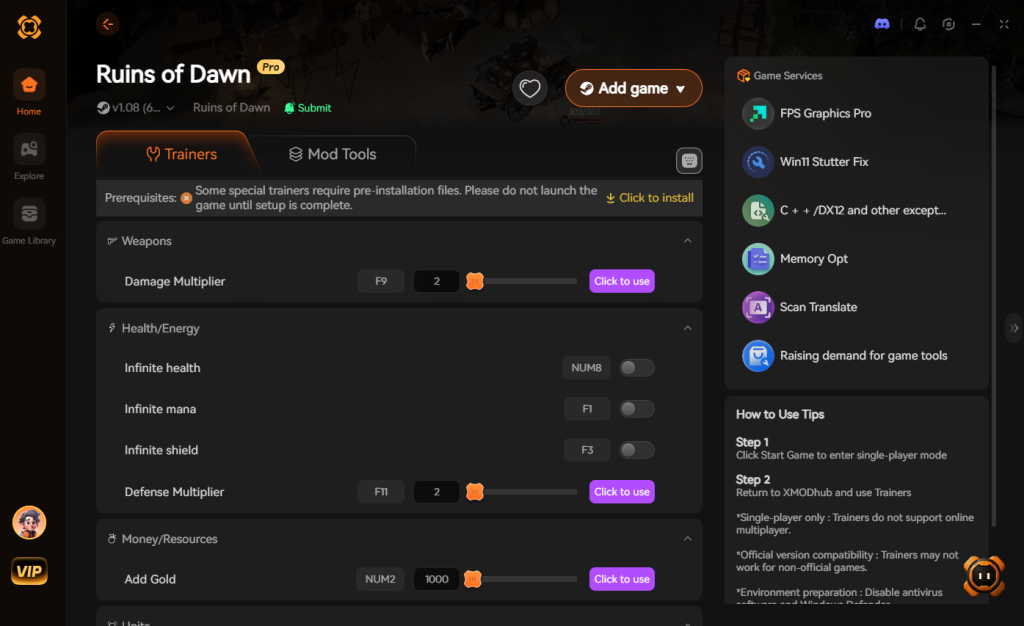
- Click “Play” to auto-hook the game safely.
- Toggle your desired cheats directly from the clean UI or via hotkeys.
Download Ruins of Dawn Trainer Now
4. Where to Find Safe Ruins of Dawn Cheat Tables (.CT)?
If you absolutely insist on using CE, you’ll want a pre-made Cheat Table (.CT file). However, you must be incredibly careful about where you source these files.
Downloading random .CT files from unverified forums, shady Discord servers, or obscure Reddit threads poses a severe cybersecurity risk to your PC. Many users do not realize that a Cheat Engine Table is not just a passive list of memory addresses; it is an XML-based file that can contain embedded Lua scripts. Cheat Engine has a built-in Lua engine that is incredibly powerful, which is great for creating complex game hacks, but terrible for your computer’s security if you download a malicious file.
Hackers can easily embed the os.execute() command within a .CT file’s Lua script. The moment you open the table and check the box to activate the cheat, the script can silently open a hidden command prompt in the background, connect to a remote server, and download a payload directly to your machine. We have seen countless instances in the modding community where players looking for a quick God Mode hack end up infecting their PCs with Remote Access Trojans (RATs), keyloggers, or silent crypto-miners that hijack your GPU power. Because Cheat Engine requires administrative privileges to read and write to game memory, any malicious script running through it also inherits those admin rights, allowing it to bypass standard Windows Defender protections easily.
This is exactly why relying on a verified, digitally signed application like XMODhub is the safe choice. Instead of rolling the dice on a sketchy .CT file uploaded by an anonymous user named “HackLord99”, you get a professionally developed, malware-free tool that is rigorously tested and sandboxed, ensuring your PC remains completely secure while you dominate Ruins of Dawn.
5. How to Load and Activate a Ruins of Dawn Cheat Table
Finding a reliable Ruins of Dawn cheat engine table is only half the battle; executing it correctly is where many players hit a wall. If you have managed to securely download a valid .CT file, you need to follow a specific sequence to inject the scripts without triggering the game’s anti-tamper mechanisms.
Step 1: Launch Ruins of Dawn and wait until you are fully loaded into your active save file. Do not attempt to attach Cheat Engine while you are sitting on the main menu, as the game has not yet allocated memory for your character’s stats.
Step 2: Open Cheat Engine. Click the green glowing monitor icon in the top left corner (Select a process to open) and choose RuinsOfDawn-Win64-Shipping.exe.
Step 3: Click the “Open Folder” icon directly next to the PC icon. Navigate to your downloads directory and select the .CT file you acquired.
Step 4: The bottom pane of your Cheat Engine window will now populate with the table’s contents. You will typically see a master script labeled [Enable], Activate Trainer, or Initialize. Click the empty square box next to it to run the setup script.
Step 5: Once the master script is successfully activated (a red “X” will appear in the box), the sub-cheats will drop down in a cascading list. You can now safely toggle individual features like Infinite Health, Max Dawn Essence, or Damage Multipliers.
6. Top Features Found in Premium Ruins of Dawn Cheat Tables
When hunting for the ultimate Ruins of Dawn cheat engine table, you want to ensure it includes the most vital scripts to bypass the game’s brutal progression loop. Advanced tables utilize Array of Bytes (AOB) injection rather than static pointers, making them significantly more resistant to minor game hotfixes and memory shifts.
Here is a breakdown of the most sought-after scripts typically found in high-tier .CT files, the underlying game mechanics they manipulate, and their associated crash risks.
| Cheat / Script Type | Memory Function Bypassed | Player Benefit | Crash Risk |
|---|---|---|---|
| Infinite Dawn Essence | Currency Subtraction Routine | Buy all Obelisk upgrades instantly without grinding. | Low |
| No Skill Cooldowns | Timer Float Values | Spam ultimate abilities endlessly against tough bosses. | Medium |
| 100% Drop Rate | RNG Loot Tables | Farm Astral Cores and legendary gear in minutes. | High |
| God Mode (i-frames) | Hitbox Collision Checks | Completely ignore The Hollowed Vanguard’s heavy attacks. | Medium |
| Infinite Crimson Flasks | Consumable Array Checks | Never run out of healing items during long raid encounters. | Low |
7. Frequently Asked Questions (FAQ)
| Platform / Storefront | Offline Singleplayer | Online / Co-op Mode | Ban Risk Level |
|---|---|---|---|
| Steam | Fully Supported | Disabled / Blocked | Low (If kept offline) |
| Epic Games Store | Fully Supported | Disabled / Blocked | Low (If kept offline) |
| Xbox Game Pass (PC) | Requires XMODhub Bypass | Disabled / Blocked | Medium (Strict UWP encryption) |
Q: Can I use Cheat Engine on the Xbox Game Pass version of Ruins of Dawn?
A: Usually, no. Game Pass uses strict UWP (Universal Windows Platform) file encryption that actively blocks Cheat Engine from attaching to the process or reading the memory space. However, XMODhub is specifically engineered to bypass these UWP restrictions seamlessly, allowing you to cheat on the Game Pass version without dealing with encrypted file dumps.
Q: Is it illegal to use Cheat Engine?
A: Modifying data on your own PC for a single-player experience like Ruins of Dawn is completely legal. You own the hardware and the local data. Just never bring memory editors into a multiplayer server, as that violates Terms of Service and will result in a permanent account ban.
Q: Will using Cheat Engine drop my FPS or slow down my PC?
A: It depends heavily on how you are using it. During a “First Scan” for an “Unknown Initial Value,” Cheat Engine is forced to dump the entire physical RAM and virtual memory allocated to Ruins of Dawn into your system’s pagefile. This massive read/write operation will cause severe CPU spikes and can drop your game to 1 FPS for several seconds. However, once you have isolated an address, “Active Freezing” (writing a value every 10ms to keep your health full) requires negligible CPU cycles. That being said, poorly written AOB injection scripts found in outdated .CT files can cause memory leaks and micro-stutters if they clash with the game engine’s internal garbage collection.
Conclusion: Work Smarter, Not Harder
Learning how memory manipulation works in Cheat Engine is a cool flex. Understanding hexadecimal offsets, pointers, and Assembly language gives you a great peek under the hood of game development. But let’s be real—when you come home from a long day at work, you just want to spawn in that legendary The Sunbreaker Greatsword and wreck some enemies without taking a computer science class.
Why spend 45 minutes digging through hex codes, risking game crashes, and dealing with broken pointers every time Ruins of Dawn receives a minor hotfix, when you can click one button and instantly get God Mode? And the best part? XMODhub supports over 5,000+ PC games. Once you install the app, you can ditch the complicated cheat tables for good and focus entirely on enjoying your games on your own terms.

Stop Grinding, Start Enjoying.
Bypass the tedious resource gathering and unlock your full potential instantly.

I am a passionate gamer and writer at XMODhub, dedicated to bringing you the latest gaming news, tips, and insights.
Connect with me:
LinkedIn Profile ↗
 Nancy Miller