
 Catherine Hu
No, Mandate Order does not have a built-in developer console or native text-based cheat codes. Because the game is currently in Early Access and heavily relies on complex background simulations—such as dynamic seasonal weather, intricate logistics, and the Hundred Schools of Thought retainer system—the developers at Digital Sky have disabled traditional command-line access to prevent severe save file corruption. If you are looking to bypass the harsh survival mechanics or instantly build your ancient military stronghold, the only way to cheat safely is by using a third-party trainer like XMODhub, which offers 1-click alternatives like God Mode, Infinite Resources, and Instant Construction.
Editor’s Note: This guide was last verified against the newest Mandate Order patch. Whether you are using native engine tools or a dedicated trainer, please back up your save files before modifying game memory to prevent unexpected bugs.
We have all been there. You have just spent hours dying to the same enemy invasion in Mandate Order, or maybe you simply do not have the time to grind for sufficient food supplies during the harsh winter seasons after a long day of work. Managing the people’s livelihood, balancing diplomacy, and surviving the brutal real-time tactical battles can become overwhelmingly punishing when starting from barren lands. Single-player games are meant to be enjoyed on your own terms. Let us get your ancient Chinese city-state powered up and ready for total conquest.
You may also like: The Ultimate Mandate Order Cheat Engine Guide (And A Much Easier Alternative)
📋 Table of Contents
- Quick Answer: Does Mandate Order Have Console Commands?
- 1. How to Enable Cheats in Mandate Order
- 2. The Complete List of Mandate Order Cheats
- 3. Item IDs and Spawning Guide
- 4. Do Cheats Disable Achievements?
- 5. Why Native Cheats Can Break Your Save Files
- 6. The Safer Alternative: 1-Click Cheats with XMODhub
- 7. Troubleshooting: Cheats Not Working
- 8. Strategic Cheat Usage: Optimizing Your Warring States Progression
- 9. Managing The Hundred Schools of Thought: Retainer Cheats
- 10. Frequently Asked Questions (FAQ)
- Conclusion
1. How to Enable Cheats in Mandate Order
Many players stepping into the chaotic Warring States period of Mandate Order instinctively press the Tilde (~) key, hoping to open a developer console to spawn resources or instantly complete their grueling Spring Plowing and Summer Cultivation tasks. Unfortunately, since there is no developer console enabled in the public build of the game, players cannot simply type in text codes to modify their world.
During the Early Access phase, developers typically lock away debugging tools. This ensures that the telemetry data they receive regarding game balance—such as how quickly players can build city walls, or how difficult a specific enemy invasion is at a certain tech level—remains highly accurate. Opening up a native console would flood their bug-reporting systems with artificial errors caused by players manipulating the game’s delicate background logic.
Since you cannot enable a native console, the safest and most efficient method to enable cheats in Mandate Order is through memory injection using a trusted application. Here is the streamlined process to get started:
- Download and Install XMODhub: Navigate to the official XMODhub website and download the desktop client. It is a lightweight, secure application designed to hook into single-player PC games without modifying the core executable files.
- Launch Mandate Order: Boot up your game via Steam. Load into your active save file where your city-state is located. Make sure you are fully loaded into the map, where you can seamlessly zoom in on your retainers or zoom out to view the entire world map.
- Attach the Trainer: Alt-tab out of the game, open XMODhub, locate the Mandate Order module, and click “Play” or “Inject”. The software will automatically find the game’s memory addresses and present you with a clean user interface where you can toggle cheats on and off with a single click or keyboard hotkey.
2. The Complete List of Mandate Order Cheats
Because Mandate Order does not feature a developer console, there are no text-based cheat codes to input. You will not find any commands like add_wood 1000 or god_mode 1 hidden in the game’s configuration files. However, you can achieve the exact same effects—and often much more stable results—using the XMODhub app.
The strategy mechanics in this game are incredibly deep, integrating production, defense, and warfare into a seamless experience. Managing the people’s will while simultaneously preparing for large-scale real-time tactical battles requires immense multitasking. To alleviate this pressure, the XMODhub trainer provides a comprehensive suite of features tailored specifically to the core gameplay loop of Mandate Order.
Here is the complete list of trainer features available in XMODhub for Mandate Order:
| Feature | Effect | How to Activate |
|---|---|---|
| Infinite Resources | Locks your primary building materials (Wood, Stone, Ore) at maximum capacity. You will never run out of materials while expanding your city-state. | Toggle via XMODhub UI or press Numpad 1 |
| Endless Food & Logistics | Prevents your food reserves from depleting during the harsh winter season. Keeps your army’s logistics fully supplied during long campaigns. | Toggle via XMODhub UI or press Numpad 2 |
| Instant Construction | Bypasses the waiting timers for city-state construction. Buildings, city walls, and defensive structures are erected the moment you place the blueprint. | Toggle via XMODhub UI or press Numpad 3 |
| God Mode (Units) | Grants infinite health to your recruited armies and retainers. Your troops will not take damage during large-scale real-time tactical battles or enemy invasions. | Toggle via XMODhub UI or press Numpad 4 |
| Max Retainer Loyalty | Instantly maximizes the loyalty and effectiveness of your retainers from the Hundred Schools of Thought, preventing them from leaving your court. | Toggle via XMODhub UI or press Numpad 5 |
| Instant Recruitment | Removes the time required for conscription. Instantly recruit refugees, convert captured prisoners, and build the best army of the age. | Toggle via XMODhub UI or press Numpad 6 |
| Max National Policy Points | Grants unlimited points to unlock the national policy nine-square grid, allowing you to upgrade your country level immediately. | Toggle via XMODhub UI or press Numpad 7 |
| Instant Farming Cycle | Instantly completes the Spring Plowing and Summer Cultivation timers, yielding immediate crop harvests regardless of the dynamic weather. | Toggle via XMODhub UI or press Numpad 8 |
| Fast Livestock Breeding | Drastically speeds up the Phase 1 Livestock System. Instantly breed chickens, dogs, cows, and mysterious animals. | Toggle via XMODhub UI or press Numpad 9 |
By utilizing these toggles, you can completely customize your experience. If you only want to focus on the free-form city-state construction without the constant threat of enemy invasion, simply activate Infinite Resources and Instant Construction. If you prefer the tactical battles but absolutely hate the logistical farming grind, Endless Food is your perfect solution.
3. Item IDs and Spawning Guide
In many PC strategy games, players rely on massive spreadsheets of Item IDs and hex codes to manually spawn specific items into their inventory. However, because Mandate Order lacks a native developer console, manually spawning items via text commands is completely impossible without native engine tools.
Furthermore, because Mandate Order is an Early Access title that receives frequent, massive updates, the internal memory addresses for items—such as specific crops, mysterious animals, or high-tier weaponry for your army—shift dynamically every time the developers release a patch. Attempting to use outdated Cheat Engine tables to manually inject hex codes will almost certainly result in a fatal game crash and potential save file corruption.
XMODhub bypasses this tedious and risky process entirely. Instead of forcing you to look up complex hex codes for every single resource in the game, the application utilizes advanced pointer scanning technology. When you click “Infinite Resources” in the XMODhub app, it automatically locates the dynamic memory addresses for your city’s storage and freezes the values at their maximum limit. This allows you to instantly maximize your inventory, add currency, or stockpile food for your retainers with a single click, completely eliminating the need for an exhaustive Item ID list.
4. Do Cheats Disable Achievements?
A major concern for hardcore PC gamers is whether modifying their game will ruin their Steam achievement progression. When dealing with native console commands in other games, the answer is almost always yes. Developers usually program their games to detect when the developer console has been opened; the moment you press the Tilde key and input a command, an invisible flag is triggered in your save file that permanently locks you out of earning achievements on that specific playthrough.
Because Mandate Order does not have a developer console, this specific internal flagging system does not exist in the traditional sense. However, the developers do monitor game state anomalies.
This is where third-party trainers shine. XMODhub operates entirely outside of the game’s internal logic. By safely modifying the values directly within your computer’s RAM rather than altering the game’s executable files or triggering in-game developer scripts, XMODhub safely bypasses achievement locks. You can utilize Infinite Resources to build a massive stronghold or use God Mode to survive a brutal enemy invasion, and your Steam achievements will continue to unlock exactly as they normally would.
5. Why Native Cheats Can Break Your Save Files
Beyond the achievement lock, native developer tools and memory editors are notoriously unstable in modern gaming. These commands were originally built for developers to test isolated bugs during production, not for everyday gameplay. Even if a hidden console were to be discovered in a future update of Mandate Order, using it comes with severe risks to the integrity of your playthrough.
Strategy games of this magnitude rely on highly complex, interconnected systems. Mandate Order features dynamic seasonal and weather changes, a delicate population livelihood simulation, and a complex diplomatic web. Forcing a quest to complete or bypassing intended story triggers—such as artificially forcing the Battle of Changping plotline to begin before your country level is high enough—can cause crucial NPCs, diplomats, or retainers to completely disappear from your map.
Memory leaks, corrupted assets, and sudden crashes to the desktop are incredibly common when you spawn too many items at once using raw engine commands. For instance, if you use a raw memory editor to spawn thousands of livestock (chickens, dogs, cows) into a city-state that does not have the logistical infrastructure to support them, the game’s pathfinding AI and seamless zoom rendering will overload, permanently corrupting that save file.
6. The Safer Alternative: 1-Click Cheats with XMODhub
If you want the benefits of cheats—like infinite health during sieges or skipping the heavy grind of the four-season farming system—without risking your save files or locking your achievements, you need a dedicated game modification tool.
Instead of typing risky code that might corrupt your game world or break the Hundred Schools of Thought retainer system, the XMODhub app hooks into Mandate Order safely and cleanly. The developers behind XMODhub constantly update their pointers to match the latest Early Access patches from Digital Sky, ensuring absolute stability.
- Achievement Safe: It bypasses the game’s internal cheat-flagging system, allowing you to 100% the game on your own terms.
- Save File Protection: It alters values temporarily in your system’s RAM. The moment you close the game, your save file remains uncorrupted and perfectly intact.
- One-Click Toggles: No more memorizing long item IDs or worrying about syntax errors. Just hit a hotkey to turn God Mode on instantly right before a massive tactical battle.
How to Use XMODhub for Mandate Order
- Download and Launch the free XMODhub desktop app on your PC.

- Search for “Mandate Order” in the library search bar.
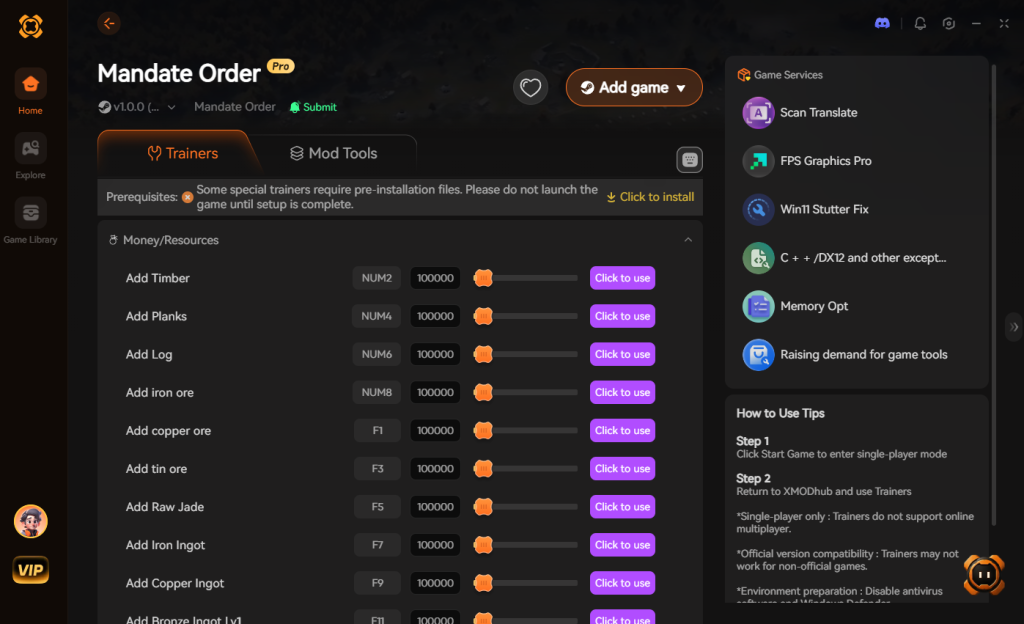
- Click “Play” to launch the game and establish a secure memory connection.
- Toggle your desired cheats directly from the clean UI on your second monitor, or utilize the customizable keyboard hotkeys while seamlessly zoomed into your city-state.
Download Mandate Order Trainer Now
7. Troubleshooting: Cheats Not Working
Even with the most advanced modification tools, PC gaming environments can sometimes cause hiccups. If you find that your XMODhub cheats are not activating properly in Mandate Order, check the following common issues:
- Game Updates Breaking Memory Pointers: Mandate Order is an Early Access game, meaning it receives frequent updates (such as the addition of the new national policy unlocking mechanism or the Phase 1 Livestock System). When the game updates, the memory addresses change. If your cheats stop working after a Steam update, simply wait a few hours; the XMODhub team automatically pushes updates to the trainer to match the new game version.
- Lack of Administrator Rights: Because trainers need to read and write to your system’s RAM to modify the game’s resources, XMODhub must be run with Administrator privileges. Right-click the XMODhub shortcut and select “Run as Administrator” to ensure it has the proper permissions to hook into the Mandate Order process.
- Antivirus False Positives: The method that trainers use to inject code into a single-player game is technically similar to how certain malicious software operates, which can trigger overly aggressive antivirus programs like Windows Defender. If XMODhub fails to attach to the game, ensure you have added the application folder to your antivirus exclusion list.
8. Strategic Cheat Usage: Optimizing Your Warring States Progression
While enabling every cheat simultaneously can be an incredibly fun power trip, many strategy veterans prefer to use specific modifications to bypass tedious mechanics while preserving the core tactical challenge of the game. In Mandate Order, managing the delicate balance of your city-state’s economy against the constant threat of invasion requires precise timing. Here is a breakdown of the most common progression bottlenecks and the optimal cheats to overcome them strategically.
| Progression Bottleneck | Recommended Cheat / Command | Strategic Advantage | Risk Level (Native Tools) |
|---|---|---|---|
| Winter Starvation | Endless Food & Logistics | Prevents your population and army from starving during the harsh winter, allowing for continuous territorial expansion. | High (Save corruption) |
| Early Game Expansion | Instant Construction | Rapidly establishes your base city walls and resource nodes before the first major enemy scouting party arrives. | Medium (Pathfinding bugs) |
| Retainer Defection | Max Retainer Loyalty | Keeps high-tier philosophers and generals from the Hundred Schools of Thought permanently in your court. | High (Breaks quest lines) |
| Army Conscription | Instant Recruitment | Quickly rebuilds your forces after a devastating tactical battle without waiting for the slow seasonal draft. | Low (Minor UI glitches) |
| Technological Lag | Max National Policy Points | Instantly unlocks the nine-square grid policies to elevate your country’s technological and military tier. | High (Breaks tech tree) |
9. Managing The Hundred Schools of Thought: Retainer Cheats
One of the most complex and rewarding background simulations in Mandate Order is the Hundred Schools of Thought system. Retainers are not just static NPCs; they possess dynamic loyalty, specific ideological traits, and unique demands based on how you rule. Losing a legendary general or a brilliant agricultural minister because your city-state suffered a poor harvest can set your campaign back by hours.
Because traditional console commands cannot safely target individual NPC memory addresses without causing fatal logic errors, utilizing a memory injector is the only reliable way to manipulate retainer stats. By toggling the Max Retainer Loyalty feature via XMODhub, you effectively lock their satisfaction meters at 100%. This allows you to mix and match conflicting ideologies—such as pairing a strict Legalist general with a pacifist Confucian minister—without triggering the native defection events. This strategic manipulation lets you build a historically unprecedented dream team to govern your ancient stronghold without the headache of constant micro-management.
10. Frequently Asked Questions (FAQ)
Q: Can I use these cheats on PlayStation or Xbox?
A: No. Modifying game memory or accessing developer tools for Mandate Order is strictly limited to the PC version. Console ecosystems are heavily locked down, making memory injection impossible for standard users.
Q: Is there a penalty for using cheats in single-player?
A: There is no account ban or official penalty for cheating in a single-player environment. Mandate Order does not have a competitive multiplayer mode with anti-cheat software. The only downsides are the potential for corrupted save files and disabled achievements if you attempt to use unstable raw memory editors, which can be entirely avoided by using a secure trainer like XMODhub.
Q: Will the trainer work on the Steam Medieval Fest Demo version?
A: Trainers are typically built and updated for the most current Early Access or Full Release build of the game. The demo version from the Steam Medieval Fest may have different memory structures, so it is highly recommended to play the current Early Access version to ensure full compatibility with all cheat features.
Conclusion
Whether Mandate Order provides a built-in console or not, taking control of your single-player experience is easier than ever. While tweaking raw engine code can be a fun technical experiment, it comes with significant risks to your save files and achievements, especially in a game with such intricate logistics, farming, and diplomatic systems. For a flawless, risk-free experience, using a dedicated modification tool is always the smarter choice.
With secure support for over 5,000+ single-player PC games, you can easily customize your gameplay, skip the tedious grind of ancient city building, and play exactly the way you want. Rise to prominence amidst the chaos of the Warring States period on your own terms.

Stop Grinding, Start Enjoying.
Bypass the tedious resource gathering and unlock your full potential instantly.

I am a passionate gamer and writer at XMODhub, dedicated to bringing you the latest gaming news, tips, and insights.
Connect with me:
LinkedIn Profile ↗
 Nancy Miller