
 Catherine Hu
How do you cheat in Mandate Order? To cheat in Mandate Order, you can manually attach Cheat Engine to the game’s executable and scan for changing numeric values like your total grain reserves for seasonal farming or your current conscript population available for tactical warfare. However, because game updates frequently break Cheat Engine tables (.CT files), the safest and easiest alternative is using an auto-updating mod manager like XMODhub, which provides 1-click cheats without requiring any memory scanning.
[Editor’s Note] Look, I get it. We all start Mandate Order thinking we’re going to play it completely legit. But after dying to a massive rival state invasion during a devastating winter famine for the 15th time, or spending hours grinding for elite retainers from the Hundred Schools of Thought, the fun stops. I’ve been messing with Cheat Engine for years, and trying to isolate the exact memory values for this game’s current patch almost drove me insane. Today, I’m going to show you how to manually hack the values if you want the technical challenge—but I’ll also share the 1-click shortcut I actually use to save my sanity.
You may also like: The Ultimate Mandate Order Console Commands and Cheats Guide
📋 Table of Contents
- Quick Answer
- 1. How to Use Cheat Engine for Mandate Order (The Manual Way)
- 2. Common CE Errors: Pointers Breaking & Not Attaching
- 3. The Better Alternative: 1-Click Cheats with XMODhub
- 4. Where to Find Safe Mandate Order Cheat Tables (.CT)?
- 5. How to Load a Mandate Order Cheat Engine Table (.CT File)
- 6. Frequently Asked Questions (FAQ)
- Conclusion: Work Smarter, Not Harder
1. How to Use Cheat Engine for Mandate Order (The Manual Way)
If you want to go the old-school route and find the memory addresses yourself, here is the basic “First Scan/Next Scan” method tailored specifically for this game. Because Mandate Order is a deeply complex war-and-city-building simulation game built around intricate systems like production, logistics, and people’s livelihood, finding the exact memory addresses requires a bit of patience.
Here is a highly detailed, step-by-step guide on how to manually isolate and modify your Grain Reserves—the most critical resource for surviving the harsh dynamic seasonal changes, especially during Spring Plowing and Summer Cultivation.
Step 1: Launch the Game and Attach the Process
First, launch Mandate Order and load into your current city-state save file. Once you are fully loaded into the map and can see your resources, press Alt + Tab to minimize the game. Open Cheat Engine. Click on the glowing PC icon in the top-left corner of the Cheat Engine interface. This will open the Process List. Scroll through the list until you find the executable for the game, which should be labeled something like Mandate Order.exe. Select it and click “Open”. You are now hooked into the game’s active memory pool.
Step 2: Perform the Initial Memory Scan (First Scan)
Return to Mandate Order and check your exact Grain Reserve number in the top resource bar. Let’s say you currently have exactly 4,500 Grain. Alt + Tab back to Cheat Engine. In the “Value” box, type 4500. Ensure the “Value Type” is set to “4 Bytes” (which is the standard integer type for most resource values in Mandate Order). Click the “First Scan” button. Cheat Engine will now comb through millions of active memory addresses and likely return thousands of results that currently share the value of 4,500. Do not touch any of these yet, as modifying the wrong address can instantly crash your game.
Step 3: Alter the In-Game Value
To filter down that massive list of addresses, you need to force the game to change the value of your Grain Reserves. Go back into Mandate Order. You can either wait for a seasonal farming tick to increase your grain, or manually spend some grain by feeding your population, recruiting refugees, or initiating a new city-state construction project. Let’s say you spend grain to recruit some refugees, dropping your total Grain Reserve down to 4,250.
Step 4: Filter the Results (Next Scan)
Quickly pause the game so the dynamic weather and logistics systems do not alter the number again while you are working. Alt + Tab back to Cheat Engine. In the “Value” box, delete your old number and type in your new exact value: 4250. Now, click the “Next Scan” button (do absolutely not click First Scan again). This will filter the previous thousands of results down to only the addresses that changed from 4,500 to 4,250. You should now see only a handful of addresses in the left-hand column—usually between one and three.
Step 5: Isolate, Modify, and Freeze the Address
Double-click the remaining addresses in the left column to drop them into your active code list at the bottom of the Cheat Engine window. Double-click the number under the “Value” column for these addresses and change it to whatever you desire—for example, 999999. Finally, click the small checkbox to the left of the address to “Freeze” it. Freezing the value forces Cheat Engine to constantly write 999999 to that memory address every millisecond. This is crucial in Mandate Order, as the game’s internal logistics loop will constantly try to deduct grain to feed your army and retainers; freezing it ensures you never run out during a large-scale real-time tactical battle.
| Memory Value Type | Common In-Game Stat | Technical Explanation for Mandate Order |
|---|---|---|
| 4 Bytes (Integer) | Population & Conscripts | Used for whole numbers. Your total refugees, prisoners captured, and active military units are stored as 4-byte integers because you cannot have a fraction of a soldier. |
| 4 Bytes (Integer) | Base Resources (Wood, Bronze) | Standard building materials utilized in your free-form city-state construction are tracked in whole numbers to manage warehouse logistics. |
| Float (Floating Point) | City Wall Health / Defense | Structural integrity during enemy invasions is calculated with decimals (e.g., 1500.75 HP) to account for complex siege weapon damage mitigation. |
| Double (Double Float) | Retainer Loyalty & Morale | The Hundred Schools of Thought retainer system uses highly precise background calculations to determine shifting loyalties based on your diplomatic actions. |
| Array of Bytes (AOB) | Dynamic Weather State | The current season and weather patterns (which affect farming and combat) are often controlled by complex hex arrays rather than a single simple number. |
2. Common CE Errors: Pointers Breaking & Not Attaching
If you are pulling your hair out because CE isn’t working for Mandate Order, you aren’t alone. Modifying a modern strategy game in Early Access is notoriously difficult. Here is what’s probably happening behind the scenes and how to troubleshoot it.
Error: “Cannot attach to process” / Game Crashes:
Mandate Order might be using specific engine protections or custom memory allocation methods that actively reject standard debugging hooks. When you try to attach Cheat Engine, the game’s engine detects the intrusion and immediately terminates the process to prevent memory corruption, resulting in a sudden crash to your desktop. To bypass this, you need to change how Cheat Engine interacts with the game. Open Cheat Engine, go to Edit > Settings > Debugger Options. Change the debugging method from the standard Windows Debugger to the “VEH Debugger” (Vectored Exception Handling). The VEH Debugger hooks into the game at a much lower, less detectable level, allowing you to scan and modify values in Mandate Order without triggering the game’s internal crash-handlers. If you still face issues, ensure you are running Cheat Engine as an Administrator.
The Pointer Problem:
You finally found the exact memory address for your elite army’s health, you froze it, and you dominated a massive real-time tactical battle. But the moment you load a new map, change seasons, or restart Mandate Order, your cheats completely stop working, and the memory addresses show random gibberish numbers. This is the dreaded “Pointer Problem.”
Mandate Order uses dynamic memory allocation. Because the game seamlessly loads massive maps with detailed grass, dynamic weather, and thousands of characters without loading screens, the engine constantly shuffles data around in your computer’s RAM to optimize performance. The memory address that held your Grain Reserves yesterday was temporarily rented; today, the game moved that data to a completely different location. To fix this manually, you have to perform a grueling process called “Pointer Scanning.” You must find the base address (a static piece of memory that never moves) and calculate the exact hexadecimal offsets that point to your dynamically moving resource values. Writing custom assembly scripts to calculate these offsets requires actual programming knowledge, which is why manual memory editing in modern Early Access titles is incredibly frustrating for the average player.
3. The Better Alternative: 1-Click Cheats with XMODhub
Here is the dirty little secret of the modding community: Nobody actually wants to spend two hours updating Cheat Engine tables every time a patch drops. The moment Mandate Order updates on Steam—which happens frequently as the developers add new maps, terrains, and battle plots like the Battle of Changping—your hard-earned memory addresses shift, your custom pointers break, and your game crashes to the desktop.
| Feature / Metric | Manual Cheat Engine (.CT) | XMODhub Auto-Trainer |
|---|---|---|
| Setup Time | 30-60 minutes of scanning and filtering per session. | Instant. 1-click injection upon launching the game. |
| Update Reliability | Breaks immediately after every minor Early Access patch. | Cloud-based auto-updates sync with the latest Steam version. |
| Crash Risk | High. Freezing the wrong dynamic address corrupts save files. | Near Zero. Professionally coded hooks prevent engine crashes. |
| Ease of Use | Requires understanding of Hex, Floats, Pointers, and AOB. | Beautiful, intuitive UI with simple ON/OFF toggle switches. |
| Feature Access | Limited to basic numeric values you can manually find. | Complex scripts (God Mode, Instant Build, Weather Control). |
Why XMODhub beats manual CE for Mandate Order:
- Zero Hex Codes Needed: Just toggle a beautiful switch on our UI. You don’t need to know what a 4-Byte integer or a Float is.
- Auto-Updating Cloud Tech: When the game patches to add the new Livestock System or new diplomatic titles, XMODhub updates its trainer automatically behind the scenes. No more broken assembly scripts.
- Premium Features Instant Access:
- Undetected God Mode / Infinite Health for your troops during city-wall attack and defense phases.
- Unlimited Grain for seasonal farming and Unlimited Bronze for instant free-form city-state construction.
- Super Speed & Custom Jump Height to navigate the massive, seamless map instantly.
- One-Hit Kills for annoying enemy invasions and rival state generals.
How to Use XMODhub for Mandate Order?
- Download and Launch the free XMODhub desktop app from our official website.

- Search for “Mandate Order” in the massive library of supported games.
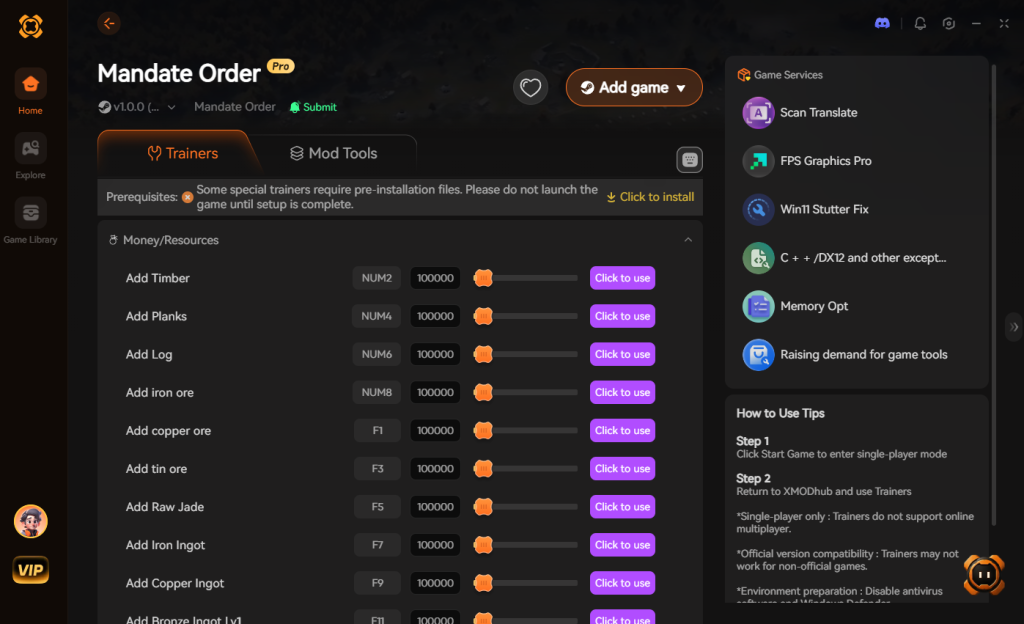
- Click “Play” to auto-hook the game safely. The software handles all the VEH debugging and pointer calculations automatically.
- Toggle your desired cheats directly from the clean UI or via customizable keyboard hotkeys while you play.
Download Mandate Order Trainer Now
4. Where to Find Safe Mandate Order Cheat Tables (.CT)?
If you absolutely insist on using CE because you enjoy the technical challenge of memory editing, you’ll want a pre-made Cheat Table (.CT file) created by veteran modders. These tables contain pre-calculated pointers and custom Lua scripts that bypass the dynamic memory allocation issues mentioned earlier. However, you must exercise extreme caution.
The internet is filled with severe cybersecurity risks when it comes to downloading random .CT files from unverified forums, shady Discord servers, or obscure Reddit threads. Cheat Engine has a built-in feature that allows it to execute custom Lua scripts the moment you open a table. While legitimate modders use this feature to automate the hooking process for Mandate Order, malicious actors use it to silently execute harmful code on your machine.
A rogue .CT file can easily contain a hidden script that downloads and installs remote access trojans (RATs), keyloggers, or silent background crypto-miners that will throttle your GPU while you are trying to enjoy your game. Because Cheat Engine requires administrative privileges to read game memory, you are essentially handing over the keys to your entire operating system when you run an untrusted Lua script.
This is exactly why relying on a verified, professionally maintained application like XMODhub is the vastly superior and safer choice. XMODhub’s code is digitally signed, rigorously tested, and completely free of malicious scripts. If you still want to hunt for .CT files, only download them from highly reputable, heavily moderated communities like FearLess Revolution, and always inspect the Lua script in a basic text editor before opening it in Cheat Engine.
5. How to Load a Mandate Order Cheat Engine Table (.CT File)
If you have successfully sourced a legitimate and safe .CT file from a trusted community, you will need to know how to properly inject it into your active game session. Unlike manual scanning, a cheat table acts as a pre-packaged script that automatically locates the dynamic memory addresses for you.
Here is the safest workflow for loading a Mandate Order cheat engine table without crashing your campaign:
Step 1: Launch Mandate Order and load into your active city-state. Ensure your game is paused so background calculations don’t interfere with the initial hook.
Step 2: Open Cheat Engine. Click the Folder Icon located next to the glowing PC icon in the top-left corner. Navigate to your downloads folder and select the .CT file you acquired.
Step 3: Click the glowing PC icon to open the Process List and select Mandate Order.exe. A prompt will appear asking: “Keep the current address list/code list?” Always click Yes so the scripts from your table remain active.
Step 4: Look at the bottom pane of Cheat Engine. You will see a list of scripts and cheats (e.g., “Enable Developer Console”, “Infinite Resources”). Click the small square box next to a script to activate it. If the box turns into a red “X”, the script is successfully running.
Top Features to Look For in a Mandate Order .CT File
When hunting for a high-quality cheat table, you want to ensure it includes scripts that specifically target the game’s most grueling mechanics. Here are the most valuable nodes you should look for, and why they matter for your playthrough:
| Cheat Category | Specific Script / Node | Optimal Use Case | Priority Level |
|---|---|---|---|
| Logistics | Infinite Grain & Bronze | Surviving harsh winter famines and rapidly expanding city walls without waiting for seasonal ticks. | High |
| Military | God Mode (Tactical Phase) | Ensuring your elite conscripts and generals survive massive rival state invasions. | High |
| Diplomacy | Max Retainer Loyalty | Instantly recruiting and retaining legendary figures from the Hundred Schools of Thought. | Medium |
| Progression | Instant Construction | Bypassing the multi-season wait times for new agricultural and military nodes. | High |
Note: If a script refuses to activate (the box won’t turn red), it means the .CT file is outdated and the game’s recent patch has broken the author’s assembly code. In this scenario, you will either need to wait days for the author to update it, or switch to an auto-updating solution like XMODhub.
6. Frequently Asked Questions (FAQ)
| Platform / Environment | Cheat Engine Compatibility | XMODhub Compatibility | Risk Level |
|---|---|---|---|
| Steam (Singleplayer) | Yes (Requires manual pointer updates) | Yes (1-Click Auto-Updates) | Safe |
| Epic Games Store | Yes (Different memory offsets than Steam) | Yes (Multi-platform support) | Safe |
| Xbox Game Pass (PC) | Blocked (Strict UWP File Encryption) | Yes (Bypasses UWP restrictions) | Safe |
| Multiplayer / Co-Op | Highly Dangerous (Instant Ban Risk) | Disabled for safety | Extreme |
Q: Can I use Cheat Engine on the Xbox Game Pass version of Mandate Order?
A: Usually, no. Game Pass uses strict UWP (Universal Windows Platform) file encryption that actively blocks Cheat Engine from reading the game’s memory pool. If you try to attach it, you will likely get an “Access Denied” error. However, XMODhub is specifically engineered to bypass these UWP restrictions seamlessly, allowing you to use cheats regardless of which storefront you purchased the game from.
Q: Is it illegal to use Cheat Engine?
A: Modifying data on your own PC for a purely single-player experience like Mandate Order is completely legal. You own the hardware and you are simply altering the local memory values in your own RAM. Just never bring memory editors into a multiplayer server, as that violates Terms of Service and will result in permanent account bans.
Q: Will using Cheat Engine drop my FPS or slow down my PC?
A: Yes, it absolutely can, depending on how you use it. During a “First Scan,” Cheat Engine dumps massive amounts of game data from your RAM into your hard drive’s pagefile. This causes massive CPU spikes and can temporarily freeze your game. Furthermore, if you use “Active Freezing” on dozens of addresses simultaneously, Cheat Engine is forcing your CPU to execute write-commands every single millisecond. In a highly CPU-dependent simulation game like Mandate Order—which is already calculating dynamic weather, logistics, and the AI of thousands of retainers and soldiers—this heavy memory polling can cause severe micro-stutters and frame rate drops. XMODhub optimizes this by injecting clean, lightweight code directly into the engine, resulting in zero performance loss.
Conclusion: Work Smarter, Not Harder
Learning how memory manipulation works in Cheat Engine is a cool flex. Understanding the difference between a 4-Byte integer and an Array of Bytes gives you a great peek under the hood of game development. But let’s be real—when you come home from a long day at work, you just want to spawn in a fully upgraded legendary Hundred Schools Retainer and command an unstoppable army to wreck some enemy states without taking a computer science class.
Why spend 45 minutes digging through hex codes, fighting game crashes, and ripping your hair out over broken pointers when you can click one single button and instantly get God Mode? Mandate Order is a brilliant, complex game, and you should spend your time enjoying its massive tactical battles and deep city-building mechanics, not staring at a spreadsheet of hexadecimal values.
And the best part? XMODhub supports over 5,000+ PC games. Once you install the app, you can ditch the complicated, malware-ridden cheat tables for good and take total control over your entire gaming library.

Grinding, Start Enjoying.
Bypass the tedious resource gathering and unlock your full potential instantly.

I am a passionate gamer and writer at XMODhub, dedicated to bringing you the latest gaming news, tips, and insights.
Connect with me:
LinkedIn Profile ↗
 Nancy Miller