
 Catherine Hu
How do you cheat in Quasimorph? To cheat in Quasimorph, you can manually attach Cheat Engine to the game’s executable and scan for changing numeric values like your clone’s current Health Points (HP), exact ammunition count in your equipped weapon, or your current Calories level. However, because game updates frequently break a Quasimorph cheat engine table (.CT files), the safest and easiest alternative is using an auto-updating mod manager like XMODhub, which provides 1-click cheats without requiring any memory scanning.
[Editor’s Note] Look, I get it. We all start Quasimorph thinking we’re going to play it completely legit. But after dying to a Tezctlan Baron on a brutal Venus extraction mission for the 15th time, or spending hours grinding for rare clone blueprints and high-tier PMC trade goods only to lose everything to a random infection, the fun stops. I’ve been messing with Cheat Engine for years, and trying to isolate the exact memory values for this game’s current patch almost drove me insane. Today, I’m going to show you how to manually hack the values if you want the technical challenge—but I’ll also share the 1-click shortcut I actually use to save my sanity.
You may also like: The Ultimate Quasimorph Console Commands and Cheats Guide
📋 Table of Contents
- Quick Answer
- 1. How to Use Cheat Engine for Quasimorph (The Manual Way)
- 2. Common CE Errors: Pointers Breaking & Not Attaching
- 3. The Better Alternative: 1-Click Cheats with XMODhub
- 4. Where to Find Safe Quasimorph Cheat Tables (.CT)?
- 5. Advanced Cheat Engine Tactics: Manipulating Inventory and Clone Stats
- 6. Frequently Asked Questions (FAQ)
- Conclusion: Work Smarter, Not Harder
1. How to Use Cheat Engine for Quasimorph (The Manual Way)
If you want to go the old-school route and find the memory addresses yourself, here is the basic “First Scan/Next Scan” method tailored specifically for this unforgiving extraction RPG. Quasimorph is a game built on brutal resource management. Every bullet, every bandage, and every calorie counts. When you are deep into a space station raid and your Quasimorphosis meter is spiking dangerously high, having the ability to freeze your ammo or health can mean the difference between a successful extraction and losing all your hard-earned gear.
Here is exactly how to manually isolate and modify your ammunition count during a tactical raid in Quasimorph using Cheat Engine. This method requires patience, as the game’s Unity engine handles memory dynamically.
- Launch Both Applications and Attach the Process: First, open Quasimorph and load into a mission (do not try this in the main menu or PMC management screen, as the combat values haven’t been loaded into your RAM yet). Once you are standing on the grid, pause the game. Open Cheat Engine, click the glowing PC icon in the top left corner, and select
Quasimorph.exefrom the process list. Click “Open.” - Identify Your Starting Value (First Scan): Look at your currently equipped weapon. Let’s say you are wielding a shotgun loaded with exactly 8 shells. In Cheat Engine, set the “Value Type” to
4 Bytes(the standard integer format for ammo in this game). Type8into the “Value” box and hit “First Scan.” You will likely see thousands of addresses appear in the left panel. Do not panic; this is normal. - Change the Value In-Game (Next Scan): Return to Quasimorph. You need to change that ammo value. Fire a single shot at an enemy, a barrel, or just an empty grid square. Your shotgun now has 7 shells remaining. Pause the game immediately. Go back to Cheat Engine, type
7into the “Value” box, and click “Next Scan.” - Filter and Isolate the Exact Memory Address: The list of addresses on the left should now be significantly smaller. Repeat Step 3—fire another shot so your ammo drops to 6, then run a “Next Scan” for 6. Continue this process of firing and scanning until you are left with only 1 to 3 addresses in the left pane. These are the memory addresses actively controlling your shotgun’s magazine.
- Modify and Freeze the Value: Double-click the remaining addresses to drop them into the bottom workspace of Cheat Engine. Double-click the number under the “Value” column and change it to
99. Then, click the small checkbox to the left of the address to “Freeze” it. Return to Quasimorph. You can now fire your shotgun infinitely without ever needing to reload or consume your precious inventory ammo boxes.
While this method works for simple integers like ammo, Quasimorph utilizes complex variables for other mechanics. Understanding what data type to scan for is half the battle.
| In-Game Statistic | Recommended CE Value Type | Scan Difficulty | Notes & Game Mechanics Context |
|---|---|---|---|
| Ammunition (Mag) | 4 Bytes | Easy | Changes frequently; easy to isolate by firing and reloading. Resets if you swap weapons. |
| Health Points (HP) | Float / 4 Bytes | Medium | Can be tricky due to the game’s wound and infection system. Best scanned by taking minor damage or using weak meds. |
| Calories / Hunger | Float | Hard | Depletes gradually with every action or turn. Requires scanning for “Decreased Value” rather than exact numbers. |
| Quasimorphosis Meter | Float | Very Hard | The phase meter constantly shifts in the background. Requires advanced “Unknown Initial Value” scanning techniques. |
| Action Points (AP) | 4 Bytes | Medium | Resets every single turn. You must scan, take one step, scan again, and freeze before the turn ends to achieve infinite movement. |
2. Common CE Errors: Pointers Breaking & Not Attaching
If you are pulling your hair out because your Quasimorph cheat engine table isn’t working, or the game is actively crashing when you try to modify a value, you aren’t alone. Quasimorph, like many modern indie titles, presents unique technical hurdles for memory editors. Here is what’s probably happening behind the scenes and how to troubleshoot it.
Error: “Cannot attach to process” / Game Crashes:
Quasimorph might be using specific engine protections or memory obfuscation techniques that conflict with Cheat Engine’s standard attachment protocols. When you attempt to hook into a Unity-based game that utilizes aggressive garbage collection or anti-tamper wrappers, standard debugging can trigger a fatal crash to the desktop. To bypass this, you need to configure Cheat Engine to use the VEH Debugger (Vectored Exception Handling).
To do this, open Cheat Engine, navigate to Edit > Settings > Debugger Options. Check the box that says “Use VEH Debugger.” This method intercepts game exceptions at the Windows kernel level, allowing Cheat Engine to read and write to Quasimorph’s memory space without alerting the game’s internal crash handlers. Furthermore, if you are playing on aggressive security settings, ensure you run Cheat Engine as an Administrator. This grants the software the necessary elevated privileges to read the memory blocks allocated to Quasimorph.exe. If crashes persist, it is highly likely that a recent game patch has completely restructured the executable, rendering your current approach obsolete until new bypasses are discovered.
The Pointer Problem:
One of the most infuriating experiences for any Cheat Engine user in Quasimorph is the “Pointer Problem.” You spend twenty minutes perfectly isolating the memory address for your clone’s maximum Health Points. You freeze it, you feel invincible, and you successfully extract from the mission. But the moment you load into the next raid, your health drops to zero, the game crashes, or the cheat simply stops working.
Why does this happen? Quasimorph uses dynamic memory allocation. Every time you pass through a loading screen, transition between your PMC ship and a planetary extraction zone, or spawn a new clone, the game’s Unity engine assigns completely new memory addresses to your stats. The address 0x1A2B3C4D that held your health in the previous mission now holds garbage data or, worse, critical game engine instructions. To fix this manually, you have to find the “Base Pointer”—a static address that always points to your dynamic health address. Finding pointers requires using Cheat Engine’s “Pointer Scan” feature, digging through multi-level assembly scripts, and understanding CPU registers (EAX, RBX, etc.). It is incredibly tedious, highly prone to failure after minor game updates, and requires a level of computer science knowledge that most gamers simply do not have the time or desire to learn.
3. The Better Alternative: 1-Click Cheats with XMODhub
Here is the dirty little secret of the modding community: Nobody actually wants to spend two hours updating Cheat Engine tables every time a patch drops. The moment Quasimorph updates on Steam, your hard-earned memory addresses shift, your carefully crafted pointers break, and your game crashes to the desktop. The extraction genre is stressful enough without having to fight your own debugging software.
| Feature / Metric | Manual Cheat Engine (.CT) | XMODhub Auto-Trainer |
|---|---|---|
| Setup Time | 15 – 45 Minutes per session | Under 10 Seconds (1-Click) |
| Update Reliability | Breaks instantly on every game patch | Auto-updates via Cloud within hours |
| Crash Risk | High (Requires exact pointer logic) | Extremely Low (Engineered bypasses) |
| Ease of Use | Requires technical memory scanning | Simple UI Toggle Switches & Hotkeys |
| Feature Access | Basic values (Ammo, HP) | Advanced (God Mode, Infinite AP, No Hunger) |
Why XMODhub beats manual CE for Quasimorph:
- Zero Hex Codes Needed: Just toggle a beautiful switch on our UI. You don’t need to know what a 4-Byte integer or a Float value is.
- Auto-Updating Cloud Tech: When the game patches, XMODhub updates its trainer automatically. No more broken scripts, no more waiting weeks for a forum user to upload a new Quasimorph cheat engine table.
- Premium Features Instant Access:
- Undetected God Mode / Infinite Health (Immune to all wounds, fractures, and infections).
- Unlimited First Aid Kits and high-caliber armor-piercing rounds directly in your inventory.
- Super Speed & Custom Action Points (Move infinitely across the tactical grid in a single turn).
- One-Hit Kills for annoying bosses and heavily armored Tezctlan demons.
- Freeze Quasimorphosis Meter (Loot the entire map without triggering the demonic endgame phase).
How to Use XMODhub for Quasimorph?
- Download and Launch the free XMODhub desktop app from our official website.

- Search for “Quasimorph” in the extensive game library.
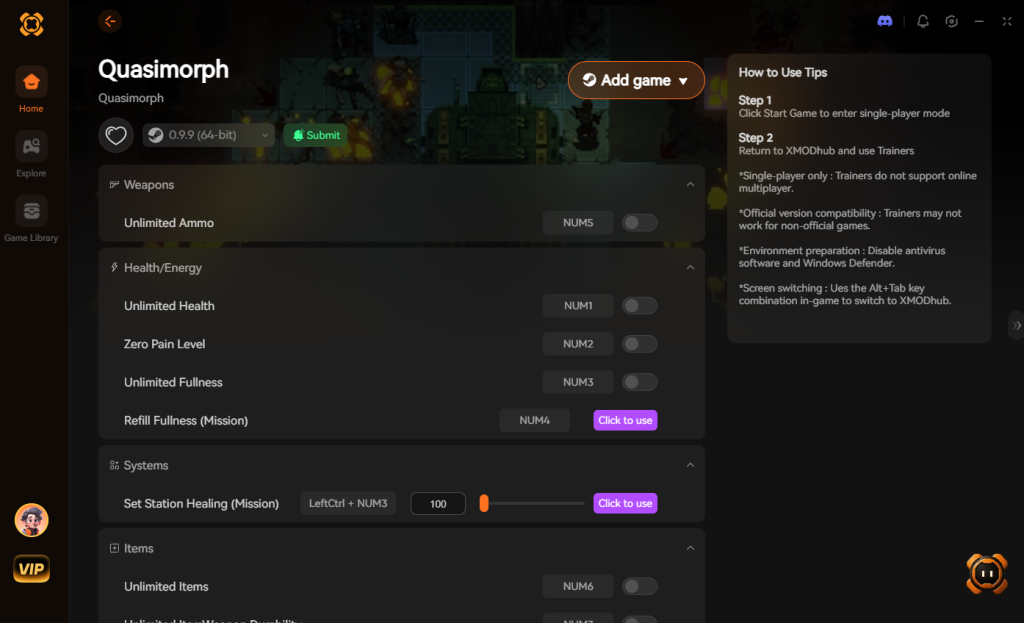
- Click “Play” to auto-hook the game safely. XMODhub will automatically detect your game version and apply the correct bypasses.
- Toggle your desired cheats directly from the clean UI or via custom keyboard hotkeys while you are actively in a raid.
Download Quasimorph Trainer Now
4. Where to Find Safe Quasimorph Cheat Tables (.CT)?
If you absolutely insist on using CE and want to avoid scanning values yourself, you’ll want a pre-made Quasimorph cheat engine table (.CT file). However, you must tread incredibly carefully. The internet is a minefield when it comes to game hacking files.
When you download a .CT file from a random Discord server, an unmoderated Reddit thread, or obscure cheating forums, you are taking a massive cybersecurity risk. Cheat Engine tables are not just simple text files containing memory addresses; they can contain complex Lua scripts. This scripting capability is a double-edged sword. While it allows skilled table creators to build intricate cheats with custom user interfaces, it also allows malicious actors to embed severe malware payloads. The moment you open a compromised Quasimorph cheat engine table and grant Cheat Engine administrator privileges, that hidden Lua script executes.
We have seen countless cases of players downloading a “Working Quasimorph Trainer 2026.ct” only to find their PCs infected with silent crypto-miners that throttle their GPU, Remote Access Trojans (RATs) that steal personal data, or aggressive ransomware that locks their entire hard drive. Antivirus software often struggles to differentiate between a legitimate Cheat Engine memory injection and a malicious one, because the very nature of game hacking looks like a virus to security programs.
This is exactly why relying on a verified, digitally signed application like XMODhub is the safe, professional choice. XMODhub employs strict internal security audits, ensuring that every trainer and cheat provided is 100% free of malware, adware, or malicious scripts. You get all the power of memory editing without risking your digital security or your Steam account.
5. Advanced Cheat Engine Tactics: Manipulating Inventory and Clone Stats
Once you master basic integers like ammunition and health, the next logical step in your Quasimorph cheat engine table journey is inventory manipulation. The ultimate goal for many extraction shooter players is to bypass the brutal grind by manually injecting high-tier weapons, rare clone blueprints, and essential trade goods directly into their PMC storage.
However, editing inventory in Quasimorph introduces a steep learning curve. Unlike your current ammo count, which is a simple 4-Byte integer, items in the Unity engine are often handled as complex arrays or strings.
How Item Spawning Works in Memory
To spawn a specific item, you cannot simply scan for “Energy Rifle.” You must locate the memory address of an existing item in your backpack (e.g., a basic bandage), find its unique Item ID string, and overwrite it with the hex code of the desired weapon. This requires a comprehensive dump of the game’s internal item IDs—a list that changes with almost every major content update.
If you input an invalid string or fail to update the item’s corresponding sprite and weight values, the game’s garbage collector will instantly flag the discrepancy, resulting in a corrupted save file or a hard crash to the desktop. Here is a breakdown of the difficulty tiers when attempting to modify specific game elements using manual memory injection:
| Modification Target | Specific Item / Stat | Memory Data Type | Success Rate via CE |
|---|---|---|---|
| Weapon Spawning | High-Tier Energy Rifles / Heavy Armor | String / Array of Bytes | Low (Requires exact ID lists) |
| Clone Attributes | Base Movement Speed / Dodge Chance | Float / Double | Medium (Requires pointer mapping) |
| Consumables | First Aid Kits / Morphine / Bandages | 4 Bytes (Stack Size) | High (Easy to isolate) |
| Trade Goods | Rare PMC Contraband / AI Cores | 4 Bytes (Stack Size) | High (Easy to isolate) |
Because of these extreme complexities, most players abandon manual string editing and rely on pre-compiled .CT tables with built-in drop-down menus, or they pivot entirely to dedicated trainers like XMODhub that handle the hex conversions natively in the background without risking save corruption.
6. Frequently Asked Questions (FAQ)
| Platform / Environment | Cheat Engine Compatibility | XMODhub Compatibility | Ban Risk Level |
|---|---|---|---|
| Steam (PC) | Yes (Requires manual updates) | Yes (Fully Supported) | Zero (Singleplayer only) |
| Epic Games Store | Yes (Often requires different pointers) | Yes (Fully Supported) | Zero (Singleplayer only) |
| GOG (DRM-Free) | Yes (Easiest to attach to) | Yes (Fully Supported) | Zero (Singleplayer only) |
| Xbox Game Pass (PC) | No (Blocked by UWP encryption) | Yes (Bypasses UWP seamlessly) | Zero (Singleplayer only) |
Q: Can I use Cheat Engine on the Xbox Game Pass version of Quasimorph?
A: Usually, no. Game Pass uses strict UWP (Universal Windows Platform) file encryption and aggressive permission management that actively blocks Cheat Engine from attaching to the process. Even if you manage to hook it, the memory addresses are heavily obfuscated. However, XMODhub is specifically engineered to bypass these Microsoft restrictions seamlessly, allowing you to cheat on the Game Pass version just as easily as the Steam version.
Q: Is it illegal to use Cheat Engine?
A: Modifying data on your own PC for a single-player experience like Quasimorph is completely legal. You own the hardware, and you are not violating any competitive integrity. Just never bring memory editors into a multiplayer server or an online competitive environment, as that violates Terms of Service and will result in permanent account bans.
Q: Will using Cheat Engine drop my FPS or slow down my PC?
A: Yes, it absolutely can, especially during the scanning phase. When you perform a “First Scan” for an “Unknown Initial Value” (which is required for complex stats like the Quasimorphosis phase meter), Cheat Engine rapidly reads your entire allocated RAM block. If you have 16GB or 32GB of RAM, this massive data dump causes a severe CPU bottleneck, often freezing the game or dropping your framerate to single digits until the scan completes. Additionally, if you have dozens of poorly optimized assembly scripts actively freezing values (writing to memory every millisecond), it can cause micro-stutters during intense combat situations. XMODhub avoids this by using optimized, low-overhead code injection that maintains your high FPS.
Conclusion: Work Smarter, Not Harder
Learning how memory manipulation works in Cheat Engine is a cool flex. Understanding hex codes, pointers, and assembly logic gives you a great peek behind the curtain of game development. But let’s be real—when you come home from a long day at work, you just want to spawn in that legendary fully loaded energy rifle, strap on some heavy power armor, and wreck some Tezctlan enemies without taking a computer science class.
Why spend 45 minutes digging through hex codes, fighting game crashes, and losing your progress to the Pointer Problem when you can click one button and instantly get God Mode? The extraction mechanics in Quasimorph are punishing enough; your modding tools shouldn’t be. And the best part? XMODhub supports over 5,000+ PC games. Once you install the app, you can ditch the complicated, risky, and outdated cheat tables for good.

Stop Grinding, Start Enjoying.
Bypass the tedious resource gathering and unlock your full potential instantly.

I am a passionate gamer and writer at XMODhub, dedicated to bringing you the latest gaming news, tips, and insights.
Connect with me:
LinkedIn Profile ↗



 Nancy Miller