Catherine Hu
How do you cheat in Waterpark Simulator? To cheat in Waterpark Simulator, you can manually attach Cheat Engine to the game’s executable and scan for changing numeric values, specifically targeting your total park budget (cash) or individual guest satisfaction ratings. However, because game updates frequently break Cheat Engine tables (.CT files), the safest and easiest alternative is using an auto-updating mod manager like XMODhub, which provides 1-click cheats without requiring any complex memory scanning or pointer manipulation.
[Editor’s Note] Look, I get it. We all start Waterpark Simulator thinking we’re going to play it completely legit. But after dying to the chaotic pressure of managing hundreds of smelly, angry guests during the peak summer season for the 15th time, or spending hours grinding for enough cash to build the ultimate custom mega-waterslide, the fun stops. I’ve been messing with Cheat Engine for years, and trying to isolate the exact memory values for this game’s current patch almost drove me insane. Today, I’m going to show you how to manually hack the values if you want the technical challenge—but I’ll also share the 1-click shortcut I actually use to save my sanity.
You may also like: The Ultimate Waterpark Simulator Console Commands and Cheats Guide
📋 Table of Contents
- Quick Answer
- 1. How to Use Cheat Engine for Waterpark Simulator (The Manual Way)
- 2. Common CE Errors: Pointers Breaking & Not Attaching
- 3. The Better Alternative: 1-Click Cheats with XMODhub
- 4. Where to Find Safe Waterpark Simulator Cheat Tables (.CT)?
- 5. Advanced Cheat Engine Techniques: Manipulating Guest AI and Water Physics
- 6. Frequently Asked Questions (FAQ)
- Conclusion: Work Smarter, Not Harder
1. How to Use Cheat Engine for Waterpark Simulator (The Manual Way)
If you want to go the old-school route and find the memory addresses yourself, here is the basic “First Scan/Next Scan” method tailored specifically for this game’s engine.
Waterpark Simulator is a highly interactive first-person management simulator where your primary bottleneck is money. Building unique pools, themed attractions, and hiring staff drains your funds incredibly quickly. To bypass this grind, we are going to use Cheat Engine to isolate the exact memory address controlling your Park Funds and manipulate it to give you an unlimited budget. Here is the highly specific, step-by-step process to achieve this in the current 2026 build of Waterpark Simulator.
Step 1: Attach to the Correct Game Process
First, launch Waterpark Simulator and load into your saved park or start a brand-new sandbox mode. Once you are physically standing in your park (not sitting in the main menu), open Cheat Engine. Click the glowing computer monitor icon in the top-left corner of the Cheat Engine interface. Scroll through the process list until you find WaterparkSimulator.exe. Select it and click “Open”. If the game crashes upon attachment, you will need to adjust your debugger settings (which we will cover in the next troubleshooting section).
Step 2: Perform the Initial Value Scan for Park Funds
Look at your in-game HUD and note your exact current Park Funds. Let’s assume you have exactly $5,000. In Cheat Engine, ensure the “Value Type” is set to “4 Bytes” (though some Unity and Unreal Engine games occasionally use “Float” for currency, 4 Bytes is the standard starting point for Waterpark Simulator). Type 5000 into the “Value” box and click “First Scan”. You will likely see thousands of addresses appear in the left panel. Do not touch them yet; we need to filter these down.
Step 3: Change the Value In-Game to Filter Addresses
Alt-tab back into Waterpark Simulator. You need to force that $5,000 value to change. The easiest way to do this is to build something cheap or interact with the park management mechanics. Open your build menu and construct a basic snack stand or a small section of a waterslide, which might cost $250. Your new balance is now $4,750. Alternatively, you can wait for a guest to buy a ticket to increase your funds.
Step 4: Execute the Next Scan to Isolate the Address
Alt-tab back to Cheat Engine. Change the number in the “Value” box from 5000 to your new exact balance of 4750. Click the “Next Scan” button (do not click First Scan again, or you will completely reset your progress). The list of thousands of addresses should now shrink dramatically, ideally down to just one or two green or black addresses. If you still have more than a dozen, go back into Waterpark Simulator, spend more money, and repeat the “Next Scan” process with the newest value until only one specific address remains.
Step 5: Modify and Freeze the Memory Value
Double-click the isolated address in the left panel to drop it into the active cheat table at the bottom of the Cheat Engine window. Double-click the number under the “Value” column in the bottom panel and change it to 999999999 (or whatever massive budget you desire). Press Enter. Finally, click the small square checkbox to the left of the address to “Freeze” it. This prevents the game from lowering your funds when you purchase high-tier staff or massive custom waterslides. Go back into Waterpark Simulator, and you will see your bank account instantly update to your new billionaire status.
| Memory Value Target | Value Type (Cheat Engine) | In-Game Effect in Waterpark Simulator | Why Players Modify This Stat |
|---|---|---|---|
| Park Funds / Budget | 4 Bytes / Double | Instantly grants unlimited money for construction. | Building massive custom waterslides and themed attractions without waiting for ticket sales. |
| Guest Star Rating | Float | Locks the park’s overall reputation to a perfect 5-stars. | Allows players to charge maximum ticket prices and unlocks end-game hireable staff immediately. |
| Guest Bladder/Hunger | Float | Freezes guest needs so they never require bathrooms or food. | Prevents the chaotic micromanagement of cleaning up after angry, smelly parkgoers. |
| Player Movement Speed | Float | Drastically increases the first-person walking/running speed. | Makes navigating massive, sprawling waterparks much faster during the daily management phase. |
| Ragdoll Force Multiplier | Float | Amplifies the physics engine when interacting with guests. | Maximizes the hilarity of spraying smelly parkgoers with water or making them crumple into a heap. |
2. Common CE Errors: Pointers Breaking & Not Attaching
If you are pulling your hair out because CE isn’t working for Waterpark Simulator, you aren’t alone. Here is what’s probably happening under the hood:
Error: “Cannot attach to process” / Game Crashes:
Waterpark Simulator might be using specific engine protections. Modern game engines, especially as Waterpark Simulator transitions from its Early Access phase into its full 1.0 release in 2026, often implement basic anti-tamper mechanisms or memory obfuscation to prevent simple memory injection. When you try to attach the standard Windows debugger via Cheat Engine, the game’s executable detects the intrusion and forcefully closes itself to prevent data corruption.
To bypass this crash, you need to change how Cheat Engine interacts with the game’s memory architecture. Open Cheat Engine, navigate to Edit > Settings, and click on the Debugger Options tab. By default, it uses the Windows Debugger. Switch this to “Use VEH Debugger” (Vectored Exception Handling). VEH debugging intercepts the game’s internal error handling rather than aggressively hooking into the process thread, making it virtually invisible to basic engine protections. Once you apply these settings, restart Cheat Engine, launch Waterpark Simulator, and attempt the attachment again. The game should now remain stable while you scan for your park management values.
The Pointer Problem:
You finally found the exact memory address for your Park Funds, changed it to a million dollars, and saved your game. But the next day, when you boot up Waterpark Simulator to continue building your aquatic empire, your cheats are gone, and the address in Cheat Engine shows a random string of useless numbers. Welcome to the nightmare of Dynamic Memory Allocation (DMA) and Address Space Layout Randomization (ASLR).
Every time you load a new save, start a new work day, or transition between different zones in Waterpark Simulator, the game’s engine dumps its current memory and reassigns all values to completely new, randomized addresses in your RAM. The static address you found yesterday is now dead. To fix this manually, you have to perform a complex procedure called “Pointer Scanning.” You must find the base address of WaterparkSimulator.exe, calculate the hexadecimal offset for the entity holding your money, and write an Assembly (AOB) script to dynamically inject your cheat every time the game loads. Writing AOB injection scripts requires a fundamental understanding of x86/x64 assembly language, and a single typo in your script will cause Waterpark Simulator to instantly crash to the desktop. This constant cat-and-mouse game of updating pointers after every minor patch is exactly why manual memory editing has become incredibly frustrating for the average gamer.
3. The Better Alternative: 1-Click Cheats with XMODhub
Here is the dirty little secret of the modding community: Nobody actually wants to spend two hours updating Cheat Engine tables every time a patch drops. The moment Waterpark Simulator updates on Steam, your hard-earned memory addresses shift, and your game crashes to the desktop.
| Feature / Metric | Manual Cheat Engine (.CT) | XMODhub Auto-Trainer |
|---|---|---|
| Setup Time | 20-45 minutes of scanning, filtering, and isolating hex values. | Under 30 seconds. Click “Play” and toggle switches. |
| Update Reliability | Breaks entirely upon any minor Waterpark Simulator patch. | Cloud-based auto-updating algorithms adapt to new patches instantly. |
| Crash Risk | High. Incorrect AOB injection or freezing wrong addresses causes fatal errors. | Zero. Professionally coded hooks ensure total game stability. |
| Ease of Use | Requires technical knowledge of Floats, 4-Bytes, and memory pointers. | Beautiful, intuitive UI with simple ON/OFF toggle switches. |
| Feature Access | Limited to basic numeric values like cash or star ratings. | Deep engine hooks for God Mode, infinite items, and physics manipulation. |
Why XMODhub beats manual CE for Waterpark Simulator:
- Zero Hex Codes Needed: Just toggle a beautiful switch on our UI.
- Auto-Updating Cloud Tech: When the game patches, XMODhub updates its trainer automatically. No more broken scripts.
- Premium Features Instant Access:
- Undetected God Mode / Infinite Health
- Unlimited Park Funds and Premium Park Expansion Permits
- Super Speed & Custom Jump Height
- One-Hit Kills for annoying bosses (or in this case, instantly ejecting non-paying customers with zero effort).
How to Use XMODhub for Waterpark Simulator?
- Download and Launch the free XMODhub desktop app.

- Search for “Waterpark Simulator” in the library.
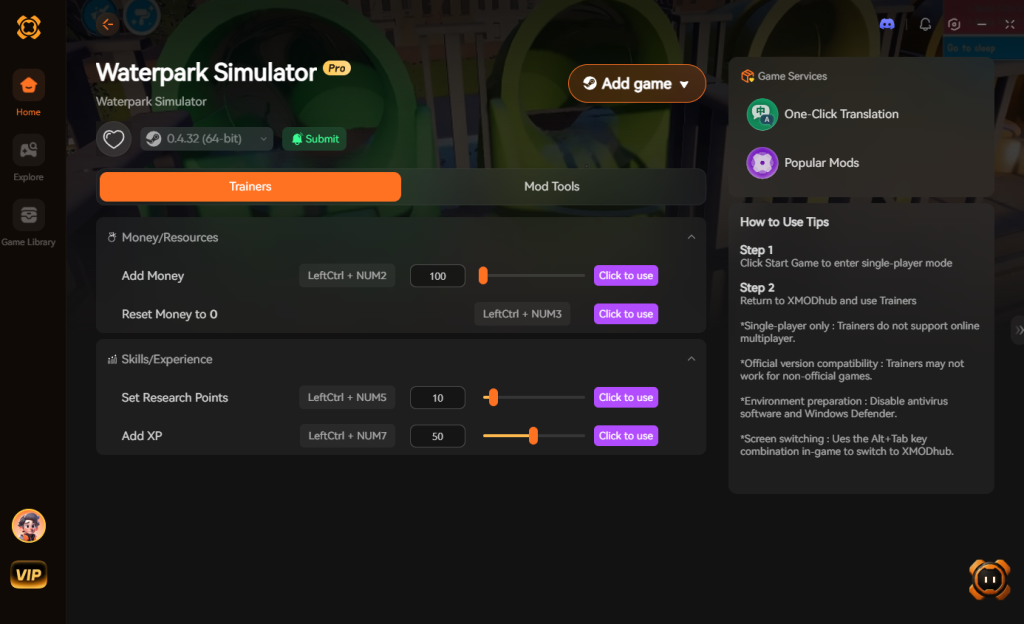
- Click “Play” to auto-hook the game safely.
- Toggle your desired cheats directly from the clean UI or via hotkeys.
Download Waterpark Simulator Trainer Now
4. Where to Find Safe Waterpark Simulator Cheat Tables (.CT)?
If you absolutely insist on using CE, you’ll want a pre-made Cheat Table (.CT file). However, you must navigate this space with extreme caution. The internet is littered with outdated forums, shady Discord servers, and unmoderated file-sharing sites claiming to offer the ultimate Waterpark Simulator cheat engine table.
What many gamers do not realize is that Cheat Engine .CT files are not just simple text documents containing memory addresses; they are capable of executing complex Lua scripts directly on your machine. Cybercriminals frequently weaponize these files. When you download a random .CT file from an unverified source and execute it, you are granting that script deep system-level access. Malicious actors routinely embed arbitrary code execution payloads within these tables. The moment you click “Attach,” the Lua script can silently deploy a background crypto-miner that permanently throttles your GPU, install a webhook token logger that steals your Discord and Steam session cookies, or drop a remote access trojan (RAT) that compromises your entire operating system.
Even if the file isn’t malicious, it is highly likely to be outdated. Because Waterpark Simulator is actively being developed by CayPlay with frequent updates refining core systems and adding new customization options, a cheat table created in August 2025 will absolutely crash the 2026 build of the game. If you must use Cheat Engine, only download tables from heavily moderated, highly reputable communities like the FearLess Cheat Engine forums, and always inspect the Lua script contents before running them. Ultimately, this severe cybersecurity risk—combined with the sheer inconvenience of broken pointers—is exactly why a verified, digitally signed application like XMODhub is the vastly superior and safe choice for modifying your game.
5. Advanced Cheat Engine Techniques: Manipulating Guest AI and Water Physics
While basic money hacks are great for getting your park off the ground, hardcore players searching for a premium Waterpark Simulator cheat engine table are usually looking to manipulate the deeper simulation mechanics. The game utilizes a surprisingly complex engine to calculate fluid dynamics for the waterslides and individual AI routines for thousands of guests simultaneously.
To manipulate these elements manually, standard 4-Byte scanning won’t cut it. You have to utilize Cheat Engine’s “Memory Dissect” feature to map out the GuestEntity and WaterPhysics structures. By finding the base pointer for the park’s global simulation manager, you can write custom Assembly scripts to alter how the game handles gravity, friction, and guest behavior. Because these values are deeply nested within the game’s logic loop, injecting a poorly written AOB script here will instantly hard-crash your game. Below is a breakdown of the advanced mechanics that top-tier cheat tables attempt to modify, and the technical impact they have on your game.
| Simulation Category | Cheat Engine Script / Value Node | In-Game Effect on Waterpark Simulator | Engine Stability Risk |
|---|---|---|---|
| Fluid Dynamics | Disable Water Displacement | Prevents pools from overflowing and draining when hundreds of heavy guests jump in simultaneously. | Moderate |
| Guest AI Logic | Override Pathfinding | Forces all guests to ignore their needs and queue exclusively for your newest mega-waterslide. | High |
| Staff Mechanics | Instant Cleaning Action | Janitors instantly vaporize trash and puddles globally upon spawning into the park. | Low |
| Physics Engine | Zero Friction Slides | Removes all friction calculations, launching guests out of slides at terminal velocity. | High (But Hilarious) |
| Time Management | Freeze Day/Night Cycle | Locks the park in perpetual peak-hour afternoon sunshine for maximum ticket profits. | Low |
Finding a .CT file that successfully hooks into these advanced structural parameters without crashing is incredibly rare. Because the developers frequently patch the AI pathfinding and physics collision meshes, these specific memory offsets break almost weekly. This constant maintenance is precisely why leaning on a cloud-updated tool that natively handles these deep-engine hooks is highly recommended over manual script injection.
6. Frequently Asked Questions (FAQ)
| Game Platform / Version | Cheat Engine Compatibility | XMODhub Compatibility | Ban Risk (Singleplayer) |
|---|---|---|---|
| Steam (PC) | Yes (Requires manual pointer updates after patches) | Yes (Fully Automated) | 0% (Safe) |
| Epic Games Store | Yes (Different base addresses required) | Yes (Fully Automated) | 0% (Safe) |
| Xbox Game Pass (PC) | No (Blocked by strict UWP file encryption) | Yes (Bypasses UWP restrictions) | 0% (Safe) |
| Multiplayer / Co-op | Highly Dangerous (Triggers anti-cheat bans instantly) | Disabled by design for safety | 100% (Do not attempt) |
Q: Can I use Cheat Engine on the Xbox Game Pass version of Waterpark Simulator?
A: Usually, no. Game Pass uses strict UWP (Universal Windows Platform) file encryption that actively blocks Cheat Engine from reading the game’s memory state. However, XMODhub is specifically engineered to bypass these restrictions seamlessly, allowing you to mod the Game Pass version without technical headaches.
Q: Is it illegal to use Cheat Engine?
A: Modifying data on your own PC for a single-player experience like Waterpark Simulator is completely legal. It is your hardware and your save file. Just never bring memory editors into a multiplayer server or competitive environment, as that violates Terms of Service.
Q: Will using Cheat Engine drop my FPS or slow down my PC?
A: Yes, it absolutely can, especially if used improperly. When you perform a “First Scan” for an unknown value in Waterpark Simulator, Cheat Engine dumps gigabytes of the game’s active RAM into your system’s page file, which will heavily spike your CPU thread usage and cause massive frame stuttering. Furthermore, if you “Freeze” too many addresses simultaneously—for example, trying to lock the hunger and bladder values of 500 individual AI guests in your park—Cheat Engine must constantly write new data to those memory addresses dozens of times per second. This aggressive, continuous memory writing creates immense CPU overhead, bottlenecking the game’s physics engine and causing your FPS to plummet, especially when the game is already calculating complex ragdoll physics for crowds. XMODhub avoids this by injecting clean, optimized assembly detours that run natively within the game’s own memory space without the constant read/write loop.
Conclusion: Work Smarter, Not Harder
Learning how memory manipulation works in Cheat Engine is a cool flex. But let’s be real—when you come home from a long day at work, you just want to spawn in that massive looping mega-slide and wreck some enemies (or in this case, playfully torture your digital guests with hilarious ragdoll physics) without taking a computer science class.
Why spend 45 minutes digging through hex codes, battling game crashes, and worrying about malware-infected .CT files when you can click one button and instantly get God Mode and infinite cash? And the best part? XMODhub supports over 5,000+ PC games. Once you install the app, you can ditch the complicated cheat tables for good and get back to what actually matters: building the most absurd, 5-star aquatic empire in Waterpark Simulator.

Stop Grinding, Start Enjoying.
Bypass the tedious resource gathering and unlock your full potential instantly.

I am a passionate gamer and writer at XMODhub, dedicated to bringing you the latest gaming news, tips, and insights.
Connect with me:
LinkedIn Profile ↗

 Nancy Miller