Catherine Hu
No, Mortal Shell II does not have a built-in developer console or native text-based cheat codes. Because the game is built upon a tightly controlled souls-like architecture emphasizing extreme difficulty and precise resource management, the developers have completely disabled the command-line interface in the retail build. There is no hidden key combination, configuration file edit, or launch parameter that will magically enable a traditional developer console.
However, this does not mean you are out of luck. The absolute best and most reliable way to cheat in the game is by using a third-party trainer like XMODhub. By utilizing memory injection, XMODhub offers powerful 1-click alternatives such as God Mode, Infinite Stamina, Instant Harden Cooldown, and Infinite Tar, completely bypassing the need for complex console commands.
Editor’s Note: This guide was last verified against the newest Mortal Shell II patch. Whether you are using native engine tools or a dedicated trainer, please back up your save files before modifying game memory to prevent unexpected bugs.
We have all been there. You have just spent hours dying to the same brutal boss in Mortal Shell II, or maybe you simply do not have the time to endlessly grind for Awakened Tar and Glimpses of Resolve after a long day of work. Single-player games are meant to be enjoyed on your own terms, at your own pace. If the punishing mechanics are getting in the way of your enjoyment of the dark fantasy world, let us get your character powered up and ready to conquer the shattered ruins.
You may also like: The Ultimate Mortal Shell II Cheat Engine Guide (And A Much Easier Alternative)
📋 Table of Contents
- Quick Answer: Does Mortal Shell II Have Console Commands?
- 1. How to Enable Cheats in Mortal Shell II
- 2. The Complete List of Mortal Shell II Cheats
- 3. Item IDs and Spawning Guide
- 4. Do Cheats Disable Achievements?
- 5. Why Native Cheats Can Break Your Save Files
- 6. The Safer Alternative: 1-Click Cheats with XMODhub
- 7. Troubleshooting: Cheats Not Working
- 8. Optimal Shell and Weapon Upgrade Paths to Fast-Track
- 9. Advanced Combat Strategies: Maximizing Trainer Benefits
- 10. Frequently Asked Questions (FAQ)
- Conclusion
1. How to Enable Cheats in Mortal Shell II
When players search for Mortal Shell II cheats, they typically expect to find a method to edit an .ini configuration file, change a launch parameter in Steam (such as -console), and press the Tilde (~) key to open a text box.
Because Mortal Shell II does not feature a developer console, players cannot type in codes to manipulate the game world. The developers intentionally stripped the debugging tools from the final August 2026 release to prevent sequence breaking and to maintain the intended dark fantasy, high-stakes atmosphere. Attempting to force the console open using outdated Unreal Engine unlockers will only result in immediate fatal crashes to your desktop, as the memory pointers for the console UI literally do not exist in the compiled game executable.
Instead of fighting the game’s engine, the modern, standard method to enable cheats in Mortal Shell II is to use a dedicated memory editing application. Here is the simple 3-step process to download and attach XMODhub to the game to enable your desired cheats safely:
- Install the Client: Download the official XMODhub application and install it on your PC. The software acts as an overlay and memory manager that runs quietly in the background.
- Select the Game: Open XMODhub, navigate to the search bar, and type in “Mortal Shell II”. The software will automatically detect your installation directory, whether you purchased the game on Steam or the Epic Games Store.
- Inject and Play: Click the “Play” button within the XMODhub interface. This will launch Mortal Shell II with the cheat engine safely hooked into the game’s dynamic memory allocation. Once loaded into your save file, you can press the designated hotkeys (e.g., F1, F2, Numpad 1) to toggle cheats on and off in real-time.
2. The Complete List of Mortal Shell II Cheats
Because Mortal Shell II does not feature a developer console, there are no text-based cheat codes to input. You cannot type “god” or “giveall” into a text box. However, you can achieve the exact same effects using the XMODhub app.
The trainer intercepts the mathematical values the game calculates (such as subtracting health when you take damage) and freezes them. Below is the comprehensive list of trainer features available in XMODhub specifically tailored for the unique mechanics of Mortal Shell II.
| Trainer Feature | Effect on Gameplay | How to Activate |
|---|---|---|
| God Mode (Infinite Health) | Prevents your Shell from taking any damage. Enemy attacks will still connect and play hit animations, but your health bar will remain permanently locked at 100%. You will never be knocked out of your Shell. | Numpad 1 or App UI Toggle |
| Infinite Stamina | Locks your stamina bar at maximum. You can endlessly dodge, sprint, and chain heavy melee attacks together without ever needing to pause and recover. | Numpad 2 or App UI Toggle |
| Instant Harden Cooldown | Mortal Shell II’s signature mechanic is the ability to turn to stone to absorb a blow. Normally, this has a cooldown timer. This cheat removes the timer entirely, allowing you to chain-harden instantly, making you virtually untouchable. | Numpad 3 or App UI Toggle |
| Infinite Resolve | Maxes out your Resolve meter and freezes it. This allows you to spam your devastating weapon abilities and weapon arts continuously without needing to build up the meter through basic attacks. | Numpad 4 or App UI Toggle |
| Add 10,000 Tar | Instantly injects 10,000 Tar (the primary currency used for upgrading your Shells and weapons) into your inventory. Can be pressed multiple times for unlimited wealth. | Numpad 5 or App UI Toggle |
| Add 100 Glimpses | Instantly adds 100 Glimpses to your current Shell. Glimpses are tied to the specific Shell you are inhabiting and are required to unlock their latent abilities and passive buffs. | Numpad 6 or App UI Toggle |
| One-Hit Kills | Multiplies your outgoing physical and elemental damage by 9999x. Even the most formidable bosses will be instantly defeated with a single light attack. | Numpad 7 or App UI Toggle |
| Super Movement Speed | Increases your base movement and sprint speed by 150%. This is incredibly useful for backtracking through the complex, maze-like environments of the shattered world without wasting time. | Numpad 8 or App UI Toggle |
| Infinite Consumables | Whenever you use an item (like a healing item or a buff), the quantity in your inventory will not decrease. You only need to find one of an item to have it forever. | Numpad 9 or App UI Toggle |
| Ignore Weapon Upgrade Requirements | Allows you to upgrade your weapons at the anvil even if you are missing the required rare materials like Quenching Acid. | Numpad 0 or App UI Toggle |
3. Item IDs and Spawning Guide
In games that support developer consoles, players often spend hours searching for specific hexadecimal codes or string names (Item IDs) to spawn weapons, armor, or quest items directly into their inventory. They would typically type something like player.additem 0001A2B3 10.
Because Mortal Shell II has completely locked down its internal command structure, manually spawning items via text is impossible without native engine tools. The game’s internal database obfuscates item strings, meaning that even if you managed to force a command line open using a third-party injector, you would be guessing blindly at the internal nomenclature the developers used for items like “Quenching Acid” or “Roasted Rat”. Guessing incorrectly often leads to severe memory access violations and immediate game crashes.
XMODhub elegantly bypasses this entire headache. By allowing players to instantly maximize their inventory quantities or add massive sums of currency with a single click, it completely eliminates the need to look up complex hex codes. If you need more healing items, you simply toggle “Infinite Consumables” before using your last one. If you need to max out a new Shell’s skill tree, you simply hit the hotkey for Glimpses and Tar. This modern approach to game modification saves you time and keeps you immersed in the action, rather than tabbing out to read spreadsheets of data strings.
4. Do Cheats Disable Achievements?
A major concern for completionists playing Mortal Shell II is whether modifying the game will permanently lock them out of earning Steam or Epic Games Store achievements.
If this game had native console commands, the answer would almost certainly be yes. In most modern titles, the moment a player presses the Tilde key and inputs a cheat, the game’s internal logic flags the save file as “modified.” This flag permanently disables the tracking of all achievements for that specific character, forcing the player to start a brand new game if they wish to earn trophies.
However, because you are using XMODhub, your achievements are completely safe. XMODhub operates by reading and temporarily altering the game’s active RAM (Random Access Memory) rather than modifying the hard-coded save file data on your disk. Because XMODhub does not touch the internal achievement-flagging scripts, Mortal Shell II simply believes you are an incredibly skilled player who never takes damage and always has perfect timing. You can freely use God Mode to defeat the hardest bosses and the game will still reward you with the corresponding progression achievements without any issues.
5. Why Native Cheats Can Break Your Save Files
Beyond the achievement lock, native developer tools and memory editors are notoriously unstable. These commands were originally built for developers to test bugs during production, not for everyday gameplay.
When a developer uses a console command to skip to a specific level or instantly kill an enemy, they are doing so in a controlled environment to test a specific variable. When a standard player attempts this, the results can be catastrophic for their playthrough. Forcing a quest to complete or bypassing intended story triggers can cause crucial NPCs to completely disappear from your map. If you use a noclip command to walk through a locked door, you might fail to trigger the invisible script that spawns the boss on the other side, permanently soft-locking your progression.
Furthermore, memory leaks, corrupted assets, and sudden crashes to the desktop are incredibly common when you spawn too many items at once using raw engine commands. If you accidentally spawn 10,000 physical models of a sword instead of adding the integer to your inventory, the game’s physics engine will overload, dropping your framerate to zero and corrupting the autosave file in the process. This is why the absence of a native console in Mortal Shell II is actually a blessing in disguise; it prevents players from accidentally destroying dozens of hours of hard-earned progress.
6. The Safer Alternative: 1-Click Cheats with XMODhub
If you want the benefits of cheats—like infinite health or skipping the heavy grind—without risking your save files or locking your achievements, you need a dedicated game modification tool.
Instead of typing risky code that might corrupt your game world, the XMODhub app hooks into Mortal Shell II safely and cleanly. The software is developed by professionals who map out the game’s memory structures so you do not have to.
- Achievement Safe: It bypasses the game’s internal cheat-flagging system, allowing you to 100% the game on your own terms.
- Save File Protection: It alters values temporarily in your system’s RAM. The moment you close the game and the trainer, your save file remains perfectly intact and uncorrupted.
- One-Click Toggles: No more memorizing long item IDs, researching complex hex codes, or typing out long strings of text. Just hit a hotkey to turn God Mode on instantly and get right back to the combat.
How to Use XMODhub for Mortal Shell II
- Download and Launch the free XMODhub desktop app from the official secure website.

- Search for “Mortal Shell II” in the library of over 5,000 supported titles.
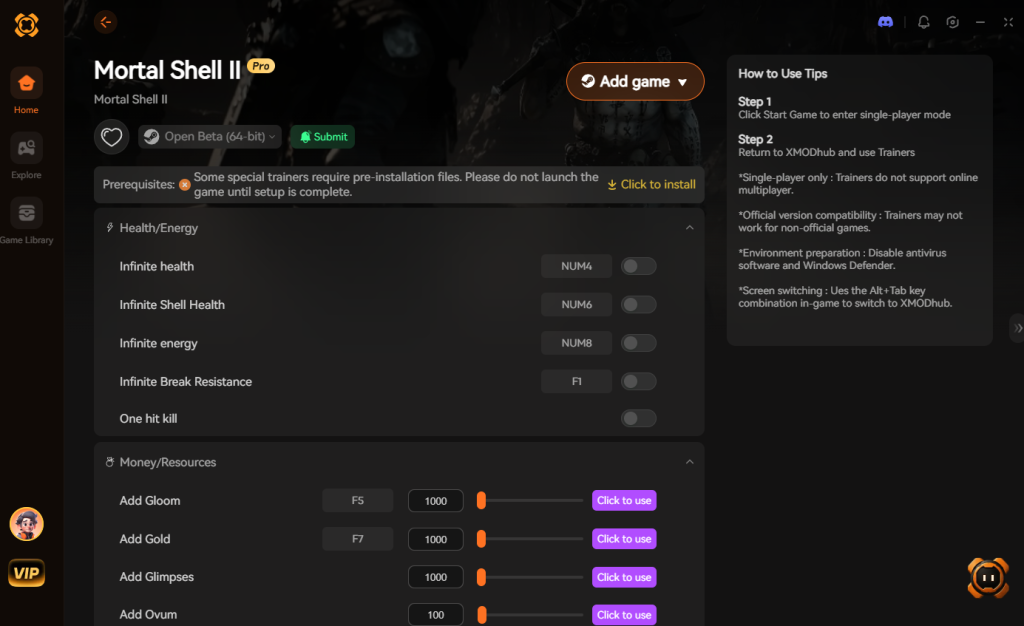
- Click “Play” to launch the game directly through the secure XMODhub wrapper.
- Toggle your desired cheats directly from the clean UI on a second monitor, or utilize the customizable keyboard hotkeys while in-game.
Download Mortal Shell II Trainer Now
7. Troubleshooting: Cheats Not Working
Even with a streamlined tool like XMODhub, PC gaming environments are complex, and you might occasionally run into hiccups where your cheats do not seem to be activating in Mortal Shell II. Here are the most common issues and how to resolve them immediately:
- Game Version Mismatches (Updates Breaking Cheats): The most common reason a trainer stops working is that the developers of Mortal Shell II released a new patch. When a game updates, the memory addresses where health and stamina are stored shift to new locations. If your game just updated on Steam, the current trainer might be looking in the wrong place. XMODhub usually pushes an automatic update within 24 hours of a major game patch. Ensure you restart the XMODhub app to download the latest trainer version.
- Missing Administrator Rights: Modifying another program’s memory requires elevated privileges in Windows. If you launch XMODhub as a standard user, the Windows operating system will physically block it from interacting with Mortal Shell II. Always right-click the XMODhub shortcut and select “Run as Administrator” before launching your game.
- Antivirus False Positives: Because trainers use memory injection techniques (the same underlying technology used by some malicious software), overzealous antivirus programs like Windows Defender or Malwarebytes will often flag them as false positives and silently block them from working. To fix this, you must go into your antivirus settings and add the XMODhub installation folder to your list of Exclusions/Exceptions. This tells your PC that the software is safe and allows it to interface with your games unhindered.
8. Optimal Shell and Weapon Upgrade Paths to Fast-Track
If you are utilizing the XMODhub trainer to bypass the tedious farming of Tar and Glimpses, you might wonder where to allocate your newly acquired, infinite wealth. Mortal Shell II features a deep progression system, and maxing out the right nodes early can drastically shift the gameplay momentum in your favor.
Rather than wandering aimlessly, use your injected currency to unlock these high-tier abilities immediately. The table below outlines the most strategic upgrades to prioritize when you no longer have to worry about the cost.
| Upgrade Classification | Specific Ability / Node | Optimal Use Case | Priority Level |
|---|---|---|---|
| Survivability | Harros – Hardening Mastery | Instantly recovering stamina upon a successful harden block. | High |
| Damage Output | Tiel – Venomous Edge | Stacking rapid damage-over-time on heavily armored boss enemies. | Medium |
| Weapon Art | Hallowed Sword – Mechanical Spike | Staggering elite enemies and interrupting unblockable attacks. | High |
| Resource Farming | Solomon – Resolve Generation | Chaining weapon abilities without cooldowns during mob fights. | Low (If using cheats) |
| Mobility | Eredrím – Executioner’s Stride | Closing the gap on ranged attackers without depleting the stamina bar. | High |
By immediately unlocking these nodes with your trainer-provided Tar, you transform your Foundling into an absolute powerhouse right from the tutorial zone, allowing you to focus purely on exploration and combat execution.
9. Advanced Combat Strategies: Maximizing Trainer Benefits
Using a trainer does not just make the game easier; it opens up entirely new, aggressive playstyles that the vanilla stamina and cooldown restrictions normally prohibit. When you are no longer chained down by the game’s punishing resource management, Mortal Shell II transforms from a slow, methodical souls-like into a high-octane action slasher.
Here are a few advanced ways to combine XMODhub features for maximum enjoyment:
- The Infinite Heavy Combo: Heavy weapons like the Martyr’s Blade or the Smoldering Mace deal massive stagger damage but normally drain your stamina in just two swings. By toggling Infinite Stamina, you can trap elite enemies and bosses in an endless stagger-lock loop. Simply spam your heavy attack button; the enemy will never get a chance to recover their poise.
- The Invincible Statue: The core mechanic of Mortal Shell II is “Hardening”—turning to stone to absorb an incoming blow. Normally, this requires precise timing due to its lengthy cooldown. By enabling Instant Harden Cooldown, you can harden mid-swing, absorb a boss’s ultimate attack, immediately un-harden to finish your combo, and instantly harden again. You become a literal walking fortress.
- Weapon Art Spamming: Weapon abilities look incredible and deal devastating area-of-effect damage, but they cost precious Resolve to cast. Toggle Infinite Resolve to bypass the buildup phase entirely. You can walk into a room filled with mobs and unleash your weapon’s ultimate attack back-to-back, clearing the entire arena in seconds without swinging a standard light attack once.
10. Frequently Asked Questions (FAQ)
Q: Can I use these cheats on PlayStation 5 or Xbox Series X/S?
A: No. Modifying game memory, utilizing trainers like XMODhub, or attempting to access developer consoles for Mortal Shell II is strictly limited to the PC version (Steam and Epic Games Store). Console ecosystems are heavily encrypted and closed off, making real-time memory injection impossible without illegal hardware modifications.
Q: Is there a penalty for using cheats in single-player?
A: There is absolutely no account ban, multiplayer restriction, or official penalty for cheating in a single-player environment like Mortal Shell II. The developers do not monitor your offline save files. The only downsides are the potential for corrupted save files and disabled achievements if you use raw memory editors like Cheat Engine, which can be entirely avoided by using a secure, professionally curated trainer like XMODhub.
Q: Does Mortal Shell II have a multiplayer or co-op mode that these cheats will affect?
A: Mortal Shell II is a strictly single-player action RPG experience. Because there is no competitive multiplayer, PvP invasions, or cooperative modes, you are not ruining the experience for anyone else. You are completely free to modify your game to suit your personal preferences without worrying about anti-cheat software like Easy Anti-Cheat (EAC) banning your Steam account.
Q: Will God Mode prevent me from getting knocked out of my Shell?
A: Yes. In the normal game, taking critical damage forces your “foundling” true form out of the Shell, leaving you vulnerable to a one-hit death. By activating God Mode via XMODhub, your health never depletes, meaning the knock-out mechanic is entirely bypassed. You can tank infinite hits while remaining safely inside your chosen armor.
Conclusion
Whether Mortal Shell II provides a built-in console or not, taking control of your single-player experience is easier than ever. While tweaking raw engine code can be a fun technical experiment in older games, it comes with significant risks to your save files, achievements, and overall game stability in modern titles. For a flawless, risk-free experience, using a dedicated modification tool is always the smarter choice.
With secure support for over 5,000+ single-player PC games, you can easily customize your gameplay, skip the tedious grind for upgrading materials, and play exactly the way you want. If a boss is too frustrating, or you just want to feel like an unstoppable god of war exploring a dark fantasy realm, the power is entirely in your hands.

Stop Grinding, Start Enjoying.
Bypass the tedious resource gathering and unlock your full potential instantly.

I am a passionate gamer and writer at XMODhub, dedicated to bringing you the latest gaming news, tips, and insights.
Connect with me:
LinkedIn Profile ↗

 Nancy Miller