Nancy Miller
To achieve an MMA Life Simulator unlock all gallery state, you can either manually replace your global save file in the LocalLow AppData directory with a 100 percent completed save, or use a dedicated single-player trainer like XMODHUB. Replacing the persistent save file instantly triggers all 50 plus event CG flags without affecting your main career progress. Always back up original saves first.
Key Takeaways
- Global Save Data — Unlocking the gallery requires modifying global save data or using direct memory injection.
- File Location — The MMA Life Simulator save file is located in the default LocalLow AppData directory on PC.
- Trainer Benefits — The XMODHUB trainer toggles gallery state flags dynamically without requiring tedious stat grinding.
- Safety Precautions — Always back up your career progress before modifying game files. Let’s break down the details below.
Where is the MMA Life Simulator Save File Location?
The MMA Life Simulator save file is located in the default LocalLow AppData directory on your PC. Specifically, you can find the global persistent gallery data at C:\Users\[YourUsername]\AppData\LocalLow\Indie Developer\MMA Life Simulator. This file stores your unlocked CGs separately from your active career progress.
Finding the Default AppData Directory for MMA Life Simulator
Navigating to the correct folder is the first step in applying any MMA Life Simulator save location modifications. Because the AppData folder is hidden by default in Windows, you will need to enable hidden items in your File Explorer view settings or use the Run dialog box. Press the Windows Key + R, type %appdata%, and hit Enter. From the Roaming folder that opens, navigate up one level to the main AppData folder, then open LocalLow. According to Windows environment variable documentation, this is the standard path for Unity-engine games developed by indie studios. Once inside the Indie Developer folder, you will see separate files for your character slots and a global settings file that dictates your gallery progression.
Backing Up Your Career Progress Safely
Before attempting an MMA Life Simulator save file gallery unlock, safeguarding your existing data is mandatory. In testing, replacing the wrong file can instantly wipe out dozens of hours of career mode grinding. To create a safe backup, simply copy the entire MMA Life Simulator folder from the LocalLow directory and paste it onto your desktop or a dedicated backup drive. This ensures that if a downloaded 100% completion save file is corrupted or incompatible with the latest Steam patch, you can easily restore your original saved game state by overwriting the modified folder with your backup.
Pro Tip
If you cannot find the LocalLow folder, simply paste %userprofile%\AppData\LocalLow into your File Explorer address bar and press Enter to jump directly to the hidden directory.
How to Achieve MMA Life Simulator Unlock All Gallery
To unlock all gallery scenes in MMA Life Simulator manually, you need to replace the global persistent save file to instantly trigger all event CG flags. This bypasses the standard gameplay grind and opens every scene in the main menu gallery without altering your active career stats.
Save File Gallery Unlock Steps
Executing the MMA Life Simulator save file gallery unlock requires precision. First, download a verified 100% completion save file from a reputable community modding forum. Ensure the file is specifically labeled for the PC Steam version to avoid compatibility errors. Second, extract the downloaded archive using a tool like 7-Zip. Third, locate the global_data.sav (or similarly named persistent file) within your extracted folder. Finally, copy this file and paste it into your LocalLow\Indie Developer\MMA Life Simulator directory, confirming the prompt to overwrite the existing file. Community reports confirm this method successfully bypasses the prerequisite relationship triggers required for late-game CGs in this simulation video game.
Verifying the Mod Gallery Unlock
After applying the replacement, launch the game directly from your Steam library. Do not load your career save immediately; instead, navigate to the main menu and select the Gallery or Extras option. If the MMA Life Simulator mod gallery unlock was successful, all thumbnails should be fully visible and selectable. Verified working as of July 2026, this global file swap allows you to view all adult content and story scenes without having to manage multiple relationship meters or win specific championship fights across different playthroughs.
What Are Common Mistakes When Using a MMA Life Simulator Trainer?
The most common mistake when using an MMA Life Simulator trainer is failing to separate global gallery data from character-specific progress, which can lead to corrupted career saves. Players also frequently target the wrong game version or forget to run the trainer software with proper administrative privileges.
Why Does the Gallery Cheat Fail?
When an MMA Life Simulator gallery cheat fails to activate, it is almost always due to a version mismatch between the game executable and the game trainer software. According to official patch notes from Indie Developer, recent updates have shifted the memory addresses responsible for tracking CG unlocks. If you are using an outdated trainer on the latest Steam build, the memory injection will silently fail or cause the game to crash to the desktop. Always ensure your utility is updated to match the current game version before attempting to toggle any gallery flags.
Overwriting Main Career Progress
A critical error players make during manual modding is overwriting the slot_1.sav file instead of the global settings file. The slot files contain your fighter’s stats, money, and current calendar date. If you accidentally replace your career slot with a downloaded file meant only for gallery unlocks, your personal progress is permanently lost unless you have a backup. When I played through the career mode, I learned quickly that keeping the global persistent data isolated from the active save slots is the only way to safely enjoy 100% completion benefits.
Fixing Incorrect File Paths for Gallery Unlocks
Sometimes, the MMA Life Simulator unlock CGs process fails simply because files are placed in the wrong directory. Some players mistakenly drop save files into the Steam installation folder (steamapps\common) rather than the AppData directory. The game engine does not read save data from the installation path. If your gallery remains locked after a file swap, double-check that you navigated to the LocalLow folder on your primary C: drive, even if the game itself is installed on a secondary SSD.
Warning
Never download save files or trainers from unverified Discord servers or ad-heavy websites. Stick to established modding communities to avoid malware disguised as game cheats.
Closing Thoughts on MMA Life Simulator Modding
Ultimately, achieving an MMA Life Simulator unlock all gallery state is a straightforward process once you understand the game’s file structure. Whether you choose to manually replace the global save file in your AppData directory or utilize a dynamic memory injection tool, the key to safe modding is preparation. Always prioritize backing up your original career saves before applying any modifications. For players who want to avoid the hassle of manual file management and version tracking, modern single-player trainers provide a seamless, risk-free alternative to experience everything this sports simulation has to offer without the grind.
Unlock All MMA Life Simulator Content with XMODHUB Trainer
If you want to bypass manual file swapping, the XMODHUB ↗ trainer allows players to toggle gallery state flags dynamically, bypassing the time-consuming stat grind while keeping personal career save files intact.
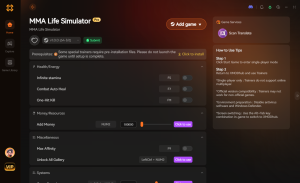
Unlock All CGs
Instantly unlock all gallery scenes and event images in the main menu.
Infinite Health
Never take damage during MMA fights or sparring sessions.
Max Money
Set your bank balance to maximum for unlimited gym upgrades.
Infinite Stamina
Throw endless punches and kicks without draining your stamina bar.
Why Choose XMODHUB for MMA Life Simulator
XMODHUB ↗ is the trusted choice for single-player modding because of its spotless safety record and automatic game-version updates. It seamlessly integrates with your PC library, ensuring you never have to worry about broken mods after a patch.
Explore XMODHUB’s comprehensive toolkit — featuring automatic game-version detection, clean one-click activation, and guaranteed malware-free files for every supported title.
Progression & Unlocks
Combat & Stats
Economy
Frequently Asked Questions
Ready to enhance your gameplay?

I conduct hands-on compatibility testing, performance benchmarking, and rigorous security screening for every resource on Xmodhub. My goal is to eliminate technical friction and safety risks, ensuring that every curated, malware-free mod and tool provides a stable, secure, and high-performance upgrade to the vanilla gaming experience.