Catherine Hu
Quick Answer: Does The Sinking City 2 Have Console Commands?
No, The Sinking City 2 does not have a built-in developer console or native text-based cheat codes. Because developer Frogwares has fully shifted this sequel into a hardcore third-person survival horror experience, the retail version of the game has completely disabled the internal developer command line to preserve the intended atmosphere of Lovecraftian dread and strict resource management.
Since you cannot press the tilde (~) key to type in standard cheat codes, the only way to cheat, modify your inventory, or enable God Mode is by using a dedicated third-party trainer like XMODhub. This application acts as an external memory editor, providing 1-click alternatives like Infinite Health, Max Sanity, and Unlimited Ammunition without requiring you to mess with complex game files.
Editor’s Note: This guide was last verified against the newest The Sinking City 2 patch. Whether you are using native engine tools or a dedicated trainer, please back up your save files before modifying game memory to prevent unexpected bugs.
We have all been there. You have just spent hours dying to the same eldritch monstrosity in The Sinking City 2, or maybe you simply do not have the time to grind for scarce ammunition, medical supplies, and sanity-restoring consumables after a long day. Navigating the flooded, desolate ruins of 1920s Arkham is incredibly punishing, and the intense resource management mechanics are not for everyone. Single-player games are meant to be enjoyed on your own terms. Let us get your character powered up so you can focus on the environmental storytelling and the haunted mysteries of Holloway Manor.
You may also like: The Ultimate The Sinking City 2 Cheat Engine Guide (And A Much Easier Alternative)
📋 Table of Contents
- Quick Answer: Does The Sinking City 2 Have Console Commands?
- 1. How to Enable Cheats in The Sinking City 2
- 2. The Complete List of The Sinking City 2 Cheats
- 3. Item IDs and Spawning Guide
- 4. Do Cheats Disable Achievements?
- 5. Why Native Cheats Can Break Your Save Files
- 6. The Safer Alternative: 1-Click Cheats with XMODhub
- 7. Troubleshooting: Cheats Not Working
- 8. Essential Arkham Arsenal: What to Maximize First
- 9. Modding and Cheat Engine: Are There Alternatives?
- 10. Frequently Asked Questions (FAQ)
- Conclusion
1. How to Enable Cheats in The Sinking City 2
Because The Sinking City 2 does not feature a native developer console, players cannot simply pause the game, open a text box, and type in traditional cheat codes. During the development process, the studio utilized internal debugging tools to test monster AI, sanity triggers, and environmental hazards in the flooded streets of Arkham. However, as is standard practice with modern survival horror releases, these debugging menus were entirely stripped from the compiled retail build available on Steam and the Epic Games Store.
Attempting to force a console open by altering the game’s .ini configuration files or modifying the launch parameters will not work. The code that processes text-based commands simply does not exist in the consumer version of The Sinking City 2.
If you want to bypass the grueling survival mechanics, you must inject these modifications externally. This is where a professional game trainer comes into play. Instead of typing risky code, you can use a 3-step process to download and attach XMODhub to the game to enable cheats seamlessly.
Step 1: Download and Install the Trainer
Navigate to the official XMODhub website and download the desktop application. The software is lightweight and designed to run quietly in the background without consuming heavy system resources. Follow the standard installation prompts to set up the client on your PC.
Step 2: Locate The Sinking City 2 in the Library
Once XMODhub is installed and open, use the search bar at the top of the application to find “The Sinking City 2”. The software automatically scans your system directories (whether you purchased the Standard, Deluxe, or Premium Edition) and detects your specific game version to ensure absolute compatibility.
Step 3: Launch and Inject
Click the “Play” button directly from the XMODhub interface. This will launch The Sinking City 2 while simultaneously hooking the trainer into the game’s active memory. Once you load into your save file in Arkham, you can immediately begin toggling cheats using the on-screen overlay or your designated keyboard hotkeys.
2. The Complete List of The Sinking City 2 Cheats
Because The Sinking City 2 does not feature a developer console, there are no text-based cheat codes to input. You will not find any commands like god or give_ammo hidden within the game files. However, you can achieve the exact same effects—and often far more stable ones—using the XMODhub app.
The trainer manipulates the game’s memory addresses in real-time, allowing you to bypass the intense Lovecraftian survival mechanics completely. Below is the comprehensive list of trainer features available for The Sinking City 2, detailing exactly how they alter your gameplay experience.
XMODhub Trainer Features for The Sinking City 2
| Feature | Effect | How to Activate |
|---|---|---|
| God Mode (Infinite Health) | Grants complete invulnerability. You will take zero damage from physical attacks, environmental hazards, or supernatural entities lurking in the flooded ruins of Arkham. | Numpad 1 or UI Toggle |
| Infinite Sanity | Locks your sanity meter at 100%. Prevents reality-twisting visual distortions, auditory hallucinations, and unprompted monster spawns that occur when your sanity drops too low. | Numpad 2 or UI Toggle |
| Unlimited Ammunition | Your firearms will never run out of bullets. You can fire your 1920s weaponry continuously without ever depleting the reserves in your Arkham Field Kit. | Numpad 3 or UI Toggle |
| No Reload | Removes the need to manually reload your weapons. Your current magazine size becomes infinite, which is absolutely crucial when being swarmed by multiple enemies in tight corridors. | Numpad 4 or UI Toggle |
| Infinite Consumables & Resources | Instantly maximizes all crafting materials, medical supplies, and quest items in your inventory. You will never need to scavenge for scraps to survive again. | Numpad 5 or UI Toggle |
| One-Hit Kills | Amplifies your weapon and melee damage to astronomical levels. Every monster, regardless of its size or cosmic power, will die instantly upon taking a single hit from you. | Numpad 6 or UI Toggle |
| Super Speed | Increases your character’s movement speed by up to 300%. This is perfect for backtracking through the desolate, flooded city without wasting time. | Numpad 7 or UI Toggle |
| Ghost Mode (Invisibility) | Enemy AI is completely disabled regarding your presence. Monsters will not detect you, allowing you to explore the environment and gather clues entirely unbothered. | Numpad 8 or UI Toggle |
| Freeze Game Timer | Halts any internal countdowns during specific timed escape sequences or ritual investigations, giving you infinite time to solve puzzles. | Numpad 9 or UI Toggle |
3. Item IDs and Spawning Guide
In traditional PC games that feature an active developer console, players can usually type a command like player.additem [Item ID] [Amount] to spawn specific weapons, quest items, or resources directly into their inventory. This requires players to search through massive databases of hexadecimal codes to find the exact string of numbers associated with a specific item.
Because The Sinking City 2 completely lacks a developer command line, manually spawning items via text is impossible without native engine tools. You cannot force the game to generate the Chthonic Arsenal weapons or specific puzzle keys by typing into a non-existent text box.
However, you do not need to worry about memorizing complex hexadecimal Item IDs anyway. XMODhub bypasses this tedious process entirely by allowing you to instantly maximize your inventory or add currency with a single click. When you activate the “Infinite Consumables & Resources” feature, the software automatically identifies the memory addresses for every single item currently in your Arkham Field Kit and sets their quantity to the maximum allowable limit. This eliminates the need to look up complex hex codes, drastically reducing the risk of spawning a corrupted item that could permanently break your inventory screen.
4. Do Cheats Disable Achievements?
When playing a heavily story-driven survival horror game, unlocking achievements is a massive part of the experience. Whether you are trying to 100% the haunted mansion story mission in Holloway Manor or simply want the bragging rights of surviving the hardest difficulty setting, you might be worried that cheating will lock you out of these digital rewards.
If The Sinking City 2 had native console commands, using them would almost certainly disable your Steam or Epic Games achievements. Most modern games are programmed to detect when the internal developer console is opened. The moment a command like God Mode is executed, a flag is permanently attached to your save file, preventing any further achievements from triggering on that specific playthrough.
This is where external trainers provide a massive advantage. XMODhub operates entirely outside of the game’s internal flag system. Because the trainer edits the active RAM (Random Access Memory) rather than modifying the core game files or triggering internal developer flags, the game has no idea that you are technically cheating. As far as The Sinking City 2 is concerned, you are simply playing the game flawlessly. You can use Infinite Health, Unlimited Sanity, and One-Hit Kills to breeze through the most terrifying encounters, and every single achievement will unlock exactly as intended. XMODhub safely bypasses achievement locks, letting you enjoy the game your way without sacrificing your progression milestones.
5. Why Native Cheats Can Break Your Save Files
Beyond the achievement lock, native developer tools and memory editors are notoriously unstable. These commands were originally built for developers to test bugs during production, not for everyday gameplay.
In a complex survival horror game like The Sinking City 2, the environment is highly reactive to your character’s state. The sanity mechanic is deeply tied to environmental storytelling, meaning specific hallucinations, enemy spawns, and reality-twisting events are hard-coded to trigger only when your resources or sanity reach specific thresholds.
Forcing a quest to complete via raw engine commands or bypassing intended story triggers can cause crucial NPCs to completely disappear from your map. If you use a raw memory editor to force your character through a locked door before a specific cutscene has loaded, the game’s logic can permanently shatter. Memory leaks, corrupted textures, and sudden crashes to the desktop are incredibly common when you spawn too many items at once using unoptimized developer commands.
Worse yet, if your save file auto-saves immediately after one of these logic breaks, your entire playthrough could be ruined, forcing you to restart your journey through Arkham from the very beginning. The risks associated with raw engine tampering far outweigh the temporary benefits.
6. The Safer Alternative: 1-Click Cheats with XMODhub
If you want the benefits of cheats—like infinite health or skipping the heavy grind—without risking your save files or locking your achievements, you need a dedicated game modification tool. The Sinking City 2 is a complete reimagining designed to challenge veterans of the genre, but you shouldn’t have to suffer through endless death screens if you just want to experience the Lovecraftian narrative.
Instead of typing risky code that might corrupt your game world, the XMODhub app hooks into The Sinking City 2 safely and cleanly. It is built by professional developers who understand exactly how Unreal Engine memory structures work, ensuring that every cheat is highly optimized and perfectly stable.
- Achievement Safe: It bypasses the game’s internal cheat-flagging system, allowing you to earn all Steam and Epic Games trophies without interruption.
- Save File Protection: It alters values temporarily in your computer’s RAM. Because it does not permanently rewrite your hard drive data, your save file remains completely uncorrupted. The moment you close the trainer, the game reverts to its normal state.
- One-Click Toggles: No more memorizing long item IDs, searching through outdated wikis, or struggling with complicated mod installations. Just hit a hotkey to turn God Mode on instantly.
How to Use XMODhub for The Sinking City 2
- Download and Launch the free XMODhub desktop app from the official website.
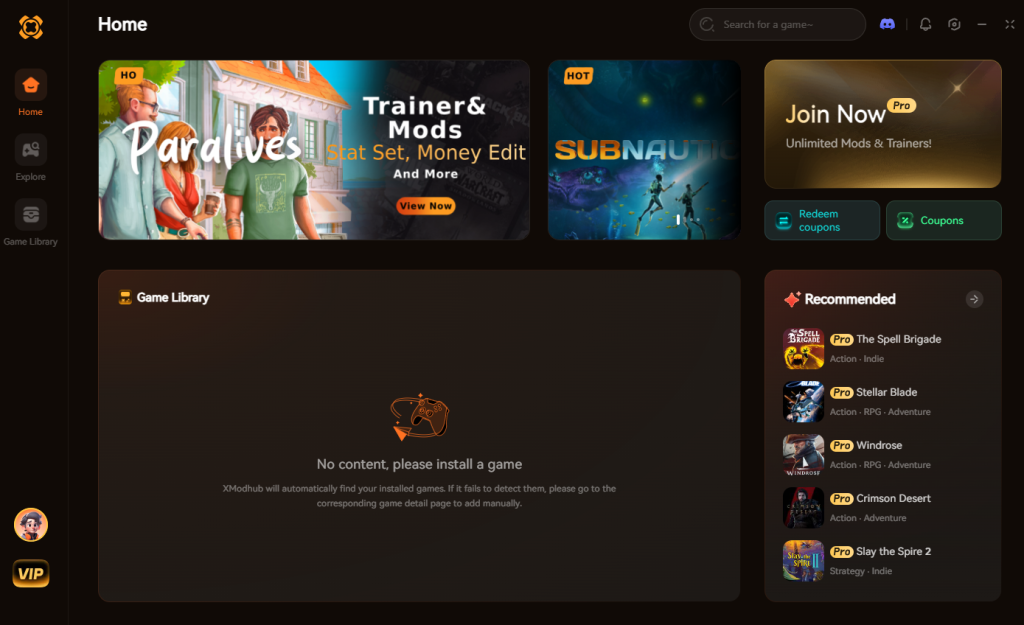
- Search for “The Sinking City 2” in the library and select the version that matches your storefront (Steam, Epic, etc.).
- Click “Play” to launch the game with the trainer attached.
- Toggle your desired cheats directly from the clean UI or via your customized hotkeys while playing.
Download The Sinking City 2 Trainer Now
7. Troubleshooting: Cheats Not Working
While using a premium trainer is vastly more reliable than dealing with broken console commands, PC gaming environments can be incredibly diverse. If you find that your cheats for The Sinking City 2 are not activating properly, it is usually due to one of a few common, easily fixable system conflicts.
- Antivirus False Positives: Because trainers work by actively modifying the memory of another running application (The Sinking City 2), overly aggressive antivirus software like Windows Defender or Norton may flag the trainer as suspicious and block it from working. To fix this, simply add the XMODhub installation folder to your antivirus exceptions or whitelist.
- Game Updates and Patches: Frogwares will inevitably release patches for The Sinking City 2 to fix bugs or add new content. When a game updates, the internal memory addresses shift, which can temporarily break the trainer. XMODhub usually pushes an automatic update within 24 hours of a major game patch. Ensure you are running the latest version of the trainer by restarting the application.
- Missing Administrator Rights: Modifying game memory requires elevated system permissions. If your hotkeys are not responding, close both the game and the trainer. Right-click the XMODhub shortcut and select “Run as Administrator” before launching The Sinking City 2 again.
8. Essential Arkham Arsenal: What to Maximize First
When players search for The Sinking City 2 cheats and console commands, their primary goal is usually to bypass the grueling early-game grind. Because ammunition and upgrade materials are brutally scarce in the flooded districts, knowing exactly what to prioritize when you activate the “Infinite Consumables & Resources” cheat will drastically improve your survival rate.
If you are using the XMODhub trainer to give yourself a boost, we highly recommend focusing on the following weapon and character upgrades immediately to counter the escalating Lovecraftian threats.
| Upgrade Category | Specific Weapon / Ability | Strategic Advantage in Combat | Priority Level |
|---|---|---|---|
| Firearms | 1920s Trench Shotgun | Instantly clears tight corridors of Deep One swarms. | High |
| Survival Gear | Expanded Field Kit | Allows carrying extra medical syringes and sanity boosters. | High |
| Offensive | Heavy Revolver Caliber | Pierces armored elite monstrosities in Holloway Manor. | Medium |
| Mobility | Enhanced Dodge Recovery | Crucial for evading unblockable cosmic entity grab attacks. | Maximum |
| Explosives | Phosphorus Grenades | Burns away environmental hazards and clustered enemies. | Medium |
9. Modding and Cheat Engine: Are There Alternatives?
Since native The Sinking City 2 console commands are disabled, some hardcore PC enthusiasts might look toward alternative modding tools like Cheat Engine (CE) tables or manual hex editing. While these methods can technically alter game values, they come with a steep learning curve and significant stability risks.
Using a public Cheat Engine table requires you to manually attach the CE debugger to the game process, locate the correct memory pointers, and freeze values by hand. Because modern Unreal Engine 5 games utilize dynamic memory allocation, these addresses change every time you load a new zone or encounter a loading screen. This frequently causes Cheat Engine to crash the game entirely, potentially corrupting your auto-save in the process.
Furthermore, downloading unverified .ct (Cheat Table) files from random modding forums can expose your PC to malware. XMODhub eliminates these risks by automatically updating its memory pointers in the cloud and providing a unified, secure interface that requires zero technical knowledge to operate.
10. Frequently Asked Questions (FAQ)
Q: Can I use these cheats on PlayStation or Xbox?
A: No. Modifying game memory or accessing developer consoles for The Sinking City 2 is strictly limited to the PC version. Console ecosystems are heavily locked down, and external trainers like XMODhub cannot interface with PlayStation 5 or Xbox Series X/S hardware.
Q: Is there a penalty for using cheats in single-player?
A: There is no account ban or official penalty for cheating in a single-player environment. The Sinking City 2 does not feature any competitive multiplayer or anti-cheat software (like Easy Anti-Cheat or BattlEye). The only downsides are the potential for corrupted save files and disabled achievements if you try to hack the game manually, which can easily be avoided by using a secure trainer like XMODhub.
Q: Will Frogwares ever add an official cheat menu to The Sinking City 2?
A: It is highly unlikely. The developers have stated that this game is a massive shift toward hardcore survival horror, focusing heavily on resource scarcity and intense difficulty. Adding an official cheat menu would contradict their design philosophy. Your best and most reliable option will always be external modification tools.
Q: Does XMODhub work with the Premium Edition 24-hour advanced access?
A: Yes. XMODhub is designed to hook into the core executable of the game. Whether you are playing during the early access period, exploring the Holloway Manor DLC, or using the Chthonic Arsenal weapons, the trainer will recognize the game client and function normally.
Conclusion
Whether The Sinking City 2 provides a built-in console or not, taking control of your single-player experience is easier than ever. While tweaking raw engine code can be a fun technical experiment in some games, the reality is that The Sinking City 2 keeps its internal mechanics locked down tight. Trying to force your way into the game’s code manually comes with significant risks to your save files and achievements, and ultimately, it just is not worth the headache.
For a flawless, risk-free experience, using a dedicated modification tool is always the smarter choice. You shouldn’t have to let a frustrating boss fight or a lack of ammunition ruin a fantastic Lovecraftian narrative.
With secure support for over 5,000+ single-player PC games, you can easily customize your gameplay, skip the tedious grind, and play exactly the way you want. Embrace the madness of Arkham on your own terms.
Stop Grinding, Start Enjoying.
Bypass the tedious resource gathering and unlock your full potential instantly.

I am a passionate gamer and writer at XMODhub, dedicated to bringing you the latest gaming news, tips, and insights.
Connect with me:
LinkedIn Profile ↗
 Nancy Miller