Catherine Hu
No, IRON NEST: Heavy Turret Simulator does not have a built-in developer console or native text-based cheat codes. Because the developers designed this brutal dieselpunk heavy-artillery simulator to be an unforgiving tactical experience, they intentionally removed access to the traditional developer command line in the public release. Pressing the tilde (~) key or modifying the game’s configuration files will not grant you access to God Mode or free items.
However, you are not out of luck. The absolute best and only reliable way to cheat in IRON NEST: Heavy Turret Simulator is by using a secure, third-party trainer like XMODhub. This dedicated software acts as a bridge to the game’s memory, offering powerful 1-click alternatives like Infinite Hull Integrity (God Mode), Unlimited Artillery Shells, and Zero Cannon Overheat, allowing you to dominate the battlefield through your colossal war machine without dealing with complex hex codes or locked developer menus.
Editor’s Note: This guide was last verified against the newest IRON NEST: Heavy Turret Simulator patch. Whether you are using native engine tools or a dedicated trainer, please back up your save files before modifying game memory to prevent unexpected bugs. — Catherine Hu, Content Lead at XMODhub
We have all been there. You have just spent hours dying to the same boss in IRON NEST: Heavy Turret Simulator, or maybe you simply do not have the time to grind for High-Grade Diesel Fuel and Tungsten Armor Plating after a long day. Mastering a heavy spider-turret dripping with steel and power requires immense patience, and managing the gritty logistics of war can sometimes detract from the sheer fun of blowing things up. Single-player games are meant to be enjoyed on your own terms. Let us get your character powered up.
You may also like: The Ultimate IRON NEST: Heavy Turret Simulator Cheat Engine Guide (And A Much Easier Alternative)
📋 Table of Contents
- Quick Answer: Does IRON NEST: Heavy Turret Simulator Have Console Commands?
- 1. How to Enable Cheats in IRON NEST: Heavy Turret Simulator
- 2. The Complete List of IRON NEST: Heavy Turret Simulator Cheats
- 3. Item IDs and Spawning Guide
- 4. Do Cheats Disable Achievements?
- 5. Why Native Cheats Can Break Your Save Files
- 6. The Safer Alternative: 1-Click Cheats with XMODhub
- 7. Troubleshooting: Cheats Not Working
- 8. Bypassing the Grind: Top Turret Upgrades You Can Instantly Unlock
- 9. Overcoming the Hardest Encounters in IRON NEST
- 10. Frequently Asked Questions (FAQ)
- Conclusion
1. How to Enable Cheats in IRON NEST: Heavy Turret Simulator
Because IRON NEST: Heavy Turret Simulator does not feature a native developer console, players cannot simply type in text-based codes to alter their gameplay. Modifying configuration files (.ini) or adding launch parameters in Steam will not force a command line interface to appear. The game engine is strictly locked down to preserve the intended brutal dieselpunk heavy-artillery simulation.
To bypass these restrictions and enable cheats, you must utilize a memory injection tool. The most secure and user-friendly method is utilizing the XMODhub desktop application. Here is the comprehensive, step-by-step process to get your cheats up and running safely:
Step 1: Download and Install the Secure Client
Navigate to the official XMODhub website and download the latest version of the desktop application. The software is lightweight and designed to run seamlessly in the background without consuming the precious CPU resources needed to render the massive battlefields and physics calculations in IRON NEST: Heavy Turret Simulator. Run the installer and follow the on-screen prompts.
Step 2: Locate the Game in Your Library
Once XMODhub is installed and launched, the application will automatically scan your system for installed games. If IRON NEST: Heavy Turret Simulator is installed via Steam, it will appear instantly on your dashboard. If it does not appear automatically, you can use the manual search bar at the top of the application to find “IRON NEST: Heavy Turret Simulator” and link the executable file directly.
Step 3: Launch and Attach the Trainer
Click the “Play” button directly from within the XMODhub interface. This action launches IRON NEST: Heavy Turret Simulator while simultaneously attaching the trainer’s memory hooks securely to the game’s process. Wait until you are fully loaded into a mission or the main menu before proceeding.
Step 4: Toggle Your Desired Cheats
With the game running, you can now press the pre-assigned hotkeys (such as F1, F2, F3) or use a secondary monitor to manually click the toggle switches within the XMODhub user interface. You will hear an audio cue confirming that the cheat—whether it is infinite ammunition for your colossal war machine or instant turret rotation—has been successfully activated.
2. The Complete List of IRON NEST: Heavy Turret Simulator Cheats
Because IRON NEST: Heavy Turret Simulator does not feature a developer console, there are no text-based cheat codes to input. You will not find any command lines like god or give_ammo hidden in the game’s code. However, you can achieve the exact same effects, and often much better ones, using the XMODhub app.
The trainer manipulates the game’s live memory, granting you absolute control over your heavy spider-turret. Below is the complete list of trainer features available in XMODhub for IRON NEST: Heavy Turret Simulator, detailing exactly how they impact your heavy-artillery gameplay.
| Trainer Feature | In-Game Effect | How to Activate |
|---|---|---|
| Infinite Hull Integrity (God Mode) | Completely protects your colossal war machine from all incoming damage. Enemy artillery, mines, and infantry attacks will deal zero damage to your armor plating. | Numpad 1 / UI Toggle |
| Unlimited Artillery Shells | Freezes your ammunition counter. You can fire your massive cannons indefinitely without ever needing to reload or scavenge for additional heavy munitions. | Numpad 2 / UI Toggle |
| Zero Cannon Overheat | Disables the thermal mechanics of your weaponry. Firing massive cannons normally causes them to overheat and jam; this cheat keeps the barrels permanently cool for a continuous barrage. | Numpad 3 / UI Toggle |
| Instant Turret Rotation | Bypasses the realistic, sluggish physics of the heavy spider-turret. Your crosshairs and massive cannons will snap instantly to wherever you aim your mouse, drastically increasing your reaction time. | Numpad 4 / UI Toggle |
| Infinite Diesel Fuel | Your war machine requires fuel to maneuver across the gritty battlefield. This cheat locks your fuel gauge at 100%, allowing unlimited sprinting and repositioning. | Numpad 5 / UI Toggle |
| Max Propaganda / Resources | Instantly grants you maximum in-game currency and upgrade materials. This allows you to purchase every single weapon upgrade, armor reinforcement, and cosmetic without grinding. | Numpad 6 / UI Toggle |
| Adjust Game Speed | Allows you to slow down time (bullet time) to make precise tactical shots against distant targets, or speed up time to skip long travel sequences across empty battlefields. | Numpad 7 / UI Toggle |
| One-Hit Kills | Multiplies your damage output exponentially. Even the most heavily armored enemy bunkers and rival war machines will be decimated with a single standard shell. | Numpad 8 / UI Toggle |
3. Item IDs and Spawning Guide
In many PC games, players can use the developer console to manually type in specific alphanumeric codes (Item IDs) to spawn weapons, armor, or quest items directly into their inventory.
Because IRON NEST: Heavy Turret Simulator lacks a developer console, manually spawning items via text commands is completely impossible without native engine tools. There is no command line to type a hex code into, and attempting to force one open through third-party unverified mods often results in immediate game crashes or corrupted save data. The game’s engine dynamically loads assets, meaning item memory addresses shift every time you load a level, rendering static Item IDs useless even if you had a basic memory scanner.
Fortunately, XMODhub bypasses this tedious process entirely. Instead of forcing you to scour the internet for a list of complex hex codes and type them out one by one, the trainer allows you to instantly maximize your inventory with a single click. By toggling the “Max Resources” or “Infinite Items” feature, the software automatically locates the dynamic memory addresses for your heavy shells, armor plating, and diesel fuel, filling your reserves to their absolute maximum limit. This eliminates the need to look up complex codes, saving you time and keeping you immersed in the brutal dieselpunk warfare.
4. Do Cheats Disable Achievements?
A major concern for hardcore gamers is whether modifying their game will lock them out of earning Steam or Epic Games Store achievements. In many modern titles, if the game detects that the developer console has been accessed, it will immediately place a permanent flag on your save file. This flag irreversibly disables all future achievement progression for that specific playthrough, forcing you to start a brand new game if you care about your completionist profile.
This is where the architecture of IRON NEST: Heavy Turret Simulator combined with XMODhub provides a massive advantage. Because the game does not have a native console, there is no built-in trigger to flag your save file when text commands are used. Furthermore, XMODhub operates entirely in the system’s RAM (Random Access Memory). It does not permanently alter the game’s executable file, nor does it inject code into the save file itself.
As a result, IRON NEST: Heavy Turret Simulator cannot detect that the values for your health or ammunition are being held artificially high by an external program. You can comfortably use God Mode to survive the hardest artillery barrages, unlock the most difficult in-game milestones, and still perfectly trigger and collect every single Steam achievement without any risk of being flagged.
5. Why Native Cheats Can Break Your Save Files
Beyond the achievement lock, native developer tools and memory editors are notoriously unstable. These commands were originally built for developers to test bugs during production, not for everyday gameplay.
Forcing a quest to complete or bypassing intended story triggers can cause crucial NPCs to completely disappear from your map. Memory leaks, corrupted assets, and sudden crashes to the desktop are incredibly common when you spawn too many items at once. In a physics-heavy simulation like IRON NEST: Heavy Turret Simulator, altering the mass of your heavy spider-turret or the velocity of your artillery shells through raw engine tweaks can completely break the game’s collision detection. You might find your colossal war machine clipping through the terrain, falling endlessly into the void, and automatically saving in that doomed state. Once a save file is corrupted by raw engine manipulation, it is almost always unrecoverable, costing you dozens of hours of strategic progression.
6. The Safer Alternative: 1-Click Cheats with XMODhub
If you want the benefits of cheats—like infinite health or skipping the heavy grind—without risking your save files or locking your achievements, you need a dedicated game modification tool.
Instead of typing risky code that might corrupt your game world, the XMODhub app hooks into IRON NEST: Heavy Turret Simulator safely and cleanly. The developers behind XMODhub meticulously map out the memory structures of the game, ensuring that when you toggle a cheat, it only affects the specific value intended, leaving the game’s core physics and quest logic completely untouched.
- Achievement Safe: It bypasses the game’s internal cheat-flagging system by operating exclusively in temporary memory.
- Save File Protection: It alters values temporarily. The moment you close the trainer, the game reverts to its natural state. Your save file remains uncorrupted and completely vanilla.
- One-Click Toggles: No more memorizing long item IDs or risking typos in a command line. Just hit a hotkey to turn God Mode on instantly while in the heat of battle.
How to Use XMODhub for IRON NEST: Heavy Turret Simulator
- Download and Launch the free XMODhub desktop app.

- Search for “IRON NEST: Heavy Turret Simulator” in the library.
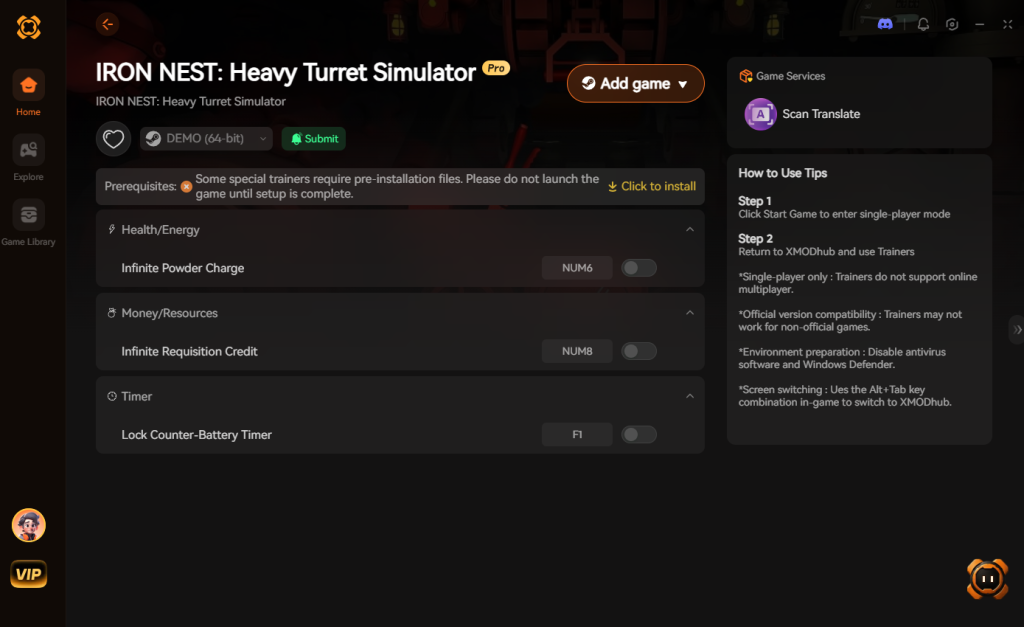
- Click “Play”.
- Toggle your desired cheats directly from the clean UI or via hotkeys.
Download IRON NEST: Heavy Turret Simulator Trainer Now
7. Troubleshooting: Cheats Not Working
Even with the most streamlined software, PC gaming ecosystems are complex, and you might occasionally run into minor hiccups when trying to modify IRON NEST: Heavy Turret Simulator. If your cheats are not activating properly, consult this detailed troubleshooting checklist:
- Game Version Mismatch: IRON NEST: Heavy Turret Simulator is an actively developed title. When the developers push a new update or patch to Steam, the underlying memory addresses of the game shift. If your game has just updated, the current version of the trainer may no longer point to the correct memory locations. The solution is simply to wait a few hours; XMODhub updates its trainers automatically via the cloud shortly after major game patches drop.
- Antivirus False Positives: Because XMODhub injects code into another running process (the game), overzealous antivirus programs like Windows Defender or Malwarebytes may mistakenly flag it as malicious behavior. This is a common false positive for all game trainers. To fix this, you must navigate to your antivirus settings and add the XMODhub installation folder to your list of exclusions or trusted programs.
- Missing Administrator Privileges: Modifying the memory of a running application requires elevated system permissions in Windows. If you launch the trainer as a standard user, it may be blocked from communicating with IRON NEST: Heavy Turret Simulator. Always right-click the XMODhub shortcut and select “Run as Administrator” to ensure the software has the necessary clearance to apply your cheats.
- Conflicting Overlays: Sometimes, third-party overlays from software like Discord, GeForce Experience, or Rivatuner can interfere with the hotkey inputs of the trainer. If pressing the Numpad keys does not trigger the cheats, try minimizing the game and clicking the toggles directly on the XMODhub user interface, or temporarily disable your other overlays.
8. Bypassing the Grind: Top Turret Upgrades You Can Instantly Unlock
One of the primary reasons players search for IRON NEST: Heavy Turret Simulator cheats and console commands is the grueling resource economy. Upgrading your heavy spider-turret requires farming thousands of scrap metal pieces, rare tungsten nodes, and high-grade diesel fuel. If you have a full-time job or simply want to experience the endgame firepower immediately, the “Max Propaganda / Resources” cheat is a game-changer.
By activating the trainer, you can instantly bypass the tech tree restrictions and purchase the most devastating augmentations. Here is a breakdown of the top-tier upgrades you should prioritize once your resources are maxed out:
| Upgrade Classification | Specific Node / Ability | Tactical Benefit | Grind Difficulty |
|---|---|---|---|
| Firepower | Tungsten Armor-Piercing Rounds | Shreds heavy mechanized bunkers and enemy armor in a single volley. | Extreme |
| Mobility | Hydraulic Leg Servos T3 | Increases your spider-turret’s lateral strafing speed by 40%, essential for dodging. | High |
| Defense | Reactive Hull Plating | Completely negates explosive splash damage from incoming enemy artillery fire. | High |
| Utility | Advanced Thermal Cooling | Significantly increases sustained fire duration before your primary cannons jam. | Medium |
| Logistics | Expanded Ammo Hoppers | Doubles your maximum shell carrying capacity, reducing reload downtime. | Medium |
By skipping the repetitive salvage missions, you can focus entirely on the core tactical gameplay—positioning, aiming, and obliterating the dieselpunk hordes with a fully optimized war machine.
9. Overcoming the Hardest Encounters in IRON NEST
IRON NEST: Heavy Turret Simulator is notorious for its punishing difficulty spikes. Even veteran strategy players often find themselves brick-walled by certain enemy compositions or boss encounters. While there are no native console commands to instantly delete these threats, utilizing specific trainer toggles can turn a frustrating roadblock into a spectacular power fantasy.
Surviving the Midnight Swarm Raids
During the infamous night-time survival missions, you are swarmed by hundreds of fast-moving infantry saboteurs attempting to plant explosives on your mechanical legs. The slow, realistic physics of the game make it nearly impossible to track them all. By combining Instant Turret Rotation with Zero Cannon Overheat, your heavy turret transforms into an agile, rapid-fire defense platform. You can snap your crosshairs instantly across a 360-degree radius, laying down an endless barrage of suppressive fire without your barrels ever jamming.
Decimating the Dreadnought Class Mega-Tanks
Encountering a Dreadnought is usually a terrifying experience that requires meticulous positioning, ammo conservation, and perfect timing. These bosses have massive health pools and can easily one-shot you if your armor is compromised. If you do not want to spend twenty minutes whittling down their health, activating One-Hit Kills allows your standard artillery shells to punch straight through their reinforced plating, instantly reducing the most fearsome enemies in the game to a pile of burning scrap metal.
10. Frequently Asked Questions (FAQ)
Q: Can I use these cheats on PlayStation or Xbox?
A: No. Modifying game memory or accessing developer consoles for IRON NEST: Heavy Turret Simulator is strictly limited to the PC version. Console ecosystems are heavily encrypted and closed off, making it impossible to run third-party trainers or memory injectors like XMODhub on a PS5 or Xbox Series X.
Q: Is there a penalty for using cheats in single-player?
A: There is no account ban or official penalty for cheating in a single-player environment. IRON NEST: Heavy Turret Simulator is a standalone experience without competitive multiplayer servers, meaning you are not ruining the game for anyone else. The only downsides are the potential for corrupted save files and disabled achievements, which can be entirely avoided by using a secure trainer like XMODhub.
Q: Can I use Cheat Engine instead of XMODhub?
A: While Cheat Engine is a powerful tool, it requires a deep understanding of memory scanning, hex editing, and pointer maps. Finding the correct values for a complex dieselpunk artillery simulator is incredibly tedious and risky for average users. XMODhub does all of this heavy lifting for you in the background, providing a safe, tested, and beautiful user interface that requires zero technical knowledge to operate.
Q: Will using unlimited shells break the game’s physics?
A: No. The trainers are specifically designed to bypass the ammunition deduction logic without interfering with the physical rendering of the artillery shells. You can fire as many rounds from your colossal war machine as you want; the game will render the explosions perfectly without crashing your system.
Conclusion
Whether IRON NEST: Heavy Turret Simulator provides a built-in console or not, taking control of your single-player experience is easier than ever. While tweaking raw engine code can be a fun technical experiment, it comes with significant risks to your save files and achievements. For a flawless, risk-free experience, using a dedicated modification tool is always the smarter choice.
With secure support for over 5,000+ single-player PC games, you can easily customize your gameplay, skip the tedious grind, and play exactly the way you want.

Stop Grinding, Start Enjoying.
Bypass the tedious resource gathering and unlock your full potential instantly.

I am a passionate gamer and writer at XMODhub, dedicated to bringing you the latest gaming news, tips, and insights.
Connect with me:
LinkedIn Profile ↗

 Nancy Miller