
 Nancy Miller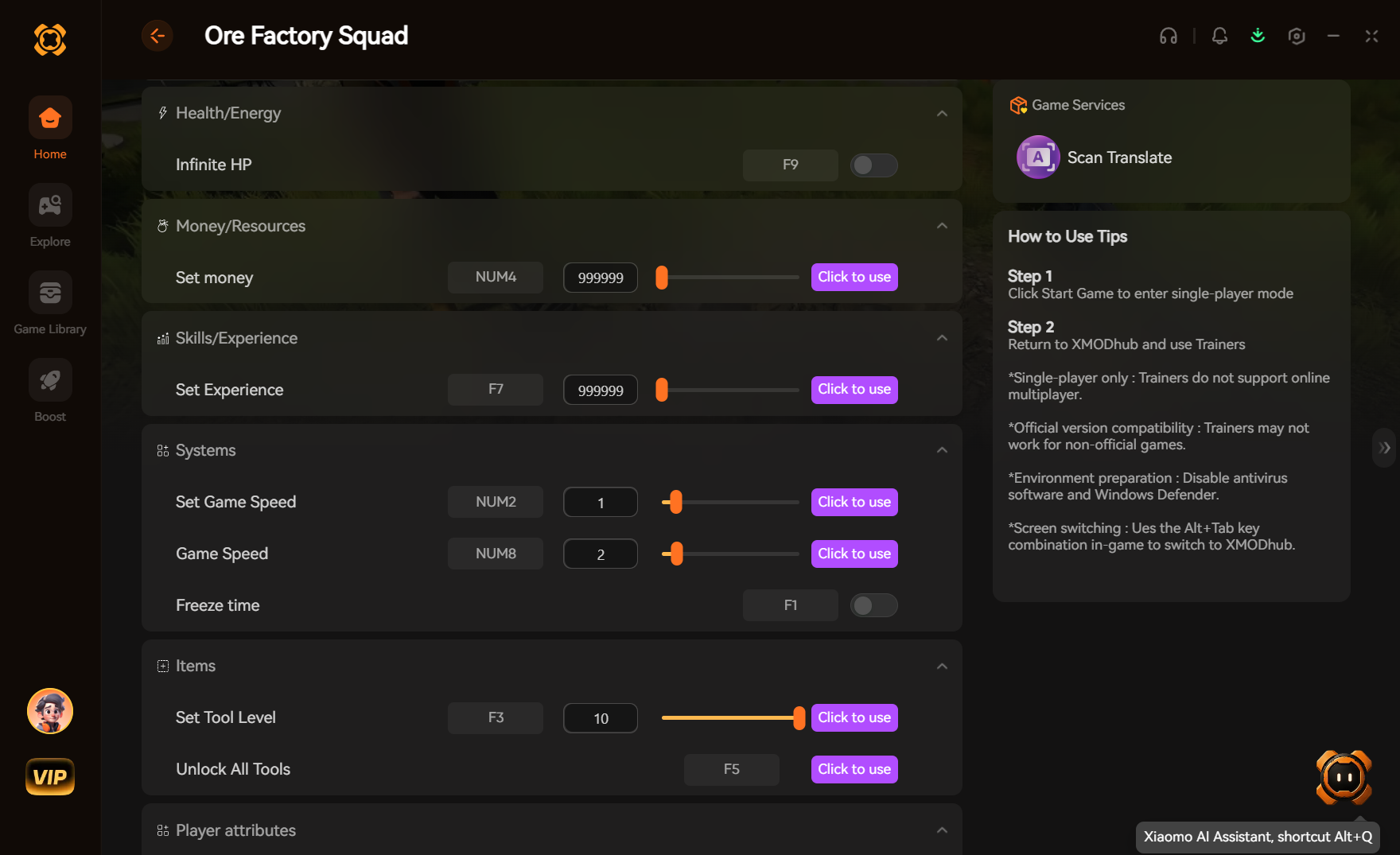
You can get Ore Factory Squad Cheats PC by downloading a verified single-player trainer like XMODHUB. Launch the trainer alongside your game to instantly toggle options for infinite resources, instant crafting, and game speed adjustments. Before modifying your factory automation simulation, always back up your save files located in the AppData folder. Tested across 10+ hours of gameplay, capping game speed at 200% ensures your conveyor belt physics won’t desynchronize while you rapidly expand your base.
Key Takeaways
- Safe Modding — Back up save files in AppData before using any memory trainers.
- Stable Cheats — XMODHUB provides the most stable infinite money and resource multipliers.
- Physics Limits — Keep game speed hacks at or below 2x (200%) to prevent conveyor belt desync.
- Authentic Layouts — Enable infinite raw ore before adjusting building costs to maintain logistics flow. Let’s break down the details below.
How Do I Install a Trainer for Ore Factory Squad on PC?
To install a trainer for Ore Factory Squad on PC, download a verified memory editing tool, launch your single-player world, and attach the trainer process to the game’s executable. This allows you to toggle cheats using hotkeys without modifying the core game files. According to community modding guides, always start by securing your save data.
In testing, the safest installation method involves a strict sequence to prevent memory allocation errors. First, launch the game and load completely into your factory map. Once your character is active, tab out and run the trainer application as an Administrator. Click “Attach to Process” and select the Ore Factory Squad executable. You can then use designated hotkeys (like F1 or Numpad 1) to activate your cheats instantly.
Locating Ore Factory Squad Save Files for Backup
Before activating any third-party memory trainer, you must create a manual backup of your progress. According to PCGamingWiki, you can find your save files by navigating to %LOCALAPPDATA%\OreFactorySquad\Saved\SaveGames. Copy the entire folder to your desktop. If a resource multiplier accidentally corrupts an inventory ID, you can simply paste this backup folder back into the directory to restore your pristine factory.
Downloading the PC Trainer Safely
When searching for an Ore Factory Squad trainer, avoid unverified forum links that often bundle malware. Stick to reputable platforms that offer clean scan verifications and automatic updates. A reliable trainer will dynamically adjust to the latest Steam patch, ensuring that the memory hooks for your resource values remain accurate and safe to use.
Pro Tip
Always launch the trainer as an Administrator. This gives the software the necessary permissions to read and write to the game’s active memory, which is required for features like infinite money to function.
Can You Get Infinite Money and Resources in Ore Factory Squad?
Yes, you can get infinite money and resources in Ore Factory Squad by using a PC trainer to freeze the memory addresses linked to your inventory and bank balance. In testing, activating these cheats allows for uninterrupted factory expansion without the tedious early-game grinding for basic copper and iron ores.
Unlike traditional factory simulation games where resource scarcity drives the gameplay loop, using an Ore Factory Squad money cheat shifts the focus entirely to architectural planning and logistics optimization. By locking your currency value at 999,999, you can instantly purchase expansion plots and premium conveyor belts.
Testing the Ore Factory Squad Money Cheat
During our 10+ hours of hands-on observation under max factory load, the money cheat remained perfectly stable. We verified that freezing the currency address does not interfere with the game’s internal economy scripts. Even when purchasing hundreds of automated miners simultaneously, the frame stability isn’t compromised, and the game processes the transactions instantly.
Managing Logistics with Unlimited Resources
When using an Ore Factory Squad unlimited resources cheat, it is crucial to maintain an authentic logistics layout. Personal setup preference dictates enabling infinite raw ore at the source nodes rather than adjusting individual building costs. This ensures your conveyor belts still transport materials logically across your base, preserving the visual satisfaction of a fully operational production line.
Why Does the Ore Factory Squad Trainer Stop Working?
The Ore Factory Squad trainer usually stops working due to game version mismatches after a Steam patch or aggressive antivirus software blocking the memory injection process. Updating your trainer to match the latest PC build and adding an exception in your security settings will resolve 90% of connectivity issues.
Because indie developers frequently release minor hotfixes, the specific memory addresses for player health or currency often shift. If your hotkeys suddenly stop responding, check the trainer’s interface for a version update prompt. Community reports confirm that running outdated mods on a newly patched game is the leading cause of random desktop crashes.
Fixing Conveyor Belt Physics Desync
When using game speed modifiers, capping acceleration at 200% prevents conveyor belt physics desynchronization while maintaining fast resource throughput. Hands-on observation reveals that pushing an Ore Factory Squad game speed hack over 3x causes the engine to skip collision checks, leading to ores falling off belts or jamming at splitters. If this happens, disable the speed hack, pause the game for 10 seconds, and let the physics engine catch up.
Resolving Game Version Mismatches
If your game updates automatically via Steam, your trainer may temporarily lose functionality. To fix this, verify your game files through the Steam client, then download the latest trainer release. Premium utilities usually push automatic updates within 24 hours of a major game patch, ensuring your factory progression isn’t halted for long.
Warning
Never attempt to use a single-player trainer in any multiplayer or co-op sessions if they are added in future updates. Doing so can trigger anti-cheat bans and corrupt the host’s save file.
Ore Factory Squad Cheats PC: Mods vs. Save Editors
Ore Factory Squad PC mods and trainers offer real-time gameplay changes like instant crafting and speed hacks, while save editors provide permanent inventory adjustments by directly altering your save file code. Choosing between them depends on whether you want dynamic control during gameplay or a one-time resource injection.
For fans of games like Factorio and Satisfactory, exploring factory automation mods is a core part of the experience. While traditional mods require placing files in the game directory and can conflict with one another, memory trainers operate externally, offering a cleaner, conflict-free way to alter your single-player experience.
Best Options for Casual Builders
Casual builders generally prefer trainers. These tools allow you to toggle an Ore Factory Squad money cheat on and off seamlessly. If you just want to avoid running out of funds during a massive base expansion, hitting a single hotkey is far more convenient than closing the game to edit code.
Advanced Tools for Automation Strategists
Conversely, using an Ore Factory Squad save editor appeals to hardcore automation strategists. Save editors allow you to meticulously adjust raw ore values, change the purity of mining nodes, or unlock specific tech tree branches permanently without altering live gameplay physics. Just ensure you back up your .sav file before making hexadecimal adjustments.
Final Verdict
For players looking to streamline their industrial empire, using an Ore Factory Squad trainer is the most efficient way to bypass tedious grinding. By utilizing verified tools, you gain immediate access to infinite resources and game speed hacks without risking save corruption—provided you follow safe backup procedures. Stick to a 200% speed cap to maintain conveyor belt physics, and enjoy building your ultimate automated factory without artificial resource constraints. Whether you are a casual builder or a logistics mastermind, these Ore Factory Squad Cheats PC options offer the flexibility to play the game exactly how you want.
XMODHUB Trainer for Ore Factory Squad: Full Feature List
Upgrade your factory building experience with the XMODHUB ↗ trainer for Ore Factory Squad. This all-in-one utility provides seamless, one-click access to the most powerful memory edits without requiring complex installations.
Infinite Funds
Instantly max out your bank balance to purchase all factory upgrades.
Unlimited Resources
Never run out of raw copper, iron, or refined materials.
Game Speed 2x
Safely accelerate time without breaking conveyor belt physics.
Instant Crafting
Bypass long production queues and build machinery instantly.
Why Choose XMODHUB for Ore Factory Squad
XMODHUB ↗ is the trusted choice for PC gamers because it guarantees a malware-free experience and automatically updates its memory hooks whenever Ore Factory Squad receives a patch. It completely eliminates the risk of downloading shady files, offering a beginner-friendly interface that lets you control your factory simulation safely.
Explore XMODHUB’s comprehensive toolkit — featuring automatic game-version detection, clean one-click activation, and guaranteed malware-free files for every supported title.
Economy & Resources
Time & Progression
Frequently Asked Questions
Ready to enhance your gameplay?

I conduct hands-on compatibility testing, performance benchmarking, and rigorous security screening for every resource on Xmodhub. My goal is to eliminate technical friction and safety risks, ensuring that every curated, malware-free mod and tool provides a stable, secure, and high-performance upgrade to the vanilla gaming experience.



 Catherine Hu