
 Catherine Hu
How do you cheat in EverRail Demo? To cheat in EverRail Demo, you can manually attach Cheat Engine to the game’s executable and scan for changing numeric values like your train’s core battery power level or your raw scrap metal inventory used for survival crafting. However, because game updates frequently break Cheat Engine tables (.CT files), the safest and easiest alternative is using an auto-updating mod manager like XMODhub, which provides 1-click cheats without requiring any memory scanning.
[Editor’s Note] Look, I get it. We all start EverRail Demo thinking we’re going to play it completely legit. But after dying to a sudden procedural blizzard in the deep frozen wasteland for the 15th time, or spending hours grinding for high-tier locomotive engine components just to watch your train’s battery hit zero, the fun stops. I’ve been messing with Cheat Engine for years, and trying to isolate the exact memory values for this game’s current patch almost drove me insane. Today, I’m going to show you how to manually hack the values if you want the technical challenge—but I’ll also share the 1-click shortcut I actually use to save my sanity.
You may also like: The Ultimate EverRail Demo Console Commands and Cheats Guide
📋 Table of Contents
- Quick Answer
- 1. How to Use Cheat Engine for EverRail Demo (The Manual Way)
- 2. Common CE Errors: Pointers Breaking & Not Attaching
- 3. The Better Alternative: 1-Click Cheats with XMODhub
- 4. Where to Find Safe EverRail Demo Cheat Tables (.CT)?
- 5. Decoding EverRail Demo Item IDs for Memory Editing
- 6. Most Popular EverRail Demo .CT Scripts Explained
- 7. Frequently Asked Questions (FAQ)
- Conclusion: Work Smarter, Not Harder
1. How to Use Cheat Engine for EverRail Demo (The Manual Way)
If you want to go the old-school route and find the memory addresses yourself, here is the basic “First Scan/Next Scan” method tailored specifically for this game. Because EverRail Demo relies heavily on its Tricore Gameplay traversal system (On Rails, In Air, On Foot) and strict resource management, finding the right values requires understanding how the engine stores data.
Here is exactly how to isolate and freeze your Train’s Battery Power—arguably the most critical survival mechanic in EverRail Demo, as hitting zero means the cold closes in and your run ends instantly.
Step 1: Attach to the Correct Process
Launch EverRail Demo and load into your procedurally generated world. Once you are standing inside your train, pause the game (or open a menu if you are in a live multiplayer session, though we highly recommend doing this in solo offline mode first). Alt-tab out, open Cheat Engine, click the glowing PC icon in the top left corner, and select EverRailDemo.exe from the process list. Do not select the launcher or the crash handler; you need the primary game executable.
Step 2: Initiate an “Unknown Initial Value” Float Scan
Unlike basic crafting materials (which are usually exact integers like 15 scrap metal), your train’s battery drains continuously in decimals. In Cheat Engine, change the “Value Type” dropdown from “4 Bytes” to “Float”. Since the game doesn’t show you the exact decimal point of your battery (e.g., it might display 85%, but the engine reads it as 85.4392), set the “Scan Type” to “Unknown initial value”. Click “First Scan”. This will return millions of results. Don’t panic; this is normal.
Step 3: Drain the Battery and Filter the Memory
Return to EverRail Demo. Start moving the train or activate your onboard heaters to intentionally drain the battery. Let it drop visibly by a few percentage points. Quickly pause the game, alt-tab back to Cheat Engine, change the “Scan Type” to “Decreased value”, and click “Next Scan”. This filters out all the static values in the game’s memory that didn’t change while your battery was draining.
Step 4: Refuel and Isolate the Address
Now, go back into EverRail Demo and throw some crafted battery cells or raw fuel into the train’s engine. Watch the battery level increase. Pause, switch back to Cheat Engine, set the “Scan Type” to “Increased value”, and hit “Next Scan”. Repeat Steps 3 and 4 (draining and refueling) until your list of millions of addresses is narrowed down to just 2 or 3 active Float values.
Step 5: Freeze the Address and Test
Double-click the remaining addresses to drop them into your active cheat list at the bottom of the window. Change their values to something high, like 1000.0, and click the checkbox to “Freeze” them. Jump back into EverRail Demo. If your train’s battery is now locked at maximum and the frozen wasteland’s cold is no longer a threat, you have successfully hacked the game’s core survival mechanic!
| In-Game Stat / Mechanic | Recommended CE Value Type | Scan Strategy | Difficulty to Isolate |
|---|---|---|---|
| Train Battery Power | Float | Unknown Initial -> Decreased/Increased | Medium |
| Scrap / Crafting Materials | 4 Bytes | Exact Value -> Changed Value | Easy |
| In-Air Jetpack Fuel | Float | Unknown Initial -> Decreased (while flying) | Hard (Drains very fast) |
| Player Health (On Foot) | Float or 4 Bytes | Unknown Initial -> Decreased (take damage) | Medium |
| Manifest Delivery Timer | Double | Unknown Initial -> Decreased | Very Hard (Often encrypted) |
2. Common CE Errors: Pointers Breaking & Not Attaching
If you are pulling your hair out because CE isn’t working for EverRail Demo, you aren’t alone. Modern survival crafting games developed by studios like Iccebird Studios often feature underlying engine quirks that make memory editing a nightmare for beginners. Here is what’s probably happening and how to fix it.
Error: “Cannot attach to process” / Game Crashes:
EverRail Demo might be using specific engine protections or aggressive garbage collection that detects standard memory injection. When you try to attach a debugger or freeze a value, the game instantly crashes to the desktop. To bypass this, you need to change how Cheat Engine interacts with the game. Go to Edit > Settings > Debugger Options in Cheat Engine. Change the debugger method from the default Windows Debugger to “Use VEH Debugger” (Vectored Exception Handling). VEH debugging hooks into the game’s error-handling process rather than directly injecting into the active memory thread, making it significantly stealthier. Additionally, ensure you are running Cheat Engine entirely as an Administrator, as modern operating systems restrict memory access across different permission levels.
The Pointer Problem:
You spent 45 minutes finding the exact memory address for your In-Air traversal fuel. You freeze it, fly around the map like a god, and feel invincible. Then, you transition to a new procedurally generated biome, hit a loading screen, and suddenly your cheat stops working. Worse, your game might crash.
This is known as the “Pointer Problem.” Because EverRail Demo uses procedural generation to create its endless icebound frontier, it utilizes dynamic memory allocation. Every time you load the game, die, or enter a new major zone, the operating system assigns a brand new memory block to the game. The address you found (e.g., 0x1A4B9F2) is now pointing to empty space or, worse, a critical game engine instruction. To fix this manually, you have to perform “Pointer Scanning” to find the base address (the static starting point of EverRailDemo.exe) and calculate the multi-level offsets that lead to your jetpack fuel. Writing custom Assembly (AOB) scripts to inject code directly into the game’s instructions is the only permanent manual fix, but it requires actual programming knowledge and hours of frustrating trial and error.
3. The Better Alternative: 1-Click Cheats with XMODhub
Here is the dirty little secret of the modding community: Nobody actually wants to spend two hours updating Cheat Engine tables every time a patch drops. The moment EverRail Demo updates on Steam or the Epic Games Store to fix a bug, your hard-earned memory addresses shift, your custom .CT files break, and your game crashes to the desktop.
If you just want to experience the Tricore Gameplay without the brutal survival grind, manual memory editing is a massive waste of your gaming time.
| Feature / Metric | Manual Cheat Engine | XMODhub Auto-Trainer |
|---|---|---|
| Setup Time | 30 – 60+ Minutes per session | Under 10 Seconds |
| Update Reliability | Breaks on every game patch | Auto-updates via Cloud Tech |
| Crash Risk | High (Dynamic Memory Allocation) | Near Zero (Engineered Hooks) |
| Ease of Use | Requires technical memory knowledge | 1-Click UI / Hotkeys |
| Feature Access | Basic values (Health, Ammo) | Complex scripts (God Mode, Flight) |
Why XMODhub beats manual CE for EverRail Demo:
- Zero Hex Codes Needed: Just toggle a beautiful switch on our desktop UI. You never have to look at a hexadecimal memory address again.
- Auto-Updating Cloud Tech: When Iccebird Studios pushes a patch for EverRail Demo, XMODhub’s server detects the new executable and updates its trainer automatically. No more broken scripts or waiting for forum users to upload a new table.
- Premium Features Instant Access:
- Undetected God Mode / Infinite Health for On Foot traversal.
- Unlimited Train Battery Power and Manifest Timers.
- Infinite Jetpack Fuel for seamless In-Air exploration.
- Super Speed & Custom Jump Height to cross the frozen wasteland fast.
- One-Hit Kills for annoying procedural boss encounters.
How to Use XMODhub for EverRail Demo?
- Download and Launch the free XMODhub desktop app.

- Search for “EverRail Demo” in the library of 5,000+ supported games.
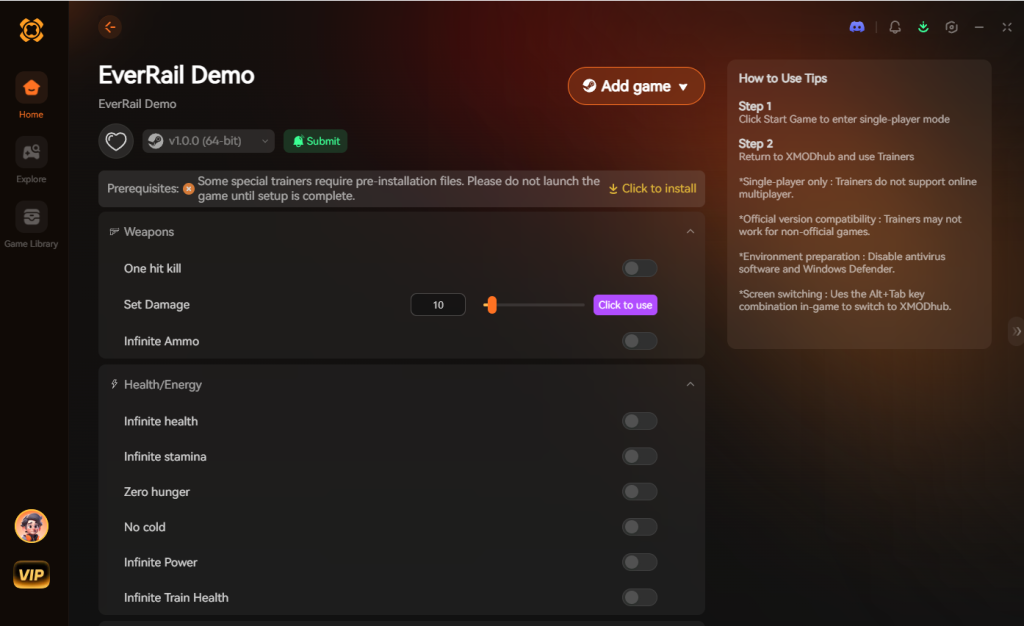
- Click “Play” to launch the game. XMODhub will auto-hook the game safely in the background.
- Toggle your desired cheats directly from the clean UI on your second monitor or via customizable in-game hotkeys.
Download EverRail Demo Trainer Now
4. Where to Find Safe EverRail Demo Cheat Tables (.CT)?
If you absolutely insist on using Cheat Engine and want to skip the manual scanning, you will need to download a pre-made Cheat Table (.CT file) created by another user. However, this comes with massive cybersecurity risks that most gamers completely ignore.
When you download a random .CT file for EverRail Demo from an obscure gaming forum, a random Discord server, or an unverified YouTube description, you are taking a massive gamble with your PC’s security. Cheat Tables are not just lists of memory addresses; they can contain complex embedded Lua scripts. Cheat Engine allows these Lua scripts to execute commands directly on your operating system.
Malicious actors frequently disguise malware as highly requested cheat tables. A compromised EverRail Demo cheat table can silently download a Remote Access Trojan (RAT), install a hidden crypto-miner that throttles your GPU, or scrape your browser for saved passwords and session tokens. Because Cheat Engine requires administrative privileges to function, any malicious script inside a .CT file instantly gains full admin access to your entire computer.
If you must use a Cheat Table, only download from highly reputable, heavily moderated communities like FearLess Revolution, and check the user’s reputation score. Never execute a .CT file that prompts you to “Run Lua Script” upon opening unless you can read and understand the code yourself. This severe security risk is exactly why a verified, digitally signed application like XMODhub is the safe choice for modern gamers.
5. Decoding EverRail Demo Item IDs for Memory Editing
Beyond just freezing your health or battery, one of the most powerful things you can do with a Cheat Engine table is manipulate your inventory. EverRail Demo gates its best traversal equipment behind a punishing RNG drop rate in the frozen wastelands. If you want to bypass the grind, you can use CE to swap a common item for a legendary one by changing its unique hexadecimal Item ID in the active memory.
To do this, you must first isolate the memory address of a specific inventory slot (e.g., Slot 1 in your Train’s Storage Locker). Once you find the address that controls the item currently sitting in that slot, you can right-click it, select “Browse this memory region,” and manually overwrite the 4-byte hex code with the ID of the item you actually want. The moment you close the inventory and reopen it, the game engine will render the new item.
Here is a breakdown of the most sought-after item IDs and their relative difficulty to manipulate without crashing the engine:
| Item Category | Target Resource / Upgrade | Hexadecimal ID (Base) | CE Modification Difficulty |
|---|---|---|---|
| Locomotive Parts | Tier-3 Thermal Engine Core | 0x8F2A |
Hard (Requires engine restart) |
| Survival Gear | Heavy Insulated Hazard Suit | 0x3B1C |
Medium |
| Raw Materials | Refined Scrap Metal | 0x11A4 |
Easy |
| Consumables | High-Yield Battery Cell | 0x22C9 |
Easy |
| Quest Items | Manifest Delivery Ledger | 0x99DF |
Very Hard (Often server-checked) |
Disclaimer: Editing item IDs manually can frequently corrupt your save file if you overwrite the wrong memory block. Always back up your local savegame.sav file before attempting hex edits.
6. Most Popular EverRail Demo .CT Scripts Explained
If you download a complex Cheat Table from a community forum, it will likely rely on Array of Bytes (AOB) Injection scripts rather than simple memory pointers. AOB scripts are essentially custom assembly code injected directly into the game’s executable to rewrite the rules of the engine. Here are the most popular scripts you will find in top-tier EverRail Demo tables, and how they function under the hood:
Infinite Train Durability (No Hull Damage)
Instead of finding the health value of your train and freezing it, an AOB script for Infinite Durability searches for the exact line of code that calculates damage when your train hits an obstacle or takes weather damage. The script replaces the SUB (subtract) instruction with NOP (No Operation). This means the game registers the hit, but the command to reduce your train’s health is completely ignored by the CPU.
Weather / Blizzard Immunity
This is a highly complex script. EverRail Demo uses an internal environmental timer that applies a “Freezing” debuff to your character when exposed to blizzards. A good Cheat Engine table will include a script that intercepts the debuff application function, forcing the game to read your character’s temperature as a static, safe value regardless of external biome conditions.
Unlimited Jetpack Thrust
Because Jetpack fuel drains in micro-decimals and recharges dynamically, standard pointer scanning almost always fails. AOB injection targets the thrust consumption multiplier, setting the drain rate to 0.0. This allows for infinite in-air traversal, completely trivializing the platforming challenges in the glacial biomes.
While these scripts are incredibly powerful, they are notoriously fragile. A simple 50MB hotfix from Iccebird Studios will shift the game’s code structure, rendering all AOB signatures obsolete and causing immediate crashes upon injection. This constant cycle of breaking and fixing is why transitioning to a dynamically updated trainer like XMODhub saves hours of frustration.
7. Frequently Asked Questions (FAQ)
| Platform / Environment | Cheat Engine Compatibility | XMODhub Compatibility | Ban Risk Level |
|---|---|---|---|
| PC – Steam (Solo) | Yes (Requires manual updates) | Yes (Fully Supported) | Zero (Single-player) |
| PC – Epic Games (Solo) | Yes (Different memory offsets) | Yes (Fully Supported) | Zero (Single-player) |
| Xbox Game Pass (PC) | No (UWP Encryption blocks CE) | Yes (Bypasses UWP) | Zero (Single-player) |
| Co-op Multiplayer (1-4) | Highly Unstable / Desyncs | Host-Only Support | High (Not Recommended) |
Q: Can I use Cheat Engine on the Xbox Game Pass version of EverRail Demo?
A: Usually, no. If EverRail Demo comes to Game Pass, those versions use strict Universal Windows Platform (UWP) file encryption. This sandboxing actively blocks Cheat Engine from attaching to the process or reading the memory pool. However, XMODhub is specifically engineered with custom bypasses to handle UWP restrictions seamlessly, allowing you to cheat on Game Pass titles without technical headaches.
Q: Is it illegal to use Cheat Engine?
A: Modifying data on your own PC for a single-player, offline experience like EverRail Demo is completely legal. It is your hardware and your software experience. However, you should never bring memory editors into a public multiplayer server, as ruining the experience for others violates Terms of Service and will result in permanent account bans. If you play the 1-4 player co-op mode, only use cheats if you are the host and your friends explicitly agree to it.
Q: Will using Cheat Engine drop my FPS or slow down my PC?
A: Yes, heavily, depending on how you use it. When you perform a “First Scan” with an “Unknown Initial Value” in EverRail Demo, Cheat Engine has to snapshot gigabytes of active RAM. This massive data dump into your system’s pagefile will cause severe CPU bottlenecking and frame stuttering. Furthermore, if you actively freeze hundreds of addresses at once, Cheat Engine runs a continuous loop (usually every 10 to 100 milliseconds) to overwrite those values. This constant read/write cycle generates significant CPU overhead, which can tank your FPS in a demanding open-world game.
Conclusion: Work Smarter, Not Harder
Learning how memory manipulation works in Cheat Engine is a cool flex. Understanding hexadecimal offsets, multi-level pointers, and assembly injection gives you a great peek under the hood of game development. But let’s be real—when you come home from a long day at work, you don’t want to take a computer science class. You just want to spawn in that legendary Tier-3 Thermal Engine Core, fully upgrade your train, and wreck some procedural blizzards without stressing over your battery dying.
Why spend 45 minutes digging through dynamic memory allocations when you can click one button and instantly get God Mode? And the best part? XMODhub supports over 5,000+ PC games. Once you install the app, you can ditch the complicated, malware-risky cheat tables for good and get back to actually enjoying your games.
Stop Grinding, Start Enjoying.
Bypass the tedious resource gathering and unlock your full potential instantly.

I am a passionate gamer and writer at XMODhub, dedicated to bringing you the latest gaming news, tips, and insights.
Connect with me:
LinkedIn Profile ↗
 Nancy Miller