
 Catherine Hu
No, Tainted Grail: The Fall of Avalon does not have a built-in developer console or native text-based cheat codes. Because the developers at Questline and Awaken Realms intentionally disabled the Unity engine debug console for the full May 23, 2025 release, players cannot simply press the tilde key (~) to type in commands for God Mode or infinite items.
However, you do not need to struggle through the punishing dark fantasy world unprotected. The only reliable and safe way to cheat is by using a third-party trainer like XMODhub. This dedicated software offers 1-click alternatives that bypass the need for complex text commands, instantly granting you God Mode, Infinite Stamina, Maximum Wyrdness Resistance, and Infinite Gold without risking your save file.
Editor’s Note: This guide was last verified against the newest Tainted Grail: The Fall of Avalon patch. Whether you are using native engine tools or a dedicated trainer, please back up your save files before modifying game memory to prevent unexpected bugs.
We have all been there. You have just spent hours dying to the same brutal enemy encounter in Tainted Grail: The Fall of Avalon, or maybe you simply do not have the time to grind for massive amounts of Gold, Wyrdness-warding potions, and rare crafting materials after a long day at work. Exploring a dark fantasy reimagining of the Arthurian legend is breathtaking, but the constant survival mechanics, punishing stamina depletion, and the oppressive nature of the Wyrdness can sometimes get in the way of enjoying the rich narrative. Single-player games are meant to be enjoyed on your own terms. Whether you want to easily locate the remaining fragments of Arthur bound to his sword Excalibur, his shield, and his crown, or you just want to explore the island of Avalon without constantly managing your health bar, let us get your character powered up.
You may also like: The Ultimate Tainted Grail: The Fall of Avalon Cheat Engine Guide (And A Much Easier Alternative)
📋 Table of Contents
- Quick Answer: Does Tainted Grail: The Fall of Avalon Have Console Commands?
- 1. How to Enable Cheats in Tainted Grail: The Fall of Avalon
- 2. The Complete List of Tainted Grail: The Fall of Avalon Cheats
- 3. Item IDs and Spawning Guide
- 4. Do Cheats Disable Achievements?
- 5. Why Native Cheats Can Break Your Save Files
- 6. The Safer Alternative: 1-Click Cheats with XMODhub
- 7. Troubleshooting: Cheats Not Working
- 8. Best Attributes and Skills to Maximize with Level Cheats
- 9. Overcoming the Wyrdness: Native Strategies vs. Trainer Enhancements
- 10. Frequently Asked Questions (FAQ)
- Conclusion
1. How to Enable Cheats in Tainted Grail: The Fall of Avalon
Because Tainted Grail: The Fall of Avalon is built on a modern game engine with strict release-build compiling, the developers have completely stripped the native debug console from the public version of the game. During the early access phase in 2023, some players attempted to use universal engine unlockers to force a command line interface to appear, but with the full 1.0 release in 2025, these backdoor methods have been heavily patched and often result in immediate game crashes.
Since there is no developer console, players cannot type in traditional cheat codes like “tgm” or “player.additem”. Trying to manually edit the game’s memory using outdated hex editors is not only tedious but incredibly dangerous to your overall game progression.
Instead, the modern, hassle-free method to enable cheats in Tainted Grail: The Fall of Avalon is through a secure, external memory-injection tool. Here is the simple 3-step process to download and attach XMODhub to the game to enable your cheats safely:
Step 1: Download and Install the Client
Navigate to the official XMODhub website and download the lightweight desktop application. The installation process takes less than a minute and requires no complex configuration.
Step 2: Locate the Game in Your Library
Open XMODhub. The software will automatically scan your PC for installed games. If Tainted Grail: The Fall of Avalon does not appear on the main dashboard immediately, simply type “Tainted Grail: The Fall of Avalon” into the search bar. The tool supports both the Steam and Epic Games Store versions of the title.
Step 3: Launch and Toggle
Click the “Play” button directly from within the XMODhub interface. This launches Tainted Grail: The Fall of Avalon with the trainer securely attached to the game process. Once you load into your save file, you can use your second monitor, the in-game overlay, or customizable keyboard hotkeys to activate any cheat instantly.
2. The Complete List of Tainted Grail: The Fall of Avalon Cheats
Because Tainted Grail: The Fall of Avalon does not feature a developer console, there are no text-based cheat codes to input. You will not find any secret phrases to type into a chat box to spawn gold or weapons. However, you can achieve the exact same effects—and often much more powerful ones—using the XMODhub app.
The trainer is designed to give you absolute control over every aspect of your character’s progression, combat capabilities, and inventory management. Below is a comprehensive list of the trainer features available for Tainted Grail: The Fall of Avalon through XMODhub.
| Feature | Effect | How to Activate |
|---|---|---|
| God Mode (Invincibility) | Completely prevents your character from taking any damage from enemy attacks, environmental hazards, or the oppressive Wyrdness. | Toggle via XMODhub UI or press Numpad 1 |
| Infinite Stamina | Your stamina bar will never deplete, allowing you to sprint indefinitely, chain endless heavy attacks, and block without ever being staggered. | Toggle via XMODhub UI or press Numpad 2 |
| Infinite Magic / Mana | Cast spells and use magical abilities without any cost, allowing for a pure magic-focused playthrough without resource management. | Toggle via XMODhub UI or press Numpad 3 |
| Maximum Wyrdness Resistance | Completely nullifies the negative effects of the Wyrdness fog that covers Avalon, allowing you to explore the darkest corners of the map safely. | Toggle via XMODhub UI or press Numpad 4 |
| One-Hit Kills | Multiplies your base damage output exponentially. Even the toughest bosses and corrupted monstrosities will fall to a single strike from any weapon. | Toggle via XMODhub UI or press Numpad 5 |
| Infinite Gold (Wealth) | Sets your total Gold to 9,999,999. You can buy every weapon, armor piece, potion, and crafting material from merchants without grinding. | Click “Set Value” in XMODhub UI |
| Infinite Consumables | When enabled, using a healing potion, food item, or crafting material will not decrease the stack size in your inventory. | Toggle via XMODhub UI or press Numpad 6 |
| Zero Weight (No Encumbrance) | Bypasses the game’s inventory weight limit. You can carry every piece of loot you find without suffering movement speed penalties. | Toggle via XMODhub UI or press Numpad 7 |
| Custom Player Level | Allows you to manually input your desired character level, instantly granting you the corresponding attribute points to spend on your build. | Type desired level in XMODhub UI and click “Apply” |
| Super Movement Speed | Increases your character’s walking and sprinting speed by up to 300%, making backtracking and open-world exploration incredibly fast. | Adjust slider in XMODhub UI |
| Freeze Time of Day | Stops the in-game clock. If you prefer exploring Avalon during the daytime to see the dark fantasy environments clearly, you can lock the sun in place. | Toggle via XMODhub UI or press Numpad 8 |
3. Item IDs and Spawning Guide
In many traditional open-world RPGs, players are accustomed to looking up massive spreadsheets of Item IDs (such as 00012F for a specific sword) and typing a command like spawnitem [ID] [Quantity] to get the gear they want.
Because Tainted Grail: The Fall of Avalon lacks native engine tools and a developer console, manually spawning items via text is completely impossible. The internal database of hex codes and asset strings is encrypted and locked behind the compiled Unity engine code. Attempting to brute-force these internal IDs using a raw memory editor often results in the game pulling the wrong asset, causing your character model to glitch out, or immediately crashing the application to your desktop.
Fortunately, XMODhub bypasses this archaic method entirely. By allowing you to instantly maximize your inventory stacks or add infinite currency with a single click, it eliminates the need to look up complex hex codes. If you need powerful weapons, simply use the Infinite Gold cheat to buy them from high-level merchants. If you need to upgrade your gear, use the Infinite Consumables cheat to ensure your crafting materials never run out. You get all the benefits of item spawning without the massive headache of typing out long strings of code and hoping the game does not crash.
4. Do Cheats Disable Achievements?
When playing a massive RPG, achievement hunting is often a major part of the experience. Many players worry that using cheats will permanently lock them out of earning Steam or Epic Games Store achievements.
In games that feature built-in developer consoles, the moment you press the tilde key and enter a command, the game’s internal logic flags your save file as “modded” or “cheated,” permanently disabling all achievement tracking for that specific character.
However, because Tainted Grail: The Fall of Avalon does not have a native console, there is no internal flag designed to catch text commands. Furthermore, XMODhub operates entirely outside of the game’s core logic. It temporarily modifies values in your computer’s RAM (Random Access Memory) rather than editing the permanent save file data. Because of this clean memory-injection method, the game’s achievement-tracking API remains completely unaware that any modification has taken place. You can use God Mode to defeat the hardest bosses or Infinite Gold to buy every item in the game, and your Steam achievements will continue to unlock perfectly as if you were playing normally.
5. Why Native Cheats Can Break Your Save Files
Beyond the achievement lock, native developer tools and memory editors are notoriously unstable. These commands were originally built for developers to test bugs during production, not for everyday gameplay.
When a developer uses a console command to skip to a specific act of the game, they are doing so in a controlled testing environment, fully expecting the game to break. For an average player, forcing a quest to complete or bypassing intended story triggers can cause crucial NPCs—such as Caradoc—to completely disappear from your map. If the game expects you to have a specific conversation to trigger the spawning of the Excalibur fragments, and you forcefully spawn the fragments via raw memory editing, the game logic will fracture.
Memory leaks, corrupted assets, and sudden crashes to the desktop are incredibly common when you spawn too many items at once using unoptimized tools. Furthermore, if a raw memory editor corrupts your JSON or XML save data, that corruption is permanent. You could lose dozens of hours of progress in Tainted Grail: The Fall of Avalon simply because a forced command overwrote a critical line of save data. The dark fantasy world of Avalon is dangerous enough without having to fight against corrupted code.
6. The Safer Alternative: 1-Click Cheats with XMODhub
If you want the benefits of cheats—like infinite health to survive brutal ambushes or skipping the heavy grind for crafting materials—without risking your save files or locking your achievements, you need a dedicated game modification tool.
Instead of typing risky code that might corrupt your game world, the XMODhub app hooks into Tainted Grail: The Fall of Avalon safely and cleanly. It is developed by professionals who understand the intricate architecture of modern game engines.
- Achievement Safe: It bypasses the game’s internal cheat-flagging system, ensuring your 100% completion run remains intact.
- Save File Protection: It alters values temporarily in your system’s RAM. Your actual save file on your hard drive remains completely uncorrupted and vanilla.
- One-Click Toggles: No more memorizing long item IDs, complex syntax, or worrying about capitalization. Just hit a hotkey to turn God Mode on instantly.
How to Use XMODhub for Tainted Grail: The Fall of Avalon
- Download and Launch the free XMODhub desktop app on your PC.

- Search for “Tainted Grail: The Fall of Avalon” in the integrated game library.
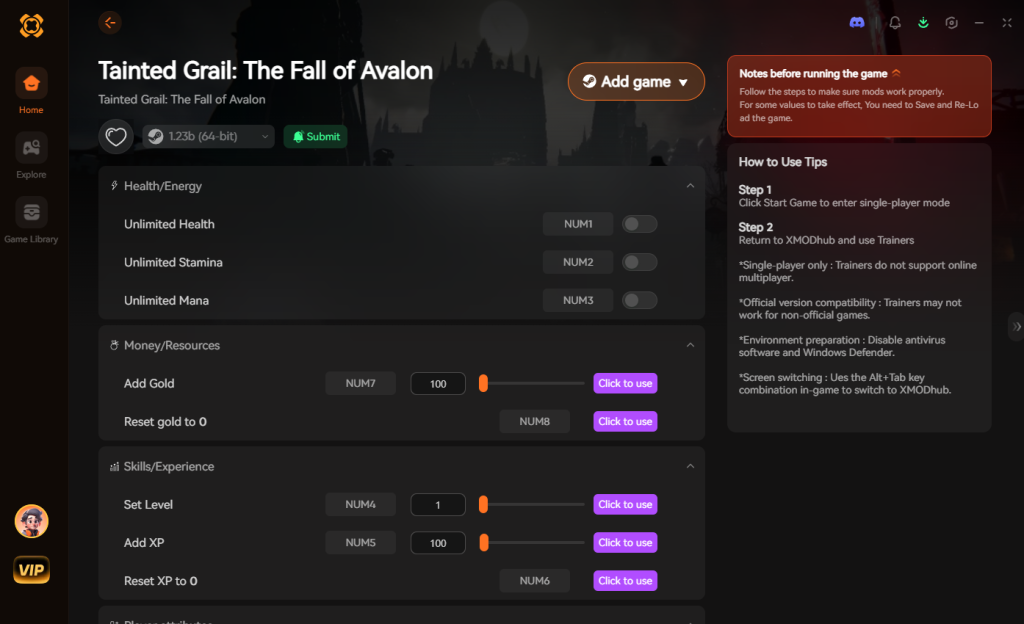
- Click “Play” to launch the game with the trainer securely injected.
- Toggle your desired cheats directly from the clean UI or via your customized keyboard hotkeys.
Download Tainted Grail: The Fall of Avalon Trainer Now
7. Troubleshooting: Cheats Not Working
Even with the most streamlined software, PC gaming can sometimes present technical hiccups. If you find that your cheats for Tainted Grail: The Fall of Avalon are not activating properly, check the following common issues:
- Game Version Mismatches: Tainted Grail: The Fall of Avalon received a massive update for its full release on May 23, 2025. If your game client automatically updated via Steam, the memory addresses may have shifted. Ensure you are using the latest version of XMODhub, as the team pushes out trainer updates within hours of a major game patch.
- Administrator Rights: Windows security protocols can sometimes prevent third-party overlays from interacting with game memory. To fix this, simply right-click the XMODhub shortcut on your desktop and select “Run as Administrator.” This grants the software the necessary permissions to inject the cheat values.
- Antivirus False Positives: Because trainers modify the memory of another active program (the game), overzealous antivirus software (like Windows Defender or Norton) may mistakenly flag the trainer as malicious. Add the XMODhub installation folder to your antivirus exclusion list to ensure it runs uninterrupted.
8. Best Attributes and Skills to Maximize with Level Cheats
One of the most popular features of using a trainer is the Custom Player Level cheat, which instantly grants you an abundance of attribute points to forge your ideal character build. Rather than grinding low-level enemies to unlock basic survival skills, you can immediately dive into the deep role-playing mechanics that Tainted Grail: The Fall of Avalon offers.
If you are using leveling cheats to jumpstart your build, it is crucial to know where to allocate those points for maximum efficiency. Below is a breakdown of the optimal attributes to prioritize when you have a surplus of skill points to spend.
| Attribute Category | Recommended Skill / Node | Optimal Use Case | Priority Level |
|---|---|---|---|
| Vitality (Health) | Endurance Boost T2 | Surviving devastating heavy blows and grab attacks from corrupted knights. | High |
| Agility (Stamina) | Dodge Efficiency | Drastically reduces stamina drain when evading large AoE boss attacks. | High |
| Magic (Wyrdness) | Spell Capacity Expansion | Allows for chaining destructive magical abilities without long cooldowns. | Medium |
| Strength (Melee) | Heavy Strike Mastery | Maximizes your raw DPS when wielding two-handed broadswords and axes. | High |
| Utility (Crafting) | Resourcefulness | Yields significantly more materials when harvesting rare flora across the island. | Low (if using infinite items) |
By strategically investing your artificially gained points into Agility and Strength early on, you can effectively create a powerhouse character capable of tearing through the game’s most unforgiving zones with absolute ease.
9. Overcoming the Wyrdness: Native Strategies vs. Trainer Enhancements
The Wyrdness—a suffocating, reality-bending fog that blankets the island of Avalon—is the core survival mechanic in the game. It constantly drains your sanity and health, forcing you to play cautiously. Understanding how to manage this mechanic is vital, whether you play vanilla or use game enhancements.
The Native Approach
In a standard playthrough, players must rely on lighting Menhirs (ancient guardian statues) to temporarily push back the Wyrdness in specific regions. This requires gathering rare resources, managing your inventory weight, and constantly rushing from one safe zone to the next. Additionally, you must craft and consume specific warding potions to survive brief excursions into the deep fog to uncover hidden lore and loot. It is a tense, resource-heavy loop that dictates the pacing of your entire adventure.
The Trainer Approach
If you prefer to focus purely on exploration and narrative without a ticking clock, using the Maximum Wyrdness Resistance cheat completely revolutionizes how you experience the game. By toggling this feature, the fog’s detrimental effects on your health and sanity are entirely nullified. You no longer need to grind for Menhir activation materials or panic when your torch burns out. This allows you to explore the darkest, most terrifying corners of Avalon at your own pace, uncovering secrets that most players miss while frantically running back to safety.
10. Frequently Asked Questions (FAQ)
Q: Can I use these cheats on PlayStation 5 or Xbox Series X/S?
A: No. Modifying game memory or accessing developer tools for Tainted Grail: The Fall of Avalon is strictly limited to the PC version. Console ecosystems are heavily locked down, and tools like XMODhub are designed exclusively for Windows operating systems.
Q: Is there a penalty for using cheats in single-player?
A: There is no account ban or official penalty for cheating in a single-player environment. Tainted Grail: The Fall of Avalon is a purely offline, single-player RPG. There is no anti-cheat software monitoring your gameplay. The only downsides are the potential for corrupted save files and disabled achievements if you use unsafe methods, which can be entirely avoided by using a secure trainer like XMODhub.
Q: Will using Infinite Stamina break the game’s combat mechanics?
A: It will certainly make the game significantly easier, as stamina management is a core pillar of the combat loop in Tainted Grail: The Fall of Avalon. However, it will not “break” the game technically. The game will simply register your stamina as always being at maximum capacity, allowing you to focus on the story and exploration rather than micromanaging your energy bar.
Q: Does XMODhub work on the Steam Deck?
A: Currently, XMODhub is natively designed for Windows environments. While some advanced users have managed to get it running on SteamOS via compatibility layers like Proton, it is officially supported only on Windows PCs. If you are dual-booting Windows on your Steam Deck, the trainer will function flawlessly.
Q: Can I turn the cheats off during gameplay?
A: Absolutely. One of the best features of using a dynamic trainer is that every cheat is a toggle. If you want to use God Mode just to get past a frustrating boss and then turn it off to resume a normal, challenging playthrough, you can simply press the hotkey again to instantly disable the cheat.
Conclusion
Whether Tainted Grail: The Fall of Avalon provides a built-in console or not, taking control of your single-player experience is easier than ever. While tweaking raw engine code can be a fun technical experiment, it comes with significant risks to your save files and achievements. For a flawless, risk-free experience in this dark fantasy reimagining of Arthurian legend, using a dedicated modification tool is always the smarter choice.
With secure support for over 5,000+ single-player PC games, you can easily customize your gameplay, skip the tedious grind, and play exactly the way you want. Reforging Avalon and learning from Arthur’s mistakes should be an epic adventure, not a frustrating chore.

Stop Grinding, Start Enjoying.
Bypass the tedious resource gathering and unlock your full potential instantly.

I am a passionate gamer and writer at XMODhub, dedicated to bringing you the latest gaming news, tips, and insights.
Connect with me:
LinkedIn Profile ↗
 Nancy Miller