
 Catherine Hu
Quick Answer: Does Bookshop Simulator Have Console Commands?
No, Bookshop Simulator does not have a built-in developer console or native text-based cheat codes. While many hardcore PC gamers are accustomed to pressing the tilde key (~) to bring up a command prompt in sandbox or simulation games, the developers of Bookshop Simulator have completely disabled the debugging interface in the public retail release on Steam. There are no hidden .ini file tweaks or launch parameters that will magically restore a text-based console.
Because the native engine tools have been stripped from the game’s executable file, the only way to cheat, modify your inventory, or alter your in-game finances is by using a specialized third-party trainer like XMODhub. By utilizing a secure memory injector, XMODhub offers 1-click alternatives like Infinite Money, Max Customer Patience, and Instant Restock, allowing you to bypass the early-game grind without needing to memorize complex coding syntax.
Editor’s Note: This guide was last verified against the newest Bookshop Simulator patch. Whether you are using native engine tools or a dedicated trainer, please back up your save files before modifying game memory to prevent unexpected bugs.
We have all been there. You have just spent hours organizing shelves, only for a massive rush of customers to completely destroy your layout, or maybe you simply do not have the time to grind for massive amounts of daily store revenue and rare first-edition antique books after a long day at work. Single-player games are meant to be enjoyed on your own terms. Let us get your character powered up and your dream bookstore built.
You may also like: The Ultimate Bookshop Simulator Cheat Engine Guide (And A Much Easier Alternative)
📋 Table of Contents
- Quick Answer: Does Bookshop Simulator Have Console Commands?
- 1. How to Enable Cheats in Bookshop Simulator
- 2. The Complete List of Bookshop Simulator Cheats
- 3. Item IDs and Spawning Guide
- 4. Do Cheats Disable Achievements?
- 5. Why Native Cheats Can Break Your Save Files
- 6. The Safer Alternative: 1-Click Cheats with XMODhub
- 7. Troubleshooting: Cheats Not Working
- 8. Best Store Upgrades to Buy with Infinite Money Cheats
- 9. Mods vs. Trainers: Which is Better for Bookshop Simulator?
- 10. Frequently Asked Questions (FAQ)
- Conclusion
1. How to Enable Cheats in Bookshop Simulator
Because Bookshop Simulator does not feature a native developer console, players cannot simply type in codes to alter their gameplay experience. In many modern indie simulation games, developers actively remove the debugging interface before compiling the final master build for Steam or the Epic Games Store. This is done to prevent accidental memory leaks, stop sequence breaking, and ensure the game runs smoothly for the average consumer. Therefore, attempting to edit configuration files or forcing command-line arguments via Steam launch options will yield absolutely no results.
Instead, modifying your game requires an external memory editor that can safely interact with the game’s active RAM while it is running. We highly recommend using XMODhub, which automates this highly technical process into a seamless, user-friendly interface.
Here is the straightforward process to enable cheats in Bookshop Simulator:
- Download and Install: Navigate to the official XMODhub website and download the latest version of the desktop application. Run the installer and grant the necessary administrative permissions.
- Locate the Game: Open the XMODhub application. In the top search bar, type “Bookshop Simulator” and select the official trainer profile from the populated list of supported titles.
- Launch and Hook: Click the prominent “Play” button within the XMODhub interface. This action will automatically launch Bookshop Simulator via Steam while simultaneously injecting the secure bypass code into the background.
- Activate Cheats: Once you have loaded into your bookstore and your character is fully spawned, simply use your second monitor or the in-game overlay to toggle your desired cheats on or off using the assigned hotkeys (e.g., F1, F2, Numpad 1).
2. The Complete List of Bookshop Simulator Cheats
Because Bookshop Simulator does not feature a developer console, there are no text-based cheat codes to input. You will not find any traditional commands like add_money 1000 or spawn_item book. However, you can achieve the exact same effects—and often much more powerful ones—using the XMODhub app.
Instead of typing repetitive commands every time you want to restock your shelves, XMODhub provides a suite of automated toggles that manipulate the game’s internal variables in real-time. Below is the comprehensive list of trainer features available for Bookshop Simulator.
| Trainer Feature | Effect on Gameplay | How to Activate |
|---|---|---|
| Infinite Store Funds | Instantly injects an unlimited amount of currency into your shop’s bank account, allowing you to purchase premium shelving, high-end decor, and the rarest book licenses without worrying about bankruptcy. | Toggle via XMODhub UI or press Numpad 1 |
| Freeze Day Timer | Halts the in-game clock entirely. This gives you infinite time to organize your inventory, clean the store, and process customer checkouts without the stress of the store closing. | Toggle via XMODhub UI or press Numpad 2 |
| Max Customer Patience | Locks the happiness and patience meters of all customers at 100%. Shoppers will never leave bad reviews or storm out of the store, even if the checkout line is incredibly long. | Toggle via XMODhub UI or press Numpad 3 |
| Instant Delivery / Restock | Bypasses the waiting period for wholesale book orders. The moment you purchase new stock from your in-game computer, the delivery boxes will immediately spawn outside your storefront. | Toggle via XMODhub UI or press Numpad 4 |
| Zero Bills & No Rent | Automatically sets all daily operational costs, electricity bills, and property rent to zero. You keep 100% of your daily profit margins. | Toggle via XMODhub UI or press Numpad 5 |
| Max Store Reputation | Instantly maximizes your overall shop level and reputation score, unlocking all late-game features, advanced book genres, and high-tier customer demographics. | Toggle via XMODhub UI or press Numpad 6 |
| Super Walking Speed | Triples your character’s movement speed, allowing you to rapidly traverse a massive, multi-floor bookstore to restock shelves and assist customers in a fraction of the time. | Toggle via XMODhub UI or press Numpad 7 |
3. Item IDs and Spawning Guide
In PC titles that feature a robust developer console, players can typically type commands using a specific syntax alongside hexadecimal item codes to spawn objects directly into their inventory.
However, because Bookshop Simulator lacks this interface, manually spawning items via text is impossible without native engine tools. The game’s inventory system is built on dynamic arrays that categorize books by genre (such as Fantasy, Sci-Fi, Academic Textbooks, and Manga), author, condition, and fluctuating market value. Attempting to force an item into these arrays using unverified hex editors or outdated cheat tables often results in corrupted inventory slots, missing textures, or immediate desktop crashes.
XMODhub bypasses this complex and dangerous process entirely. By allowing players to instantly maximize their inventory capacity or add infinite currency with a single click, it eliminates the need to look up complex hex codes. If you need 50 copies of a bestselling fantasy novel or a highly sought-after Antique First Edition, you no longer need to find a 16-digit item ID and type a command; you simply activate “Infinite Store Funds” and “Instant Delivery,” then purchase exactly what you need through the game’s natural interface without any of the associated waiting or financial grind.
4. Do Cheats Disable Achievements?
When modifying any single-player simulation game, one of the most common concerns is whether activating cheats will permanently lock your Steam or Epic Games achievements.
In games that officially support native console commands, the developers usually program a strict flag into the engine. The moment you press the tilde key and execute a command, the game communicates with the Steamworks API to permanently disable achievement tracking for that specific save file. This is intended to preserve the integrity of global completion statistics and prevent players from artificially inflating their gamer score.
Fortunately, Bookshop Simulator does not have a native console, meaning there is no official “cheat flag” hardcoded into the interface. Furthermore, when you use a professional trainer like XMODhub, it operates entirely outside of the game’s standard event triggers. XMODhub safely bypasses the achievement locks by temporarily editing the values in your system’s RAM rather than permanently alerting the game’s core executable. This means you can give yourself infinite money, expand your bookstore to the maximum size, hire a full staff of NPCs, and still trigger all the associated progression achievements flawlessly.
5. Why Native Cheats Can Break Your Save Files
Beyond the achievement lock, native developer tools and memory editors are notoriously unstable in modern game engines. These commands were originally built for developers to test bugs during production, not for everyday gameplay.
When you use raw console commands to force a quest to complete or bypass intended story triggers, you risk breaking the game’s internal logic. This can cause crucial NPCs (like the daily delivery driver or the rare book appraiser) to completely disappear from your map. Memory leaks, corrupted 3D assets, and sudden crashes to the desktop are incredibly common when you spawn too many items at once without utilizing the game’s proper memory garbage collection. This is why relying on text-based commands, even if a mod eventually restores them, is highly discouraged for players who value their long-term save files.
6. The Safer Alternative: 1-Click Cheats with XMODhub
If you want the benefits of cheats—like infinite store funds or skipping the heavy grind—without risking your save files or locking your achievements, you need a dedicated game modification tool.
Instead of typing risky code that might corrupt your game world, the XMODhub app hooks into Bookshop Simulator safely and cleanly.
- Achievement Safe: It bypasses the game’s internal cheat-flagging system entirely.
- Save File Protection: It alters values temporarily in your RAM. Your physical save file on your hard drive remains uncorrupted.
- One-Click Toggles: No more memorizing long item IDs or command syntax. Just hit a hotkey to turn God Mode on instantly.
How to Use XMODhub for Bookshop Simulator
- Download and Launch the free XMODhub desktop app.

- Search for “Bookshop Simulator” in the library.
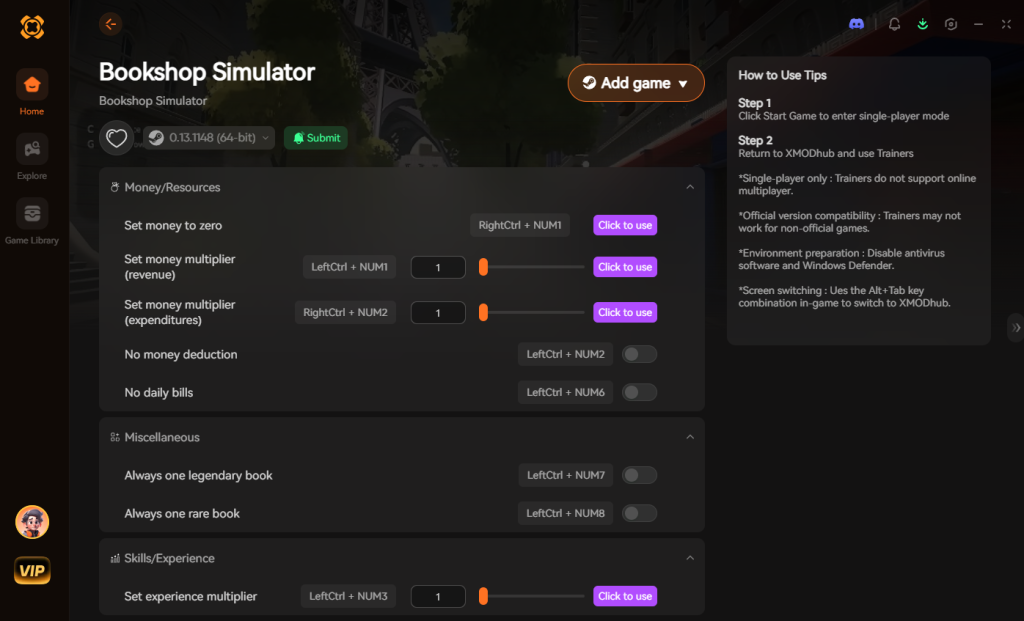
- Click “Play”.
- Toggle your desired cheats directly from the clean UI or via hotkeys.
Download Bookshop Simulator Trainer Now
7. Troubleshooting: Cheats Not Working
Even with a streamlined tool, PC gaming environments can sometimes introduce technical conflicts. If you find that your modifications for Bookshop Simulator are not activating properly, consult the following troubleshooting steps:
- Antivirus False Positives: Because trainers must inject code into active RAM to modify variables like money and time, aggressive antivirus software (including Windows Defender) will often flag them as suspicious. You must add the XMODhub installation folder to your antivirus exclusion list to ensure the injector is not being silently blocked in the background.
- Game Version Mismatch: Bookshop Simulator is an actively updated indie game. When the developers push a new patch on Steam, the memory addresses for variables (like customer patience or store funds) are completely randomized. If the game just updated, you may need to wait 12 to 24 hours for the XMODhub team to push an updated trainer profile that matches the new memory architecture.
- Missing Administrator Privileges: Modifying the memory allocation of another program requires elevated system rights. Always ensure you are right-clicking the XMODhub shortcut and selecting “Run as Administrator” before attempting to launch Bookshop Simulator.
- Corrupted Game Files: Occasionally, Steam updates can leave fragmented files that interfere with memory hooking. Open your Steam library, right-click Bookshop Simulator, navigate to Properties > Installed Files, and click “Verify integrity of game files.”
8. Best Store Upgrades to Buy with Infinite Money Cheats
When you bypass the financial grind using the XMODhub Infinite Store Funds cheat, the entire progression system of Bookshop Simulator opens up immediately. Instead of waiting in-game weeks to afford basic improvements, you can instantly transform your humble corner shop into a massive literary empire. But what should you prioritize?
Here is a strategic breakdown of the most powerful early-game investments you can make once your bank account is limitless.
| Upgrade Classification | Specific Item / Node | In-Game Benefit / Optimal Use Case | Cost Without Cheats |
|---|---|---|---|
| Premium Shelving | Antique Oak Bookcases | Holds 50% more stock per shelf and passively attracts high-tier antique collectors. | $5,000 |
| Automation | Smart Register System | Enables self-checkout for customers, drastically reducing line queues and wait times. | $12,500 |
| Store Expansion | Floor 2 Access License | Doubles your total retail square footage, allowing you to stock entirely new book genres. | $25,000 |
| Decorations | Cozy Reading Lounge | Passively increases the maximum patience meter of all shoppers and boosts tip probability. | $3,200 |
| Staffing | Senior Restock Clerk | Automatically unboxes deliveries and places books on appropriate shelves while you manage the register. | $1,500 / Day |
By immediately unlocking the Smart Register System and the Senior Restock Clerk, you can entirely automate the most tedious parts of Bookshop Simulator. This allows you to focus purely on the aesthetic design of your store and hunting down rare book licenses, turning a stressful management game into a relaxing sandbox experience.
9. Mods vs. Trainers: Which is Better for Bookshop Simulator?
Another common question from the PC gaming community is whether they should use community-made mods or a dedicated trainer to alter their game. While websites like Nexus Mods and the Steam Workshop offer fantastic community content, they often come with significant drawbacks in simulation games that receive frequent developer updates.
Mods typically require you to manually inject .dll files into the game’s core directory. When Bookshop Simulator receives a patch, these hardcoded mods instantly break, often corrupting your save file or causing the game to crash on startup until the mod author decides to update their code—which can sometimes take weeks.
In contrast, a trainer like XMODhub operates externally. It does not overwrite your core game files. Furthermore, the XMODhub team utilizes automated scanners to detect game updates, often pushing a fixed version of the trainer within hours of a new game patch. If you want stability, achievement safety, and zero hassle, a trainer is objectively the superior choice for managing cheats in Bookshop Simulator.
10. Frequently Asked Questions (FAQ)
Q: Can I use these cheats on PlayStation or Xbox?
A: No. Modifying game memory or accessing developer consoles for Bookshop Simulator is strictly limited to the PC version. Console ecosystems are heavily encrypted and do not allow the background execution of third-party memory trainers.
Q: Is there a penalty for using cheats in single-player?
A: There is no account ban or official penalty for cheating in a single-player environment. The only downsides are the potential for corrupted save files and disabled achievements, which can be completely avoided by using a secure trainer like XMODhub.
Q: Will using infinite money ruin the progression of Bookshop Simulator?
A: That entirely depends on your personal playstyle. Many players use infinite money simply to focus on the architectural design and aesthetic decoration of their store, treating it as a creative sandbox rather than a stressful management simulation. You have the freedom to toggle the cheats on and off as you see fit.
Q: Does XMODhub work on the Epic Games Store version?
A: Yes. XMODhub is designed to hook into the game’s active memory regardless of the launcher you use. Whether you purchased Bookshop Simulator on Steam, Epic Games, or GOG, the trainer will function flawlessly as long as the game version matches.
Conclusion
Whether Bookshop Simulator provides a built-in console or not, taking control of your single-player experience is easier than ever. While tweaking raw engine code can be a fun technical experiment, it comes with significant risks to your save files and achievements. For a flawless, risk-free experience, using a dedicated modification tool is always the smarter choice.
With secure support for over 5,000+ single-player PC games, you can easily customize your gameplay, skip the tedious grind, and play exactly the way you want. Build the ultimate bookstore without the stress of bankruptcy today.

Stop Grinding, Start Enjoying.
Bypass the tedious resource gathering and unlock your full potential instantly.

I am a passionate gamer and writer at XMODhub, dedicated to bringing you the latest gaming news, tips, and insights.
Connect with me:
LinkedIn Profile ↗
 Nancy Miller