
 Catherine Hu
How do you cheat in Bookshop Simulator? To cheat in Bookshop Simulator, you can manually attach Cheat Engine to the game’s executable and scan for changing numeric values like your total shop revenue or the exact quantity of rare legendary book editions you currently hold in your inventory. However, because game updates frequently break Cheat Engine tables (.CT files), the safest and easiest alternative is using an auto-updating mod manager like XMODhub, which provides 1-click cheats without requiring any memory scanning.
[Editor’s Note] Look, I get it. We all start Bookshop Simulator thinking we’re going to play it completely legit. But after going bankrupt from exorbitant staff wages for the 15th time, or spending hours grinding for that elusive legendary book parody just to realize the game artificially limits you to displaying only one legendary podium in your entire shop, the fun stops. I’ve been messing with Cheat Engine for years, and trying to isolate the exact memory values for this game’s current patch almost drove me insane. Today, I’m going to show you how to manually hack the values if you want the technical challenge—but I’ll also share the 1-click shortcut I actually use to save my sanity.
You may also like: The Ultimate Bookshop Simulator Console Commands and Cheats Guide
📋 Table of Contents
- Quick Answer
- 1. How to Use Cheat Engine for Bookshop Simulator (The Manual Way)
- 2. Common CE Errors: Pointers Breaking & Not Attaching
- 3. The Better Alternative: 1-Click Cheats with XMODhub
- 4. Where to Find Safe Bookshop Simulator Cheat Tables (.CT)?
- 5. Advanced Cheat Engine Tactics: Manipulating Inventory and Book Rarity
- 6. Save Editing vs. Cheat Engine: Which is the Better Hack?
- 7. Frequently Asked Questions (FAQ)
- Conclusion: Work Smarter, Not Harder
1. How to Use Cheat Engine for Bookshop Simulator (The Manual Way)
If you want to go the old-school route and find the memory addresses yourself, here is the basic “First Scan/Next Scan” method tailored specifically for this game. Modifying your available funds to instantly expand your shop and buy high-tier shelves is the most common reason players open up memory editors. Here is exactly how to do it without crashing your save file.
Step 1: Attach to the Correct Executable Process
First, launch Bookshop Simulator and load into your active save file where you can see your character standing in the shop. Once loaded, minimize the game and open Cheat Engine. Click the glowing monitor icon in the top-left corner of the Cheat Engine interface. Scroll through your active processes until you find the executable specifically named for Bookshop Simulator. Do not attach to the Steam bootstrapper or the crash handler; you must select the main game process. Click “Open” to bind the memory editor to the game’s RAM allocation.
Step 2: Perform the Initial Value Scan for Revenue
Look at your current in-game revenue (e.g., $450). In Cheat Engine, set the “Value Type” to “Float” or “Double” (since Bookshop Simulator calculates money with decimals, even if the UI rounds it up to a whole number). Type “450” into the “Value” text box and hit “First Scan.” Cheat Engine will sift through millions of memory addresses and likely return thousands of results on the left-hand panel. This is entirely normal. Do not change anything yet, as modifying the wrong address will instantly crash Bookshop Simulator.
Step 3: Force the Value to Change In-Game
Return to Bookshop Simulator and perform an action that alters your total revenue. The easiest way is to sell a used book to a customer or purchase a cheap decorative item like a plant or a basic wooden shelf. Let’s say you buy a shelf for $50, dropping your total revenue to $400. Ensure the transaction is fully complete and the UI has updated.
Step 4: Execute the Next Scan to Filter Addresses
Alt-tab back to Cheat Engine. Do not click “New Scan.” Instead, enter your new revenue value (“400”) into the “Value” box and click “Next Scan.” This forces Cheat Engine to cross-reference the thousands of addresses from Step 2 and only keep the ones that successfully changed from 450 to 400. Repeat Step 3 and Step 4 until you have isolated only 1 to 3 addresses in the left panel.
Step 5: Modify, Freeze, and Verify
Double-click the remaining addresses to drop them into the bottom workspace. Change the value of these addresses to your desired amount—for instance, 999999. Check the “Active” box next to the address to freeze it, preventing the game from altering your money when staff wages are deducted. Tab back into Bookshop Simulator. You may need to trigger one more transaction (like selling a cheap book) for the UI to visually update, but you should now have unlimited funds to fully upgrade your store and endlessly hunt for those rare parody editions.
| Memory Feature / Stat | Recommended Value Type | Search Difficulty | In-Game Impact |
|---|---|---|---|
| Shop Revenue (Cash) | Float / Double | Easy | Allows infinite purchases of shelves, decorations, and staff hiring. |
| Legendary Podium Limit | 4 Bytes | Hard | Bypasses the strict 1-podium limit, letting you stack massive legendary buffs. |
| Staff Wage Timers | Float | Medium | Freezes the countdown timer so staff work indefinitely without draining profits. |
| Customer Patience | Float | Medium | Keeps customers happy forever, preventing them from leaving bad shop reviews. |
| Rare Book Drop Rate | Array of Byte (AOB) | Expert | Forces the supplier to only deliver legendary parody books. |
2. Common CE Errors: Pointers Breaking & Not Attaching
If you are pulling your hair out because CE isn’t working for Bookshop Simulator, you aren’t alone. Modern simulation games are surprisingly complex under the hood. Here is what’s probably happening when things go wrong.
Error: “Cannot attach to process” / Game Crashes
Bookshop Simulator might be using specific engine protections or anti-debugging measures that instantly kill the process when a memory scanner is detected. If the game immediately closes to the desktop the second you click “First Scan,” you are triggering a memory access violation. To bypass this, you need to configure Cheat Engine to use the VEH Debugger. Go to Edit > Settings > Debugger Options, and change the debugger method from “Windows Debugger” to “Use VEH Debugger.” This hooks into the game’s exception handling rather than directly probing the memory threads, making it much stealthier. Additionally, ensure you are running Cheat Engine as an Administrator, as standard user privileges often block read/write access to the RAM allocated by Bookshop Simulator.
The Pointer Problem
Have you ever spent an hour finding the exact memory address for your legendary book inventory, successfully changed it, but then the cheat completely stopped working the next day? This is due to dynamic memory allocation. Because Bookshop Simulator is built on a modern engine (likely Unity), it utilizes aggressive garbage collection. Every time you hit a loading screen, close the game, or even transition from the shop management phase to the ordering phase, the game’s engine reshuffles where data is stored in your RAM.
The address you found yesterday (e.g., 0x1A4B8F90) is now holding meaningless texture data today. To fix this manually, you have to perform complex pointer scanning. You must find the static base address of the Bookshop Simulator executable and calculate the exact hex offsets that point to your inventory data through multiple levels of pointers. Writing an Assembly (ASM) script to inject an Array of Byte (AOB) patch is the only permanent manual fix, but learning x86 assembly language is an incredibly frustrating and time-consuming process for someone who just wants to relax and run a virtual bookstore.
3. The Better Alternative: 1-Click Cheats with XMODhub
Here is the dirty little secret of the modding community: Nobody actually wants to spend two hours updating Cheat Engine tables every time a patch drops. The moment Bookshop Simulator updates on Steam to add new book parodies or fix a minor bug, your hard-earned memory addresses shift, your carefully crafted .CT file breaks, and your game crashes to the desktop.
| Feature / Metric | Manual Cheat Engine | XMODhub Auto-Trainer |
|---|---|---|
| Setup Time | 30-60 Minutes per session | Instant (1-Click) |
| Update Reliability | Breaks on every minor Steam patch | Auto-updates via Cloud Integration |
| Crash Risk | High (Requires exact hex values) | Zero (Safely hooks game engine) |
| Ease of Use | Requires technical memory scanning | Clean UI with simple toggle switches |
| Feature Access | Basic values (Money, Stock) | Advanced (Bypass Podium Limits, God Mode) |
Why XMODhub beats manual CE for Bookshop Simulator:
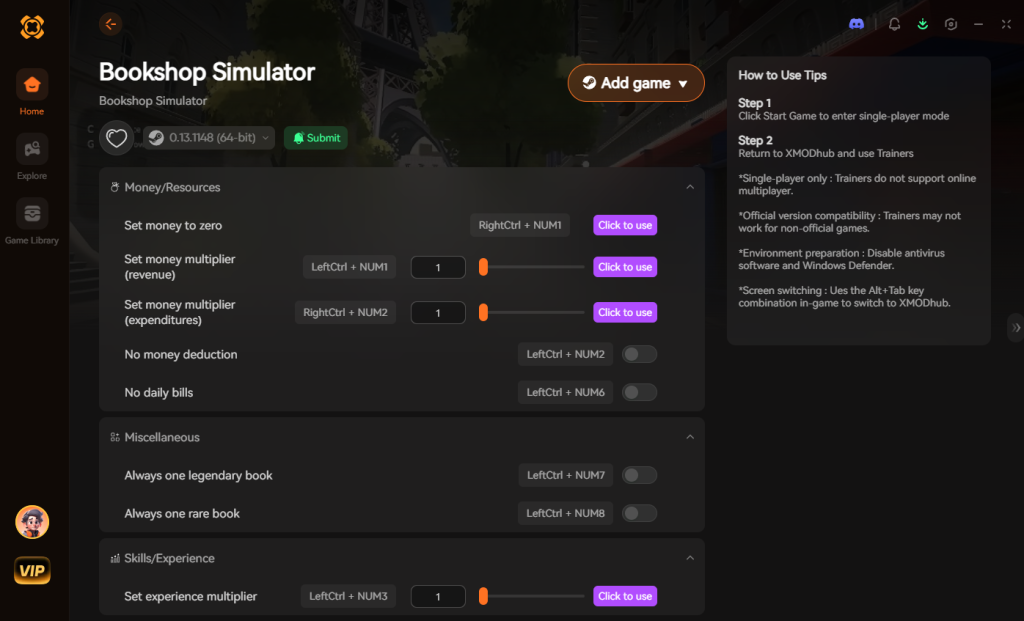
- Zero Hex Codes Needed: Just toggle a beautiful switch on our UI. You don’t need to understand floats, 4-bytes, or pointer offsets.
- Auto-Updating Cloud Tech: When the game patches, XMODhub updates its trainer automatically behind the scenes. No more broken scripts or waiting for forum users to upload a new table.
- Premium Features Instant Access:
- Bypass the 1-Podium Limit: Display as many legendary books as you want and stack those +10% profit / -15% price buffs to create a legendary mini-museum.
- Unlimited Shop Revenue & Instant Deliveries.
- Super Speed & Custom Jump Height to navigate your massive, fully-expanded bookstore instantly.
- Freeze Staff Wages so your hired help actually feels useful instead of being a massive financial drain that ruins the cozy gameplay loop.
How to Use XMODhub for Bookshop Simulator?
- Download and Launch the free XMODhub desktop app from our official secure server.

- Search for “Bookshop Simulator” in the comprehensive game library.
- Click “Play” to auto-hook the game safely without triggering any anti-debug crashes.
- Toggle your desired cheats directly from the clean UI overlay or via customizable keyboard hotkeys while playing.
Download Bookshop Simulator Trainer Now
4. Where to Find Safe Bookshop Simulator Cheat Tables (.CT)?
If you absolutely insist on using CE and want to skip the manual scanning, you’ll want a pre-made Cheat Table (.CT file). However, you must tread incredibly carefully in this space.
The internet is absolutely flooded with malicious actors preying on gamers looking for shortcuts. When you download a random .CT file for Bookshop Simulator from an unverified Discord server, a shady Reddit thread, or an obscure modding forum, you are taking a massive cybersecurity risk. Cheat Engine tables aren’t just simple text files; they support embedded Lua scripts. This means a malicious creator can write a script inside the .CT file that executes arbitrary code the exact second you open it.
We have seen countless instances where players thought they were downloading a simple infinite money cheat for a cozy game like Bookshop Simulator, only to accidentally execute a silent background script that installs a crypto-miner, a Trojan horse, or a RedLine Stealer. These malware strains are specifically designed to scrape your browser cookies, steal your Discord authentication tokens, and hijack your Steam session data to steal your inventory.
Furthermore, community-made tables are notoriously unreliable. A table made for version 1.0.2 of Bookshop Simulator will instantly cause a fatal crash if you try to use it on version 1.0.3. This is why relying on a verified, professionally engineered application like XMODhub is the only truly safe choice. XMODhub’s developers rigorously test every trainer update, ensuring that the code injecting into your game is 100% clean, optimized, and completely free of malicious payloads.
5. Advanced Cheat Engine Tactics: Manipulating Inventory and Book Rarity
Once you have mastered basic float scans for your cash stack, the next logical step in utilizing a Bookshop Simulator cheat engine table is advanced inventory manipulation. Players constantly search for ways to force the game to spawn high-tier loot, specifically the legendary parody books that drive massive customer foot traffic and skyrocket daily revenue.
Unlike simple numerical values, editing your inventory requires searching for specific Item IDs or utilizing Array of Byte (AOB) scans to intercept the game’s RNG (Random Number Generation) code the exact moment a delivery box is opened. Here is a breakdown of the most sought-after features in community cheat tables and why they are so notoriously difficult to execute manually:
| Cheat Table Feature | Target Memory Type | Implementation Method | Crash Risk Level |
|---|---|---|---|
| Infinite Shop Cash | Float / Double | Standard First/Next Scan | Low |
| Instant Book Delivery | Timer (Float) | Value Freezing at 0.0 | Medium |
| Max Shop Reputation | 4 Bytes | Pointer Scan & Offset Tracking | High |
| Spawn Legendary Books | String / AOB | Hex Injection via Custom Script | Extreme |
| Ignore Podium Limits | Boolean (Byte) | Assembly (ASM) Logic Patching | Extreme |
Attempting to inject an AOB script to guarantee legendary drops often triggers Unity engine crash handlers. If you miss a single hex character in your script, your save file will corrupt instantly. This is why most players abandon manual memory editing for these advanced features and switch to a dedicated trainer that handles the heavy lifting safely behind the scenes.
6. Save Editing vs. Cheat Engine: Which is the Better Hack?
Another common workaround players look for alongside a Bookshop Simulator cheat engine table is a save file editor. Since the game stores your progress locally on your hard drive, you can technically open your save file using a text editor like Notepad++ or a dedicated JSON editor to modify your core stats without touching your system’s RAM.
However, save editing comes with its own massive drawbacks. Bookshop Simulator often formats its save files in complex, nested JSON structures. Accidentally deleting a single bracket or comma will render the entire file unreadable, instantly wiping out your 50-hour bookstore empire.
Furthermore, save editing is entirely static. You have to completely close the game, edit the file, save it, and endure the loading screens to relaunch. You cannot actively freeze dynamic values—like staff wage countdown timers, customer patience meters, or dynamic lighting costs—using a save editor. Cheat Engine provides live, dynamic memory editing, but as we established, it is highly unstable. XMODhub bridges this gap perfectly. It offers the live, dynamic injection of Cheat Engine without the severe risk of breaking your save file or requiring constant, tedious game restarts.
7. Frequently Asked Questions (FAQ)
| Platform / Environment | Cheat Engine Compatibility | XMODhub Compatibility | Ban Risk Level |
|---|---|---|---|
| Steam (Singleplayer) | Yes (Requires manual updates) | Yes (Fully Supported) | Zero (Safe) |
| Epic Games Store | Yes (Different memory offsets) | Yes (Auto-detects version) | Zero (Safe) |
| Xbox Game Pass (PC) | No (Blocked by UWP encryption) | Yes (Bypasses UWP natively) | Zero (Safe) |
| Multiplayer / Co-Op | Highly Unstable (Desyncs) | Disabled to protect users | High (Not Recommended) |
Q: Can I use Cheat Engine on the Xbox Game Pass version of Bookshop Simulator?
A: Usually, no. Game Pass uses strict Universal Windows Platform (UWP) file encryption that actively blocks Cheat Engine from reading the game’s virtual memory space. Attempting to attach CE to a UWP app often results in an “Access Denied” error. However, XMODhub is specifically engineered to bypass these restrictions seamlessly, allowing you to cheat on the Game Pass version just as easily as the Steam version.
Q: Is it illegal to use Cheat Engine?
A: Modifying data on your own PC for a single-player, offline experience like Bookshop Simulator is completely legal. You own the hardware and you are simply altering the temporary data stored in your own RAM. Just never bring memory editors into a competitive multiplayer server, as that violates Terms of Service and will result in account bans.
Q: Will using Cheat Engine drop my FPS or slow down my PC?
A: Yes, it absolutely can, especially during the “First Scan” phase. When you ask Cheat Engine to scan the entire memory space of Bookshop Simulator for an unknown value, it forces your CPU to rapidly read gigabytes of RAM while simultaneously writing the results to a temporary file on your hard drive or SSD. This aggressive read/write cycle causes heavy page faulting and memory paging, which will temporarily spike your CPU usage to 100% and cause severe frame drops or stuttering in-game. Active freezing (checking the “Active” box on a value) also requires your CPU to constantly overwrite that memory address every few milliseconds. XMODhub circumvents this performance hit by directly patching the game’s instructional code via lightweight assembly injection, meaning it uses virtually zero background resources.
Conclusion: Work Smarter, Not Harder
Learning how memory manipulation works in Cheat Engine is a cool flex. It gives you a peek behind the curtain of game development. But let’s be real—when you come home from a long day at work, you just want to spawn in that legendary Lord of the Rings parody edition, bypass the ridiculous one-podium limit, and build the ultimate bookstore museum without taking a computer science class in x86 assembly language.
Why spend 45 minutes digging through hex codes, filtering float values, and fighting dynamic memory allocation when you can click one button and instantly get infinite funds and unlimited legendary podiums? And the best part? XMODhub supports over 5,000+ PC games. Once you install the app, you can ditch the complicated cheat tables and broken .CT files for good.

Stop Grinding, Start Enjoying.
Bypass the tedious resource gathering and unlock your full potential instantly.

I am a passionate gamer and writer at XMODhub, dedicated to bringing you the latest gaming news, tips, and insights.
Connect with me:
LinkedIn Profile ↗
 Nancy Miller