
 Catherine Hu
Quick Answer: Does idle:Doodle Realm Have Console Commands?
No, idle:Doodle Realm does not have a built-in developer console or native text-based cheat codes. Because the game was developed by JIANBING as a streamlined auto-battler and idle loot experience, the traditional developer debugging tools were entirely stripped from the final public release build on Steam. There is no hidden .ini file to edit, and pressing the Tilde (~) key will not open a command prompt.
Editor’s Note
This guide was last verified against the newest idle:Doodle Realm patch. Whether you are using native engine tools or a dedicated trainer, please back up your save files before modifying game memory to prevent unexpected bugs.
However, this does not mean you are stuck grinding indefinitely. The only reliable and safe way to cheat in this game is by using a third-party memory trainer like XMODhub. This dedicated software offers 1-click alternatives that directly inject into the game’s memory, providing features like God Mode for your castle units, Infinite Relics, and Instant Talent Upgrades without requiring you to type complex lines of code.
We have all been there. You have just spent hours dying to the same boss in idle:Doodle Realm, or maybe you simply do not have the time to grind for legendary relics, high-tier equipment, or premium talent upgrade points after a long day of work. The castle war combat style is visually stunning, but the mathematical progression required to push your units forward can become an exhausting time-sink. Single-player games are meant to be enjoyed on your own terms. Let us get your character powered up and bypass the tedious roadblocks.
You may also like: The Ultimate idle:Doodle Realm Cheat Engine Guide (And A Much Easier Alternative)
1. How to Enable Cheats in idle:Doodle Realm
Because idle:Doodle Realm was meticulously designed by JIANBING to focus heavily on unit synergy effects and passive progression, the architecture of the game does not support a native text-input overlay. In many traditional PC games, players can simply edit a configuration file to set bEnableDeveloperConsole=True, but idle:Doodle Realm handles its memory arrays differently, locking these variables away from the end-user to maintain the integrity of its idle mechanics.
Since there is no developer console, players cannot type in codes to alter the game state. Attempting to force a console open using generic Unity or Godot engine unlockers will typically result in an immediate crash to the desktop, as the UI elements for the text prompt simply do not exist in the compiled game assets.
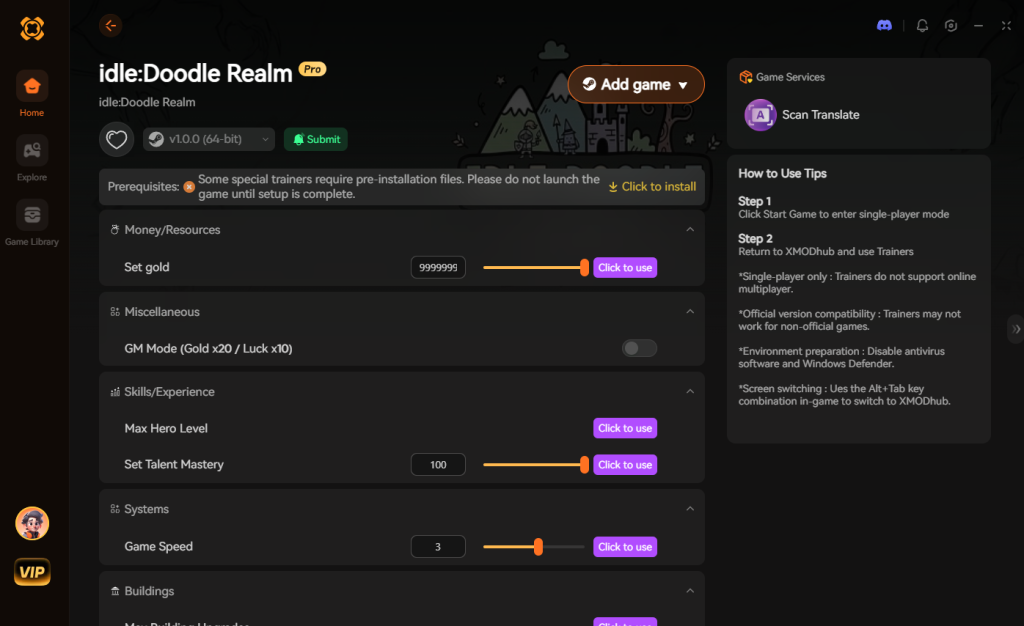
Instead, the most efficient and stable method to enable cheats is to utilize a background memory modification tool. Here is the simple 3-step process to download and attach XMODhub to the game to enable your desired cheats safely:
2. The Complete List of idle:Doodle Realm Cheats
Because idle:Doodle Realm does not feature a developer console, there are no text-based cheat codes to input. You will not find any commands like add_gold 9999 or kill_all_enemies here. However, you can achieve the exact same, if not better, effects using the XMODhub app.
In an auto-battler where your units automatically fight and push forward, having granular control over the background mathematics is crucial. Below is a comprehensive breakdown of the “Trainer Features” available in XMODhub specifically tailored for the castle war mechanics of idle:Doodle Realm.
These tools completely revolutionize how you approach the game, shifting the focus from tedious waiting and grinding to pure strategic experimentation and power fantasy enjoyment.
3. Item IDs and Spawning Guide
In many PC games, players rely on comprehensive lists of hexadecimal Item IDs to spawn specific weapons or materials directly into their inventory. However, manually spawning items via text is impossible in idle:Doodle Realm without native engine tools. The game utilizes a dynamic loot generation system where equipment stats and relic properties are rolled procedurally upon dropping, meaning static item IDs do not function in the traditional sense.
Attempting to inject raw hex codes into the game’s memory to force an item to appear usually results in corrupted inventory slots, invisible items, or catastrophic save file corruption. The memory addresses for these dynamic items shift every time you transition between different castle war stages or close the application.
XMODhub bypasses this convoluted and dangerous process entirely by allowing players to instantly maximize their inventory or add currency with a single click, eliminating the need to look up complex hex codes. Instead of trying to spawn a specific “Sword of the Realm” using a string of numbers, you simply activate the “Max Equipment Stats” or “Infinite Loot” toggles. The trainer interacts with the game’s overarching resource managers rather than individual inventory slots, providing a much cleaner, safer, and user-friendly experience.
4. Do Cheats Disable Achievements?
When playing idle:Doodle Realm on Steam, players are often concerned about whether modifying their game will lock them out of earning achievements. The answer depends heavily on the method you use to alter the game.
If a game officially supports a developer console, the developers usually program a hardcoded trigger that flags your save file as “cheated” the moment you press the Enter key on a command. This flag permanently disables all achievement tracking for that specific save slot, forcing you to start a completely new game if you wish to 100% your Steam profile.
However, because you are using a third-party memory injection tool like XMODhub, you completely circumvent this issue. XMODhub operates externally, temporarily altering the active RAM values without ever touching the hardcoded achievement flags within the game’s executable. As far as the Steam API and the game’s internal logic are concerned, your units are simply dealing an incredible amount of damage naturally. This means you can safely use God Mode, speed up the game, and unlock every talent while still popping Steam achievements flawlessly.
5. Why Native Cheats Can Break Your Save Files
Beyond the achievement lock, native developer tools and memory editors are notoriously unstable. These commands were originally built for developers to test bugs during production, not for everyday gameplay.
Forcing a quest to complete or bypassing intended story triggers can cause crucial NPCs to completely disappear from your map. Memory leaks, corrupted assets, and sudden crashes to the desktop are incredibly common when you spawn too many items at once.
In the context of an auto-battler like idle:Doodle Realm, the game is constantly calculating thousands of variables simultaneously—unit attack speeds, synergy buffs, relic multipliers, and enemy spawn rates. If you use amateur memory editing software (like unverified Cheat Engine tables) to freeze a value incorrectly, you can cause an integer overflow. This is a fatal mathematical error where a number becomes too large for the game engine to comprehend, instantly crashing the game and permanently corrupting the save.json file. Once a save file is corrupted in this manner, hours of progress are lost forever.
6. The Safer Alternative: 1-Click Cheats with XMODhub
If you want the benefits of cheats—like infinite health or skipping the heavy grind—without risking your save files or locking your achievements, you need a dedicated game modification tool.
Instead of typing risky code that might corrupt your game world, the XMODhub app hooks into idle:Doodle Realm safely and cleanly. The software is developed by reverse-engineering experts who map out the exact memory addresses required for safe modification, ensuring that the core game loop remains stable.
How to Use XMODhub for idle:Doodle Realm

Download idle:Doodle Realm Trainer Now
7. Troubleshooting: Cheats Not Working
Even with the most streamlined software, PC gaming environments can be highly complex, and you might occasionally run into issues where your cheats refuse to activate. If you are having trouble getting XMODhub to work with idle:Doodle Realm, check the following common culprits:
8. Top Relics and Synergies to Target with Cheats
When utilizing XMODhub’s Infinite Loot or Guaranteed Legendary Relics features, you might wonder which items are actually worth prioritizing. Because idle:Doodle Realm relies heavily on mathematical synergy between your castle units, having the right gear can make the difference between a stalled run and an infinite push.
Instead of letting the game’s random number generator dictate your build, using cheats allows you to instantly assemble the ultimate auto-battler composition. Below is a breakdown of the optimal upgrade paths and relics to target once your resources are fully unlocked.
By forcing these specific items to drop, you can bypass dozens of hours of repetitive farming and immediately experience the maximum potential of your army’s synergy grid.
9. How to Back Up Your Save File Before Modding
Even when using a highly secure memory trainer like XMODhub, it is a universally accepted best practice in PC gaming to back up your local save files before altering game states. If you accidentally leave the Game Speed Multiplier running overnight and progress further than you intended, having a manual backup allows you to safely revert your timeline.
To manually back up your idle:Doodle Realm progress, navigate to the following directory on your Windows PC: C:\Users\[Your Username]\AppData\LocalLow\JIANBING\idleDoodleRealm\
Simply copy the save.json file and paste it into a safe, separate folder on your desktop.
Pro-Tip for Steam Users: If you ever need to restore this backup, make sure you temporarily disable Steam Cloud Sync for idle:Doodle Realm by right-clicking the game in your Steam Library, selecting Properties, and toggling off the Cloud feature. Replace the active file with your desktop backup while the game is fully closed. Once you boot the game and confirm your old save has loaded correctly, you can re-enable Steam Cloud Sync and overwrite the cloud data with your local backup.
10. Frequently Asked Questions (FAQ)
A: No. Modifying game memory or accessing developer consoles for idle:Doodle Realm is strictly limited to the PC version. Console ecosystems are heavily encrypted and closed off, preventing third-party software like trainers from hooking into the game data.
A: There is no account ban or official penalty for cheating in a single-player environment. The developers of idle:Doodle Realm do not utilize anti-cheat software like Easy Anti-Cheat (EAC) because the game does not feature competitive multiplayer or leaderboards. The only downsides are the potential for corrupted save files and disabled achievements, which can be avoided entirely by using a secure trainer like XMODhub.
A: If pushed too high (e.g., beyond x20 speed), some lower-end CPUs might struggle to calculate the unit synergy effects fast enough, leading to skipped attack frames. It is recommended to keep the speed multiplier between x2 and x5 for the most stable and visually coherent experience during intense castle wars.
A: You only need an internet connection to initially download the trainer and verify the latest game patch pathways. Once XMODhub is running and injected into idle:Doodle Realm, you can safely play entirely offline.
Conclusion
Whether idle:Doodle Realm provides a built-in console or not, taking control of your single-player experience is easier than ever. While tweaking raw engine code can be a fun technical experiment in some games, the lack of native support in this title means attempting manual modifications comes with significant risks to your save files and achievements. For a flawless, risk-free experience, using a dedicated modification tool is always the smarter choice.
With secure support for over 5,000+ single-player PC games, you can easily customize your gameplay, skip the tedious grind, and play exactly the way you want. You no longer have to let arbitrary time-gates or brutal RNG loot drops dictate how you enjoy your free time.


I am a passionate gamer and writer at XMODhub, dedicated to bringing you the latest gaming news, tips, and insights.
Connect with me:
LinkedIn Profile ↗






