
 Catherine Hu
Quick Answer: How do you cheat in Summer at Smile Café?
To cheat in Summer at Smile Café, you can manually attach Cheat Engine to the game’s executable and scan for changing numeric values like your total Cash (used for buying art supplies) or the exact Affection Points for any of the eight female characters. However, because game updates frequently break Cheat Engine tables (.CT files), the safest and easiest alternative is using an auto-updating mod manager like XMODhub, which provides 1-click cheats without requiring any memory scanning.
Editor’s Note
Look, I get it. We all start Summer at Smile Café thinking we’re going to play it completely legit. But after failing the Final Art Exhibition deadline for the 15th time, or spending hours grinding for Inspiration Points and Cash for expensive dates, the fun stops. I’ve been messing with Cheat Engine for years, and trying to isolate the exact memory values for this game’s current patch almost drove me insane. Today, I’m going to show you how to manually hack the values if you want the technical challenge—but I’ll also share the 1-click shortcut I actually use to save my sanity.
You may also like: The Ultimate Summer at Smile Café Console Commands and Cheats Guide
1. How to Use Cheat Engine for Summer at Smile Café (The Manual Way)
If you want to go the old-school route and find the memory addresses yourself, here is the basic “First Scan/Next Scan” method tailored for this game.
Because Summer at Smile Café is a deep 2D interactive adventure that requires you to balance a freelance artist career while managing complex relationships with eight different women, your most precious resource is Cash. You need money to buy painting materials, upgrade your home studio, and pay for expensive dates at the café. Finding the memory address for your wallet is the perfect entry point for learning how to manipulate the game’s engine.
Here is the exact, step-by-step process to isolate and freeze your money values in Summer at Smile Café using manual memory scanning:
| In-Game Stat | CE Value Type | Memory Behavior | Common Modification Goal | Difficulty to Find |
|---|---|---|---|---|
| Cash / Wallet | 4 Bytes | Static during session | Set to 999,999 for unlimited spending | Easy |
| Affection Points | Float | Dynamic / Hidden | Maximize romance progression instantly | Medium |
| Daily Energy | 4 Bytes | Decreases per action | Freeze at max to paint endlessly | Easy |
| Art Inspiration | 2 Bytes | Increases on success | Boost to guarantee masterpiece commissions | Hard |
| Time of Day | Array of Bytes | Continuous cycle | Freeze clock to maximize daily interactions | Very Hard |
2. Common CE Errors: Pointers Breaking & Not Attaching
If you are pulling your hair out because CE isn’t working for Summer at Smile Café, you aren’t alone. Here is what’s probably happening:
Error: “Cannot attach to process” / Game Crashes
Summer at Smile Café might be using specific engine protections depending on how Shanlan Entertainment compiled the final build. Modern PC games, especially those built on popular frameworks like Unity (using IL2CPP backends) or heavily modified visual novel engines, often include basic anti-tamper mechanisms that detect when a standard Windows debugger hooks into their memory space. When you try to attach standard Cheat Engine, the game’s watchdog thread panics and forcefully terminates the SmileCafe.exe process, resulting in an immediate crash to your desktop.
To bypass this frustrating issue, you need to change how Cheat Engine interacts with the game’s executable. Open Cheat Engine, navigate to Edit > Settings > Debugger Options. By default, this is set to the standard Windows Debugger. You must switch this to the “VEH Debugger” (Vectored Exception Handling). The VEH Debugger operates at a different layer of the operating system, allowing it to silently intercept memory calls without triggering Summer at Smile Café’s internal security checks. Once you apply these settings, restart both Cheat Engine and the game, and you should be able to attach the process without suffering an instant crash.
The Pointer Problem
Nothing is more demoralizing than spending thirty minutes perfectly isolating the memory address for your favorite heroine’s Affection Points in Summer at Smile Café, only to have that address become completely useless the moment you walk through a door or reload your save file. This phenomenon occurs because modern operating systems and game engines utilize Dynamic Memory Allocation (DMA). Every time Summer at Smile Café transitions from the café environment back to your home studio, the game wipes its temporary memory and reloads assets into entirely new, randomized RAM addresses.
Because of DMA, the static address you found (e.g., 0x1A4B89C) is now pointing to empty space, or worse, a critical engine function. To fix this manually, you have to perform deep pointer scanning. This involves right-clicking your found address, generating a pointermap, restarting the game, finding the new address, and cross-referencing the pointermaps to find the static base address and its subsequent offsets (which in Unity games can sometimes be seven or eight levels deep). Alternatively, you have to write custom Assembly (AOB) injection scripts to intercept the game’s internal instructions as they read the memory. For the average player who just wants to enjoy the romance and art management of Summer at Smile Café, writing Assembly code is an absolute nightmare.
3. The Better Alternative: 1-Click Cheats with XMODhub
Here is the dirty little secret of the modding community: Nobody actually wants to spend two hours updating Cheat Engine tables every time a patch drops. The moment Summer at Smile Café updates on Steam, your hard-earned memory addresses shift, and your game crashes to the desktop.
| Feature / Metric | Manual Cheat Engine | XMODhub Auto-Trainer |
|---|---|---|
| Setup Time | 20-45 minutes per session | < 5 seconds (1-Click) |
| Update Reliability | Breaks on every minor game patch | Cloud auto-updates instantly |
| Crash Risk | High (Wrong memory edits cause crashes) | Zero (Safely injected via tested API) |
| Ease of Use | Requires technical knowledge / Hex values | Beautiful UI with simple toggle switches |
| Feature Access | Basic numbers (Money, Energy) | Complex logic (Instant Max Romance, God Mode) |
Why XMODhub beats manual CE for Summer at Smile Café:
How to Use XMODhub for Summer at Smile Café?

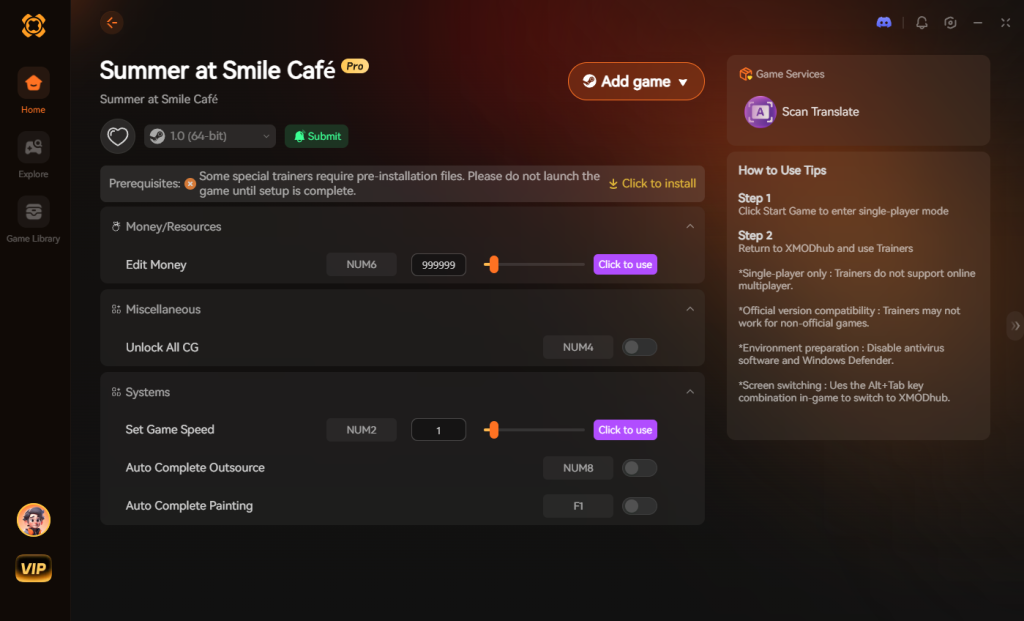
Download Summer at Smile Café Trainer Now
4. Where to Find Safe Summer at Smile Café Cheat Tables (.CT)?
If you absolutely insist on using CE, you’ll want a pre-made Cheat Table (.CT file). However, you must tread incredibly carefully when hunting for these files online.
The internet is flooded with shady forums, unmoderated Discord servers, and sketchy download portals claiming to offer the ultimate Summer at Smile Café cheat engine table. What many gamers do not realize is that a .CT file is not just a harmless text document containing memory addresses. Cheat Engine features a highly robust, built-in Lua scripting engine. While this engine is legitimately used by advanced table makers to create complex graphical user interfaces and automate AOB injections, it can also be maliciously weaponized.
When you download a random .CT file from an unverified source and open it, Cheat Engine will often execute the embedded Lua scripts automatically. Cybercriminals exploit this by hiding malicious payloads within the script. In the blink of an eye, opening a fake Summer at Smile Café cheat table can silently execute shell commands in the background of your PC, downloading and installing Remote Access Trojans (RATs), keyloggers, or hidden crypto-miners that will throttle your GPU to death.
You should only ever download .CT files from highly reputable, heavily moderated communities where files are manually vetted by veteran reverse-engineers. Better yet, skip the cybersecurity anxiety altogether. This is exactly why a verified, closed-ecosystem application like XMODhub is the safe choice. With XMODhub, you are never downloading random user-generated scripts; you are utilizing professionally developed, digitally signed trainers that guarantee your PC remains completely free of malware while you enjoy Summer at Smile Café.
5. Essential Features Every Summer at Smile Café Cheat Table Should Have
When you do track down a working Summer at Smile Café cheat engine table, you want to ensure it actually has the scripts necessary to bypass the game’s toughest grinds. A premium .CT file goes beyond basic memory scanning and utilizes Assembly (AOB) injection to manipulate the game’s core logic, allowing you to focus on the story and the art.
If you are evaluating a downloaded cheat table, look for the following essential script categories. If the table lacks these, it is likely an amateur build that will break during your playthrough:
| Cheat Category | Specific Script / Function | In-Game Benefit | Crash Risk |
|---|---|---|---|
| Economy Management | Infinite Cash & Art Tokens | Buy premium paints and fund expensive café dates instantly. | Low |
| Relationship Mechanics | Max Affection Multiplier | Guarantees successful dialogue checks with all 8 heroines. | Medium |
| Time Manipulation | Freeze Time of Day | Prevents the daily clock from advancing, giving you infinite action points. | High |
| Career Progression | Instant Masterpiece | Forces the art minigame to yield maximum Inspiration Points. | Medium |
| Inventory Edits | Unlock All Golden Brushes | Bypasses the late-game grind for top-tier art supplies. | Low |
6. How to Load and Execute a .CT File in Summer at Smile Café
If you have successfully downloaded a legitimate .CT file from a trusted forum, you need to know how to properly hook it into the game. Simply double-clicking the file isn’t enough; you must follow a specific sequence to ensure the scripts inject correctly. Here is the safest method to load your Summer at Smile Café cheat engine table without triggering anti-cheat mechanisms or corrupting your save file.
7. Frequently Asked Questions (FAQ)
| Platform / Environment | Cheat Compatibility | Ban Risk Level | Recommended Tool |
|---|---|---|---|
| Steam (Singleplayer) | 100% Compatible | None (0%) | XMODhub / Cheat Engine |
| Epic Games Store | 100% Compatible | None (0%) | XMODhub / Cheat Engine |
| Xbox Game Pass (PC) | Highly Restricted (UWP) | Low | XMODhub Only |
| Multiplayer / Co-op | Not Applicable | High (If forced) | DO NOT CHEAT |
A: Usually, no. Game Pass uses strict UWP (Universal Windows Platform) file encryption and isolated memory containers that actively block Cheat Engine from attaching to the process. Even if you manage to attach it, the memory addresses are heavily obfuscated. However, XMODhub is specifically engineered to bypass these restrictions seamlessly, allowing you to cheat on the Game Pass version just as easily as the Steam version.
A: Modifying data on your own PC for a single-player experience like Summer at Smile Café is completely legal. There are no laws against altering the RAM on hardware you own for a solo offline game. Just never bring memory editors into a multiplayer server, as that violates Terms of Service and will result in permanent account bans.
A: Yes, it absolutely can, depending on how you use it. When you perform a “First Scan” in Summer at Smile Café—especially an “Unknown Initial Value” scan for hidden stats like a heroine’s internal affection meter—Cheat Engine forces your CPU to rapidly index gigabytes of active RAM. This will cause massive CPU spikes, pushing utilization to 100% and causing your game’s FPS to stutter violently. Furthermore, if you “Freeze” dozens of addresses simultaneously, Cheat Engine must constantly write to your RAM every few milliseconds to keep those values locked, which creates persistent CPU overhead. Using an optimized trainer like XMODhub minimizes this overhead by injecting clean, efficient assembly bypasses rather than brute-force freezing.
Conclusion: Work Smarter, Not Harder
Learning how memory manipulation works in Cheat Engine is a cool flex. But let’s be real—when you come home from a long day at work, you just want to spawn in that legendary Golden Paintbrush, max out your relationships with all eight women, and enjoy the story of Summer at Smile Café without taking a computer science class.
Why spend 45 minutes digging through hex codes, fighting game crashes, and dealing with broken pointers when you can click one button and instantly get God Mode and infinite cash? And the best part? XMODhub supports over 5,000+ PC games. Once you install the app, you can ditch the complicated cheat tables for good.


I am a passionate gamer and writer at XMODhub, dedicated to bringing you the latest gaming news, tips, and insights.
Connect with me:
LinkedIn Profile ↗






