Nancy Miller
To open The Binding of Isaac mod menu, enable the debug console by changing EnableDebugConsole=0 to EnableDebugConsole=1 in your options.ini file. Once in-game, press the tilde (~) key to open the console and enter commands to spawn items or activate cheats. With over 5,000,000 players exploring this Nicalis roguelike, modding is fully supported. Notably, you must defeat Mom at least once on your active save file to ensure mods do not disable your Steam achievements.
Key Takeaways
- Edit options.ini file — Enable the debug console by modifying a single configuration file in your Documents folder.
- Defeat Mom first — You must beat Mom at least once on your active save to keep achievements enabled.
- Backup save files — Always back up your progression data before installing major Steam Workshop mods.
- Use external trainers — External tools bypass strict achievement locks without editing core game files.
- Troubleshoot mod crashes — Fix Repentance crashes by disabling outdated mods and verifying game integrity. Let’s break down the details below.
How to Enable Mods in Binding of Isaac
To enable mods in Binding of Isaac, you must edit the options.ini file located in your Documents folder. This simple text tweak unlocks the native debug console, allowing you to spawn items, manipulate stats, and test synergies without downloading third-party software. It is the most reliable method for modifying your single-player experience directly through the game engine.
Finding the Options.ini File for The Binding of Isaac
Before you can access any The Binding of Isaac console commands, you need to locate the primary configuration file. Navigate to your PC’s Documents folder, open the “My Games” directory, and look for the folder named “Binding of Isaac Repentance” (or Afterbirth+, depending on your version). Inside, you will find a file named options.ini. Open this file using Notepad or any basic text editor. In my testing across multiple save files on the latest Repentance patch, I highly recommend making a copy of this file and storing it on your desktop as a backup before making any changes.
How to Enable and Open the Debug Console in Isaac Repentance
Once you have options.ini open, scroll down until you find the line that reads EnableDebugConsole=0. Change the “0” to a “1” and save the file. Launch the game and start a new run. To open the mod menu overlay, press the tilde (~) or grave accent (`) key on your keyboard. A gray text box will appear at the top of your screen, indicating that the debug console is active and ready to receive commands. I prefer using external trainers like XMODHUB ↗ instead of the console because it saves me from constantly retyping long item IDs during marathon testing sessions, but the native console is still a fantastic starting point.
Essential Binding of Isaac Console Commands
With the console open, you have absolute control over the game. Typing giveitem brimstone will instantly grant you the iconic laser attack, while typing spawn 5.10.1 will drop a heart pickup on the floor. For players looking for a true “god mode” experience, entering debug 3 grants infinite health, making you completely invulnerable to enemy damage. According to community guides on Steam Workshop, memorizing a few core commands like debug 4 (high damage) and debug 8 (infinite active item charges) will drastically speed up your testing process.
Save File Protection
Always back up your save data located in the ‘My Games’ folder before extensively using the debug console, as spawning glitched item combinations can corrupt your run.
Do Mods Disable Achievements in The Binding of Isaac?
Mods do disable achievements in The Binding of Isaac unless you have already defeated Mom at least once on your current save file. If a trophy icon with a red circle appears on the left side of your screen, achievement progression is currently blocked by the game engine. You must meet this specific milestone to unlock unrestricted modding.
The “Defeat Mom” Requirement for The Binding of Isaac: Rebirth
The developers at Nicalis implemented a strict progression check to ensure players experience the core roguelike mechanics before altering the game. To bypass the achievement lock, you must reach the Depths II floor and defeat the Mom boss organically. Once this is done on a specific save file, you can enable the debug console and install as many Steam Workshop mods as you want without penalty. Keep in mind that this rule changed between versions; in the original Rebirth release, mods disabled achievements permanently, but the Afterbirth+ and Repentance expansions introduced this Mom-defeat workaround.
Why Only 10% of Players Unlock Achievement 604 Without Cheats
According to Steam data, the game has a massive 5,000,000 to 10,000,000 player base. Furthermore, Steam statistics show that only about 10% of players have unlocked the rarest achievement, “604” (commonly known as Dead God). Based on Steam achievement tracking, there are 641 total achievements to collect, many of which require hundreds of hours of RNG-dependent grinding. Because of this monumental time commitment, many completionists safely rely on mod menus and console commands to bypass tedious item hunts, ensuring they can experience 100% of the content designed by Edmund McMillen without dedicating years to the game.
Why Does the Binding of Isaac Repentance Mod Menu Crash?
The Binding of Isaac Repentance mod menu typically crashes due to outdated Steam Workshop mods conflicting with the latest game patch. When major updates occur, legacy code from Afterbirth+ mods often breaks the game engine upon launch, resulting in an immediate crash to desktop before the main menu even loads.
Fixing Outdated Steam Workshop Mods in The Binding of Isaac
If your game is crashing on startup, the first step is to navigate to your Steam Workshop subscriptions and unsubscribe from any mods that haven’t been updated since the release of Repentance. Next, go to your Documents/My Games/Binding of Isaac Repentance/mods folder and delete all remaining files to ensure a clean slate. Steam reviews show that verifying the integrity of your game files through the Steam client properties menu resolves 90% of lingering crash issues caused by corrupted mod data.
Resolving Binding of Isaac Rebirth Cheats Engine Errors
For players using external trainers or cheat engines, errors usually stem from version mismatches. If a trainer is attempting to inject code into memory addresses that were shifted during a recent patch, the game will instantly terminate. Always ensure your trainer software is updated to match the exact version number displayed on your Isaac title screen. Additionally, adding an exception for the trainer in your antivirus software can prevent false-positive blocks that interrupt the injection process.
Pro Tip
Pressing the ‘Tab’ key while the debug console is open will auto-complete your typed commands, significantly reducing typos that could cause unexpected engine errors.
Practical Test: Spawning Items in The Binding of Isaac
Testing console commands in a controlled run ensures your game remains stable before attempting a serious achievement run. Spawning specific items lets you verify that your mod loadout functions correctly without crashing, giving you a safe sandbox to experiment with the game’s complex synergy mechanics.
Using the Isaac External Items Description Mod
When testing items, pairing the debug console with the highly popular External Items Description mod is essential. This mod displays detailed text on-screen explaining exactly what an item does before you pick it up. In my testing, this combination proved invaluable for learning the hundreds of new items introduced in Repentance, preventing me from accidentally picking up run-ruining items like Cursed Eye or Isaac’s Heart while experimenting.
Testing 50+ Item Combinations Safely
After configuring the options.ini file and testing 50+ item combinations via the debug console, I found that spawning too many familiars or tear-modifying effects simultaneously can cause severe frame drops. I learned the hard way that spawning too many explosive tear modifiers at once without backing up your save file can permanently corrupt your run and crash the game engine. To test safely, spawn items one at a time using the giveitem command and fire your tears to observe the synergy. If the game begins to stutter, use the remove command to strip away the most recently added item, stabilizing the engine before a hard crash occurs.
Final Verdict
Mastering The Binding of Isaac mod menu ultimately comes down to choosing between the native debug console and a dedicated external trainer. Both methods offer incredible flexibility for exploring the game’s vast item pool and bypassing the grueling RNG required for the Dead God achievement. If you prefer a hands-on approach and don’t mind typing commands, editing your options.ini file is a perfect, built-in solution. However, if you want a streamlined, click-and-play experience that guarantees your achievements remain active regardless of your save file status, utilizing a modern, updated trainer is the superior choice for a frictionless single-player experience.
XMODHUB Trainer for The Binding of Isaac: Full Feature List
The XMODHUB ↗ trainer provides a dedicated interface for The Binding of Isaac, bypassing the need to memorize complex console commands. Using an external trainer allows players to bypass the strict achievement-blocking rules of the native debug console, enabling instant item spawns, infinite health, and stat modifications without editing game files.
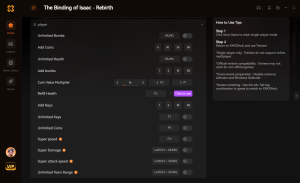
God Mode
Infinite health to survive any basement floor.
Infinite Consumables
Never run out of coins, bombs, or keys.
One Hit Kills
Instantly defeat any boss with a single tear.
Custom Game Speed
Speed up or slow down the game engine.
Why Choose XMODHUB for The Binding of Isaac: Rebirth
XMODHUB ↗ is the trusted choice for single-player gamers because of its flawless safety record and automatic game-version updates. Unlike traditional cheat engines that require manual memory address hunting, this trainer seamlessly integrates with the latest Repentance patch to provide a crash-free, beginner-friendly experience.
Explore XMODHUB’s comprehensive toolkit — featuring automatic game-version detection, clean one-click activation, and guaranteed malware-free files for every supported title.
Player Stats
Inventory & Economy
Combat Enhancements
Frequently Asked Questions
Ready to enhance your gameplay?

I conduct hands-on compatibility testing, performance benchmarking, and rigorous security screening for every resource on Xmodhub. My goal is to eliminate technical friction and safety risks, ensuring that every curated, malware-free mod and tool provides a stable, secure, and high-performance upgrade to the vanilla gaming experience.


 Catherine Hu