Catherine Hu
Quick Answer: Does Human Host Have Console Commands?
No, Human Host does not have a built-in developer console or native text-based cheat codes. Despite being a highly complex open-world zombie survival crafting game, the developers intentionally omitted a traditional command-line interface for players. Pressing the Tilde (~) key, F1, or modifying the game’s configuration files will not unlock a hidden developer menu or debug screen.
Because native commands do not exist, the only way to cheat, bypass the brutal survival grind, or manipulate the procedurally generated world is by using a secure third-party trainer like XMODhub. This dedicated tool provides seamless, 1-click alternatives such as God Mode, Infinite Stamina for digging deep underground, and Infinite Items for instant base building.
Editor’s Note
This guide was last verified against the newest Human Host patch. Whether you are using native engine tools, modding frameworks, or a dedicated trainer, please always back up your local save files before modifying game memory to prevent unexpected bugs or progression loss.
We have all been there. You have just spent hours dying to the same relentless zombie horde in Human Host, or maybe you simply do not have the time to grind for reinforced concrete, rare medical antibiotics, and high-tier weapon parts after a long day at work. Single-player games are meant to be enjoyed on your own terms. Let us get your character powered up so you can focus on building the ultimate indestructible base rather than endlessly scavenging for basic, low-tier supplies.
You may also like: Comprehensive Human Host Modding & Tools Guide
1. How to Enable Cheats in Human Host
In many PC survival games, enabling cheats is as simple as adding a launch parameter in Steam or editing an .ini file in the local app data folder. However, Human Host is built differently. Because there is no developer console coded into the retail release of the game, players cannot simply type in text codes to spawn terrain blocks or eliminate zombies. The engine strictly locks runtime memory to preserve the integrity of its endless procedurally generated environments.
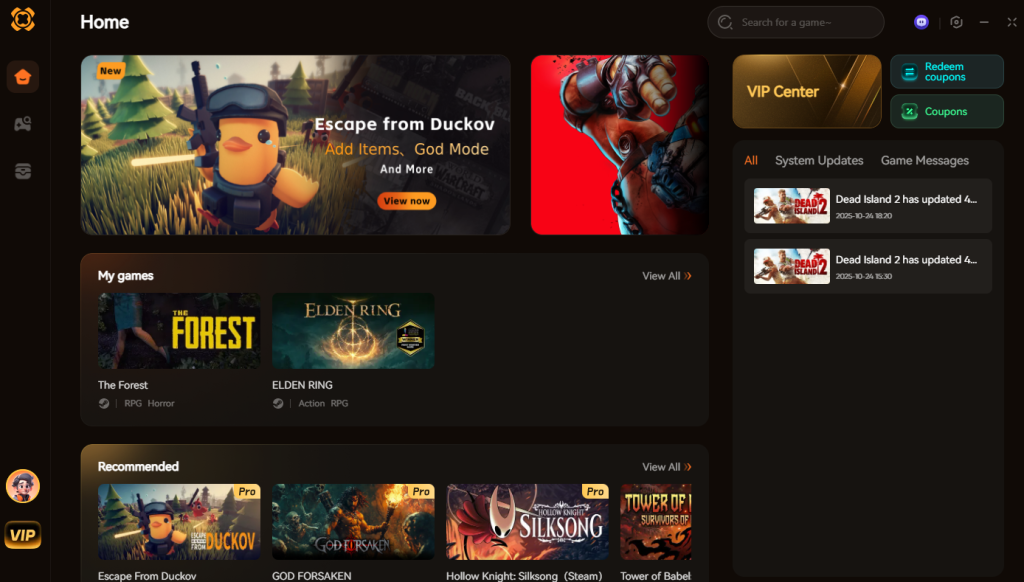
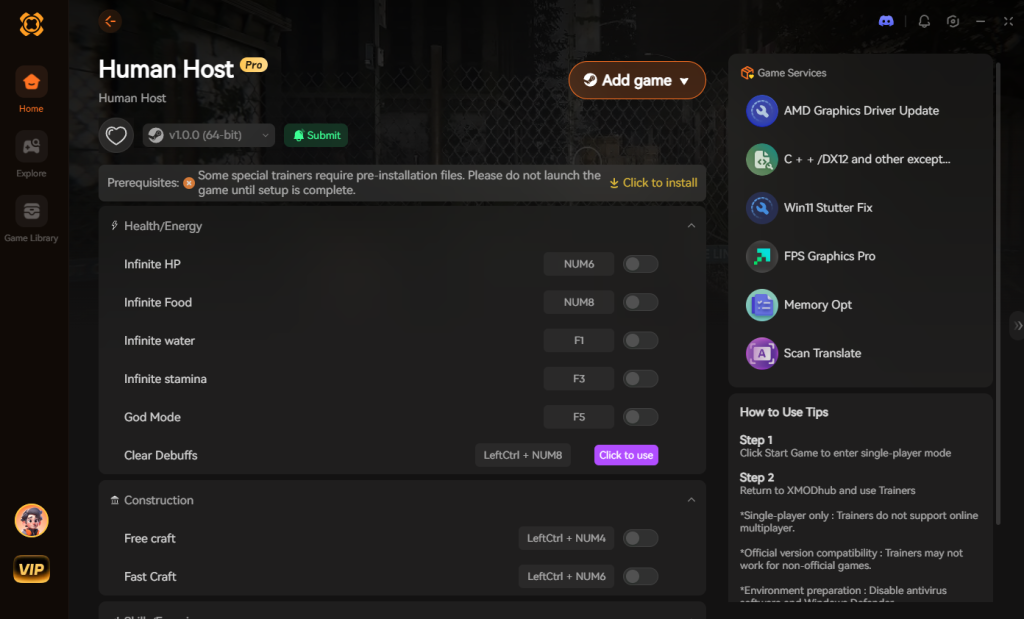
Since you cannot type in codes manually, you must rely on memory injection. This might sound complicated, but modern tools have automated the entire process. Here is the simple 3-step process to enable cheats in Human Host using XMODhub:
Download Human Host Trainer Now
2. The Complete List of Human Host Cheats
Because Human Host does not feature a developer console, there are no text-based cheat codes to input. You will not find any god, noclip, or giveitem commands here. However, you can achieve the exact same effects—and often much more stable ones—using the XMODhub app.
When surviving in an endless procedurally generated world where everything is destructible, managing your character’s vitals and structural integrity is paramount. Here are the trainer features available in XMODhub that perfectly replicate and enhance the traditional console command experience:
| Feature / Cheat | Effect in Human Host | How to Activate |
|---|---|---|
| God Mode (Invincibility) | Completely negates all incoming damage. Zombie bites, fall damage from digging deep underground, and environmental hazards will no longer reduce your health pool. | Toggle via XMODhub UI or Numpad 1 |
| Infinite Stamina | Your stamina bar never depletes. This is absolutely essential for endlessly swinging your pickaxe to mine rocks, chopping down trees, or sprinting away from massive undead hordes without fatigue. | Toggle via XMODhub UI or Numpad 2 |
| No Hunger / No Thirst | Freezes your character’s metabolic needs. You will no longer need to scavenge for canned food or purify water, allowing you to focus entirely on base building and exploration. | Toggle via XMODhub UI or Numpad 3 |
| Infinite Item Durability | Weapons, tools, and armor never degrade. Your axes and firearms will remain at 100% condition regardless of how many destructible environments you tear down or zombies you eliminate. | Toggle via XMODhub UI or Numpad 4 |
| Unlimited Crafting Resources | Bypasses the required material checks in the crafting menu. You can build massive fortresses, defensive traps, and advanced weaponry even if your inventory is completely empty. | Toggle via XMODhub UI or Numpad 5 |
| Super Movement Speed | Increases your base walking and sprinting velocity by up to 500%. Perfect for traversing the vast, endless procedurally generated terrain in seconds. | Toggle via XMODhub UI or Numpad 6 |
| One-Hit Kill | Multiplies your raw damage output to absurd levels. A single punch or bullet will instantly obliterate any zombie, boss, or destructible wall in your path. | Toggle via XMODhub UI or Numpad 7 |
| Ghost Mode (Invisibility) | Removes your character’s aggro radius. Zombies and hostile entities will completely ignore your presence, allowing you to scavenge highly dangerous urban areas in total peace. | Toggle via XMODhub UI or Numpad 8 |
| Set Time of Day | Freezes or alters the game’s internal clock. You can permanently lock the game to daylight, completely avoiding the terrifying nighttime zombie sieges. | Slider via XMODhub UI |
3. Item IDs and Spawning Guide
In games that feature built-in developer consoles, players usually have to hunt down massive spreadsheets containing complex alphanumeric Item IDs (e.g., player.additem 0001A2B3 50). Because Human Host lacks native engine tools, manually spawning items via text commands is completely impossible. You cannot force the engine to generate specific items by typing hex codes.
However, grinding for specific loot in a procedurally generated world can be an absolute nightmare. If you desperately need fifty units of scrap metal or a specific engine part to build a generator, relying on random number generation (RNG) is a massive waste of your gaming time.
XMODhub elegantly bypasses this limitation. Instead of requiring you to look up complex hex codes and type them out flawlessly, the trainer features a dynamic “Inventory Manipulation” tab. When activated, you simply need to have at least one of the desired items in your backpack. By pressing the designated hotkey, XMODhub will instantly maximize that item’s stack size to its absolute limit (e.g., turning 1 piece of wood into 999 pieces of wood). This eliminates the tedious grind of scavenging and allows you to instantly amass the resources required to construct the ultimate underground bunker, all without needing to memorize a single Item ID.
4. Do Cheats Disable Achievements?
For many completionists, unlocking Steam or Epic Games Store achievements is a core part of the gaming experience. In most modern titles, if you somehow manage to force a developer console open or use raw memory editors like Cheat Engine to manually alter values, the game’s internal telemetry will instantly flag your save file as “tainted.” Once a save file is flagged, all future achievement progression for that specific procedural seed is permanently disabled.
Because Human Host relies heavily on progression milestones—such as surviving your first 7 days, killing 1,000 zombies, or digging to the lowest bedrock layer—losing the ability to earn achievements can be devastating.
This is where XMODhub provides a massive advantage. Because the trainer operates externally and modifies values securely within your system’s RAM rather than writing dirty data directly into the game’s save file architecture, it completely bypasses the internal cheat-flagging system of Human Host. You can utilize Infinite Health to survive a massive horde or use Unlimited Resources to build a towering skyscraper, and the game will still register your milestones normally. Your achievements remain 100% safe and unlockable.
5. Why Native Cheats Can Break Your Save Files
Beyond the achievement lock, native developer tools and memory editors are notoriously unstable. These commands were originally built for developers to test bugs during production, not for everyday gameplay.
Forcing a quest to complete or bypassing intended story triggers can cause crucial NPCs to completely disappear from your map. Memory leaks, corrupted assets, and sudden crashes to the desktop are incredibly common when you spawn too many items at once. In a game like Human Host, where the environment is procedurally generated and entirely destructible, raw memory manipulation is incredibly dangerous.
If you attempt to force-spawn massive terrain blocks or delete chunks of the underground map using unoptimized scripts, you risk breaking the procedural generation algorithm. This can result in infinite falling loops, corrupted chunk loading, or a save file that simply crashes the moment you attempt to load it. The developers did not optimize the engine to handle sudden, massive injections of code, which is precisely why the console was removed from the public build in the first place.
6. The Safer Alternative: 1-Click Cheats with XMODhub
If you want the benefits of cheats—like infinite health or skipping the heavy grind—without risking your save files or locking your achievements, you need a dedicated game modification tool.
Instead of typing risky code that might corrupt your game world, the XMODhub app hooks into Human Host safely and cleanly. The developers behind the trainer spend hundreds of hours analyzing the game’s memory structure to ensure that every toggle is optimized and safe for long-term play.
How to Use XMODhub for Human Host
7. Troubleshooting: Cheats Not Working
Even with the most advanced tools, PC gaming can sometimes present technical hiccups. If you find that your XMODhub cheats for Human Host are not activating properly, run through this technical checklist to resolve the issue:
8. Advanced Debug Features: FOV, HUD, and Performance
Players actively searching for Human Host console commands are frequently looking for more than just invincibility; they want to tweak the game’s visuals, adjust the Field of View (FOV), or disable the Heads-Up Display (HUD) for immersive screenshots. In titles with native consoles, commands like cl_drawhud 0 or cg_fov 90 are standard.
Because Human Host locks the command line, you have to approach visual debugging differently. While XMODhub handles memory-based modifications like infinite health, visual and performance tweaks require direct .ini file adjustments.
To manually force a custom FOV or unlock framerates beyond the in-game menu limits, you must navigate to %LOCALAPPDATA%\HumanHost\Saved\Config\WindowsNoEditor and open the GameUserSettings.ini file. From here, you can manually input custom resolution scales, disable volumetric fog to boost FPS, or widen your FOV to give you a better peripheral view of incoming zombie hordes. Combined with XMODhub’s Ghost Mode, this makes for the ultimate cinematic screenshot toolkit, allowing you to capture the game’s stunning procedural environments without UI clutter or the threat of being attacked.
9. Optimal Base Building: Skipping the Grind
Survival crafting games are notorious for locking the most creative architectural mechanics behind dozens of hours of tedious resource harvesting. If you want to test out complex base defense designs, trap corridors, and automated turrets in Human Host, farming the necessary iron, copper, and electronic components can take weeks of real-world time.
Typically, players would use a developer console to activate “Creative Mode.” Since that is not an option natively, utilizing a trainer is the only strategic way to transition from a struggling survivor to a master architect instantly. By combining specific memory toggles, you can emulate a fully-fledged sandbox environment.
Here is a breakdown of how XMODhub’s features replace traditional base-building console commands to accelerate your architectural goals:
| Cheat Category | Specific Action / Feature | Base Building Application | Priority Level |
|---|---|---|---|
| Resource Management | Infinite Crafting Materials | Instantly erecting reinforced concrete walls and defensive traps without scavenging. | High |
| Mobility & Positioning | Super Movement & Ghost Mode | Reaching towering rooftops quickly or scouting structural weaknesses without zombie aggro. | High |
| Time Manipulation | Instant Crafting Speed | Bypassing the agonizing wait times for smelting advanced alloys and crafting electronics. | Medium |
| Structural Integrity | Infinite Block Durability | Testing zombie pathing against indestructible barrier setups during a simulated horde night. | High |
By leveraging these specific toggles, you can effectively bypass the early-game grind and immediately start constructing the massive, impenetrable fortresses that Human Host’s advanced physics engine was designed for.
10. Frequently Asked Questions (FAQ)
A: No. Modifying game memory or accessing developer consoles for Human Host is strictly limited to the PC version. Console ecosystems are heavily encrypted and closed off, making memory injection impossible without illegal hardware modifications.
A: There is no account ban or official penalty for cheating in a single-player environment. The only downsides are the potential for corrupted save files and disabled achievements, which can be entirely avoided by using a secure trainer like XMODhub.
A: No. Infinite Stamina simply locks the memory value of your stamina bar at its maximum integer. It does not stress the game engine. However, if you use Infinite Stamina to dig out massive, city-sized underground caverns very rapidly, the game’s engine may experience minor frame drops as it struggles to calculate the physics of the newly created destructible environments.
A: You only need an internet connection to initially download the trainer definitions and verify the game version. Once the trainer is injected and running, you can disconnect from the internet and play Human Host completely offline while retaining full access to all your activated cheats.
A: XMODhub is strictly designed for single-player use. Attempting to use memory modification tools on dedicated multiplayer servers for Human Host will likely result in a desynchronization error, instantly disconnecting you from the host server. We advocate for fair play; keep your modifications restricted to your solo survival worlds.
Conclusion
Whether Human Host provides a built-in console or not, taking control of your single-player experience is easier than ever. While tweaking raw engine code can be a fun technical experiment in some games, it comes with significant risks to your save files and achievements in highly volatile procedurally generated worlds. For a flawless, risk-free experience, using a dedicated modification tool is always the smarter choice.
With secure support for over 5,000+ single-player PC games, you can easily customize your gameplay, skip the tedious grind, and play exactly the way you want.


I am a passionate gamer and writer at XMODhub, dedicated to bringing you the latest gaming news, tips, and insights.
Connect with me:
LinkedIn Profile ↗


 Nancy Miller