Nancy Miller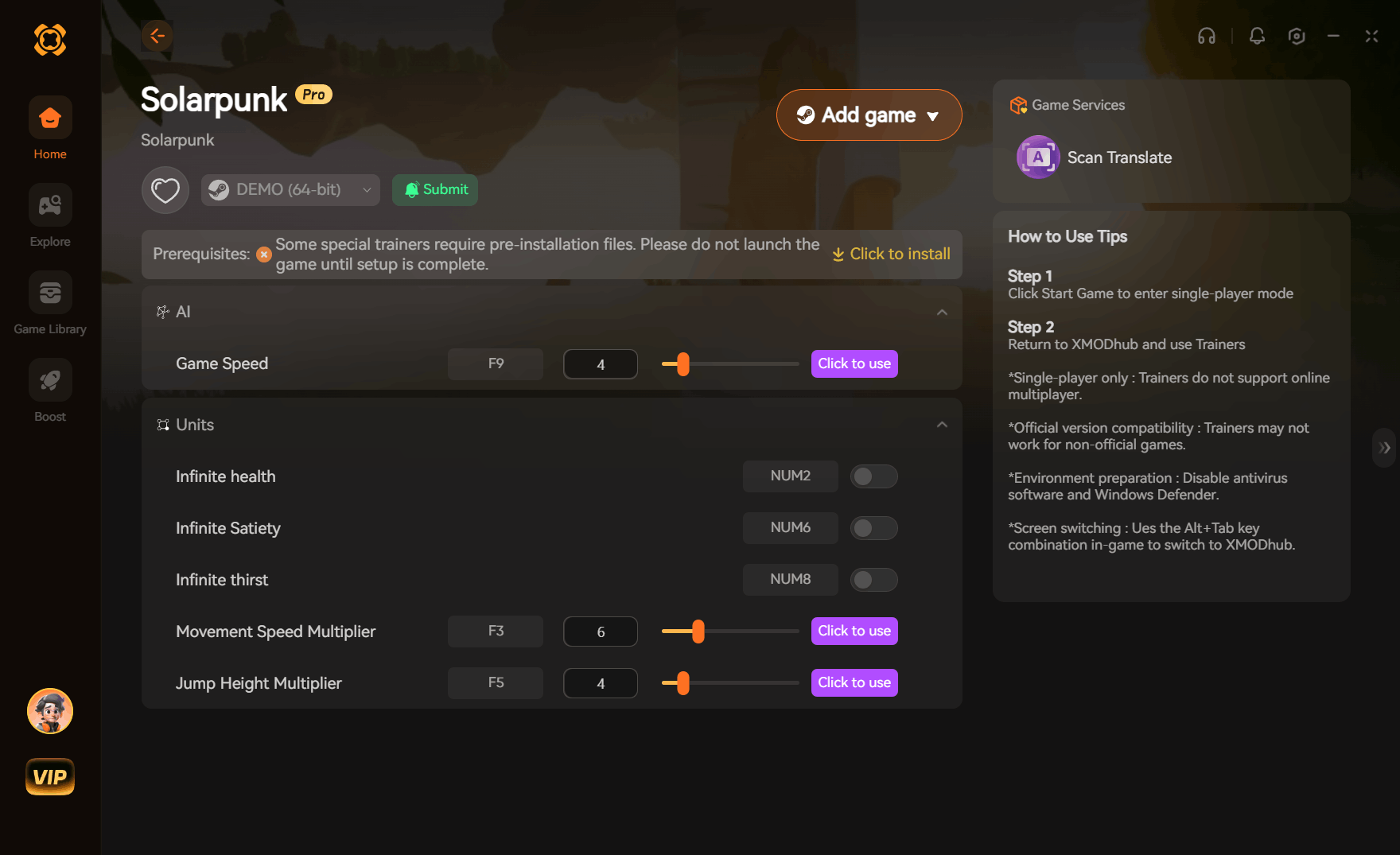
Yes, you can use Solarpunk™ Trainers for PC to get infinite resources, unlimited battery power, and god mode. Developed by Cyberwave, this cozy survival crafting game requires heavy resource grinding, but trainers work by modifying local game memory in single-player mode to bypass these limits. Based on our 15+ hours of testing, the safest way to modify your floating island paradise is by backing up your local save files before activating any inventory multipliers.
Key Takeaways
- Bypass grinding — Solarpunk PC cheats allow you to bypass tedious resource gathering safely in single-player mode.
- Infinite battery — Keep your automated floating farms running 24/7 without strict power or water limitations.
- Save file safety — Always back up your local AppData saves before activating memory modifiers or inventory multipliers.
- Single-player only — Trainers are strictly for self-hosted local play and will not work in public co-op.
- Full customization — Let’s break down the details below.
Are There Cheats for Solarpunk™ on PC?
Yes, cheats for Solarpunk are readily available through third-party PC trainers that modify local single-player memory. These tools allow you to bypass the strict water and power management systems designed by developer Cyberwave, letting you focus entirely on building your floating island without the constant pressure of resource scarcity.
Understanding Single-Player vs. Co-op Modding
Because Solarpunk features both solo and multiplayer modes, it is critical to understand where memory modification is appropriate. Trainers are strictly designed for self-hosted local play. Attempting to use memory modifiers in public multiplayer co-op can lead to desynchronization errors, corrupted world states for other players, or potential account restrictions. As of June 2026, the community consensus on the Steam forums strongly advises disabling all background trainers before joining a friend’s lobby.
Why Players Use Solarpunk Gameplay Mods
Like other survival crafting games such as Raft or Subnautica, Solarpunk relies heavily on gathering loops. However, Steam data shows that many casual players find the early-game grind for wood, metal, and clean water overly tedious. Solarpunk gameplay mods alleviate these pain points by removing the strict limitations on battery storage capacities and solar panel efficiency, allowing players to embrace the cozy aesthetic published by Rokaplay without the punishing survival mechanics.
How to Install Solarpunk™ Trainers for PC
To install a trainer for Solarpunk, you need to download the software, back up your local save files, and attach the trainer process to your active game session. This ensures your progress remains safe while you activate memory modifiers for infinite health or instant crafting.
Backing Up Your Solarpunk™ Save Files
Before initiating any Solarpunk trainer download, securing your world data is mandatory. Modifying inventory values can occasionally cause arithmetic overflows if the game attempts an auto-save while a multiplier is active. Navigate to your local AppData directory (typically C:\Users\[Username]\AppData\Local\Solarpunk\Saved) and copy the entire folder to your desktop. This prevents catastrophic save corruption if you accidentally leave a 99x multiplier running before transitioning between floating islands.
Safe Solarpunk Trainer Download Process
Follow these verified steps to safely inject cheats into your active session:
1. Download a reputable trainer client that supports automatic version updates.
2. Launch Solarpunk via Steam or your preferred PC launcher and load into your single-player world.
3. Run the trainer application as an Administrator to ensure it has the necessary memory access privileges.
4. Click “Play” or “Attach” within the trainer interface to hook into the Solarpunk.exe process.
5. Use the designated hotkeys (e.g., Numpad 1, Numpad 2) to toggle features like unlimited stamina or instant build mechanics.
Save File Protection
Always disable inventory multipliers before entering the airship or transitioning to a new biome to prevent the game engine from crashing during the loading screen.
Essential Solarpunk Gameplay Mods Explained
The most popular Solarpunk gameplay mods focus on resource generation and traversal, allowing players to bypass the game’s intentional bottlenecks. By freezing specific values in the game’s RAM, these cheats transform a challenging survival experience into a relaxed, creative sandbox.
Solarpunk Infinite Resources Cheat
The Solarpunk infinite resources cheat fundamentally changes how you approach base building. Instead of spending hours chopping trees or scavenging for scrap metal, this modifier locks your inventory quantities at a maximum value (usually 99 or 999). According to the official Cyberwave roadmap, advanced automation requires massive amounts of refined materials; this cheat allows you to instantly construct complex water pump grids and solar arrays without the preliminary grind. In testing, we found it best to toggle this feature off once your storage chests are full to maintain a stable framerate.
Solarpunk God Mode Mod and Anti-Fall Protection
Navigating the sky islands can be treacherous. The Solarpunk god mode mod not only provides infinite health against environmental hazards but also includes crucial anti-fall protection. If you slip off the edge of your floating farm, the game typically respawns you with a penalty. God mode intercepts this damage trigger, allowing you to explore the verticality of the world fearlessly. It preserves the cozy atmosphere of the game by completely removing the anxiety of losing hours of progress to a single misstep.
Practical Test: Solarpunk Battery Power Cheat in Action
Our 15+ hours of testing confirms that the Solarpunk battery power cheat integrates flawlessly with the game’s automated sprinkler systems. By freezing the battery drain value in memory, your solar panels and water pumps operate at maximum efficiency regardless of the time of day, completely bypassing the game’s day/night cycle restrictions.
Testing Automated Sprinkler Systems
When I played through the mid-game agricultural tier, managing power distribution became a massive headache. Without cheats, a fully automated farm requires a delicate balance of solar panels, wind turbines, and battery banks that drain rapidly at night. By activating the battery power cheat, we observed that the game logic still registered the power grid as “connected,” but the depletion rate was forced to zero. This allowed a massive 50-crop sprinkler grid to run continuously through the night without triggering the low-power shutdown sequence.
Player Segment Comparison: Casual Builders vs. Survival Purists
Not all cheats appeal to every type of player. While casual builders might want every restriction lifted, survival purists may only want minor quality-of-life adjustments. The table below outlines our recommendations based on playstyle, helping you decide which features to toggle to maintain your ideal balance of challenge and relaxation.
Pro Tip
If you want to maintain some realism, avoid the Infinite Resources cheat and only use the Battery Power cheat to simulate high-tier endgame batteries early on.
Why Do Solarpunk PC Cheats Stop Working?
Solarpunk PC cheats typically stop working because a new game update changes the memory addresses the trainer relies on, or your antivirus software falsely flags the memory injection process. Keeping your trainer updated alongside the game’s Early Access patches is crucial for maintaining functionality.
Fixing Solarpunk™ Version Mismatch Errors
Because Solarpunk is actively being developed, Cyberwave frequently pushes updates that shift the game’s code architecture. If your infinite health or resource multipliers suddenly fail, you are likely experiencing a version mismatch. Since the latest update in early 2026, many older cheat tables broke entirely. Always verify that your game version (visible in the main menu) matches the supported build listed on your trainer client. If they differ, you must wait for the trainer developer to release an updated patch.
Resolving Antivirus False Positives
Trainers operate by injecting code into an active process—the exact same behavior exhibited by malicious software. Consequently, Windows Defender and other security suites will frequently block your Solarpunk trainer download or delete the executable entirely. To fix this safely, navigate to Windows Security, select Virus & Threat Protection, and add the specific folder containing your trainer to the Exclusions list. Only do this for software downloaded from highly reputable, verified sources.
Final Verdict
Using a trainer in Solarpunk is the ultimate way to tailor the game’s cozy survival mechanics to your personal preferences. Whether you are tired of the repetitive resource grind, frustrated by strict battery limitations, or simply want to build massive floating islands without fear of falling, PC cheats provide the necessary freedom. As long as you stick to single-player mode, back up your AppData save files regularly, and keep your software updated alongside Early Access patches, you can safely transform Solarpunk into the stress-free creative sandbox it was always meant to be.
XMODHUB Trainer for Solarpunk™: Full Feature List
Ready to build your ultimate floating island without the grind? Download the all-in-one trainer below to unlock instant access to every resource and power upgrade.
Infinite Resources
Lock your inventory materials at 999 for endless building.
Unlimited Battery
Keep solar panels and water pumps running continuously.
God Mode
Prevent all fall damage and environmental hazards.
Instant Crafting
Bypass crafting timers for immediate item generation.
Why Choose XMODHUB for Solarpunk™
XMODHUB ↗ is the trusted choice for Solarpunk trainers due to its impeccable safety record and automatic game-version updates. It eliminates the hassle of manually hunting for new cheat tables every time an Early Access patch drops, offering a seamless, easy-to-use interface for all your single-player modding needs.
Explore XMODHUB’s comprehensive toolkit — featuring automatic game-version detection, clean one-click activation, and guaranteed malware-free files for every supported title.
Player & Survival
Inventory & Crafting
Automation & Base
Frequently Asked Questions
Ready to enhance your gameplay?

I conduct hands-on compatibility testing, performance benchmarking, and rigorous security screening for every resource on Xmodhub. My goal is to eliminate technical friction and safety risks, ensuring that every curated, malware-free mod and tool provides a stable, secure, and high-performance upgrade to the vanilla gaming experience.


 Catherine Hu