
 Catherine Hu
Sailing a massive galleon, managing cannons, and fighting soulslite bosses inside instanced caves is practically impossible to do efficiently alone. Windrose is heavily designed around cooperative play. But before you invite your entire Steam friends list to join your pirate crew, you need to know the hard limits of the game’s servers.
If you are wondering about the Windrose co-op max players limit, how to actually invite your friends, and whether you can accidentally shoot your crewmates, here is the definitive multiplayer guide.
✦You may also like:
The Ultimate Windrose Cheat Engine Guide (And A Much Easier Alternative)
With Windrose launching into Early Access tomorrow, April 14th, the number one question blowing up the community Discord is about crew size. As someone who has run massive clans in games like Rust, Ark, and Palworld, I know that organizing a group for a survival base-builder is a logistical nightmare. Pocketpair and Windrose Crew have built this game from the ground up for PvE multiplayer, but there are strict limits depending on how you host your world. Below is the exact breakdown of player caps, how to fix annoying connection timeouts, and how to use PC trainers if your crew doesn’t have time to grind.
–Catherine Hu, Content Lead at XMODhub
1. What is the Max Player Limit in Windrose Co-op?
How many people can play Windrose co-op? The max player limit for Windrose co-op depends on your hosting method.
Local / Peer-to-Peer
8 Players
If you are hosting a local session directly from your PC, the max co-op limit is capped at 8 players. Your friends connect directly to your machine.
Dedicated Server
32 Players
If you rent or set up a dedicated server, the player cap is vastly expanded, allowing up to 32 players to play in the same world simultaneously.
2. How to Invite Friends to Your Windrose Lobby
Early Access UIs can be a bit clunky, and Windrose is no exception. If you are hosting an 8-player local session, here is exactly how to invite friends in Windrose:
01
Launch a Multiplayer World
From the main menu, select “Start Game,” choose your world, and ensure the “Multiplayer” toggle is set to ON before hitting play.
02
Open the Pause Menu
Once loaded into the island, press ESC to open the main menu.
03
Show Invite Code / Steam Overlay
You can either click “Reveal Invite Code” and copy-paste that code to your friends on Discord, or simply press Shift + Tab to open the Steam Overlay, right-click your friend’s name, and click “Invite to Lobby.”
04
Joining
Your friends can either accept the Steam invite or select “Join via Code” on the main menu and paste your session ID.
3. Shared Progression: How Does Co-op Save Data Work?
Before you start building a massive brick fortress, you need to understand how the game handles save files. Like most survival games in 2026, Windrose ties the world progression to the Host’s Save File.
➤
If you play on a Local Host (8-Player): Your friends bring their characters into your world. If you log off, the world shuts down, and your friends will be kicked out. They cannot continue building the ship or mining sulfur without you.
➤
If you play on a Dedicated Server (32-Player): The world is persistent and runs 24/7. Any player can log in, access the shared chests, farm clay, and fight bosses even if the server owner is offline.
Character levels, stats, and unlocked crafting blueprints are tied to the individual player’s character. However, the ships, bases, and world map exploration are tied exclusively to the host server.
4. Fixing Windrose Co-op Connection Errors
Because this is an Early Access launch, you are guaranteed to run into the dreaded “Connection Timed Out” or “Failed to Join Session” error. If your Windrose multiplayer is not working, try these quick fixes:
🔧
Check Windows Firewall: This blocks 90% of peer-to-peer connections. Search “Firewall” in your Windows search bar, click “Allow an app through Windows Firewall,” and ensure both Private and Public boxes are checked for Windrose.
🔄
Verify Game Versions: Pocketpair will be pushing hotfixes rapidly this week. If your friend downloaded a 50MB patch and you didn’t, the version mismatch will prevent you from joining each other. Restart Steam to force the update.
5. Does Windrose Have PvP or Friendly Fire?
Because Windrose pivoted away from its original MMO PvP concept, the game is almost entirely a PvE (Player vs. Environment) experience.
Currently, there is no forced PvP or open-world raiding by other players in standard co-op. More importantly, friendly fire is disabled by default in your world settings. This means you can fire cannons during a chaotic naval battle or swing a heavy boarding axe inside a cramped instanced cave without accidentally killing your crewmates.
6. Skip the Grind: Use XMODhub in Private Co-op
While 8 to 32 players sounds like a lot, the economy in Windrose is brutal. Building a top-tier Galleon isn’t a solo job. But what happens if you only have one or two friends to play with, and you still want to build massive ships?
Instead of spending your weekend hitting rocks with a pickaxe, the host of the world can use XMODhub. Because Windrose doesn’t use invasive anti-cheat software for private, password-protected local sessions, the host can safely inject quality-of-life mods to bypass the brutal economy. Here is how you can respect your crew’s time:

✨
Host Downloads XMODhub: The player hosting the 1-8 player local session downloads the free XMODhub desktop client.
✨
Activate Mods: Before launching the world, the host toggles on “Ignore Crafting Requirements” or “Infinite Item Spawns.”
✨
Provide for the Crew: The host can instantly craft ships, generate endless gunpowder for the cannons, and build a massive base. Your friends simply log in and focus on the fun parts: exploring and fighting soulslite bosses.
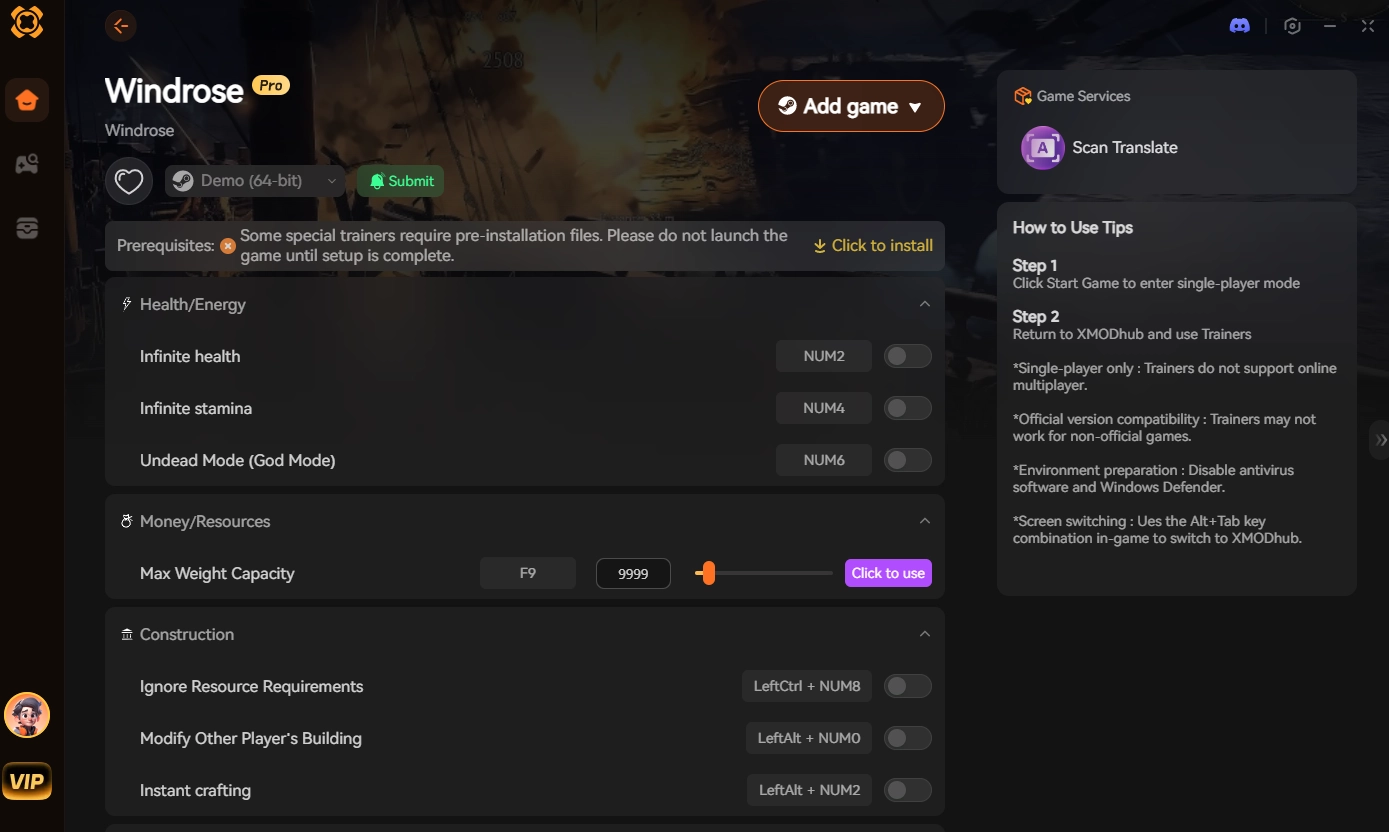
Note: Memory injections and trainers only work for the Host in a peer-to-peer session. Client players connecting to the host cannot inject their own cheats, which keeps your lobby safe from rogue randoms.
✦ Windrose Multiplayer FAQ ✦
Q: Does Windrose support crossplay between PC and consoles?
A: At the launch of Early Access in April 2026, Windrose is currently PC-only (Steam). Crossplay features are typically added later in the development roadmap if console versions are announced.
Q: Can I change my single-player world into a co-op world?
A: Yes! If you started playing completely solo offline, you can change your world settings from the main menu to “Multiplayer” and invite up to 7 friends to join your existing save file.
Q: Is there matchmaking to find random players?
A: No. Windrose uses an invite-only system for local co-op, or a server browser/IP connection for dedicated servers. There is no automated matchmaking to pair you with random pirates.
8. Conclusion: Assemble Your Crew
Windrose is shaping up to be one of the best cooperative survival games of the year. Whether you are hosting a small, 8-player peer-to-peer session with your closest friends or renting a 32-player dedicated server to build a massive pirate armada, the game offers incredible freedom.
But remember, your gaming group’s time is limited. If coordinating resource runs feels more like a chore than a game, don’t let the grind kill your crew’s motivation. Download XMODhub today, enable free crafting for your hosted session, and get straight to conquering the high seas. And the best part? The anti-grind doesn’t stop here. XMODhub supports over 5,000+ PC games, meaning you can bring the same 1-click freedom to other heavy multiplayer survival titles like Valheim, Palworld, Enshrouded, and Raft. Reclaim your gaming time today.


I am a passionate gamer and writer at XMODhub, dedicated to bringing you the latest gaming news, tips, and insights.
Connect with me:
LinkedIn Profile ↗




 Nancy Miller