
 Catherine Hu
You have spent the last 20 minutes scouring forums for a working Solasta II Cheat Engine table (.ct file). You finally found one, loaded it up to give the Colwall siblings some extra gold before tackling the dangerous factions of Neokos, and… it says “Process not found” or simply crashes your game client.
The era of manually searching for memory addresses and risking your 40-hour D&D 5.2 campaign save data is over.
Today, we break down why the XMODhub Trainer is the safer, smarter evolution of Cheat Engine for Solasta II players on Steam and Xbox Game Pass.
You may also like: Solasta II Console Commands Guide
Editor’s View: The “Update” Nightmare
“I used to love Cheat Engine. But when Solasta II Early Access released Hotfix 1 yesterday, every single pointer for my Rogue’s sneak attack damage and my Cleric’s spell slots broke. I had to wait days for the forum creator to update the .ct file. With XMODhub, the app detected the patch and auto-updated the cheats in seconds. It saves me time, plain and simple.”
— Catherine Hu, Senior Editor at XMODhub
At a Glance: XMODhub vs. Cheat Engine Table
| Feature | Cheat Engine Table (.ct) | XMODhub Trainer |
|---|---|---|
| Ease of Use | Hard (Manual Scripts/UE5 Pointers) | Easy (Sliders/Toggles) |
| Game Updates | Breaks Instantly (Manual fix) | Auto-Updates (Cloud Sync) |
| Game Pass Support | Very Difficult (Encrypted) | Native Support |
| Safety | High Risk (User Uploads) | Verified (Signed Code) |
| Mobile Control | No | Yes (Remote App) |
| Cost | Free | Free |
The “Hard Way”: How to Use a Cheat Engine Table or UE5 Console
If you insist on using the old-school method for Solasta II, you are in for a rough ride. Because Tactical Adventures upgraded from Unity to Unreal Engine 5 for the sequel, the old memory injection tricks and cheat codes are much harder to execute.
In the retail release of Solasta II, there is no native command console enabled by default. You cannot simply press the tilde key and type add_gold 1000. To even open the console, you have to use third-party bypass tools like the Universal Unreal Engine Unlocker. Once unlocked, spawning items requires typing out exact, complex blueprint object paths, such as Summon /Game/Items/Weapons/Swords/BP_Longsword_PlusOne.BP_Longsword_PlusOne_C. It is a technical nightmare for the average tabletop fan who just wants to have fun.
Alternatively, trying to use a Cheat Engine table requires these steps:
- Download and install Cheat Engine (Risk of bundled bloatware).
- Find a .ct file on a forum matching your exact Early Access game version.
- Launch Solasta II.
- Open Cheat Engine, click the “PC Icon”, and attach to the
Solasta2-Win64-Shipping.exeprocess. - Load the table file.
- Hope the D20 roll mechanics and pointer paths haven’t been altered by the latest patch.
Warning: One wrong click on a memory value can permanently corrupt your %LOCALAPPDATA%\Solasta2\Saved\SaveGames\ save files.
The “Easy Way”: How to Use XMODhub
Now compare that to the XMODhub experience. You do not need to know anything about UE5 blueprint paths, memory addresses, or console unlockers.

- Download and Launch XMODhub.
- Search Solasta II.
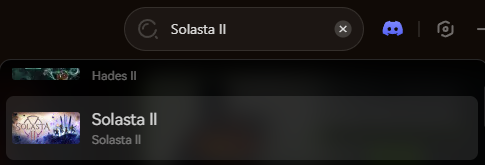
- Click “Play”.
- Use simple sliders and toggles to set Infinite Health for your party, Infinite Spell Slots for your Wizard, or Max Action Points.
- Done. No attaching processes, no version matching, no risking your saves.
Game Pass & Windows Store: The Cheat Engine Killer
Playing Solasta II on Xbox Game Pass (PC)?
Cheat Engine often fails completely on Windows Store games because the executable files are encrypted and hidden in protected folders like WindowsApps. You cannot “attach” to them easily, resulting in the dreaded “Process Not Found” error.
XMODhub is different. Our engine is built to recognize Game Pass and Windows Store directories natively. We handle the encryption bypass automatically, so your cheats work seamlessly regardless of where you bought your ticket to Neokos.
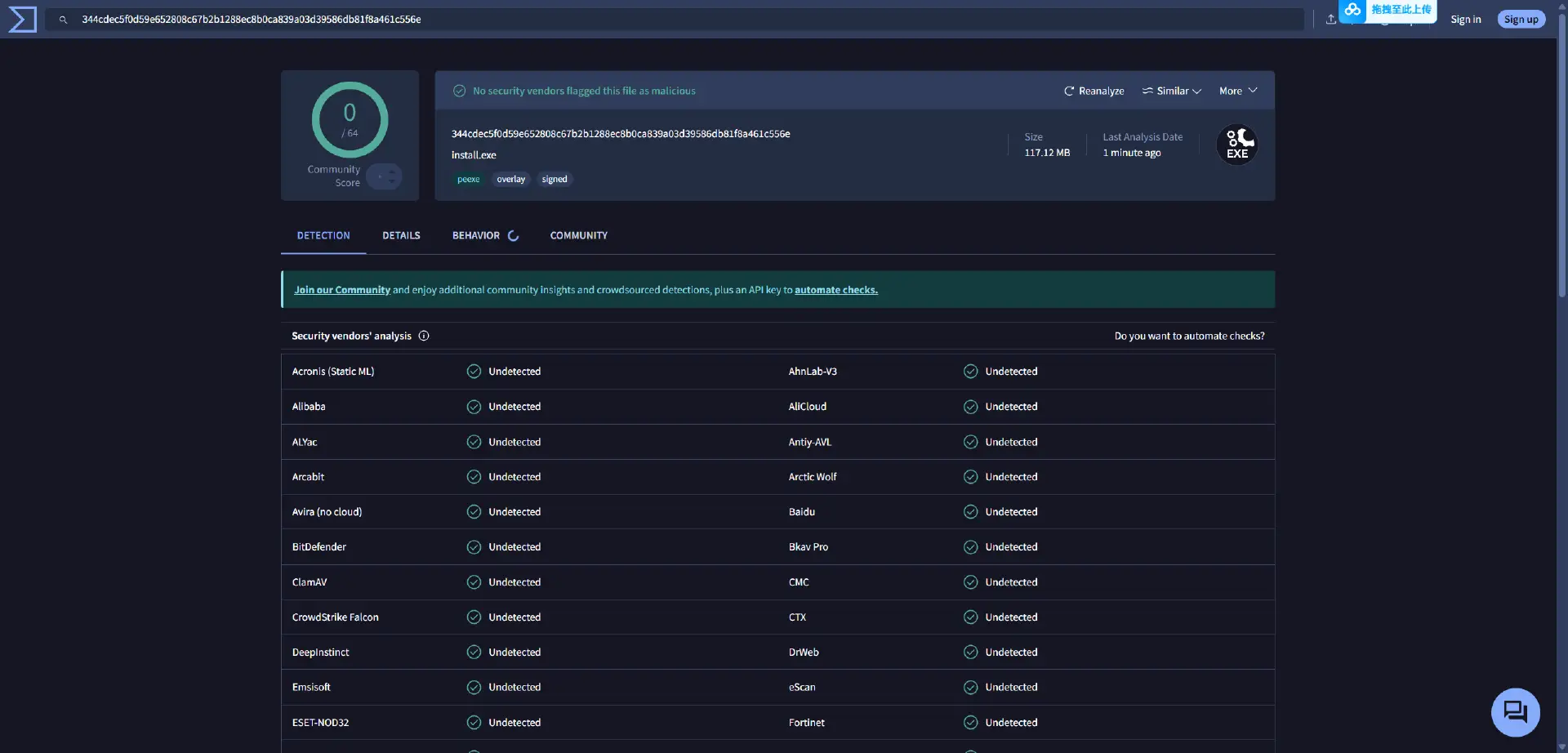
Safety Check: VirusTotal Proof
Is XMODhub safe? Yes. Trainers are often flagged as “False Positives” by Windows Defender because they inject code into memory (just like a virus, but for a good cause like ensuring your Paladin’s smite always hits).
Unlike random forum files where anyone could hide a trojan in a .ct script, XMODhub is:
- Digitally Signed.
- Bloatware Free.
- Scanned Daily.
Why is XMODhub the Best WeMod Alternative?
WeMod is the market leader, but XMODhub offers key advantages for Solasta II players:
- Support for 5,000+ games: A huge and growing library covering both new SRD 5.2 releases and classic CRPG titles, all in one place for easy access.
- Launch-day trainers and mods: We have our trainers ready on release day. Get enhanced gameplay immediately without the long wait.
- Community Requests: Our cheat creation is driven by user votes. Need a cheat to guarantee natural 20s on every persuasion check with the Shadwyn faction? Vote for it in our app!
FAQ
Q: My Solasta II Cheat Engine table says “???” on all values.
A: This means the table is outdated. The pointers (memory addresses) have changed in the latest UE5 update. You must switch to XMODhub or wait for the original creator to upload a new table.
Q: Can I use this in Multiplayer or Co-op?
A: No. While Tactical Adventures is developing multiplayer features for Solasta II, XMODhub is strictly designed for Single Player / Campaign use. Using it in online modes will trigger anti-cheat mechanisms.
Q: How do I fix “Process Not Found” on Game Pass?
A: As mentioned above, Cheat Engine struggles with Game Pass encryption. Download XMODhub, which features native Game Pass support to bypass this error instantly.
Conclusion
Stop fighting with broken pointers, locked UE5 consoles, and encrypted Game Pass folders. Upgrade your tabletop gaming experience with the XMODhub Trainer for Solasta II. It is the modern, safe alternative that ensures your cheats work flawlessly—whether you are exploring the high-magic continent of Neokos on Steam, Epic, or Xbox Game Pass.
Cheat Smarter, Not Harder.

XMODhub supports more than 5000+ games, and also supports similar CRPG titles like Baldur’s Gate 3 and Pathfinder: Wrath of the Righteous.

I am a passionate gamer and writer at XMODhub, dedicated to bringing you the latest gaming news, tips, and insights.
Connect with me:
LinkedIn Profile ↗


 Nancy Miller