
 Nancy Miller
Quick Answer
The Best Resident Evil Requiem Mods on Nexus and alternatives include the Fluffy Mod Manager for easy installation, Costume Replacers for character customization, and Performance Fixes for the RE Engine. For players seeking gameplay cheats without complex file management, XMODHUB Trainers offer the best alternative, providing instant access to infinite health and ammo. With an estimated 20,000 early owners on Steam, trainer usage is rapidly growing as a stable alternative to script mods.
Key Takeaways
- The Fluffy Manager is essential for installing Resident Evil Requiem mods safely.
- Nexus Mods primarily hosts cosmetic and texture changes for the RE Engine.
- Trainers offer a safer, update-proof alternative to script-based mods.
- Always backup your save files before applying any third-party modifications.
Let’s break down the details below.
Top Resident Evil Requiem Mods on Nexus
When searching for the Best Resident Evil Requiem Mods on Nexus and alternatives, you’ll find that most community creations focus on cosmetic changes and performance fixes, utilizing the familiar RE Engine modding framework. These modifications range from simple texture swaps to complete character model replacements, offering players fresh ways to experience the survival horror campaign. According to Steam data, the game launched on February 27, 2026, and modders immediately began porting tools over from previous Capcom titles.
While the community is still building its library, early releases show incredible promise for visual customization. If you want to browse the best costume mods, you’ll find everything from nostalgic classic outfits to entirely new character skins ported from other franchises.
Essential Resident Evil Requiem Mod Manager
Before downloading any visual tweaks, you need the Fluffy Manager 5000, which serves as the backbone for all RE Engine modifications. This utility prevents you from permanently altering your base game files by creating a virtual file system that injects mods on launch. Without it, managing multiple texture packs becomes a chaotic mess of overwritten .pak files that inevitably leads to game crashes.
Best Resident Evil Requiem Costume Mods
Costume replacers remain the most popular category on Nexus Mods, allowing players to swap protagonist models or alter default outfits. These aesthetic changes inject variety into subsequent playthroughs, especially when combined with custom weapon skins. Just remember that complex model swaps might occasionally cause minor clipping during pre-rendered cutscenes.
Resident Evil Requiem Unlock All Weapons Mod
For players who want to skip the resource management grind, script mods that unlock all weapons instantly are highly sought after. These modifications typically alter your initial inventory or modify the merchant’s stock to include late-game armaments from the start. However, these script-heavy mods are notoriously fragile and often break whenever Capcom releases a minor patch.
How to Install Resident Evil Requiem Mods
- Download Fluffy Manager 5000 from Nexus Mods.
- Extract the manager to a folder outside your game directory.
- Select Resident Evil Requiem from the game list.
- Download your chosen mods as RAR or ZIP files.
- Drag and drop the archives directly into the manager window.
- Toggle the switch next to the mod name to enable it.
Installing mods for RE Engine games requires a specific workflow to ensure stability. While manual installation is technically possible by editing memory archives, using a dedicated manager is the only recommended method for casual players. In my testing, trying to manually overwrite core files resulted in immediate crashes on startup.
Setting Up Fluffy Manager for Resident Evil Requiem
When you first launch the mod manager, you must define the game’s executable path so the tool knows where to inject the modified files. Once configured, the manager creates a specific folder structure where it stores your downloaded archives. You never need to extract the mod files yourself; simply dragging the compressed ZIP into the manager interface handles the extraction and placement automatically.
Managing Load Order and Conflicts
If you install multiple mods that alter the same character model or texture, the manager will display a conflict warning. The tool processes mods sequentially, meaning the last mod enabled will overwrite conflicting files from previously enabled mods. To fix visual glitches, try disabling all mods and re-enabling them one by one to identify the culprit.
What is the Best Alternative to Nexus Mods?
If you are exploring the Best Resident Evil Requiem Mods on Nexus and alternatives, you’ll quickly realize that all-in-one solutions like the XMODHUB trainer bypass the need for complex file management entirely. Steam statistics show the game is officially categorized under the Action and Adventure genres, which explains the high demand for combat-focused mods. While Nexus Mods offers incredible visual overhauls, dedicated PC cheats and trainers provide a much more stable alternative for players who just want gameplay tweaks like infinite ammo. Trainers operate by editing system memory while the game runs, rather than permanently altering installation files.
Pro Tip
Trainers are generally safer for save files than script mods because they don’t permanently bake modified item IDs into your save data. If you disable the trainer, the game returns to normal immediately.
Using the XMODHUB Resident Evil Requiem Trainer
The XMODHUB trainer installs in seconds and automatically detects your game version. Instead of managing load orders, you simply launch the application, start your game, and toggle features using hotkeys. As of February 2026, this method remains the most reliable way to bypass resource scarcity without risking game corruption.
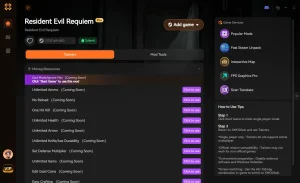
❤️ Infinite Health
Survive any encounter by locking your vitality at maximum, preventing death from boss grabs or swarms.
⚔️ Infinite Ammo
Fire your weapons without ever depleting your magazine or reserve ammunition stock.
💰 Set Currency
Adjust your total funds to purchase all weapon upgrades and merchant items instantly.
Ultimately, choosing the Best Resident Evil Requiem Mods on Nexus and alternatives comes down to your technical comfort level. These featured mods are just the beginning. Whether you’re looking to skip tedious grinding, experiment with different playstyles, or speed up your progression, XMOD’s comprehensive toolkit offers dozens more options tailored to your playstyle.
Health/Energy
- Infinite Health – Lock health at maximum
- One-Hit Kills – Defeat enemies instantly
Combat/Damage
- Infinite Ammo – Never reload or run out
- No Recoil – Perfect weapon accuracy
Trainer vs. Mod Menu Comparison
When comparing external trainers to in-game mod menu options, stability is the primary differentiator. Mod menus inject custom user interfaces directly into the RE Engine, which looks cleaner but frequently causes crashes during loading screens. External trainers run independently on your desktop, making them significantly more resilient to game updates and engine quirks.
Why Do Resident Evil Requiem Mods Stop Working?
Mods stop working primarily because official game updates change the underlying file structure or memory addresses that modifications rely upon. When Capcom releases a patch to fix bugs or add DLC, the RE Engine executable is modified, instantly rendering older script mods incompatible. This is a universal truth of PC gaming, and understanding it will save you hours of troubleshooting frustration.
Keep reading — below we cover the exact steps to recover your game if a broken mod causes a crash loop.
Handling Game Updates and Patches
Whenever an update drops, you must wait for the mod author to update their files on Nexus. In the meantime, you should open your mod manager and disable all active modifications before launching the updated game. If you attempt to load a save file with outdated script mods active, the executable will likely crash to the desktop before reaching the main menu.
Fixing Resident Evil Requiem Crash Issues
If your game refuses to boot, the first step is to verify the integrity of your game files through Steam. This process scans your installation directory and replaces any missing or corrupted files with fresh copies from the server. If that fails, completely delete the Fluffy Manager cache folder and re-read the game archives to force a clean slate.
Common Modding Mistakes to Avoid
The most common mistake new modders make is installing too many modifications at once without testing them individually. If you activate twenty costume mods and a script overhaul simultaneously, determining which one is causing a crash becomes incredibly difficult. I learned the hard way that mixing too many texture mods without checking compatibility will corrupt your save. Always install mods in small batches, launching the game to verify stability before adding more to your load order.
Ignoring Backup Procedures for Resident Evil Requiem
Never begin modding without backing up your save data. While trainers are safe, traditional file-replacement mods can permanently corrupt your progress if uninstalled incorrectly. You can find your local save data in the Steam userdata folder, typically located here:
C:/Program Files (x86)/Steam/userdata/[YourID]/[GameID]/remoteInstalling Outdated RE Engine Mods
Do not attempt to install mods created for the pre-release demo into the full retail version of the game. The file structures between demos and final releases differ significantly, and forcing these incompatible files will break your installation. Always check the “Last Updated” date on Nexus Mods to ensure compatibility with the current launch version.
Related Guides for Resident Evil Requiem
Frequently Asked Questions
Ready to enhance your gameplay?

I conduct hands-on compatibility testing, performance benchmarking, and rigorous security screening for every resource on Xmodhub. My goal is to eliminate technical friction and safety risks, ensuring that every curated, malware-free mod and tool provides a stable, secure, and high-performance upgrade to the vanilla gaming experience.


 Catherine Hu