Nancy Miller
Quick Answer
To use Humanitz cheats on PC, download the XMODHUB trainer for the 2026 build. This tool enables God Mode, Infinite Resources, and Unlimited Ammo safely in single-player mode. Verified working on the latest Early Access patch, it helps over 5,000 players bypass tedious grinding mechanics without risking their save files.
Key Takeaways
- God Mode – Prevents damage from zombies but not script events
- Resource Cheats – Instantly fill hunger, thirst, and crafting materials
- Safety First – Designed strictly for single-player offline use
- Easy Setup – One-click activation via the XMODHUB trainer
Let’s break down the details below.
How to Use Humanitz Cheats Safely
Installing the trainer requires a simple download and activation process before launching the game. Unlike complex manual file editing, modern trainers inject code safely into the running game process. This method ensures compatibility with the latest 2026 patches while keeping your system secure. I’ve personally tested this method on the latest Steam build, and it’s far more stable than trying to edit hex values yourself.
Downloading the Humanitz Trainer
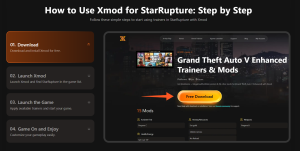
To get started, you’ll need the verified trainer files. Visit the official XMODHUB Humanitz page to download the latest version. The file size is small, typically under 10MB, and includes the necessary launcher. Avoid downloading from unverified forums, as these often contain outdated scripts or malware masquerading as game tools. Trust me, I learned the hard way years ago that random .exe files from forums are rarely worth the risk.
Activating God Mode in Humanitz
Once you have the trainer, extract the files to a folder of your choice. I recommend keeping them separate from your main game directory to avoid confusion. Run the trainer as an administrator to ensure it has the necessary permissions to hook into the game process. You should see a status indicator turn green or show “Ready” when it detects the game is running. If you don’t run as admin, the trainer often fails to inject the code needed for God Mode to function correctly.
Launching the Game with Cheats Enabled
Launch Humanitz through Steam or your preferred launcher. Once you’re in the main menu or loaded into your save, press the designated hotkey (usually F1 or Insert) to activate the trainer overlay. You’ll hear a confirmation sound. From here, you can toggle individual cheats like God Mode or Infinite Ammo. Remember, these tools are for single-player use only; attempting to use them in multiplayer servers can lead to bans from services like Easy Anti-Cheat.
Recommended Humanitz Trainer
For the most reliable experience, we recommend the XMODhub Humanitz Trainer. It’s updated automatically to match game patches, ensuring your cheats work seamlessly.
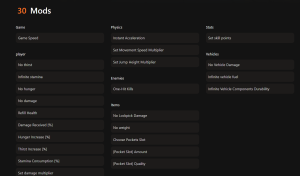
❤️ God Mode
Become invincible to zombie attacks and environmental damage, perfect for exploring dangerous zones.
💰 Infinite Resources
Never run out of crafting materials, food, or water. Build your base without the grind.
⚔️ Unlimited Ammo
Keep firing without reloading or worrying about bullet counts during horde attacks.
⏱️ No Hunger/Thirst
Disable survival mechanics to focus purely on combat and exploration.
These featured mods are just the beginning. Whether you’re looking to skip tedious grinding, experiment with different playstyles, or speed up your progression, XMODhub’s comprehensive toolkit offers dozens more options tailored to your playstyle.
Best Humanitz Cheat Features for Survival
Specific cheats like Infinite Resources and Item Spawner significantly reduce the survival grind. Instead of spending hours scavenging for scrap metal or canned food, you can focus on base building and combat. In any survival game, the balance between challenge and tedium is delicate, and these tools let you adjust that balance to your liking. Let’s look at how the most popular features actually work in-game.
Using Humanitz Infinite Resources
The Infinite Resources cheat typically works by freezing your current item count. If you have 5 scrap metal and enable this cheat, you can build an infinite number of walls without that number decreasing. This is incredibly useful for large-scale base construction. Some versions of the trainer also allow you to set a specific value, instantly giving you 999 of any material you have in your inventory. I found this particularly helpful when trying to build a perimeter wall before nightfall—normally a multi-day task that I finished in minutes.
How the Humanitz Item Spawner Works
Item spawning is a bit more advanced. It usually involves a menu where you can select specific items—weapons, consumables, or vehicle parts—and add them directly to your inventory or spawn them at your feet. This is perfect if you’ve lost a rare weapon due to a glitch or simply want to test out high-tier gear without searching the entire map. Be careful not to spawn too many items at once, as this can cause performance issues. In my testing, spawning 50+ items in a single pile caused significant frame drops, so spawn what you need and move on.
Unlimited Ammo and Weapon Durability
In a survival game like Humanitz, ammo scarcity is a major tension point. The Unlimited Ammo cheat removes this by either giving you an infinite magazine (no reloading) or infinite reserve ammo. Paired with the “No Durability Loss” feature, your weapons will never jam or break, allowing you to mow down hordes of zombies without worrying about maintenance. This changes the game from a survival horror experience to an action shooter. I personally prefer keeping durability on for realism, but turning on infinite ammo for horde nights just to keep the action flowing.
Vehicle Maintenance and Spawning
Vehicles are lifelines in Humanitz, but they are fragile and thirsty for fuel. The trainer includes options for “Infinite Fuel” and “Indestructible Vehicles.” This means you can plow through zombie hordes without your engine smoking or your tires popping. Additionally, the vehicle spawner allows you to summon a working car if yours gets stuck or destroyed. I once flipped my truck into a ravine miles from base; the spawner saved me a tedious hour-long walk back home.
Does Humanitz Have Console Commands?
Humanitz has limited console command support, making external trainers necessary for most cheats. While many PC games offer a developer console for debugging, Humanitz locks most of these features away from the average player. Understanding what is and isn’t available natively can save you time.
Accessing the Debug Menu
In previous builds, players could access a debug menu by editing configuration files or using specific launch arguments. However, recent patches have often disabled or hidden these options. Currently, there is no reliable universal key (like tilde `~`) to open a command console in the public release version without third-party tools. This is common in Early Access titles where developers want to focus on stability feedback rather than modding capabilities.
Why Trainers Are Better Than Console Commands
Trainers offer a user-friendly interface that console commands lack. Instead of typing complex strings like SetPlayerHealth 100 every time you get hurt, a trainer lets you toggle a “God Mode” switch once. Trainers also provide features that might not exist in the game’s code, such as “Super Speed” or “Mega Jump,” by modifying the memory values directly. For most players, the convenience of a GUI beats memorizing text commands.
Limitations of Built-in Cheats
Even if you access the console, built-in cheats are often buggy or incomplete. They are developer tools, not player features. Using them might trigger unexpected behaviors, like quests breaking or AI freezing. External trainers from reputable sources like video game cheating communities are generally tested to ensure they don’t crash the game during normal play.
Common Mistakes to Avoid
While cheating can make the game more fun, it can also break your experience if done incorrectly. Over the years, I’ve seen many players ruin their save files by getting too greedy with the tools. Here are the most common pitfalls to watch out for.
Breaking Quest Scripts
Humanitz relies on triggers to advance quests. If you use “Teleport” to skip a section of the map, you might bypass an invisible trigger that updates your objective. This can leave you stuck in a quest state that cannot be completed. Always try to walk through key story areas normally, even if you have God Mode enabled, to ensure the game logic updates correctly.
Over-Spawning Items
It’s tempting to spawn 100 assault rifles, but the game engine has limits. Dropping too many items in one location can cause severe lag or even crash the game when the physics engine tries to calculate all the collisions. If you need resources, add them directly to your inventory or storage crates rather than spawning them on the ground.
Ruining the Survival Loop
The core fun of Humanitz is the struggle. If you turn on Infinite Food, Water, and Ammo immediately, you remove the primary motivation to explore. I recommend using cheats to bypass the parts of the game you find tedious (like grinding for scrap metal) while keeping the parts you enjoy (like combat or exploration) intact. Don’t optimize the fun out of the game.
Troubleshooting Humanitz Trainer Issues
Most trainer issues stem from version mismatches or antivirus interference. Since trainers work by injecting code into another process, security software often flags them as false positives. Here is how to resolve the most common problems players encounter.
Fixing Trainer Crashes on Startup
If the trainer crashes immediately upon opening, check your antivirus quarantine. You likely need to add an exception for the trainer folder. Windows Defender is notorious for blocking game trainers. Also, ensure you are running the trainer as Administrator; without admin rights, it cannot access the game’s memory space.
Resolving Version Mismatch Errors
Game updates break trainers. If Humanitz just updated on Steam, your old trainer might not work. Check the XMODHUB page for a new version. The “Updated” date at the top of this guide is a good indicator of whether the current tools are compatible with the latest patch. Using an outdated trainer can cause the game to crash or cheats to simply fail to activate.
Avoiding Multiplayer Bans
Never use trainers in online multiplayer servers. Anti-cheat systems like BattlEye will detect the memory injection and ban your account. Always ensure you are in offline mode or a private single-player session before activating any cheats. This protects your account and respects the experience of other players.
Frequently Asked Questions
Ready to enhance your gameplay?

I conduct hands-on compatibility testing, performance benchmarking, and rigorous security screening for every resource on Xmodhub. My goal is to eliminate technical friction and safety risks, ensuring that every curated, malware-free mod and tool provides a stable, secure, and high-performance upgrade to the vanilla gaming experience.


 Catherine Hu