
 Nancy Miller
Clair Obscur: Expedition 33 brings a stunning Belle Époque aesthetic to the RPG genre, but its reactive turn-based combat isn’t for everyone. If you’re struggling with tight QTE windows or just want to enjoy the story without the grind, mods are the answer. Whether you need an auto-parry tool to perfect your defense or a cosmetic unlocker to access every outfit instantly, the modding community has already delivered powerful solutions for 2026. Honestly, I got stuck on the second boss for hours before trying these tools myself.
Key Takeaways
- Auto Parry – Automate difficult defensive timings perfectly.
- Cosmetic Unlocker – Access all outfits and hair colors instantly.
- Infinite AP – Never run out of actions during crucial turns.
- Save Safety – Always backup saves before injecting DLLs.
Let’s break down the details below.
Top Expedition 33 Best Mods 2026 List
The modding scene for Expedition 33 has exploded since release, offering everything from subtle quality-of-life tweaks to complete gameplay overhauls. Most players are looking for ways to mitigate the punishing difficulty of the reactive combat system or simply want to look their best without hundreds of hours of grinding. Below are the essential tools dominating the community this year.
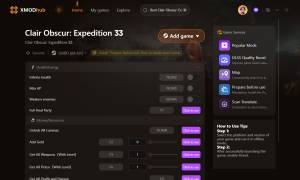
For an all-in-one solution that covers all these features safely, XMODhub’s Expedition 33 trainer is the top-rated choice.
⚔️ Auto Parry
Automatically executes perfect parries and dodges during enemy turns, removing the need for precise reflex timing.
📈 Cosmetic Unlocker
Instantly unlocks all outfits, hair colors, and visual customizations without requiring achievement completion.
⚔️ Infinite AP
Provides unlimited Action Points during your turn, allowing for endless combo chains and ability usage.
📈 Max Level
Instantly boosts your characters to the level cap, unlocking all stat benefits immediately.
❤️ Infinite Health
Keeps your party alive through the toughest boss mechanics, perfect for enjoying the story stress-free.
These featured mods are just the beginning. Whether you’re looking to skip tedious grinding, experiment with different playstyles, or speed up your progression, XMODhub’s comprehensive toolkit offers dozens more options tailored to your playstyle.
Expedition 33 Auto Parry Mod Features
The standout feature for many players is the auto-parry capability. Expedition 33 relies heavily on reactive turn-based mechanics, where you must press a button at the exact moment an enemy attacks to mitigate damage. This mod automates that process completely. It reads the game’s internal state to trigger a “Perfect Guard” or “Dodge” frame-perfectly every time. This transforms the gameplay from a reflex test into a more traditional strategic RPG experience, allowing you to focus on your offensive planning rather than twitch reactions.
How the Expedition 33 Cosmetic Unlocker Works
Fashion is a huge part of the game’s appeal, but many outfits are locked behind grueling challenges or late-game achievements. The cosmetic unlocker modifies the game’s memory to flag all visual items as “owned” in your inventory. This includes alternate costumes, hair colors, and weapon skins. Importantly, this is usually a temporary memory edit, meaning it’s safe to use without permanently corrupting your save file, though some versions can save these unlocks permanently if you choose.
Using the Expedition 33 Infinite AP Cheat
Action Points (AP) dictate how many moves you can make in a single turn. Running out of AP often means passing your turn and taking damage. The Infinite AP cheat freezes your AP value, letting you cast your most powerful spells and execute long combo chains without restriction. This is particularly useful for testing build synergies or rushing through low-level mob encounters that would otherwise feel tedious.
Max Level and Unlimited Skill Points Options
For players who want to see the end of the story without the grind, progression mods are essential. The max level trainer instantly sets your party to the level cap, while the unlimited skill points option gives you enough currency to max out every skill tree immediately. This allows you to experience the full breadth of your characters’ abilities from the very first chapter.
How to Install Mods for Clair Obscur: Expedition 33
Installing mods for Expedition 33 is straightforward, but it requires care to avoid game crashes. Most mods function as external trainers or DLL injections rather than permanent file replacements.
Preparing Your Game Folder for Modding
First, identify your game version. Mods are often version-specific. You can check your version in the main menu’s bottom corner. Navigate to your installation folder to ensure you have write permissions. Usually, this is found in:
C:/Program Files (x86)/Steam/steamapps/common/Expedition33Safely Injecting the Trainer or DLL
If you are using XMODhub, the process is automated. Simply launch the trainer first, then launch the game. The tool detects the running process and hooks into it automatically. For manual DLL mods, you might need a separate injector tool, but standalone trainers are generally safer and easier for beginners.
Backing Up Save Files Before Modding
Before activating any cheats, back up your save data. If a mod writes bad data to your save, you could lose hours of progress. Copy your save folder to a safe location on your desktop. Save files are typically located here:
C:/Users/[Username]/AppData/Local/Expedition33/Saved/SaveGamesReal-World Test: Do Auto-Parry Mods Ruin the Fun?
One common concern is whether automating the game’s core mechanic makes it boring. We tested the auto-parry mod extensively to find out.
Impact on Reactive Turn-Based Mechanics
Expedition 33 is unique because it blends turn-based strategy with real-time reactions. Removing the reaction element definitely changes the game’s feel. It becomes a pure strategy game. For players who love planning but have slower reflexes, this actually improves the experience. You no longer feel punished for mistiming a button press by milliseconds.
Boss Fight Consistency with Auto Dodge
In high-difficulty boss encounters, the auto-dodge feature is a lifesaver. Bosses often have complex attack patterns that can wipe your party in one turn if you fail to parry. With the mod active, your characters become untouchable defensive masters. While this removes the tension of survival, it allows you to appreciate the cinematic animations and story flow without the frustration of constant “Game Over” screens.
Which Trainer Fits Your Playstyle?
Not every player wants to be a god. Some just want a little help. Here is how different features cater to different types of players.
God Mode vs. Subtle QoL Tweaks
Full invincibility is fun for a few minutes, but it can kill the game’s tension entirely. If you want to maintain some challenge, avoid “Infinite Health” and instead stick to “Infinite Potions” or “Auto Parry.” This keeps the threat of failure alive while giving you a massive advantage.
Recommended Tools for Casual Players
For those who are here for the story and art, the “Cosmetic Unlocker” and “XP Multiplier” are the best options. They remove the need to grind repetitive battles for levels or outfits, letting you move from one story beat to the next without friction.
Why Is My Expedition 33 Trainer Not Working?
Mods can be finicky. If your trainer isn’t attaching or features aren’t activating, check these common issues.
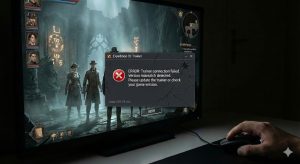
Fixing Version Mismatch Errors
The most common issue is a game update breaking the mod. If Expedition 33 just received a patch (e.g., v1.02 to v1.03), your v1.02 trainer likely won’t work. You must wait for the trainer developer to update the tool. XMOD usually updates within 24 hours of a major patch.
Resolving Antivirus False Positives
Trainers work by injecting code into the game process, which looks suspicious to antivirus software. If the file disappears or won’t open, your antivirus likely quarantined it. You need to add the trainer folder to your antivirus “Exclusions” or “Allow List.”
Troubleshooting Expedition 33 Crash on Launch
If the game crashes immediately upon launching with the mod, it’s often due to a conflict with overlays. Disable the Steam Overlay, Discord Overlay, and NVIDIA GeForce Experience overlay, then try again. These overlays hook into the same graphics processes as the mod and can cause instability.
Frequently Asked Questions
Ready to enhance your gameplay?

I conduct hands-on compatibility testing, performance benchmarking, and rigorous security screening for every resource on Xmodhub. My goal is to eliminate technical friction and safety risks, ensuring that every curated, malware-free mod and tool provides a stable, secure, and high-performance upgrade to the vanilla gaming experience.


 Catherine Hu