
 Catherine Hu
MIO: Memories in Orbit is a stunning visual journey through a decaying mechanical world, but its punishing Metroidvania combat can sometimes bring that journey to a grinding halt. Whether you’re stuck on a massive difficulty spike or just want to explore the ruined vessel without the constant threat of death, using a trainer can tailor the experience to your liking. Honestly, I turned on the speed hack just to make the backtracking less tedious, and it completely refreshed the game for me, allowing me to appreciate the art without the frustration.
Key Takeaways
- God Mode – Eliminate frustration by becoming invincible during boss fights.
- Movement Speed – Drastically reduce travel time when backtracking for secrets.
- Safety – Use cheats in offline mode to avoid any potential conflicts.
- Easy Setup – No complex coding required; just install and play.
Let’s break down the details below.
MIO: Memories in Orbit Trainer by XMODhub
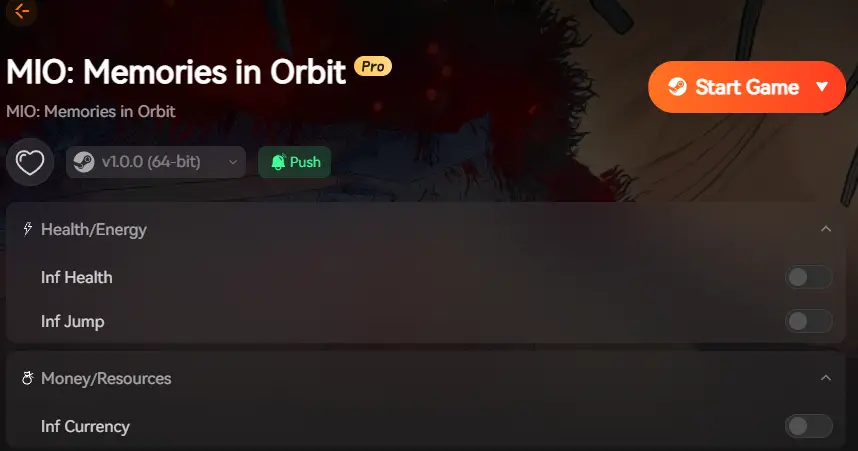
The most reliable way to modify your gameplay is through the XMODhub all-in-one trainer. Unlike raw cheat tables that require manual script editing, this tool provides a simple interface to toggle features on and off safely. The trainer is specifically designed to hook into the game’s memory process, allowing for real-time adjustments without needing to restart the application.
❤️ Infinite Health
Take zero damage from enemies and environmental hazards. This is essential for surviving the game’s bullet-hell segments where screen clutter can make dodging impossible.
⚔️ One-Hit Kills
Defeat bosses and standard enemies instantly. Perfect for when you’ve mastered the mechanics but just want to get past a damage sponge enemy to see the next story beat.
⏱️ Super Speed
Increase your movement speed to traverse the massive map quickly. This reduces the tedium of backtracking through empty corridors you have already cleared.
📈 Infinite Jumps
Reach inaccessible areas effortlessly without needing to unlock specific movement abilities first. Great for sequence breaking or recovering from a missed platform.
These featured mods are just the beginning. Whether you’re looking to skip tedious grinding, experiment with different playstyles, or speed up your progression, XMODhub’s comprehensive toolkit offers dozens more options tailored to your playstyle. The tool also includes features like Infinite Energy for special attacks and Freeze Timer for timed challenges.
How to Install the Trainer
Getting started is straightforward. The tool is designed to inject safely into the game process without modifying permanent game files, ensuring your installation remains clean.
- Download the XMODhub launcher from the official page. Ensure you have the latest .NET framework installed if prompted.
- Launch MIO: Memories in Orbit via Steam or your preferred platform. Wait for the main menu to load to ensure the game memory is initialized.
- Open XMODhub and search for “MIO”. The software should automatically detect the running game process.
- Click “Play” to attach the trainer to the game. You should hear a confirmation sound indicating the injection was successful.
Activating God Mode and Infinite Health
Once the trainer is attached, you can toggle cheats using hotkeys or the overlay menu. For God Mode, the default toggle is usually F1. You’ll hear a confirmation sound, and your health bar will lock at its maximum value. This is particularly useful when learning boss patterns, as it allows you to observe attacks without the penalty of restarting the fight repeatedly. If you prefer using a controller, you can map these toggles to specific button combinations within the XMODhub settings menu.
When Should You Use Cheats in MIO: Memories in Orbit?
Cheating isn’t always about breaking the game; often, it’s about fixing the pacing to match your available time. Here are the best scenarios for enabling mods to enhance your enjoyment.
Overcoming Difficulty Spikes in MIO: Memories in Orbit
Metroidvanias are known for sudden difficulty spikes, especially with late-game bosses that require pixel-perfect precision. If you find yourself stuck on a specific encounter for hours, toggling Infinite Health temporarily can help you progress. You can turn it off immediately after the fight to resume the standard challenge. This prevents you from abandoning the game entirely due to frustration, allowing you to see the conclusion of the story you invested in.
Speeding Up Backtracking with Movement Mods
The map in MIO is vast, and backtracking to unlock previously inaccessible doors is a core mechanic. However, traversing the same corridors repeatedly can get tedious. Using the Speed Multiplier allows you to zip through cleared areas, making the exploration phase much snappier without skipping any actual content. This is similar to techniques used in speedrunning, where optimizing movement is key to efficiency.
Content Creation and Testing
For content creators or guide writers, trainers are invaluable tools. Being able to freeze timers or become invincible allows you to capture the perfect screenshot or record specific boss mechanics without worrying about survival. You can position yourself perfectly for a cinematic shot or test damage numbers repeatedly to write accurate guides for the community.
Manual Editing vs. Trainers
Before dedicated trainers became the norm, players often had to rely on manual memory editing to achieve similar results. This involved using a hex editor or memory scanner to locate the specific address where the game stored values like health or ammunition.
While this method offers granular control, it is fraught with risks. Modifying the wrong memory address can cause the game to crash, corrupt your save file, or introduce game-breaking bugs that persist even after a restart. Trainers like XMODhub automate this process by identifying the correct dynamic addresses every time the game launches, ensuring that the modifications are applied safely and correctly. This abstraction layer protects the user from the complexities of low-level memory management.
Why Does the MIO: Memories in Orbit Trainer Stop Working?
If your cheats suddenly fail to activate, it’s usually due to one of a few common issues: game updates, security software, or permission levels.
Solving Version Mismatch Errors
Game developers frequently patch PC games for bug fixes. When MIO updates, the memory addresses used by the trainer may shift, causing cheats to fail. XMODhub auto-updates to match the latest game version, but you must ensure your launcher is connected to the internet to receive these definitions. Check the version number in the bottom corner of your game menu and compare it with the trainer version displayed in the XMODhub app.
Fixing Antivirus Conflicts with Cheat Engine
Trainers work by injecting code into the game’s memory, a behavior that some antivirus software flags as suspicious. This is a “false positive.” If XMODhub won’t launch or attach, you may need to whitelist the application folder. The default installation path is usually:
C:/Users/[Username]/AppData/Local/XMODhub/Running as Administrator
Sometimes, the trainer lacks the necessary permissions to access the game’s process, especially if the game itself is running with elevated privileges. To fix this, right-click the XMODhub shortcut and select “Run as Administrator.” This ensures that the trainer has the authority to read and write to the game’s memory space.
Player Comparison: Casual vs Hardcore
Deciding whether to use cheats depends heavily on what you want to get out of the game. Here is a breakdown of how different playstyles benefit from specific mods.
Which MIO: Memories in Orbit Cheats Suit You?
If you are here for the art style and story, don’t feel guilty about using God Mode. The game’s atmosphere is worth experiencing even if the combat isn’t your cup of tea. For players who enjoy the challenge but hate the downtime, movement speed mods offer a perfect middle ground—keeping the combat difficult while removing the walking simulator aspects.
Balancing Fun and Challenge in Metroidvanias
The key to using mods in a Metroidvania is restraint. Activating “Unlock All Items” or “Infinite Jumps” too early can break the game’s progression logic, allowing you to reach areas before you’re supposed to. This can trigger story events out of order or leave you stuck in a room you can’t exit. I recommend sticking to health and damage modifiers until you’ve beaten the main story at least once.
Frequently Asked Questions
Ready to enhance your gameplay?

I am a passionate gamer and writer at XMODhub, dedicated to bringing you the latest gaming news, tips, and insights.
Connect with me:
LinkedIn Profile ↗


 Nancy Miller