
 Nancy Miller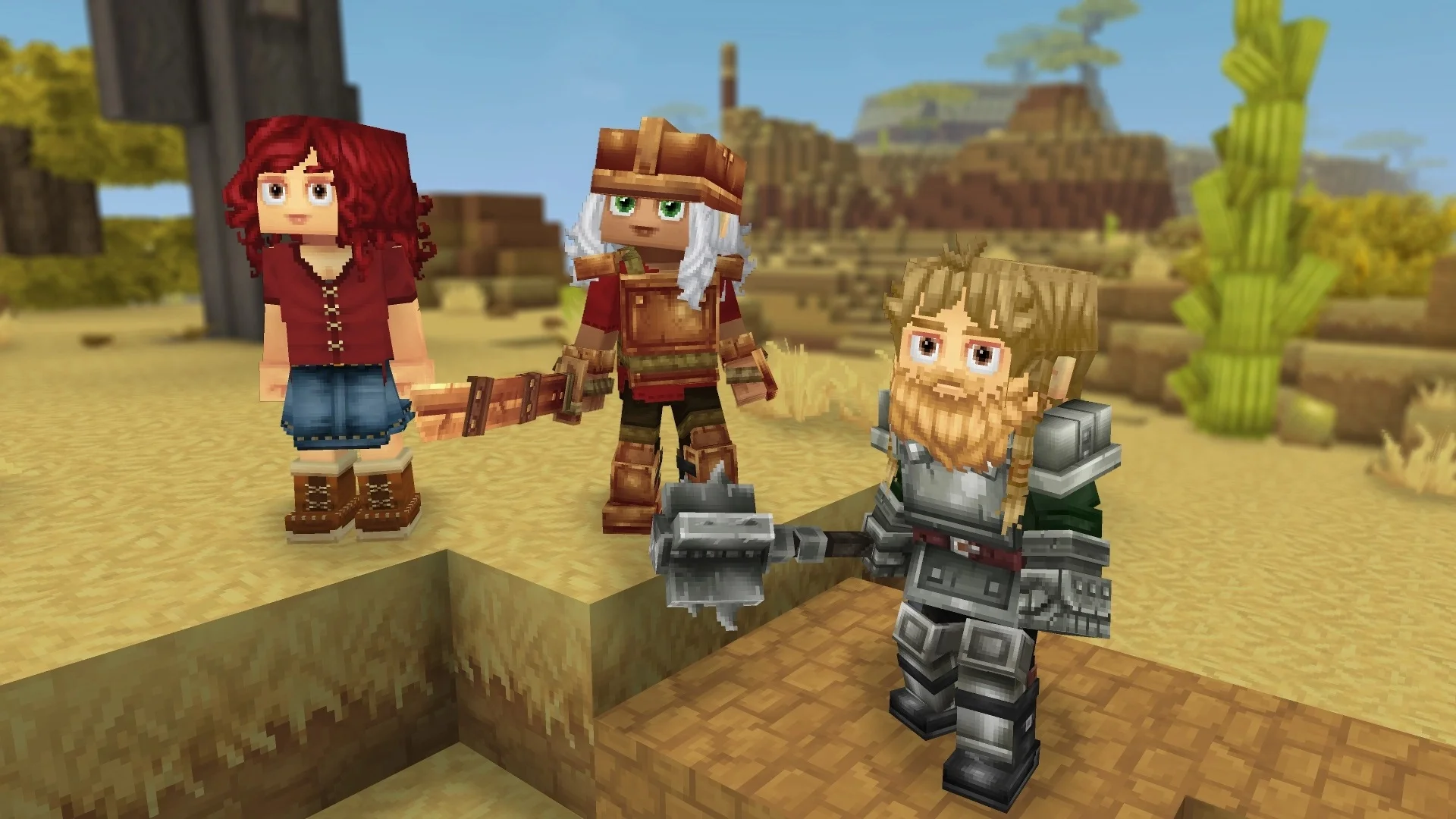
The wait for Hytale has been long, but the promise of its modding capabilities keeps the community buzzing. Unlike many sandbox games where modding is an afterthought, Hypixel Studios has built the entire engine with creators in mind, moving away from the “spaghetti code” modding of the past. The developers, having roots in the Minecraft modding scene, understand the frustrations of third-party loaders and version conflicts. From the browser-based Model Maker to deep scripting access, the tools available are set to revolutionize how we customize our blocky adventures. Whether you are a veteran modder looking to build a total conversion or just a server owner wanting to tweak the lobby, understanding these tools is the first step.
Key Takeaways
- Collaboration – The Hytale Model Maker allows real-time collaborative asset creation directly in your browser.
- Depth – Scripting uses standard languages for deep gameplay customization beyond simple stat tweaks.
- Stability – Server-side modding prevents version mismatches and eliminates manual downloads for players.
- Integration – Mods are officially supported and seamlessly integrated into the game client.
Grab your pickaxe; we’re digging into the code below.
What Are the Official Hytale Modding Tools?
Hypixel Studios has provided a suite of powerful utilities designed to lower the barrier to entry for content creation while maintaining high-level capabilities for advanced users.
How the Hytale Model Maker Works
The Hytale Model Maker (HMM) is a web-based modeling and animation tool that functions similarly to Google Docs for 3D design. It allows multiple users to work on the same asset simultaneously. You can model with voxels, paint textures, and animate characters all in one interface. Because it runs in a browser, there is no heavy software to install, and your work is saved to the cloud instantly. No more messing with JSON files manually; it’s a visual playground.
One of the standout features of the HMM is its handling of attachment points. In traditional modding, equipping a custom sword often required complex coordinate guessing to make it sit right in a character’s hand. HMM allows you to define these points visually. Furthermore, the animation timeline supports keyframe interpolation, making it easier to create smooth walk cycles or attack animations without being a professional animator.
Using Hytale Scripting for Advanced Gameplay
For those looking to change how the game plays, Hytale scripting offers extensive control. The API allows modders to hook into game events, modify entity behaviors, and create entirely new mechanics. Unlike simple configuration changes, scripting permits logic-based modifications. This means you can create a fireball spell that actually interacts with the physics engine, rather than just spawning a particle effect.
Developers have also hinted at ‘hot-reloading’ capabilities. This means you can tweak a script while the server is running and see the changes instantly without a restart. Imagine tweaking a boss’s attack pattern while your friends are actively fighting it—that’s the power of Hytale’s live scripting environment. For complex mods, this iteration speed is a game-changer. The API is expected to expose everything from weather patterns to AI pathfinding, giving creators the keys to the kingdom.

Customizing World Generation
Beyond characters and items, Hytale allows deep modification of the terrain itself. You can define new biomes, change how caves generate, or create floating islands. The configuration files allow you to set rules for block placement, tree density, and structure spawning. This means you could create a world that is entirely an ocean with underwater cities, or a skyland realm, without needing to rewrite the engine’s core code. The flexibility extends to underground structures, allowing for the procedural generation of vast dungeons that feel handcrafted.
Accessing Official Hytale Modding Tools
Access to these tools is integrated directly with your game account. The official documentation provides comprehensive guides on the API references and Model Maker shortcuts. When you launch the game, you will typically find a “Creative” or “Developer” menu that links directly to these resources, ensuring you are always using the compatible version of the tools.
How Do Hytale Server Mods Differ From Client Mods?
One of Hytale’s most significant innovations is its server-driven modding architecture, which solves many headaches associated with traditional sandbox game modding.
Installing Mods on a Hytale Server
When a server administrator installs a mod, it is automatically pushed to players when they join. There is no need for players to manually download files or worry about version mismatches. The server sends the necessary assets and scripts to the client temporarily, ensuring everyone sees the same custom blocks, creatures, and items without cluttering their local installation folders. Think of it like Roblox’s ease of access met with the depth of modded Minecraft.
Performance Benefits of the C++ Engine
Because Hytale is built on a custom C++ engine rather than Java, it handles mods with much greater efficiency. The lag often seen in heavily modded block games is largely mitigated by this architecture. The engine is designed to handle thousands of custom assets and complex scripts without bringing your frame rate to a crawl. This optimization is crucial for large servers that want to run hundreds of mods simultaneously without alienating players with lower-end hardware.
Client-Side Customization in Hytale
Client-side customization is generally limited to UI tweaks, local graphics settings, and personal accessibility options. Because the server dictates the game logic to prevent cheating and ensure consistency, you cannot install a “flight mod” on your client and expect it to work on a server that hasn’t enabled it. This separation ensures a fair and stable multiplayer experience.
Can You Create Custom Assets with Hytale Customization?
Absolutely. The engine is built to allow complete visual overhauls, from the player character to the environment itself.
Designing Characters in Hytale
Character customization goes beyond simple skin files. You can attach new 3D geometry to player models, such as custom hats, armor pieces with moving parts, or entirely new creature models. The animation system supports inverse kinematics, meaning your custom armor will move naturally with the character’s limbs rather than just stretching like a static texture.
Mastering the VFX Editor
Visual effects are often what separate a good mod from a great one. Hytale includes a dedicated VFX editor that lets you layer particles, light sources, and sound effects. You can design a custom spell that emits smoke, glows purple, and plays a crackling sound upon impact. These effects are node-based, allowing for complex behaviors like particles that react to wind or gravity, adding a layer of immersion previously difficult to achieve.
Redesigning the User Interface
Hytale’s UI is built using HTML and CSS-like standards, making it incredibly accessible for web developers. You can completely overhaul the inventory screen, create custom HUDs for minigames, or design unique dialogue boxes for RPG maps. This flexibility ensures that total conversion mods can look like entirely different games, not just Hytale with a texture pack. You can even script dynamic UI elements that react to game events in real-time.
Building Cinematic Scenes in Hytale
Hytale includes built-in cinematic tools that allow creators to make machinima without external software. You can set up camera paths, control lighting, and trigger animations on command. This is perfect for server trailers or storytelling videos, giving creators director-level control over the game world directly from the client.
Enhance Your Hytale Experience with XMODHUB
While official tools are great for creation, sometimes you just want to experiment freely in your own world. XMODHUB offers a streamlined utility for players who want to bypass limits and test mechanics efficiently.
Whether you are testing a new dungeon build or just want to explore the infinite lands without danger, XMODHUB provides the essential toolkit for single-player freedom.
❤️ Infinite Health
Explore the deepest dungeons and fight the toughest bosses without fear of losing your progress.
⏱️ Super Speed
Traverse the vast generated worlds in seconds to find the perfect biome for your next build.
📈 XP Multiplier
Speed up your character progression and unlock high-level crafting recipes instantly.
⚔️ One-Hit Kills
Clear out enemy camps quickly to secure the area for your construction projects.
These featured mods are just the beginning. Whether you’re looking to skip tedious grinding, experiment with different playstyles, or speed up your progression, XMODhub’s comprehensive toolkit offers dozens more options tailored to your playstyle.
Health/Energy
- Infinite Health – Never take damage from enemies or falls
- Infinite Stamina – Sprint and climb without getting tired
Movement/Physics
- Super Jump – Leap over walls and obstacles easily
- Float Mode – Hover in the air for better building angles
Common Mistakes When Installing Hytale Mods
Even with user-friendly tools, things can go wrong. Here are the most frequent issues players encounter.
Why Your Hytale Mods Are Not Working
The most common reason for mods failing is a mismatch in permission settings. If you are trying to use a mod on a server where the admin has not enabled it, the client will block the script from running. Always check the server’s mod list in the lobby or pause menu to confirm which modifications are active and allowed.
Overlooking Server Dependencies
Some complex mods rely on ‘library’ mods—core scripts that power multiple other modifications. If you are setting up a server, ensure you have installed all required dependencies listed by the mod author. Missing a core library is a frequent cause of server crashes upon startup. Always read the documentation provided with the mod to ensure you have the full stack of required files.
Ignoring Hot-Reload Limits
While hot reloading is great, spamming it can sometimes desync the client from the server state. If you notice entities glitching or blocks not updating after a script save, a quick reconnect usually fixes this ghost data. It is best practice to pause heavy logic loops before saving changes to a live script.
Fixing Hytale Model Maker Import Errors
If your custom assets appear as purple and black checkerboards, it usually means the texture mapping is broken. This happens when the texture file path in the HMM project does not match the directory structure expected by the game. Ensure all your textures are saved within the project folder before exporting, and double-check that your file names do not contain special characters.
Frequently Asked Questions About Hytale Mods
Ready to enhance your gameplay?

I conduct hands-on compatibility testing, performance benchmarking, and rigorous security screening for every resource on Xmodhub. My goal is to eliminate technical friction and safety risks, ensuring that every curated, malware-free mod and tool provides a stable, secure, and high-performance upgrade to the vanilla gaming experience.


 Catherine Hu
I love how Hytale is taking modding seriously with features like real-time collaborative asset creation. It’s a game-changer for teams working on custom content together. The stability of server-side mods will also save so much time for server owners!