Catherine Hu
Pax Autocratica is built on modern 3D engines combining colony simulation with FPS roguelite combat, but does hybrid gameplay mean you need high‑end hardware? check the Pax Autocratica system requirements to see if your PC meets the minimum or recommended specs.
Featuring totalitarian base building with complex automation systems, plus first-person battles ranging from skirmishes to large-scale mechanized warfare with tanks and mechs, the game’s dual systems require substantial specs.
If you’re wondering if your rig can handle managing your autocratic state while leading combat expeditions—or why you’re experiencing frame drops during massive battlefield sequences—this guide covers everything from official specs to real-world optimization strategies.
Quick Summary (TL;DR)
- Minimum GPU: NVIDIA GTX 1060 6GB / AMD RX 480 (6GB VRAM)
- Recommended GPU: NVIDIA RTX 2060 Super / AMD RX 5700 XT (8GB VRAM)
- Storage: 40GB required, SSD mandatory for dual-system transitions
- Low FPS Solution: If hardware limits your dual gameplay, XMODhub’s tools reduce both colony and combat strain
Table of Contents
- Editor’s View: Dual Systems Demand Power
- Official System Requirements (Minimum vs. Recommended)
- Real-World Performance: What to Actually Expect
- Optimization Checklist: Fix Stutter & Lag
- How XMODhub Compensates for Low-End Hardware
- Troubleshooting & FAQ
- Conclusion
Editor’s View: “Dual Systems Demand Power”
Catherine Hu | Strategy Game Analyst and Game Writer at XMODhub
“I tested Pax Autocratica’s prologue on both a modern gaming rig and a budget laptop with GTX 1060. On the gaming PC with RTX 3070, colony management ran at 60 FPS, and large-scale mech battles maintained smooth performance.
On the budget laptop? Frame rate dropped to 35 FPS when managing complex automation systems, then plummeted to 25 FPS during mechanized warfare with multiple tanks and infantry units. The dual colony sim + FPS roguelite systems strain older hardware simultaneously. Don’t assume ‘Early Access’ means ‘runs anywhere’—this hybrid game demands solid specs for both gameplay modes.”
Official System Requirements
Based on the Steam page data for Pax Autocratica’s February 2, 2026 Early Access release, here’s the official breakdown:
- OS: Windows 10 (64-bit required)
- Processor: Intel i5-8600 / AMD Ryzen 5 1600x
- Memory: 16 GB RAM
- Graphics: NVIDIA GTX 1060 6GB / AMD RX 480 (6GB+ VRAM) for 1080p | GTX 1070 8GB / RX Vega 56 (8GB+ VRAM) for 1440p
- DirectX: Version 11
- Storage: 40 GB available space
- OS: Windows 10 (64-bit required)
- Processor: Intel i7-8700K / AMD Ryzen 5 3600 or equivalent
- Memory: 16 GB RAM
- Graphics: NVIDIA RTX 2060 Super / AMD RX 5700 XT (8GB+ VRAM)
- DirectX: Version 11
- Storage: 40 GB available space (SSD required)
Note: Both colony simulation and FPS combat systems run simultaneously during expeditions, requiring substantial CPU and GPU resources even during Early Access.
Real-World Performance: What to Actually Expect
Why does a hybrid game need solid specs?
Pax Autocratica’s performance demands come from specific technical features:
Colony management continues running in background during FPS expeditions. The game processes citizen AI, production chains, and Fear/Loyalty calculations while rendering first-person combat.
Mechanized warfare features dozens of infantry units, multiple tanks, and mechs fighting simultaneously. Each unit requires AI processing, physics calculations, and visual rendering.
Complex production lines with streamlined logistics calculate resource flows continuously. Advanced automation systems multiply CPU load exponentially.
Hundreds of possible buff combinations require real-time stat recalculation during combat. The roguelite progression system adds memory overhead for tracking permanent upgrades.
Building placement, citizen pathfinding, and state apparatus structures all use physics calculations that accumulate across expanding colonies.
Optimization Checklist: Fix Stutter & Lag
If experiencing performance issues with the February 2, 2026 Early Access launch, try these steps:
Lower maximum unit counts during FPS battles. Large-scale warfare with 50+ units overwhelms older GPUs during intense firefights.
Start with manual production before introducing complex automation. Streamlined logistics calculations strain CPU during mid-to-late game.
Dynamic shadows from buildings, mechs, and infantry units are expensive. Drop to “Low” for significant FPS gains during combat.
Check settings for “Pause Colony During Expeditions” to focus resources on FPS combat performance only.
Switching between colony management and FPS expeditions requires fast 40GB asset streaming. HDD causes 5-10 second transition freezes.
Dual gameplay systems demand maximum CPU and RAM access. Close Discord, browsers, and streaming software during sessions.
Ensure latest GPU drivers are installed. Older drivers cause compatibility issues with DirectX 11 rendering.
How XMODhub Compensates for Low-End Hardware
Don’t let frame drops during critical battles or colony management ruin your regime-building experience. XMODhub will offer trainers for the game on the release day.
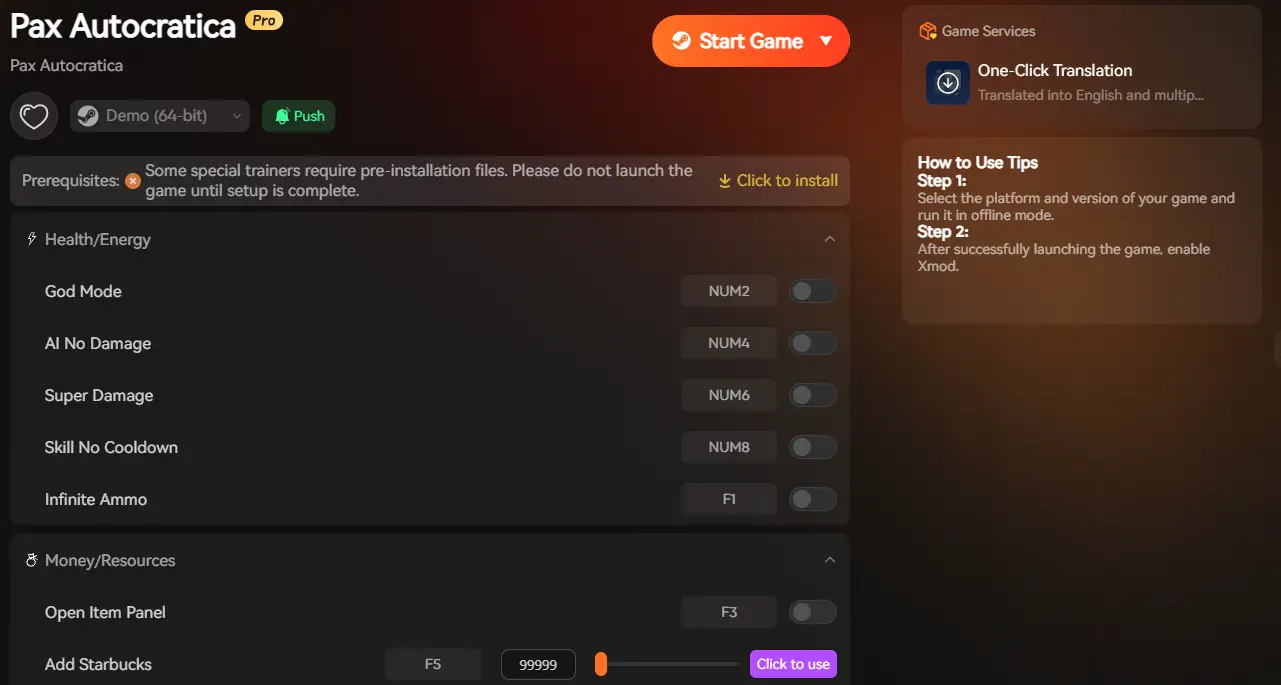
XMODhub is not only a modding app, but it also serves as a performance buffer for struggling systems, reducing the dual-system load that causes performance issues.
Colony Automation: Instant resource generation bypasses complex production chain calculations, reducing CPU overhead.
Combat Simplification: Reduce active enemy counts during FPS battles to maintain frame rates while preserving progression.
Population Control: Lower citizen counts to decrease pathfinding AI load without impacting colony functionality.
Unit Reduction: Remove non-essential units from large-scale battles, focusing processing on core combat mechanics.
Instant Construction: Complete buildings immediately without waiting for construction animations that strain GPU.
[Optimize Your Pax Autocratica Experience with XMODhub]
Troubleshooting & FAQ
Q: Can I run Pax Autocratica on GTX 1050 Ti?
A: Not recommended. The hybrid gameplay systems require 6GB+ VRAM. GTX 1050 Ti’s 4GB struggles with dual colony sim + FPS rendering.
Q: Why does switching between colony and combat cause lag?
A: Transitioning between two different gameplay systems loads separate asset groups. Without SSD, transitions cause 5-10 second freezes.
Q: Is 16GB RAM mandatory?
A: Yes. Both colony simulation and FPS combat run simultaneously during expeditions. Less than 16GB causes severe memory bottlenecks.
Q: Will there be optimization patches during Early Access?
A: Developer Multiverse plans optimization updates based on community feedback throughout Early Access development.
Q: Why do mech battles cause worse FPS than infantry?
A: Mechs feature complex models, particle effects, and physics calculations. Multiple mechs fighting simultaneously multiply GPU load significantly.
Conclusion: Dual Gameplay Needs Solid Hardware
Build your totalitarian regime and lead forces across the Tyris System. The hybrid colony sim + FPS roguelite systems conceal demanding processing requirements that benefit from modern hardware.
While minimum specs allow playability, the game’s dual systems shine at 60 FPS with responsive controls and smooth transitions. Realistic expectations: GTX 1060 6GB minimum for playable performance, RTX 2060 Super recommended for comfortable large-scale battles.
Follow our optimization checklist, ensure SSD installation for seamless system transitions, and if hardware still limits your dual gameplay—XMODhub provides tools that reduce performance-intensive processing for both colony management and FPS combat.
Rule the Tyris System without hardware holding you back.

I am a passionate gamer and writer at XMODhub, dedicated to bringing you the latest gaming news, tips, and insights.
Connect with me:
LinkedIn Profile ↗


 Nancy Miller