Nancy Miller
Executive Summary
- •Source Authority: The safety of game mods sites is determined by active community moderation, not just search ranking.
- •Performance Cost: Visual mods tax the GPU; script mods tax the CPU. Understanding this balance prevents FPS death.
- •The “50/50” Method: The only professional way to troubleshoot crashes is by disabling half your load order iteratively.
- •Trainer Specialization: For cheats and trainers, general hubs are risky; specialized platforms like XMODHUB offer curated, malware-free environments.
Read on to master the ecosystem of PC game modification without compromising your system security.
How have game mods sites evolved in the modern era?
The ecosystem for video game modification has shifted dramatically. While we used to rely on fragmented forums, 2026 sees a consolidation into three distinct tiers of repositories. Understanding these tiers is crucial for finding the right content for your PC Games.
Tier 1: Centralized Mega-Hubs
Sites like Nexus Mods or CurseForge dominate because they offer standardized installers. These game mods sites provide “One-Click” integration with mod managers, reducing user error by 90%. They are best for general content: textures, quests, and UI overhauls. Their primary strength is safety through volume—millions of users mean malware is reported and removed within minutes.
Tier 2: The GitHub and Discord Underground
For technical tools, script extenders, and open-source engine fixes, developers now prefer GitHub. Meanwhile, niche communities (like specialized fighting game mods or simulator add-ons) often live entirely on private Discord servers. While these offer cutting-edge content, they lack the safety nets of major game mods sites. You must verify the reputation of the uploader personally.
What are the red flags on unverified game mods sites?
Not every site listing “free mods” is benevolent. In my 15 years of consulting, I have seen countless PCs compromised by “drive-by” downloads disguised as game patches.
The “Fake Download Button” phenomenon
Low-quality aggregators monetize aggressive ads. If a site has five “Download” buttons and four of them lead to unrelated software installers, leave immediately. A legitimate game mods site will have a clear, distinct file structure, usually offering a “Main File” and “Optional Files” section without deceptive UI patterns.
Executable (.exe) vs. Archive (.zip/.rar)
This is the golden rule: Asset mods should not be executables. If you are downloading a “Better Trees Mod,” it should be a .zip, .7z, or .rar archive containing textures. If it is an `.exe` file, it is highly suspicious.
Exception: Trainers and Cheat Engine tables must be executables or scripts to function, which makes finding a safe source for them significantly harder than finding texture mods.
Do mods from these sites slow down your PC?
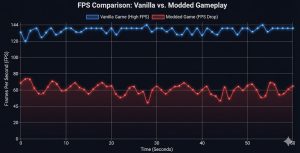
A common misconception is that “more mods equals less FPS.” The reality is more nuanced. It depends entirely on what you are downloading from game mods sites.
High Impact: VRAM
4K/8K Texture Packs. These fill up your Video RAM. If you exceed your GPU’s VRAM (e.g., 8GB), the game will stutter massively as it swaps data to system RAM.
High Impact: CPU
Script Heavy Mods. Mods that add complex AI, new spawn systems, or background physics checks run on the CPU (single-core mostly). Too many scripts = lower FPS.
Advanced Troubleshooting: The “Binary Search” Method
When your game crashes on startup, panic sets in. Browsing the FAQ on game mods sites helps, but often you need a systematic approach to find the culprit.
How to perform a 50/50 split test
- Disable the bottom 50% of your mod list.
- Launch the game. Does it crash?
- If YES: The bad mod is in the active top half. Disable 50% of that half.
- If NO: The top half is safe. The bad mod is in the disabled bottom half. Enable 50% of the bottom half.
- Repeat until one mod remains.
This method turns a 4-hour headache into a 15-minute fix. It is the gold standard for debugging complex load orders.
Why XMODHUB is the specialist’s choice for game trainers
While generalist sites excel at textures and quests, there is a specific category of “mods” that requires a higher level of trust: Trainers and Cheats. Because these tools must actively inject code into the game’s memory to function (giving you infinite health, ammo, or resources), they behave similarly to malware. This makes finding a “clean” source incredibly difficult on the open web.
Curated safety in a risky niche
This is where XMODHUB has established itself as a vital resource. Unlike forums where user-uploaded executables might contain keyloggers, XMODHUB acts as a managed library. They verify the integrity of the cheat tools and trainers hosted on their platform. For a player who just wants to bypass a tedious grind in a single-player RPG without risking their operating system, this curation is invaluable.
Simplifying the “Cheat” experience
Traditional cheat engines require you to search for hex values manually—a daunting task for most. The tools found on XMODHUB prioritize UX (User Experience). They typically present a clean dashboard where enabling “God Mode” or “Unlimited Money” is a simple toggle. By bridging the gap between complex memory editing and a simple user interface, they provide a safe, accessible way to customize your difficulty level in PC Games.
Deep Dive: Core Features of XMODHUB Modifiers
Beyond basic safety, modern trainers offer sophisticated control over game parameters. XMODHUB modifiers typically include a suite of core functions designed to tailor the gameplay loop without breaking it.
- Infinite Resources: Toggles for unlimited health, stamina, ammo, or crafting materials. This is essential for players who want to focus on the story rather than resource management.
- Game Speed Manipulation: A feature often overlooked, the ability to speed up game logic (for skipping long travel times) or slow it down (for precise combat timing) is a core utility in the XMODHUB toolkit.
- One-Click Activation: Unlike legacy trainers that require remembering complex hotkeys (e.g., Ctrl+NumPad 5), the interface usually supports clickable interactive toggles and customizable hotkey binding.
How to Use XMODHUB Trainers Safely (Anti-Ban Guide)
While XMODHUB ensures the files are virus-free, avoiding account bans in games with online components requires disciplined usage. Anti-cheat systems (like BattlEye, EAC, or VAC) are aggressive. Follow these strict protocols to ensure your account remains in good standing.
⚠️ The Golden Rules of Anti-Ban Safety
- Offline Mode Only: Before launching any trainer, disconnect your internet or set the game platform (Steam/Epic) to “Offline Mode.” This prevents the game from sending telemetry data to the developer’s servers.
- Disable Anti-Cheat: Many single-player games still run Easy Anti-Cheat in the background. XMODHUB tools often come with a “Launcher” or instructions to disable EAC specifically for offline modding. Use this every time.
- Avoid “Account” Items: In games with a shared online/offline inventory (like some ARPGs), do not hack premium currency or exclusive skins. These values are server-side checked and will flag your account immediately.
By treating trainers as a “Sandbox Only” tool, you eliminate 99% of ban risks. The goal is to enhance your personal experience, not to disrupt the ecosystem of the game developer.
Expert Answers to Common Questions
Why do antivirus programs flag trainers from game mods sites?
Trainers use “code injection” to modify game memory values (like health). Antivirus heuristics identify this behavior as suspicious, similar to a virus. If you download from a trusted source like XMODHUB, this is likely a “False Positive.”
Will using mods prevent me from earning Steam Achievements?
In many cases, yes. Developers often disable achievements if the game detects a modified checksum. However, ironically, there are often mods available specifically to re-enable achievements while modded!
What is the difference between a Mod and a Trainer?
A Mod typically alters game files (assets, scripts) and is loaded when the game starts. A Trainer is a separate program running alongside the game that modifies the game’s state in real-time (e.g., freezing your health bar).
Can I use mods on the Epic Games Store or Game Pass versions?
It is harder but possible. Steam is the most mod-friendly platform. Game Pass often encrypts game files, making file-replacement mods difficult, though trainers (memory injection) usually still work fine.
Elevate Your Gameplay Safely
Modding is the art of tailoring a game to your exact preferences. Whether you are installing 4K textures to push your new GPU to the limit, or looking for a reliable trainer to breeze through a story mode, safety must come first. Always use trusted game mods sites, keep your backups updated, and for the best experience with game cheats and trainers, verify your tools at XMODHUB.
Disclaimer: Use mods offline to avoid multiplayer bans. Mod responsibly.

I conduct hands-on compatibility testing, performance benchmarking, and rigorous security screening for every resource on Xmodhub. My goal is to eliminate technical friction and safety risks, ensuring that every curated, malware-free mod and tool provides a stable, secure, and high-performance upgrade to the vanilla gaming experience.


 Catherine Hu