Nancy Miller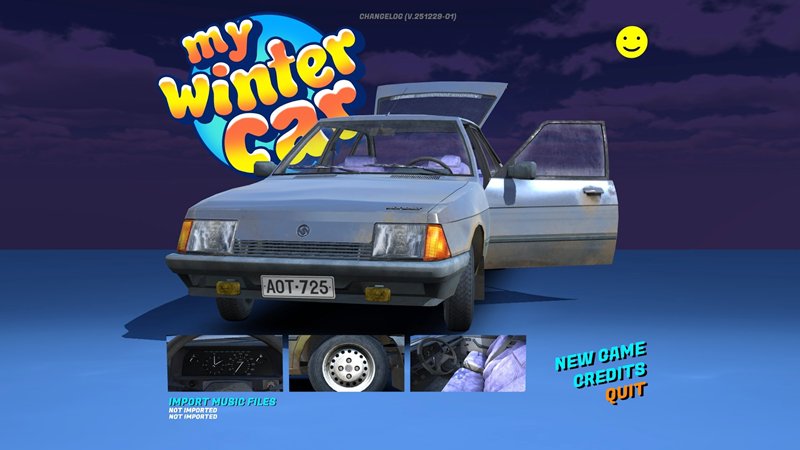
Key Takeaways
- Save Editing is King: External tools are often safer and more reliable than runtime memory injectors for this specific Unity engine build.
- Console Commands: Developer debug consoles can control fatigue, hunger, and teleportation instantly.
- Mod Safety: Always backup your
defaultES2File.txtbefore installing any My Winter Car mod menu. - Automated Trainers: Platforms like XMODHUB offer pre-configured cheats if manual coding is too difficult.
Next, we’ll break down the game’s core difficulty mechanics and the practical steps to modify them safely.
Survival simulations built on the Unity engine are notorious for their punishing difficulty. Whether you are battling the freezing elements, assembling a complex vehicle from scratch, or just trying to keep your character from starving, the challenge is real. Sometimes, you just want to test a mechanic or recover from a glitch without losing hours of progress. That’s where a reliable My Winter Car Cheat comes in handy.
What Defines the My Winter Car Experience?
Before diving into cheats and trainers, it is crucial to understand what makes My Winter Car distinct from its predecessor. While the goal remains restoring a classic vehicle, the introduction of severe weather conditions changes the gameplay loop entirely. Based on current player feedback, here are the three core pillars that usually drive players to seek out assistance.
01Bolt-for-Bolt Mechanical Assembly
MWC is not an arcade racer; it is a mechanic simulator. You are building a car (inspired by the Ford Taunus) literally one bolt at a time. Missing a single gasket or tightening a screw incorrectly can lead to catastrophic engine failure miles from home. This extreme complexity is the #1 reason players look for My Winter Car cheats—to spawn missing parts or debug an engine that refuses to start.
02Unforgiving Winter Physics
The shift from summer gravel to winter ice drastically alters vehicle handling. Black ice, snowdrifts, and cold tires mean that even a perfectly built car can slide into a ditch instantly. Unlike standard driving games, MWC requires you to manage engine temperature not just to prevent overheating, but to prevent freezing. Many users turn to mods simply to reset their car’s position after sliding off the map.
03The Lethal Cold & Economy
Survival is no longer just about food and water; it is about heat. If your car’s heater is broken or you get stranded without warm clothes, your character will freeze to death rapidly. Combined with a punishing economy where jobs are scarce, the grind can be overwhelming. This is where money cheats and “God Mode” trainers become essential for players who want to focus on the car building rather than the survival struggle.
How does the My Winter Car cheat system work?
Unlike mainstream AAA titles that might offer a simple “cheat code” menu, hardcore simulation video games often require a more hands-on approach. The game stores data locally in text-based or binary save files, which makes them prime targets for manipulation.
Why standard trainers might fail in My Winter Car
Traditional memory trainers often struggle with this title because of how the game engine handles object IDs and dynamic variables. If a my winter car trainer attempts to inject a value into a memory address that has shifted after an update, it can lead to immediate crashes or corrupted vehicle physics.
The role of Save Editors vs. Runtime Injection
The safest route for most players is “cold” editing—changing values while the game is closed. This is usually done via a specialized tool or a hex editor. By modifying the save file directly, you ensure the game loads the new data (like 999,999 currency) cleanly upon launch, bypassing anti-tamper triggers that might exist during runtime.
Implementing the My Winter Car Money Cheat & Stats
Running out of money (Marks) usually means a game over or a tedious grind. Here is how to bypass the economy and survival constraints effectively.
Editing player currency manually
To perform a my winter car money cheat, locate your save file directory (usually in AppData/LocalLow). Open the relevant data file with a text editor or a dedicated save editor tool. Look for the variable labeled “money” or “player_money”. Changing this value to a higher number gives you the financial freedom to buy all replacement parts immediately.
Managing hunger, thirst, and fatigue
Survival stats in My Winter Car tick up constantly. If you find yourself dying of thirst while trying to tune an engine, you can freeze these values. In a save editor, look for “thirst” or “fatigue” and set them to 0. Some advanced my winter car mods allow you to toggle “God Mode,” which effectively locks these values at zero so they never increase during gameplay.
Why XMODHUB for My Winter Car Cheats?
Let’s be honest: manually editing text files or hex codes isn’t for everyone. One wrong keystroke can corrupt your save file permanently. For players who want a safer, “plug-and-play” experience without the technical risk, using a dedicated platform like XMODHUB is often the smarter choice.
XMODHUB My Winter Car Page Highlights
XMODHUB aggregates the latest compatible trainers and mod tables, ensuring you don’t download outdated tools that crash your game. Key benefits include:
- Version Matching: Trainers are tagged with specific game versions, reducing “not working” errors.
- Safety First: Tools are vetted for malware, which is a common risk on sketchy forum threads.
- Feature Clarity: Clearly lists features like Infinite Money, No Hunger, and Instant Part Installation.
Troubleshooting: My Winter Car Not Working with Mods
It is common for the game to refuse to load or behave erratically after installing a new my winter car mod menu. This is usually due to version mismatches or conflicting files.
Identifying mod conflicts
If your game crashes on the loading screen, disable all mods and re-enable them one by one. Often, texture replacement mods conflict with script-based modding tools. Check the console log (often generated in the game folder) to see which specific mod threw the error.
Restoring corrupted My Winter Car saves
Did a my winter car cheat break your save? This is why backups are critical. If you didn’t make a backup, check the save folder for a file named save_backup or similar. Rename it to the main save filename to roll back your progress. If the physics engine is freaking out (cars flying into space), it usually means a value was set outside the engine’s acceptable float range (e.g., setting speed to infinity).
Common Mistakes to Avoid
×
Over-editing money: Setting money to 999,999,999 can sometimes cause an integer overflow, resetting your balance to negative.
×
Modding online: Never attempt to use cheats if the game has any connected leaderboards or multiplayer components, as this risks a ban.
×
Ignoring readmes: Most “not working” issues stem from skipping the specific installation steps required for the mod loader.
Frequently Asked Questions
Is there a built-in cheat console in My Winter Car?
Many Unity games have a developer console, but it is often disabled in public builds. You usually need a mod or a specific launch parameter (like -developer) to re-enable it.
Can I use My Summer Car tools for this game?
It depends. Since both games share similar architecture, some save editors like MSCEditor may be updated to support MWC saves, but using an outdated version can corrupt your data.
How do I fix the “My Winter Car not working” error on launch?
This is typically a DirectX or Visual C++ redistributable issue. Ensure your drivers are updated. If you are using mods, delete the Mods folder temporarily to see if the vanilla game launches.
Is there a teleport cheat?
Yes, most trainer menus include a teleport function. This is vital when your vehicle flips into a ditch miles away from civilization.
Ready to build the ultimate winter machine without the headache?
Modding can breathe new life into your survival experience. Just remember to keep your backups safe and respect the simulation mechanics where it counts.

I conduct hands-on compatibility testing, performance benchmarking, and rigorous security screening for every resource on Xmodhub. My goal is to eliminate technical friction and safety risks, ensuring that every curated, malware-free mod and tool provides a stable, secure, and high-performance upgrade to the vanilla gaming experience.


 Catherine Hu